Mac Apps
Camo Studio 2.9.0
Mac AppsUpdated
| Requirement | On file |
|---|---|
| macOS | macOS 12.3 or later |
| CPU | Apple Silicon, Intel 64-bit |
| Download | 100 MB |
You open a video call and the built-in MacBook camera frames you with the office ceiling lights blowing out half your face. Meanwhile, the phone in your pocket has a sensor that handles backlight properly, shoots 4K, and sits on a small tripod you already own. Camo Studio bridges that gap without adding a dedicated webcam to the desk.
Appears as a standard camera in Zoom, Teams, QuickTime, and browsers
macOS sees Camo as a standard camera input, so it appears in the video settings of Zoom, Teams, QuickTime, OBS, and any browser-based meeting tool. The phone handles all the video processing — encoding, exposure, and stabilisation — leaving the Mac free to run the call and other apps without a heavy GPU load.
What can you adjust from the Mac side?
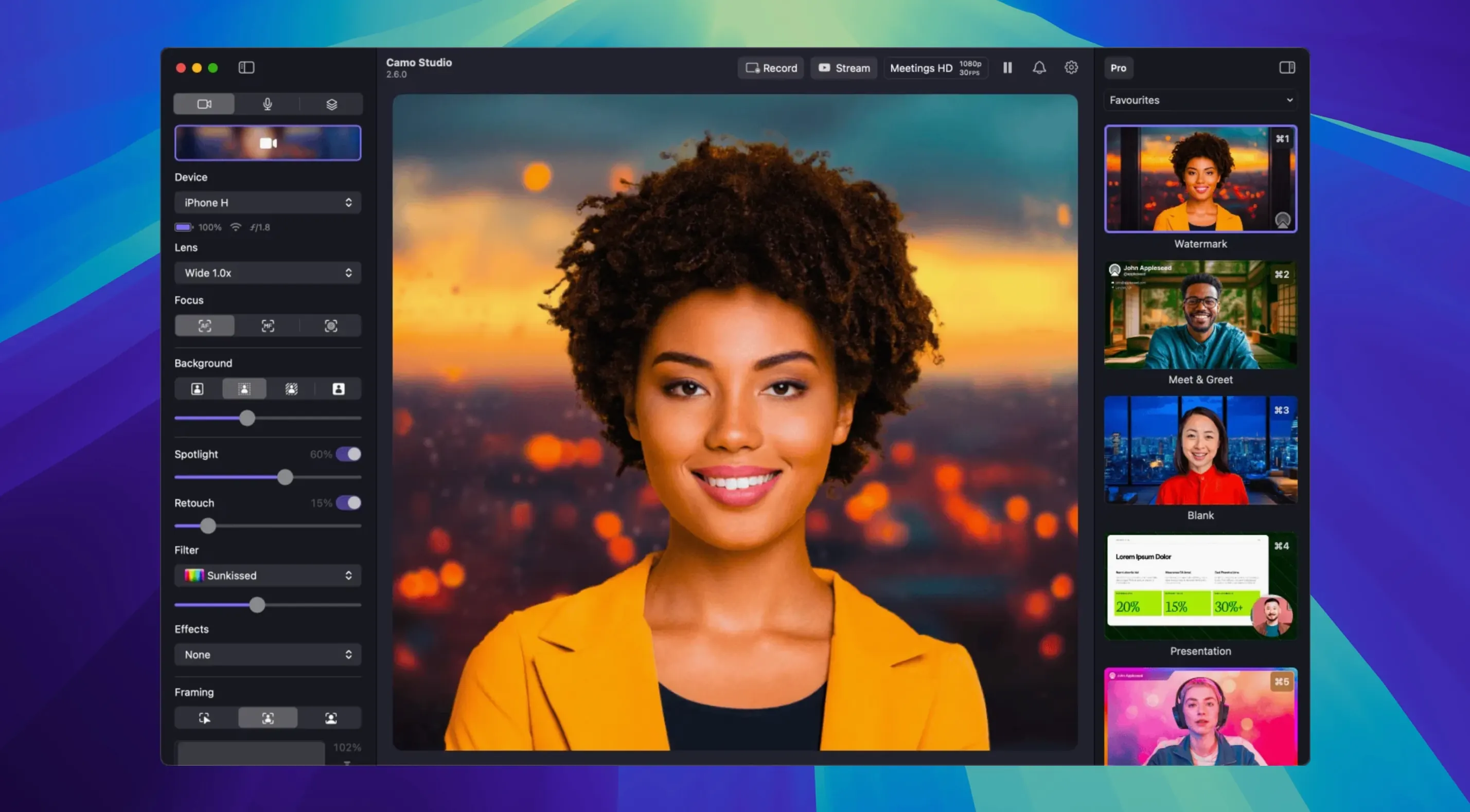
The studio panel gives you manual control over exposure, white balance, focus, and zoom. You can load custom LUT files or pick from 18 built-in colour filters. A virtual green screen replaces the background without a physical cloth, and the automatic framing keeps you centred if you move around the frame.
Layers in stabilisation, face retouching, and dual-format streaming
Not entirely, but it layers in features that most native camera apps do not offer for live video: digital image stabilisation, AI face retouching, and dual-format streaming. Version 2.9.0 also adds audio noise reduction and the ability to record isolated tracks on macOS, which helps when you want to capture a clean feed separate from the call audio.
A tablet gives you a framing preview on its larger screen
An iPad or Android tablet works as a camera source the same way a phone does. The larger screen gives you a preview of what the Mac is capturing, which is useful for framing a shot when the tablet is mounted at a distance.
Select Camo from the video dropdown one layer below your meeting app
Camo Studio does not try to replace your meeting or streaming software. It sits one layer below, as a camera source that those apps already know how to consume. In Zoom, select Camo from the video dropdown. In OBS, add it as a video capture device. In QuickTime, choose it from the camera list under File > New Movie Recording. No bridge apps, no virtual camera drivers to install separately.
The connection to macOS is similarly low-friction. Camo respects the system microphone privacy prompt, and the phone link runs over USB or Wi-Fi depending on what you have connected. USB gives the most consistent frame delivery and also keeps the phone charged. Wi-Fi frees the phone from the desk, which matters when you want a wide shot of a whiteboard or a lab bench.
One detail worth knowing: because Camo is a standard camera input, macOS treats it like any other capture device. That means Shortcuts and Automator can trigger recording sessions, and you can pipe the output into apps that accept Core Image filters. The app itself does not expose a scripting interface beyond what version 2.9.0 adds for AI agents, but the camera stream is visible to anything that can read a system camera.
The phone needs a companion app running on both sides
The first question most people ask is whether the phone needs a companion app. It does. Camo runs on both sides: the Mac app handles composition, scenes, and overlays; the phone app captures and processes the video. Both need to be running for a session. The phone app is the same Camo family product, and it should be installed from the phone's app store before you first connect.
A second frequent question concerns CPU load. Because video processing happens on the phone, the Mac side stays light even at 4K. Encoding, colour work, stabilisation, and the Portrait mode bokeh are all computed on the phone's silicon. The Mac receives a ready-to-use stream, which keeps fans quiet during long calls.
People also ask about Android versus iPhone quality. Camo supports both, and the feature set is largely the same. Differences in output come from the phone's hardware, not the app: a phone with a better sensor and lens will produce a cleaner image at 4K 60 FPS. Camo exposes the same manual controls across platforms, but the ceiling on quality is set by the device in your hand.
Finally, there is the installation question. Camo Studio 2.9.0 requires macOS 12.3 or later and runs on both Apple Silicon and Intel 64-bit Macs. It does not run on macOS Tahoe, so if you are on an early Tahoe beta you should not expect the current release to work. The install itself is a standard disk image flow: open the downloaded DMG, drag the app to the Applications folder shortcut, then launch it from Launchpad.
Start wired to remove Wi-Fi variability while you learn the controls
Start with a wired connection. USB-C to Lightning or USB-C to USB-C removes Wi-Fi variability while you learn the controls. Set the phone on a small tripod or a stand before you open Camo, and check the framing in the studio panel rather than in your video call app. The preview in Camo updates faster than the preview in most meeting tools.
Set exposure manually on day one. The auto mode is competent, but a fixed exposure stops the image from pulsing when a window behind you catches the sun. Lock white balance the same way, especially in rooms with mixed lighting. After that, test the Video Call mode; it lifts shadows on the face without washing out the background, which is often all a remote worker needs.
If you plan to use a virtual background, enable the green screen replacement in Camo instead of relying on Zoom or Teams. Camo's chroma key runs before the stream reaches the call, so the edges tend to hold up better when you move. The automatic framing pairs well with this: you can stand, sit, or step aside, and the scene stays composed.
Finally, spend ten minutes setting up one scene with a text overlay and a small logo. Even a minimal lower-third label makes recordings feel finished, and version 2.9.0's isolated recordings let you capture a clean camera track separately from call audio. If you later want more advanced setups, you will already know where the layering controls live.
- Streaming and recording — dual-format output added on macOS
- Recording — isolated track recording added on macOS
- Audio — noise reduction processing added on macOS
- Automation — control from AI agents added on macOS
- macOS 12.3 or later
- Apple Silicon or Intel Mac
Questions on file
Does Camo Studio work on macOS Tahoe?
No, it requires macOS 12.3 or later and is not compatible with macOS Tahoe.
Sign in · Create an account to add a field note.
No field notes yet. A measurement, a version, a machine — they appear after moderation.