VST Plugins
Blue Cat Audio Blue Cats PatchWork 2.7.5
VST PluginsUpdated
| Requirement | On file |
|---|---|
| macOS | OS X 10.9 or later |
| CPU | Apple Silicon, Intel 64-bit |
| Download | 587 MB |
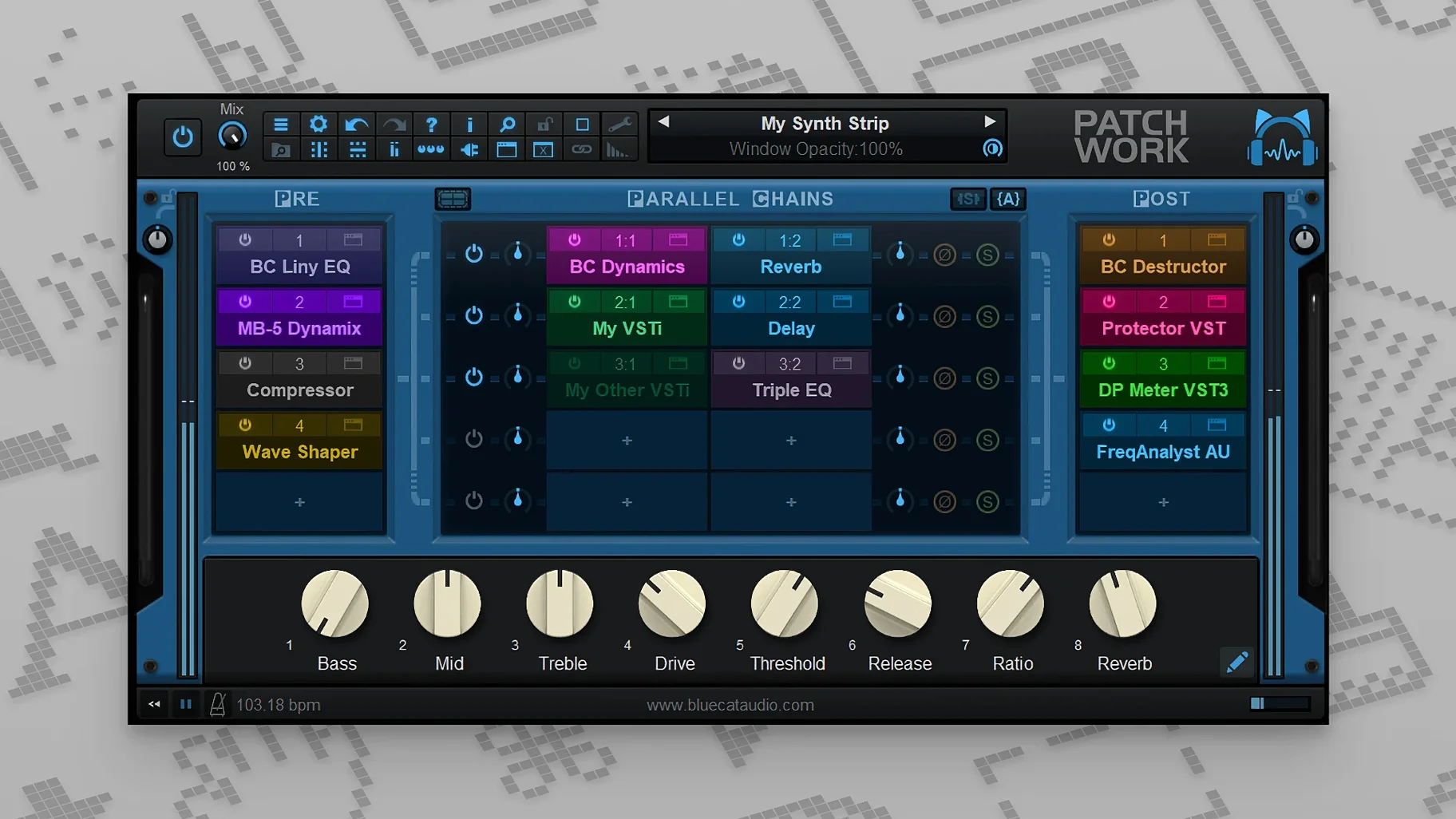
If you have ever used a channel strip plug-in and wished the compressor slot could load a different developer's compressor, PatchWork operates on that exact instinct. It sits in a DAW insert as a shell, and inside that shell you build a serial chain of up to 64 VST3 or AUv3 plug-ins, with parallel splits at any point. The signal path is set on a virtual grid — drag nodes to reorder, branch a dry line around a distortion stage, or sum two parallel chains back together before a limiter. Each slot has its own bypass, gain staging and wet/dry mix, so gain‑staging a chain of ten plug-ins does not need ten floating windows open behind it.
Turn One Insert Slot Into a Full Multi‑Effect Rack
- Slot‑limited DAWs: one instance of PatchWork gives you a full multi‑effect rack where the host only sees a single insert.
- Parallel processing without busses: split the signal inside the plug-in, process each branch separately, then blend them back together — no extra aux tracks needed.
- Quick A/B of effect orders: drag a saturation plug-in before or after an EQ and hear the difference in real time, with no re‑patching.
- Capturing a performance: the built‑in recorder grabs up to 16 channels of audio, useful for printing a processed stem without leaving the plug-in.
VST3 Editor Context Drops When the Window Is Hidden on macOS
- VST3 editor loading on macOS only works while the interface is visible; hiding the window drops the editor context.
- The 64‑bit requirement means older 32‑bit VST2 plug‑ins will not load, even wrapped.
- MIDI control for individual plug-in bypass and UI open/close arrived in version 2.75; check your version if those controls are missing.
Where PatchWork Sits in a Real Workflow
PatchWork does not replace a DAW mixer, but it changes which problems you solve inside the mixer and which you solve inside a single insert slot. A producer tracking guitars might run an amp sim, two IR loaders in parallel, and a gate — all inside one PatchWork instance on the armed track. The host session stays cleaner because one insert holds what would otherwise be five. If the amp sim crashes during a plugin scan, it takes down only PatchWork, not the entire DAW. Blue Cat's other host plugins — Axiom, Late Replies, MB‑7 Mixer — cover different ground, but PatchWork remains the most direct for building serial or parallel effects chains without switching to a separate application.
On macOS, PatchWork talks to the system at the plugin level. The built-in scanner reads Audio Unit, VST3, and AUv3 components from their standard locations, so a plugin installed yesterday appears in PatchWork's browser without manual path configuration. The browser itself supports full‑text search and updates results while you type, which matters when you have 400 plug‑ins and remember the name as "something‑comp." Drag a plug‑in from the browser onto a slot and its interface opens inside PatchWork's own window — no floating panels unless you deliberately detach them.
The standalone application works as a lightweight host for live use or quick sound design. You can build a chain with the same routing grid, save it as a preset, then load that preset later inside the DAW plug‑in version. Some musicians use the standalone app as a practice rig: guitar input, tuner, amp sim, cab IR, reverb — all running outside a DAW, with the 16‑channel recorder capturing output when an idea appears.
Settings to Change Within the First Ten Minutes
Out of the box, PatchWork's gain staging is conservative, but two preferences change the feel immediately. First, set the default wet/dry mix per slot to 100% wet. The factory default is a blend state that catches people out — they insert a compressor and wonder why the signal sounds half‑processed. Second, enable the option that keeps plugin windows open when you switch slots. Without it, clicking a different slot closes the previous GUI, which slows down gain‑staging across a chain.
If you use MIDI controllers, assign bypass toggles for the first four slots early. Version 2.75 added MIDI control for individual plug‑in bypass and UI open/close, so you can map a pad controller to kill a reverb or open an EQ window without touching the mouse. The MIDI learn dialogue is straightforward: right‑click a parameter, move a controller, and the assignment sticks. For parameter control, the expanded MIDI event types in 2.75 mean NRPN and 14‑bit CC messages work where previously only 7‑bit CC was reliable — important for filter cutoff sweeps on hardware that sends high‑resolution data.
The plug‑in scanner defaults to checking all known formats. If you work exclusively with Audio Units, disable VST3 scanning in the preferences. Startup time drops noticeably on systems with large plug‑in collections, and the browser shows fewer duplicate entries for plug‑ins that ship in multiple formats.
Mistakes That Trip Beginners
Loading a 64‑slot chain before checking latency is the most common. Every plug‑in adds its own processing delay, and while PatchWork reports total latency to the host, a chain of ten look‑ahead limiters and linear‑phase EQs can push a session into unusable territory for live monitoring. Build chains incrementally and keep an eye on the reported latency figure in the host's plug‑in window header.
Another recurring mistake: assuming the parallel split point sums automatically. You must place a mixer node or adjust the output routing of each branch to control how signals recombine. A signal split into three branches that simply reconnect at the output grid without gain adjustment will sum unpredictably loud. Route each branch to a dedicated gain plug‑in or use the built‑in wet/dry control per slot to set blend levels before the final output stage.
Forgetting that VST3 editor loading on macOS depends on window visibility catches users who minimise PatchWork or close its interface. If a VST3 plug‑in displays a black window, bring PatchWork's GUI back into focus and reopen the plug‑in editor. AUv3 plug‑ins do not share this limitation, so when the choice exists, loading the AUv3 version of a plug‑in often yields more consistent behaviour on macOS.
Beginners also miss that the built‑in recorder captures pre‑fader or post‑fader depending on where you place it in the chain. Placing it at the very end prints everything; placing it after a parallel branch captures only that branch's output. Setting the record point intentionally avoids exporting a stem that later sounds nothing like what was heard during playback.
Version 2.75 and Everyday Use
The 2.75 update changed how presets and chains travel between projects. Before 2.75, saving a complex parallel routing meant saving the entire PatchWork preset; there was no way to lift just a four‑slot chain and drop it into another instance. With copy, paste, save, and reload for effects chains, you can now select a cluster of slots — say a preamp, EQ, and compressor — copy them, and paste the cluster into a different PatchWork instance in another session. For mix engineers who build go‑to processing chains, this cuts setup time considerably.
The built‑in audio recorder added in 2.75 records up to 16 channels, which turns PatchWork into a stem‑printing tool without routing cables outside the plug‑in. A producer running a multi‑mic drum chain inside PatchWork can record the processed output of all 16 channels to disk from within the plug‑in, then drag the resulting files into the DAW timeline. The recorder respects the routing grid, so what you hear is what gets printed.
MIDI control for bypass and UI open/close meant that live performers could finally map footswitches to toggle individual effects inside a chain. A guitarist with a two‑button MIDI foot controller can bypass a delay on one switch and open a tuner window on the other, all without touching the laptop. The expanded MIDI event types made parameter automation smoother for controllers that output high‑resolution data, reducing the steppy filter sweeps that older versions could produce with certain hardware.
- macOS 10.9 or later
- Intel or Apple Silicon (64‑bit only)
- AUv3 and VST3 plug‑in host support
Questions on file
Does PatchWork save the whole chain as a single preset?
Yes. The enhanced presets browser stores full multi‑plug‑in chains, supports real‑time filtering as you type, and includes full‑text search through saved plug‑ins.
Sign in · Create an account to add a field note.
No field notes yet. A measurement, a version, a machine — they appear after moderation.