VST Plugins
Arturia Augmented Grand Piano 2.0.2
VST PluginsUpdated
| Requirement | On file |
|---|---|
| macOS | macOS 11 or later |
| CPU | Apple Silicon, Intel 64-bit |
| Download | 2.6 GB |
Augmented Grand Piano picks up where the rest of the Augmented series left off. If you have used Augmented Strings or Voices, the architecture will feel familiar: two layers, each with two sound sources, routed through a shared modulation engine. The difference here is the source material—a mix of close-mic’d grand piano samples and synthesized textures that go well beyond the natural instrument.
Morphing from concert hall to abstract synthesis
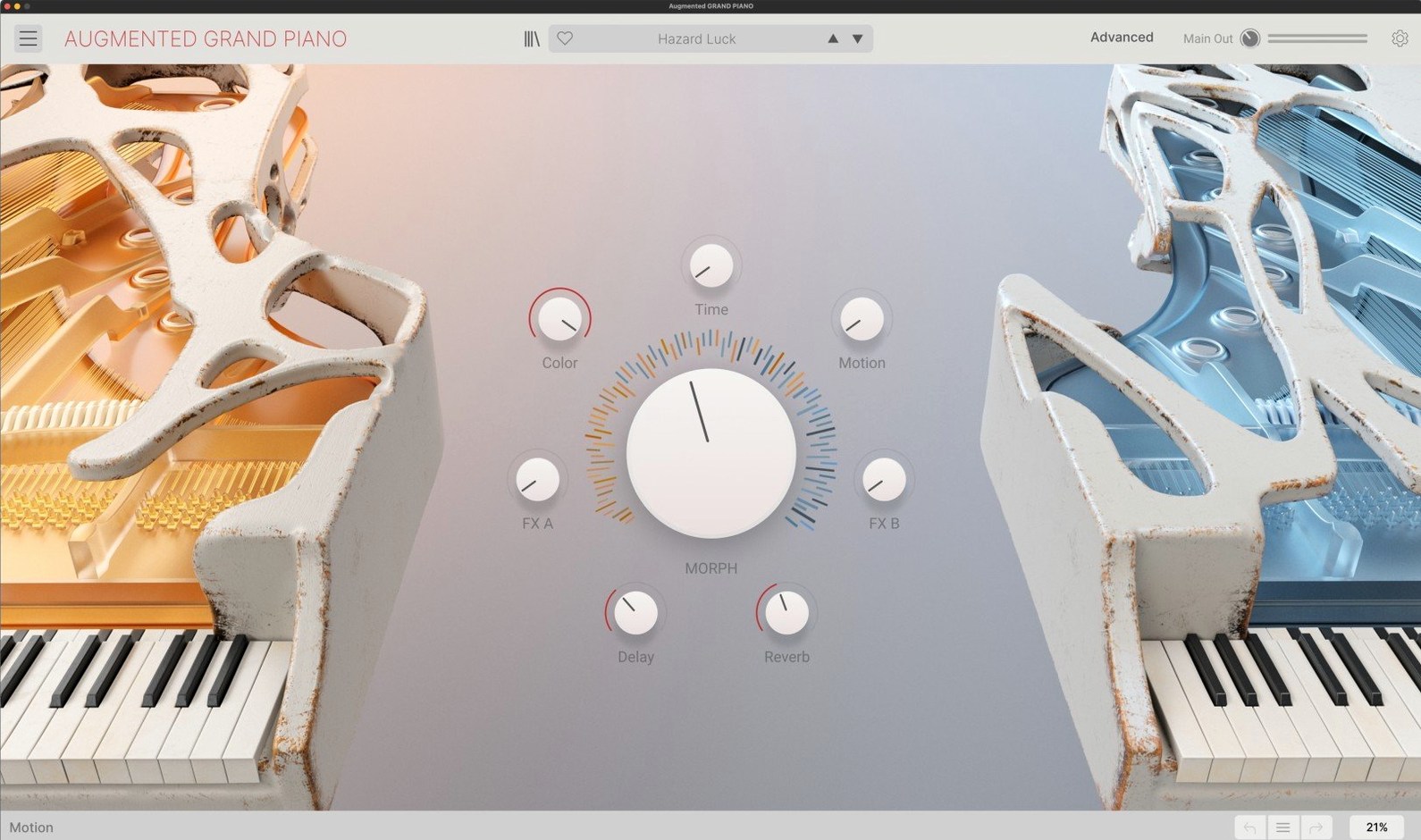
- Producers who want a piano that morphs between familiar and unfamiliar. The Morph control moves the sound from purely acoustic samples through to abstract synthesized layers, and every point in between is usable.
- Sound designers needing quick, expressive results. Four macro controls sit at the top of the interface, and the smart arpeggiator gives you movement without leaving the plugin window.
- Anyone working across multiple DAWs. The instrument ships as a VST, Audio Unit, and AAX plugin, plus a standalone application, on both Intel and Apple Silicon Macs running macOS 11.0 or later.
Carrying a full synthesis engine for a classical concert grand
- The 300-plus presets lean heavily into modern and abstract territory. If you need only a straight classical concert grand, you are carrying a lot of synthesis architecture you may not touch.
- Each layer’s dual-source design invites complex modulation, which rewards time spent learning the routing. It is not a one-knob realism machine out of the box.
Sort presets by category before you audition a single sound
Resist the urge to audition presets at random for the first hour. The preset list exceeds 300 entries, organised by category—Piano, Keys, Pads, Textures, and Rhythmic among them—and jumping between Cinematic Trails and a processed felt piano tells you little about how the instrument actually behaves. Instead, load the default "Concert Grand Clean" preset and turn off Layer B entirely. Spend ten minutes playing with velocity curves and the four macro controls (Timbre, Colour, Motion, and Space) one at a time. You will learn more about the engine from a single naked layer than from fifty fully dressed presets.
A second practical step: configure the instrument's audio and MIDI buffer behaviour early. The standalone application shares settings with the DAW plugin instances, but the arpeggiator's clock source, the aftertouch response curve, and the Morph control's MIDI CC assignment all need checking before they appear in a project. Open the settings panel (the gear icon, top right) and confirm that the arpeggiator is set to sync to host transport unless you have a reason to run it free. Nothing derails a session faster than an arp that drifts because it was left on internal clock from a sound-design jam the night before.
Building a Trailer Cue: A Start-to-Finish Workflow
Film and game work is where Augmented Grand Piano earns its keep, so here is one practical route for a 45-second dramatic cue.
- Layer A—acoustic foundation. Load a close-mic'd grand sample with the felt or damper character dialled up. Set velocity response to a narrow curve so soft strikes still speak clearly. Keep the Morph control at 0% for now.
- Layer B—synthetic texture. Choose a wavetable or granular source from the second engine. Pull the Colour macro toward a darker, glassy tone and set Morph to about 40% so the synthetic layer barely ghosts behind the piano.
- Modulation routing. Assign an LFO to the Morph parameter with a slow triangle wave (0.20 Hz). The sound now breathes between acoustic and synthetic without noticeable pumping. Use the Motion macro to widen the LFO depth as the cue builds.
- Arpeggiator for momentum. Engage the smart arpeggiator on Layer B only, set to a 16th-note pattern with octave jumps. Gate length around 60% keeps the texture percussive without overpowering the sustained piano notes.
- Performance and mix. Record the piano part with aftertouch assigned to the Colour macro—pressing harder darkens the tone slightly, mimicking the natural compression of a real grand. In your DAW, high-pass the synthetic layer at 200 Hz to leave the low register clean for the acoustic samples.
The result is a cue that starts with an almost-natural piano and ends somewhere closer to a processed hybrid score instrument, all with one plugin and no automation drawn by hand.
Morph is not a wet/dry crossfader
- Treating the Morph control as a wet/dry mix. Morphing is not crossfading. At 50%, you are not hearing 50% Layer A and 50% Layer B blended equally—the internal scaling depends on the sound sources loaded and the modulation assignments. The only way to know what a middle position sounds like is to play it.
- Ignoring the per-layer arpeggiator scope. The smart arpeggiator can target either layer, both, or neither. Leaving it active on the acoustic piano layer while playing block chords produces rhythmic stabs that beginners often mistake for a buffer or voice-stealing bug. Check the arpeggiator's layer assignment before troubleshooting audio glitches.
- Piling on macros without checking the underlying routing. The four macro knobs control multiple parameters simultaneously, and the factory mapping is not always obvious. A new user who turns Colour, Motion, and Space all to maximum can end up with a washed-out, phasey mess and blame the instrument—when the real culprit is three stacked modulation destinations pulling in different directions.
- Skipping the expanded panel entirely. Arturia's interface defaults to a simplified view, and many beginners never click the arrow to reveal the full modulation matrix and per-source editing. The Compact view is fine for quick tweaks, but if you want to understand why a preset behaves the way it does—or fix one that almost works—the expanded panel is where the answers live.
- Core application — updated to version 2.0.2.6369.
- macOS 11.0 or later
- Intel or Apple Silicon Mac
Questions on file
What plug-in formats does Arturia Augmented Grand Piano use on Mac?
It is available in VST, Audio Unit, and AAX formats, and it can also run as a standalone application.
How does the Morph control work?
The Morph control lets you move continuously between the sampled acoustic piano layer and the synthesized layer, blending the two sound sources in real time.
Sign in · Create an account to add a field note.
No field notes yet. A measurement, a version, a machine — they appear after moderation.