VST Plugins
Arturia Efx AMBIENT 1.0.0
VST PluginsUpdated
| Requirement | On file |
|---|---|
| macOS | OS X 10.10 or later |
| CPU | Apple Silicon, Intel 64-bit |
| Download | 285 MB |
If you've used a convolution reverb to place a dry signal in a hall, Efx AMBIENT takes the opposite approach — it doesn't emulate real spaces. It synthesises them from scratch using Feedback Delay Networks and spectral processing, which puts it closer to a sound design tool than a traditional mixing plug-in.
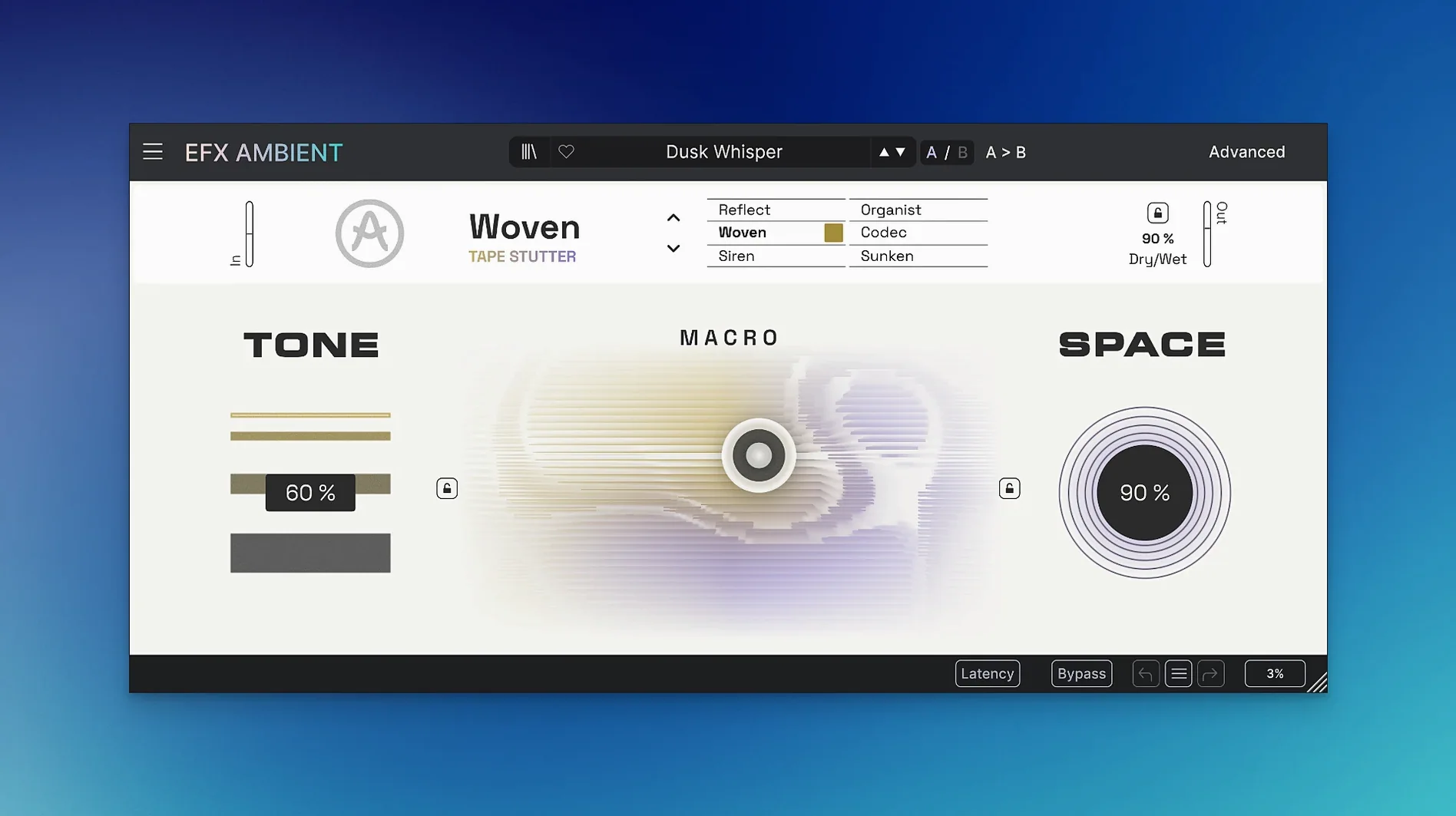
On an individual track, the six operating modes let you push a simple synth pad into reverse playback textures or apply detailed sound deformation that breaks apart the source in controlled ways. The motion and depth controls respond fast enough to ride an automation lane, so you can shift the perceived distance of a part mid-phrase without touching a send fader.
Across a bus or aux return, the Advanced panel becomes the main workspace. You set time-based reflections that react differently depending on the incoming transients — useful when you're feeding it a drum room mic and want the tail to bloom only on snare hits. Because the engine builds its own spectral interpretation of the signal, two different instruments hitting the same bus produce distinct spatial signatures rather than a uniform wash.
In a mastering context, think surgical rather than broad. A light touch of the deformation mode on a parallel chain can introduce stereo width that stays phase-coherent, but the plug-in's nature is more experimental — it's happier mangling a field recording on a sound design track than sitting transparently on a finished mix.
Supermassive Does Gigantic Tails, Efx AMBIENT Builds a Scene in Layers
Put Efx AMBIENT next to Valhalla DSP's Supermassive and the differences surface quickly. Supermassive excels at huge, modulated delays and reverbs with a single-purpose interface — you dial in a mode, tweak a handful of knobs, and it sounds expensive. Efx AMBIENT doesn't chase the same simplicity. Its six modes cover some delay territory, but the Advanced panel and the 2D Macro control push it toward real-time performance shaping that Supermassive leaves to your DAW's automation lanes.
Eventide's Blackhole is the closer match on intent. Both create spaces that don't exist in nature, and both handle cinematic long-tail effects with ease. The difference sits in the engine. Blackhole relies on Eventide's pitch-shifted reverb algorithms; Efx AMBIENT layers spectral processing and Feedback Delay Networks to build the space from frequency-domain analysis of the incoming audio. In practice, that means Blackhole tends to produce a more consistent, signature halo around a source, while Efx AMBIENT's tail changes character depending on the spectral content you feed it — a plucked acoustic guitar doesn't get the same treatment as a synth pad.
Unfiltered Audio's SILO offers a different kind of granular spatialisation that overlaps with Efx AMBIENT's deformation mode, but SILO works best on frozen buffers and isolated hits. Efx AMBIENT handles continuous material more gracefully — you can leave it running on a live track without the engine choking on the buffer length.
Integration with Other Applications and macOS Features
Efx AMBIENT runs as a 64-bit AU, VST3, and AAX plug-in, so it slots into Logic Pro, Ableton Live, Cubase, and Pro Tools without extra routing. On Apple Silicon Macs, the plug-in loads natively; Arturia's 1.0.0 build covers both architectures in a single package, so you don't juggle separate installers.
macOS's Audio Unit validation picks it up on first scan. If you use Logic's Smart Controls, the 2D Macro maps cleanly to a single X/Y pad — assign the X axis to the motion control and the Y axis to depth, and you can ride both with a trackpad gesture during playback. In Ableton Live, the same Macro works as a device parameter for Push controllers, which turns the plug-in into a performance effect you can play two-handed alongside a clip launch.
Outside the DAW, the plug-in benefits from macOS's aggregate device routing. Feed it system audio through BlackHole or Loopback, route the return into OBS, and you have a real-time ambient processor for live streams without touching your interface's physical loopback cables. The latency sits low enough on M-series machines that spoken-word applications stay intelligible — useful if you're processing a podcast vocal through the blur mode at a subtle mix level.
Arturia's own ecosystem connects through the FX Collection 6 bundle, but Efx AMBIENT also plays well with third-party modulation sources. Cable Audio's MidiShaper or Xfer Records' LFO Tool can push the Macro parameters via MIDI CC, which means tempo-synced spatial sweeps without drawing automation curves.
Runs on a 2013 Mac Pro or an M3 MacBook Air Without Extra Steps
Does it work on an older Intel Mac? Yes, provided you're on macOS 10.10 or later. The 64-bit build covers Intel and Apple Silicon, so a 2013 Mac Pro or a recent MacBook Air M3 both load the same plug-in binary. Performance scales with the processor — the spectral processing modes hit the CPU harder than the blur mode, but an i7 from the Haswell era still handles a single instance at a 256-sample buffer without dropouts.
Is it a reverb, a delay, or something else? It occupies the space where all three overlap. The Feedback Delay Networks in the engine behave like a reverb in the sense that they create dense reflections, but the pitch-shifting and reverse modes pull it into delay-processor territory. Think of it as a spatial effect that builds its own interpretation of a room rather than simulating one. If you need a realistic scoring stage, look elsewhere — this is for sounds that don't exist in physical acoustics.
Can I use it live without crashing my set? The plug-in handles preset changes smoothly in the current build. Loading a new mode during playback causes a brief processing gap — not a crash, but enough of a hiccup that you'll want to automate mode switches at bar lines rather than mid-phrase. The motion and depth controls, however, respond in real time without artefacts, so you can perform spatial shifts continuously.
What file formats does it read for presets? Efx AMBIENT uses Arturia's proprietary preset format; it doesn't load impulse responses or third-party reverb maps. The factory library covers each mode with starting points that are genuinely useful rather than demo filler — the reverse-mode presets, in particular, work straight out of the gate on percussive material.
Version 1.0.0 Ships as a Polished First Release, Not a Fixer-Upper
Version 1.0.0 is the initial release, so there's no upgrade history to trace. The build that ships — 1.0.0.6577 — represents the plug-in as Arturia intended from day one. This matters because first-release plug-ins often ship with a handful of modes and expand later, but Efx AMBIENT arrived with all six modes, the Advanced panel, and the 2D Macro control fully implemented.
In practice, that means early adopters aren't waiting for a missing feature. The deformation mode already reaches deep enough to mangle a field recording into something unrecognisable; the blur mode already handles real-time pad processing without glitching. What you install today matches what the product page describes — there's no roadmap gap between the marketing and the download.
One practical note from the current build: the plug-in respects macOS's dark mode through the host application, but it doesn't offer its own UI theme switching. The interface uses a consistent dark colour scheme that reads clearly on both Retina and standard-DPI displays, and the parameter labels stay legible at smaller plugin window sizes — a detail that matters when you're stacking multiple Arturia effects in a session and screen real estate gets tight.
- macOS 11.0 or later
- 64-bit host (Apple Silicon or Intel)
Questions on file
What are the system requirements for Arturia Efx AMBIENT?
It requires macOS 11.0 or later on a 64-bit Mac, with native support for both Apple Silicon and Intel processors.
How many operating modes does Efx AMBIENT include?
It includes six distinct modes covering reverse playback and detailed sound deformation among other processing types.
What does the Advanced panel control?
The Advanced panel provides detailed, time-based sound shaping controls for adjusting the reflection and spatial behaviour of the effect.
Sign in · Create an account to add a field note.
No field notes yet. A measurement, a version, a machine — they appear after moderation.