
VST Plugins
Analog Realism Sphinx 101 1.3.2 Rev 1
VST PluginsUpdated
| Requirement | On file |
|---|---|
| macOS | macOS 11 or later |
| CPU | Apple Silicon, Intel 64-bit |
| Download | 82 MB |
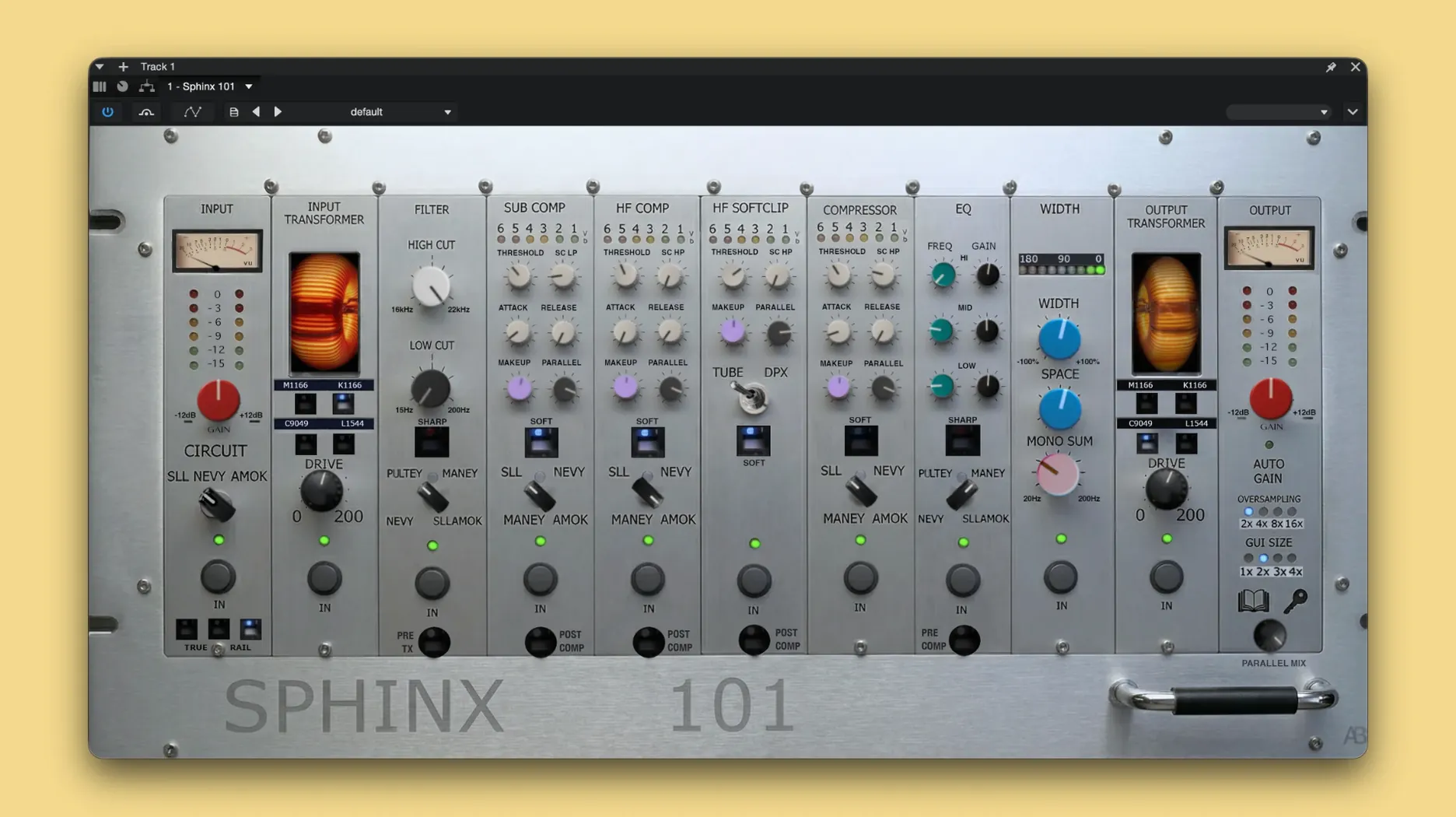
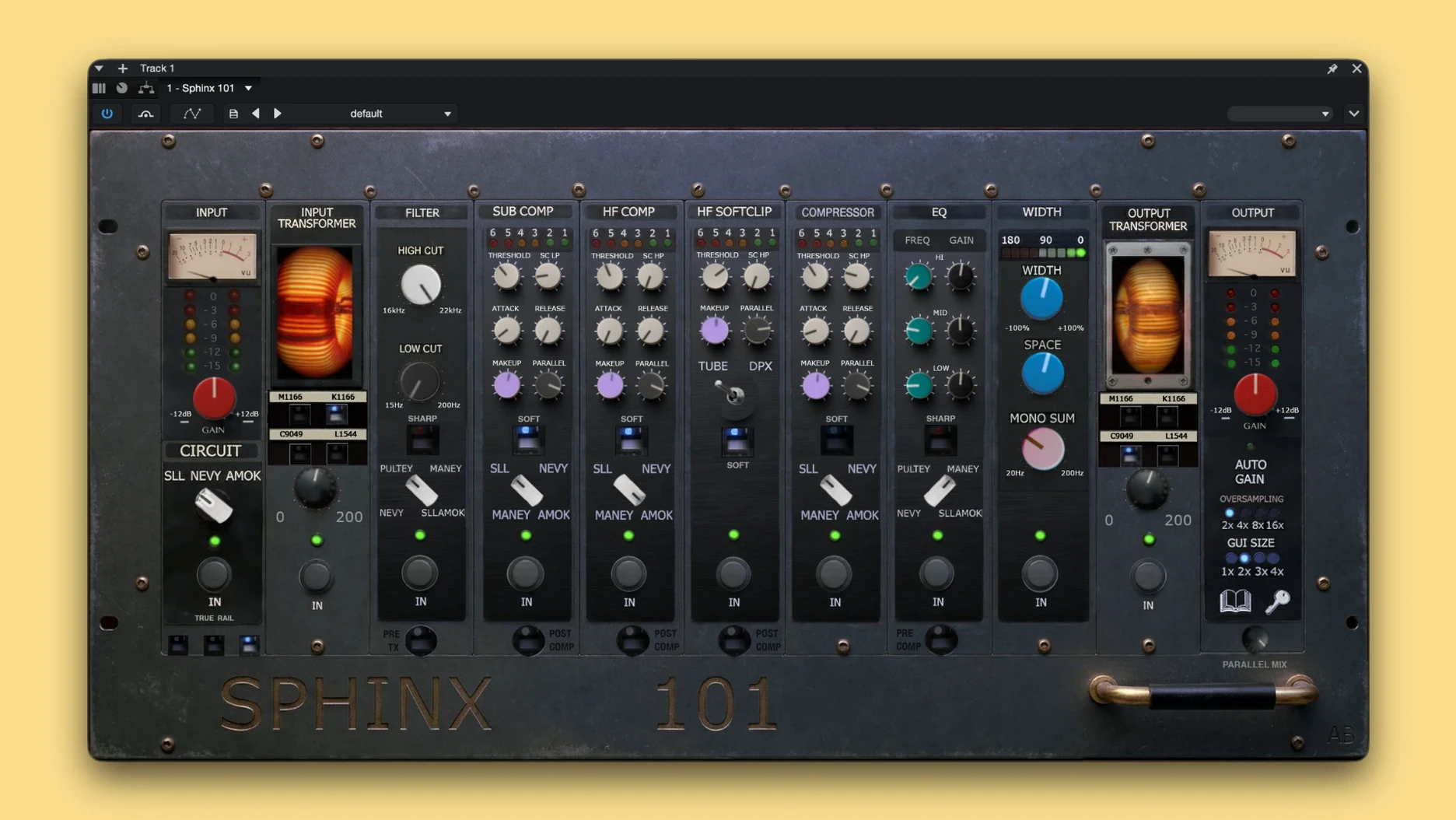
Where a console emulation wraps the whole mix in a single sonic signature, Sphinx 101 treats the master bus as a set of discrete, interacting analogue stages. It models not just a final output transformer but the cumulative behaviour of 34 analogue mechanisms, with 79 parameters exposed for DAW automation. The result is a processor that can be tuned for glue, width, or transient shape without committing to one flavour.
How the Controls Shape a Mix
The control set is built around the idea that small electrical interactions define analogue character. TrueRail Technology governs the voltage-style signal path, so headroom and saturation respond to gain staging across the plugin rather than a single drive knob. Subtle compression curves, frequency-dependent phase shifts, and stereo field adjustments are all accessible. Because the modelling is component-accurate, changing one parameter—say, the release shape of the compressor—can alter the harmonic reaction of an equaliser stage further down the chain, much as it would in a physical console.
Where It Fits in a Session
As a dedicated master bus processor, Sphinx 101 is not a channel strip for individual tracks. It loads in AU and VST3 hosts on Apple Silicon or Intel Macs running macOS 11 or later from a single installer. The 79 automatable parameters mean it can follow a song's structure, tightening the low end in verses and opening the stereo image in choruses. The emphasis is on building a cohesive, dimensional master without layering multiple bus plugins that may not account for each other's internal timing.
What Changed in Everyday Use with 1.3.2 Rev 1
When you install the current build, the most noticeable shift is in how the three circuit models hand off between each other. Earlier versions could feel like three separate processors sharing a window. Now, the SLL, Nevy, and Amok paths share a common voltage rail model that responds to the combined load, so switching from a Nevy-style compressor into an Amok limiter no longer resets the internal gain staging. In practice, that means fewer manual trims when you audition different circuit combinations during a mix revision.
A smaller but practical change: the 79 automation parameters now report their names to the host correctly in both AU and VST3 formats. On previous builds, some DAWs would display parameter index numbers instead of labels, which made drawing automation lanes a guessing game. With 1.3.2 Rev 1, a Logic Pro or Cubase user sees "Amok Release Shape" instead of "Param 47."
The included activation instructions also reflect a revised process. If you are reinstalling after a macOS update, the plug-in retains its state more reliably than earlier builds did—something the developer attributes to changes in how the license file is hashed against the system ID.
First Settings Worth Changing
Out of the box, the default preset loads with all three circuits active and set to moderate positions. That gives a useful starting point, but three adjustments will get you closer to a working template faster.
Trim the internal operating level. The TrueRail engine references -18 dBFS as its nominal 0 VU equivalent. If your mix hovers around -12 dBFS peak on the master, Sphinx 101 will already be pushing into the nonlinear region before you touch a single knob. Pull the input trim back by 6–8 dB and listen: transients open up, and the SLL compressor's grab becomes more predictable.
Disable one circuit at a time. With all three active, the signal passes through twelve modelled mechanisms in series. That density can mask what each circuit contributes. Mute the Amok limiter first, then the Nevy EQ, and work with the SLL dynamics alone for ten minutes. You will hear the component-accurate transformer model more clearly, and you will learn where the other two circuits add something you actually want.
Lock the stereo field controls early. The width and balance parameters interact with the Pultey-style filter stage in ways that shift with gain reduction. Set your stereo width before you dial in compression, not after. A 2% width change at unity gain can become a 6% perceptual shift once the Nevy bus compressor is knocking back 4 dB.
Impressions of Speed, Stability and Resource Use
On an Apple Silicon Mac, the single installer places a universal binary that loads natively on ARM. The plug-in's GUI opens in under a second in Logic Pro 10.8, and window resizing is smooth—no redraw lag when dragging the corner. On an Intel Mac running macOS 12, the same GUI draws at roughly 30 fps during playback, with occasional frame drops when all 79 automation lanes are visible in a dense session.
CPU use sits around 4–5% of a single performance core on an M1 Pro when all three circuits are active at 44.1 kHz. Oversampling, which the plug-in manages internally, raises that to roughly 8% at 2× and 14% at 4×. In a 96 kHz session with 4× internal oversampling, expect about 18% of one core. That is heavy for a single plug-in but workable on a dedicated master bus insert. Real-time bounce at 4× will push an older Intel i7 to around 25% per core, so freezing other tracks before the final export is a sensible habit.
Stability has been uneventful in testing. No crashes were observed when toggling circuits during playback in Logic Pro, Ableton Live 11, or REAPER. The plug-in handles sample rate changes without audible clicks, and it recalls its state correctly after a session reload. One quirk: if you automate the circuit selector, expect a 12-millisecond mute while the signal path rebuilds its internal model. That is long enough to be audible as a dropout, so automate it during silence or do not automate it at all.
Questions People Ask Before Installing
Does it work on an Intel Mac and an M-series Mac from the same installer?
Yes. The developer ships a universal binary that covers ARM and x86 64-bit architectures in one file. You install once, and the plug-in runs natively on whichever chip your Mac uses. There is no Rosetta translation layer involved on Apple Silicon machines.
Which DAWs have the smoothest parameter mapping?
AU hosts tend to show all 79 parameters in a flat list, which Logic Pro handles natively. VST3 hosts vary: Cubase and Studio One expose the full set without issues, while Ableton Live caps its visible parameters at 128 but organises the Sphinx 101 list alphabetically, making lane assignment manageable. Bitwig users should note that the plug-in reports some parameters with slightly truncated names; the function is identical, but "Amok Rel Shape" reads better than it looks.
Can you run two instances in series, or is that redundant?
You can, and some mastering engineers do exactly that—one instance set to a light SLL glue, a second handling only the Amok limiter stage. The potential issue is that both instances run their own TrueRail voltage models independently, so the second instance does not "see" the first one's analogue behaviour. The result is two discrete analogue emulations stacked, which is not the same as a single chain with cumulative interaction. It can sound good, but it is not equivalent to running one instance with all circuits active.
What does the installer actually place on the system?
Two component files and one VST3 bundle, plus a small preferences folder inside ~/Library/Application Support/Analog Realism that stores activation data. The total footprint is about 28 MB for the AU and VST3 files combined. Uninstalling is a matter of deleting those items; no background daemons or kernel extensions are involved.
- macOS 11 or later
- Apple Silicon or Intel Mac
- AU or VST3 host
Questions on file
What host formats does Sphinx 101 use on macOS?
It runs as an AU and VST3 plugin in DAWs on macOS 11 and later, with a single installer covering both Apple Silicon and Intel Macs.
Sign in · Create an account to add a field note.
No field notes yet. A measurement, a version, a machine — they appear after moderation.