VST Plugins
Ample Guitar M 4.1.0
VST PluginsUpdated
| Requirement | On file |
|---|---|
| macOS | macOS 10.13 or later |
| CPU | Apple Silicon, Intel 64-bit |
| Download | 5.2 GB |
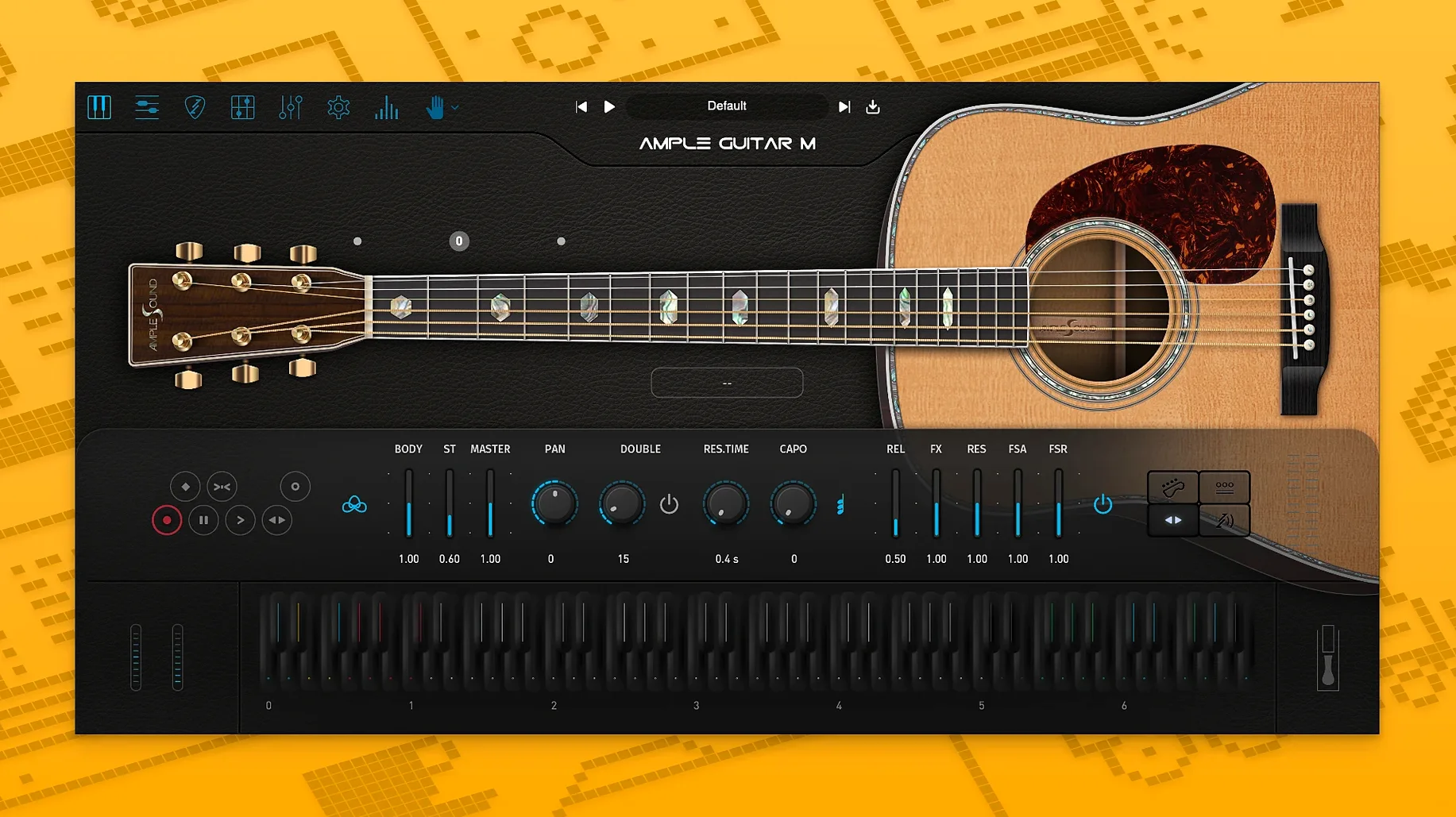
Ample Guitar M is a sample-based virtual instrument that models the sound of a Martin D-41 acoustic guitar, complete with steel strings and a wide set of articulations. It loads as a plugin instrument track in a DAW, drawing from a required sample library to reproduce fingerpicking, strumming, palm muting, hammer-ons, pull-offs, legato slides, harmonics, and vibrato.
In a typical session, you insert the plugin on a dedicated instrument track. MIDI parts are either played in live or programmed using its built-in tablature player. The Riffer engine handles strumming patterns and rhythm sequencing, which makes it straightforward to create convincing rhythm guitar beds that sit under a vocal without manual key-switching.
Once the MIDI performance is set, the audio output often routes to a bus for shared processing like light compression or a room reverb. Because the samples are dry and closely captured, they take well to amp simulation and cabinet IRs on an auxiliary track if you need a more contemporary, produced tone.
For layering, a common job is to double a picked part with a second instance panned opposite and nudged a few milliseconds ahead. The instrument's legato and vibrato articulations keep the double from sounding mechanical. Its strongest role remains the core acoustic bed: a single track feeding a subtle bus chain delivers a clean, articulate foundation that leaves the centre clear for a lead instrument or voice.
How Ample Guitar M Fits into a Mac Production Setup
Ample Guitar M is an AU, VST3, and AAX plugin, so it slots into Logic Pro, Ableton Live, Cubase, and Pro Tools without a wrapper. On Apple Silicon Macs it runs natively, which matters when a session already carries a dozen Kontakt instances and three convolution reverbs — the plugin’s own sampler engine loads the D-41 library into RAM directly, and the 4.1.0 update shortened that load time noticeably.
It also talks to standard macOS MIDI routing. Core MIDI sees the plugin’s input port, so you can drive it from a notation application like Dorico or MuseScore; the built-in tab player will follow the incoming notes and apply its own fretboard logic. Guitar Pro files drag straight onto the Riffer panel, and the plugin’s fingering engine respects the string and fret data embedded in the .gp file. This means a composer who sketches in Guitar Pro on a MacBook during a commute can drop the file into Ample Guitar M back in the studio and hear the part with round-robins and release samples instead of General MIDI plinks.
For producers who lean on Logic’s Articulation Set system, the plugin responds to the articulation key-switch map Ample Sound publishes. Set it up once per template, and the same MIDI region can flip from fingerpicked verse to palm-muted chorus without extra lanes.
A Fingerpicked Bed from Scratch: A Walkthrough
Assume a singer-songwriter project in Logic Pro at 96 bpm, key of E major. The goal is a fingerpicked acoustic bed that breathes behind a vocal and a sparse electric piano.
- Insert Ample Guitar M on a stereo instrument track. Set the internal capo to fret 2 — this shifts the voicing up a whole tone while keeping the open-string character, so a D-chord shape rings as E.
- Open the Strummer panel and pick the “Folk Fingerpicking” pattern from the preset list. Set the pattern length to two bars and lock it to the host tempo. The pattern defaults to a D major voicing, which capo-2 turns into E major.
- Draw a four-bar MIDI region on C3 (the default strum-trigger note). The plugin picks an alternating bass line on beats 1 and 3, with the top strings filling beats 2 and 4. Velocity at 90 feels natural; lower it to 70 for the second repeat to introduce dynamic contrast.
- For the B section, switch to a second Riffer lane with a pattern that uses hammer-ons on the high E string. Drag the transition from bar 8 to bar 9 so the last note before the change rings into the first hammer-on.
- Insert a light arrangement of the bass notes via the piano roll: add a MIDI note an octave below the strum trigger on beat 1 of each bar, routed to the low E string via the plugin’s string-force matrix. This keeps the bass line independent of the pattern engine without extra programming.
- Route the track output to a bus with a FET-style compressor (4:1 ratio, 3 dB reduction on the loudest transient) and a convolution reverb set to a medium wooden room, 1.2 s decay, mixed 30% wet. The close-miked samples dry up quickly; the room tail glues the part to the electric piano without smearing the finger noise.
- Print the track or leave it live — the 4.1 sampler improvements mean the D-41 library streams from an NVMe drive with no audible dropouts even under real-time bounce.
Faster Loading and a More Responsive Riffer in 4.1.0
The 4.1.0 release focused on the sampler engine and the Riffer. Faster loading is the first thing you notice: on an M1 Max with the library on the internal SSD, the instrument went from a noticeable pause to ready in under four seconds. In a template with four Ample instruments, that cuts the session-open wait by a tangible amount.
The Auto Vibrato Curve inside Riffer now adjusts vibrato depth based on note duration, so a held whole note gets a wider, slower vibrato than a quarter note, without drawing automation. Swing Quantization in Riffer respects the DAW’s swing setting; a pattern that used to sit rigidly on the grid can now shuffle in time with the drum track, which matters for country and folk feels where the acoustic guitar locks with a brushed snare.
Both changes reduce the amount of manual MIDI editing required after the pattern plays. Producers who used to humanise strummed parts with offset MIDI notes can rely more on the Riffer itself, which makes the plugin fit faster-moving sessions where an acoustic part needs to go from drag-and-drop to printed in a few minutes.
Running the Library from an External Drive Without Issues
Does the sample library run from an external drive? Yes. The installer places the library folder wherever you point it during setup, and the plugin remembers the path. A USB 3.1 SSD or Thunderbolt enclosure works well; spinning hard drives will increase the initial load time, but once the samples are in RAM, playback is unaffected.
How much disk space does the library need? Ample Sound’s D-41 library for the full version is substantial — several gigabytes. The download page lists the exact size for the current build, and you need that space free before running the PKG installer. The plugin will not function without the library present.
Will it choke on dense strumming at low buffer sizes? On Apple Silicon with a 128-sample buffer, sustained sixteenth-note strumming at 120 bpm uses about 15–20% of a single performance core. Intel machines manage the same load at a 256-sample buffer. The 4.1 engine handles voice-stealing more cleanly than earlier builds; held notes fade rather than cut off abruptly when polyphony hits the ceiling.
Can Ample Guitar M open Guitar Pro tabs downloaded from the web? Yes, so long as the file is .gp5, .gpx, or .gp format. Drag the file onto the Riffer, and the plugin reads the tab data, assigns strings and frets, and maps articulations to its own engine. Some users look for an ample guitar torrent to source tabs inside the library, and separately obtained Guitar Pro files work identically. The same applies if you come across an ample guitar m torrent or an ample guitar mac torrent — the plugin only cares about the .gp file content, not its origin.
Is iLok required? Activation uses iLok, but a physical dongle is not mandatory; machine-based activation through iLok Cloud or iL
Sampler engine — faster loading and playback performance
Riffer — added Auto Vibrato Curve and Swing Quantization
- macOS 10.13 or later
- Intel or Apple Silicon Mac
- Sample library (required)
Questions on file
Does Ample Guitar M require the sample library to work?
Yes, the sample library is mandatory. The plugin will not produce sound without it installed alongside the software.
Sign in · Create an account to add a field note.
No field notes yet. A measurement, a version, a machine — they appear after moderation.