VST Plugins
Arturia Acid V 1.1.5
VST PluginsUpdated
| Requirement | On file |
|---|---|
| macOS | macOS 11 or later |
| CPU | Apple Silicon, Intel 64-bit |
| Download | 542 MB |
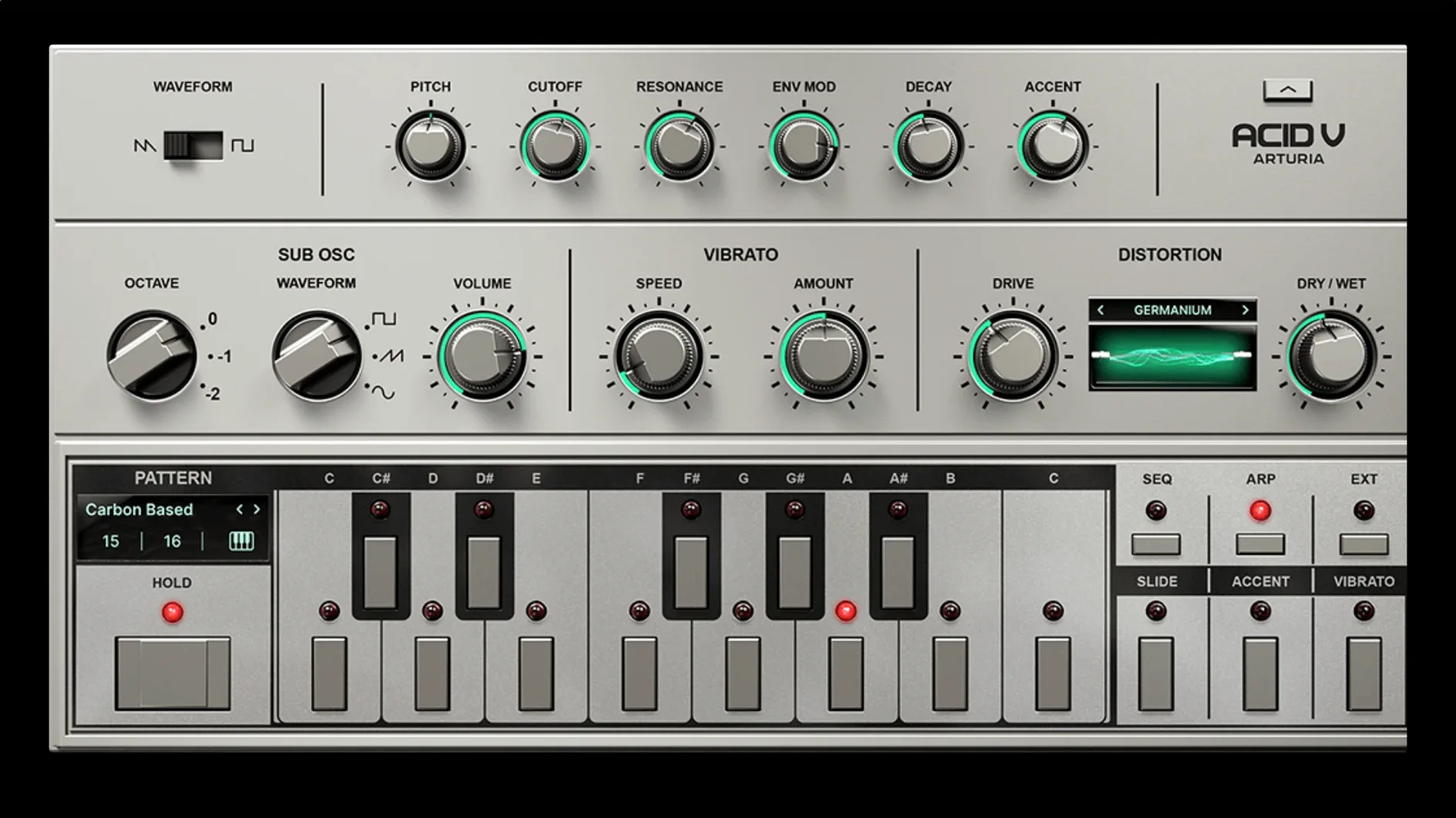
Arturia Acid V is a software bassline synthesizer that models the signal path of a Roland TB-303, adding a second oscillator and a modern sequencer to the original design. The sound pivots on a resonant 18 dB/oct low-pass filter that goes from a round, rubbery thump to a razor-edged squelch as you push the resonance past 3 o’clock. Detune the main oscillator slightly against the sub and the low end fattens without turning muddy; the sub itself spans two octaves and switches between sine, square, and pulse waveforms, so you can dial in a clean floor or a distorted rumble under the classic sawtooth buzz.
Polymetric Sequencer Beyond a Clone
| What | Detail |
|---|---|
| Plugin type | Virtual instrument (VST, AU, AAX, standalone) |
| Engine | Enhanced TB-303 emulation with sub-oscillator |
| Filter | Resonant low-pass, 18 dB/oct |
| Sequencer | Polymetric sequencer and arpeggiator |
| Presets | 150+ factory patches |
| Version | 1.1.5 (6367) |
The sequencer is where Acid V pulls ahead of a straight clone. It chains up to 64 steps with per-step gate, slide, accent, and vibrato, and it lets you set a different track length for pitch, gate, and slide lanes—a polymetric setup that spits out evolving patterns a basic 16-step line can’t touch. The vibrato is a genuine addition to the 303 formula, giving held notes a seasick pitch warble that sits well in leftfield techno and breakbeat. Running standalone, you can drive it from any MIDI keyboard; inside a DAW, it slots into a channel like any other soft synth and plays back automation for the filter cutoff and envelope mod amount right from the plugin parameters.
Tagged Presets Show Off Modulation and FX
After you drop Acid V onto a track, give the preset browser ten minutes before you do anything else. The 150-plus factory patches are tagged by type—Bass, Lead, SFX, Sequence—and many are designed to show off the modulation and FX chains, not just the raw oscillator tone. Audition a dozen across different categories while watching the sequencer lane lengths. You will spot patterns where the gate lane runs at 12 steps while pitch runs at 15; that tension is what makes a loop breathe over four bars instead of one. Save the three or four patches that fit your current project into a user playlist so you can return to them without re-browsing.
Second, map your MIDI controller’s mod wheel to the filter cutoff by right-clicking the Cutoff knob and selecting MIDI learn. The 303’s signature comes from riding the cutoff in real time, and doing it with a physical wheel or slider is faster than drawing automation. On a MacBook without a controller, assign the QWERTY keys A and D to Cutoff and Resonance via the MIDI keyboard tab in the top toolbar—the incremental steps work well enough for recording passable squelch lines.
Lower GUI Quality on Intel Macs
Open the cog menu in the upper right and switch the GUI quality from High to Low if you are on an Intel Mac. The vector interface redraws constantly when the sequencer runs, and on older machines that can push the fan before you have added a single FX slot. The sound engine is unaffected.
Next, set the sequencer’s default step count from 16 to something shorter while you learn the lane offset behaviour. Type 8 for pitch, 12 for gate, and 7 for slide in the Lane Length fields of an init patch, then hit Run. The pattern cycles a polymetric loop immediately, and hearing those odd overlaps early stops you writing flat 16-step lines out of habit. Dial the master tempo down to 110 BPM while you edit steps; the clearer articulation makes it obvious when a slide is too long or an accent transient clips the distortion input.
Turn on the sub-oscillator only after you have shaped the main oscillator tone. The sub defaults to a sine one octave below the main pitch, and at full mix it buries a kick drum in a busy arrangement. Start with the sub Mix knob at 9 o’clock and the waveform on square; the hollowed midrange leaves more space for the filter squelch than the sine does.
Workflow: Building a Corrosive Bassline from Scratch
This is a start-to-finish method for a driving acid line that sits under a four-on-the-floor kick, using only Acid V’s internal engines and FX.
- Initialise the patch. Click the hamburger menu on the preset bar and choose New Preset. Set the main oscillator to square wave, tune to 0 cents, and pull the sub Mix to zero for now.
- Shape the core tone. Set Cutoff to 10 o’clock, Resonance to 2 o’clock, and Env Mod to 11 o’clock. The filter envelope amount determines how much the VCA envelope opens the cutoff per step; at 11 o’clock you get a short, woody pluck that tightens the transient without chirping.
- Dial in the sequencer. Set Pitch lane to 12 steps, Gate lane to 9 steps, Slide lane to 5 steps. Click into the pitch grid and place notes on steps 1, 4, 7, 9, and 11. Add a slide on step 7 and an accent on step 1. The 9-step gate lane means the gate resets independently of pitch, creating a hiccup in the middle of the phrase.
- Add the sub. Bring the sub Mix to 10 o’clock, waveform on pulse, range switch to -1 octave. The pulse sub tightens the square-wave attack without the bloom of a sine.
- Apply distortion. Open the Distortion module and select algorithm 8, Germanium. Set Drive to 12 o’clock and Tone to 1 o’clock. Germanium adds odd-harmonic grit that hardens the filter sweep without fizzing out the top end.
- Slot an effect. In FX slot 1, load the Analog Delay. Set Time to 3/16 dotted, Feedback to 30%, Mix to 25%. The dotted delay throws a syncopated repeat that lands in the gaps the polymetric gate lane leaves open.
- Record the output. Enable the DAW transport and record the plugin’s audio output for 8 bars while you ride the Cutoff knob manually. Open the filter slightly on bar 5 for a lift, then close it hard on bar 7.
- Print and shape. Commit the audio to a clip. Apply a high-pass filter at 80 Hz in the DAW channel strip to clear the sub-bass overlap with the kick, then add a narrow cut at 300 Hz if the resonance rings too long on your monitoring setup.
The result is a bassline that stays out of the kick’s fundamental, moves unpredictably across the barline because of the 9-step gate lane, and cuts through a dense mix when the delay throws ghost notes into the off-beats. Swap the Germanium distortion for algorithm 4 (Shred) if the line needs more upper-harmonic bite; Shred pushes the resonant peak into near-oscillation without needing extra filter envelope.
- macOS package — Listed for version 1.1.5.6367.
- macOS 11.0 or later
- Intel or Apple Silicon processor
Questions on file
Does Acid V just copy the original TB-303 sound?
It recreates the core oscillator and filter behaviour of the TB-303, then extends it with a sub-oscillator, polymetric sequencing, and a dedicated vibrato section.
What macOS version does Acid V require?
Arturia lists macOS 11.0 or later as the minimum version, and it runs natively on both Intel and Apple Silicon Macs.
Can I use Acid V without a DAW?
Yes, it ships with a standalone application that responds to any connected MIDI keyboard, so you can play and sequence directly.
Sign in · Create an account to add a field note.
No field notes yet. A measurement, a version, a machine — they appear after moderation.