VST Plugins
Arturia Pigments 7.0.1-6772
VST PluginsUpdated
| Requirement | On file |
|---|---|
| macOS | macOS 11 or later |
| CPU | Apple Silicon, Intel 64-bit |
| Download | 1.8 GB |
A producer builds a bass patch from a wavetable, drags a modulation line to a filter cutoff, and runs the result through a new bit-crushing effect before dropping it into a track. That workflow sits at the centre of Pigments 7, a software synthesizer that combines wavetable and virtual analog engines with a colour-coded interface.
Arturia Pigments Mac Compatibility
Does Arturia Pigments run on Apple Silicon Macs?
Yes. Version 7.0.1-6772 runs natively on both Apple Silicon and Intel 64-bit Macs, so no Rosetta translation layer is required.
Big Sur Minimum for Intel and Apple Silicon
macOS 11 (Big Sur) or later. The same requirement applies to both Intel and Apple Silicon machines.
Corroder Bit-Crusher and 150 New Presets Ship
A hybrid synthesis engine with drag-and-drop modulation, a redesigned Play Page for quick sound tweaking, and a set of built-in effects that includes the new Corroder bit-crusher. The 7.0.1 update also ships 150 new factory presets, 50 wavetables, 30 samples, and 20 noise sources.
What plug-in formats work on a Mac?
A Session with Pigments, Step by Step
Tuesday evening, a blank Ableton Live set, and a half-formed idea for a synth lead that needs to cut through a dense mix. Pigments loads as an AU instrument on a new MIDI track in under three seconds on an M3 MacBook Air. The Play Page opens first — the redesigned hub from the 7.0.1 update — showing four macro sliders and a grid of preset categories.
Step 1: Click the Bass category, filter by Aggressive, and scroll. The preset “Corroded Line” catches attention partly because it uses the new Corroder effect. A quick C3 note on the MIDI keyboard confirms it has the right grit, but the filter sweep feels too slow.
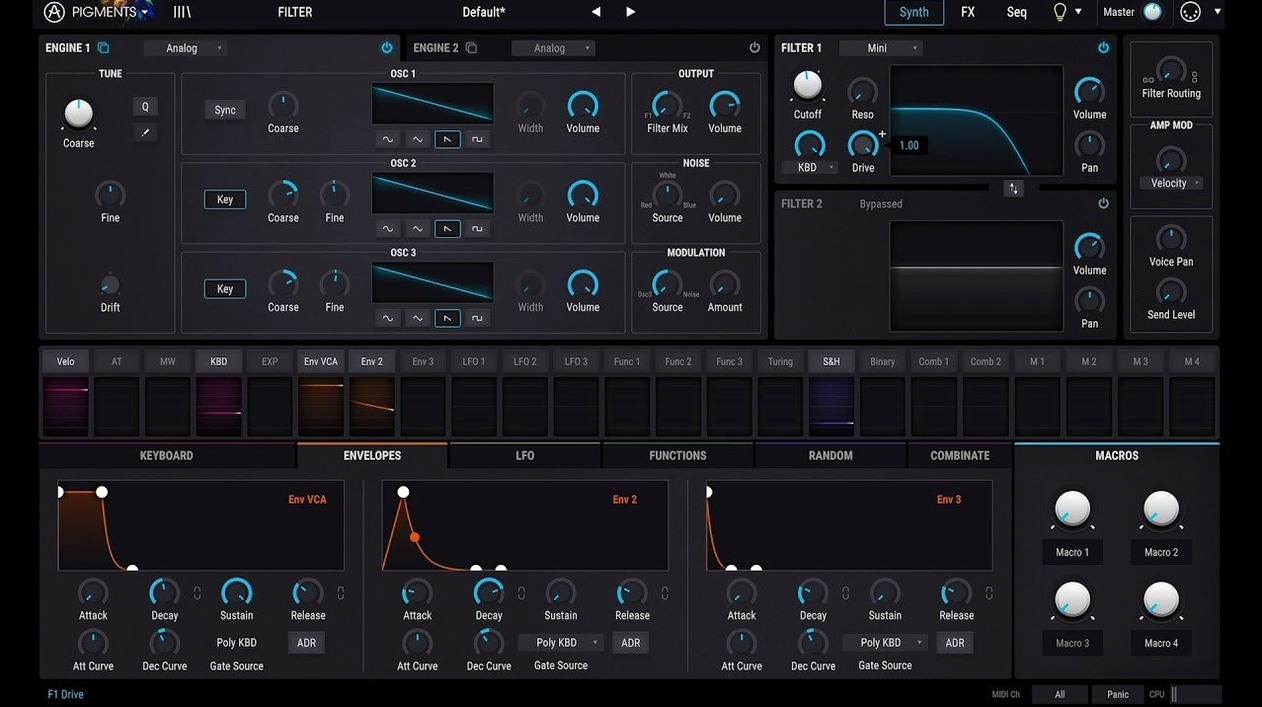
Step 2: Switch to the Synth tab. Engine 1 shows a wavetable oscillator running a metallic sweep from the new 50-wavetable pack. Engine 2 sits below it with a virtual analog square wave, detuned by 7 cents. The colour coding does its job here: wavetable parameters glow blue, analog engine controls stay orange. No hunting.
Step 3: Drag a modulation source — an LFO set to a syncopated eighth-note pattern — onto the filter cutoff of Engine 1. The drag line snaps into place with a subtle animation. Dial the LFO amount to 40%. Now the sweep pulses in time with the project tempo at 128 bpm.
Step 4: The Corroder effect sits in slot four of the FX chain. Drop its sample rate to 4.4 kHz, push the drive to 65%, and blend it back to 30% wet. The lead keeps its body but gains a crust of digital noise that sits right where the guitars leave a gap. Five minutes from blank preset to a sound that belongs in the track.
Step 5: Hit the sequencer tab. Disable the arpeggiator, enable the generative sequencer, and set it to Random mode with a two-octave range. Constrain the scale to D minor. Now holding a single note produces a prickly, evolving line that never repeats the same pattern twice — useful for a B-section that needs unpredictability. Record the MIDI output to a second track, chop the best four bars, and commit.
Where Pigments Fits in a Mac Production Setup
Pigments plays well with the broader Mac audio ecosystem. As an Audio Unit, it drops straight into Logic Pro’s instrument slot without a wrapper. Users of Ableton Live 11 or 12 can fold it into Racks, mapping the four Play Page macros to eight Macro controls for live performance. In Bitwig Studio, the modulators in Pigments sit alongside Bitwig’s own modulation system — two separate signal paths that don't intersect but complement each other.
macOS-level integration matters too. Pigments respects Core Audio’s sample rate switching when changing projects from 44.1 kHz to 48 kHz. MIDI 2.0 devices connect via the Audio MIDI Setup utility, and Pigments reads the higher resolution velocity and per-note expression data where the host DAW passes it through. The plug-in sandbox in Logic Pro keeps a misbehaving instance from taking down the whole session, though crashes are rare in 7.0.1.
One overlooked workflow: sampling directly into Pigments from Finder. Drag a 24-bit WAV from a desktop folder onto Engine 1’s sample slot, and it maps across the keyboard in seconds. No third-party sampler bridge required. The new 30 samples in 7.0.1 include some useful transient material — clave hits, noise bursts — that work as exciter sources for the virtual analog engine's filter ring.
Evolving 30-Second Cues via Six-Engine Layering
Sound designers working on game and film projects benefit from the six-engine architecture. Layering a granular engine with a wavetable and routing both through the new Ripple filter produces evolving textures that shift over 30-second cues without static repetition. The modulation system handles slow, complex curves — assign a random modulator to three parameters at once and the patch breathes on its own.
Electronic music producers who build tracks from scratch rather than tweaking loops find the generative sequencer a practical writing tool. It spits out patterns that the producer can capture, edit, and turn into something intentional. The 150 new factory presets lean toward modern genres: trap basses with 808-style pitch envelopes, house stabs with syncopated LFOs, and aggressive neuro-bass patches that use the Corroder effect heavily.
Bedroom producers with one synth budget get a lot of ground covered. One instance can handle a bass patch, a lead, a pad, and percussive noise hits across four tracks without the CPU spiking past what a base M1 Mac mini can handle. That single-synth approach forces deeper learning too — users who stick with Pigments tend to learn its modulation system properly rather than skimming presets across five different instruments.
Keyboard players looking for expressive patches connect with the redesigned Play Page. The four macro sliders map to mod wheel, aftertouch, and MIDI CC assignments without opening the modulation matrix. A patch called “Stage Brass” in the new factory bank responds to polyphonic aftertouch on a compatible controller, opening the filter differently per note.
Serum’s Direct FFT Editing vs. Imported Wavetables
Serum remains the benchmark for wavetable synthesis, and its wavetable editor is still more detailed than Pigments'. Serum lets you draw harmonics directly on an FFT graph; Pigments relies on imported wavetables plus the 50 new additions. But Pigments counters with a broader palette: the virtual analog, granular, and sample engines cover territory Serum doesn't touch. Serum also lacks built-in effects at the Corroder's level of character — you'd need a separate bit-crusher plug-in to match it.
Vital offers a similar wavetable-plus-modulation setup at no cost for the basic tier, and its spectral oscillator warping modes are inventive. Where Pigments pulls ahead is in the effects section and the physical modelling engine. Vital's reverb and delay are functional; Pigments' new Ripple and Reverb filters, combined with the Corroder effect, produce a more polished final sound without leaving the plug-in window. The trade-off: Vital's interface feels snappier on older Intel Macs, while Pigments wants a Metal-capable GPU for smooth animations.
Diva by u-he models analog circuits with painstaking accuracy, and its filter emulations sound more authentically “vintage” than Pigments' virtual analog engine. But Diva doesn't do wavetables, granular, or samples at all. It's a specialist where Pigments is a generalist. A producer who wants one synth that covers analog-style basses, digital wavetable leads, and sample-based textures will find Diva too narrow. Pigments' CPU load also scales more predictably — Diva's “Divine” accuracy mode can choke a session at low buffer sizes.
Stuttering Modulator Drag on 2018 Intel Graphics
GUI lag on older Intel Macs. On a 2018 Mac mini with Intel UHD Graphics 630, the animation when dragging modulators can stutter at buffer sizes below 128 samples. The fix: close the modulation view when not actively patching, or reduce the frame rate in Pigments' settings to 30 fps. The synth engine runs at full quality regardless of display performance.
Preset browser resets unexpectedly. If the browser jumps back to the top of the list after loading a preset, check whether the DAW is sending a MIDI Program Change message on channel 1. Some controllers default to sending PC 0 on power-up. Filter out Program Change in the DAW's MIDI input settings or reassign the controller's default preset.
CPU spikes with multiple instances of the granular engine. A single granular patch averages 8–12% CPU on an M2 core. Three instances playing simultaneously can push a buffer-underrun at 64 samples. Workaround: freeze or bounce the granular tracks first, then compose over them. Alternatively, reduce the grain count from the default 4 to 2 — the difference in density is subtle but the CPU saving is roughly 35%.
AU validation fails in Logic Pro after update. Rare, but reported with 7.0.1 on macOS 14 Sonoma. The fix is to delete the Audio Unit cache file at ~/Library/Caches/AudioUnitCache/com.apple.audiounits.cache, restart Logic, and let it re-scan. Pigments validates within 20 seconds on a rescan.
No sound after loading a preset. Usually a MIDI routing issue, not a Pigments bug. Open the Play Page and click the virtual keyboard at the bottom. If sound plays, the plug-in is fine — check the DAW's track input routing. If no sound, verify the FX mix knob isn't set to 100% dry on an effect that depends on wet output, or check that Engine 1 and Engine 2 aren't both muted in the mixer tab.
Pigments runs as a VST, Audio Unit, and AAX plug-in inside all major DAWs that support 64-bit hosts on macOS 11 and above.
- Play Page — Redesigned for quicker access to macro controls and sound tweaking.
- Filters — New Rage, Ripple, and Reverb filter types added.
- Effects — Corroder bit-crushing and degradation effect introduced.
- Factory content — 150 new presets, 50 wavetables, 30 samples, and 20 noise sources included.
- macOS 11 (Big Sur) or later
- Apple Silicon or Intel 64-bit processor
- VST, Audio Unit, or AAX compatible host
Questions on file
Is Pigments 7 a wavetable synth or a virtual analog synth?
It is a hybrid instrument that gives you both wavetable and virtual analog synthesis in a single plugin, with a drag-and-drop modulation system tying them together.
What effects are built into Arturia Pigments?
Pigments includes a range of built-in effects, and the 7.0.1 update adds the Corroder effect alongside new Rage, Ripple, and Reverb filters.
Does Pigments 7 include new sounds?
Yes, the 7.0 update adds 150 factory presets, 50 wavetables, 30 samples, and 20 noise sources to the factory library.
Sign in · Create an account to add a field note.
No field notes yet. A measurement, a version, a machine — they appear after moderation.