VST Plugins
Cableguys Snapback 1.1
VST PluginsUpdated
| Requirement | On file |
|---|---|
| macOS | macOS 10.13 or later |
| CPU | Apple Silicon, Intel 64-bit |
| Download | 37 MB |
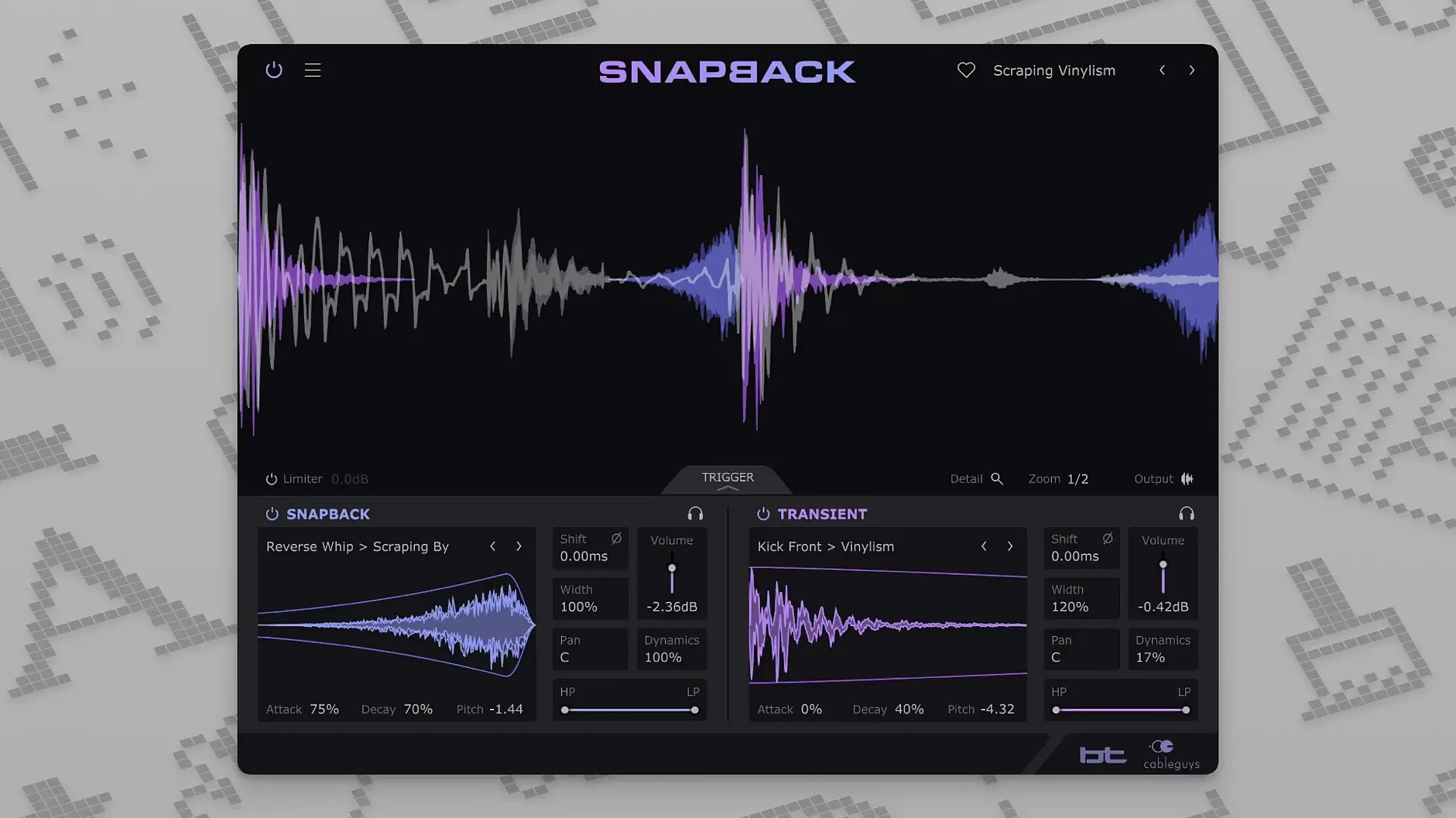
If you treat a noise gate as a creative trigger — opening one signal with the energy of another — Snapback operates on a similar principle applied to drum layering. It monitors an incoming audio track, identifies each snare or kick hit, and fires a chosen sample exactly in time, without manual slicing or dragging. The process collapses a routine editing job into a real‑time performance decision you can ride while the track plays.
- Sample placement can sit before the transient, not just on or after it. This lets you pull a noise tail or a reverse swell into the beat so the attack lands where the original hit peaks.
- On‑board pitch control shifts the loaded sample across a wide range, making it practical to tune a tom sample into a kick reinforcement or to re‑pitch a white‑noise layer for different sections of a track.
- Detection runs automatically across the input, with no need to print a MIDI track first. You insert Snapback, drag in a sample or pick one from the 200‑plus factory set, and the plugin handles alignment.
- A Reverse button, added in version 1.1, flips the loaded sample in a single click — useful for building pre‑hit swells and textural lifts without leaving the window.
- User sample import works alongside the built‑in library, so the palette can be anything from a field‑recording click to a synthesised thump.
On a drum bus the plugin adds weight behind an entire kit without altering the summed transients; on a single close mic it reinforces a weak snare wire or a beater click. The CPU footprint stays low enough to run multiple instances across toms and kick channels, and version 1.1 opens up to 256 MIDI ports for setups that route from complex pad controllers. It runs as VST 2, VST 3, AU or AAX on Intel and Apple Silicon Macs back to macOS 10.13.
macOS 10.13 High Sierra Support on Intel and Apple Silicon
Does Snapback work on an older Mac? The plugin loads on Intel and Apple Silicon machines running macOS 10.13 or later. If your studio machine sits on High Sierra, that is still within range, though the developer's own requirements page lists 10.15 as the baseline for officially tested configurations.
Which hosts does it cover? VST 2, VST 3, AU, and AAX formats are all in the installer, which means Logic Pro, Ableton Live, Cubase, Pro Tools, REAPER, Bitwig Studio, and FL Studio on Mac are all realistic targets. There is no standalone app — it is inserted on an audio track or bus like any other processor.
Do I need to print a MIDI track first? No. Detection runs on the incoming audio itself. You insert the plugin on a drum track, choose a sample, and set the sensitivity so hits register cleanly. There is no sidechain routing required, although routing a separate trigger track in is possible if you have a cleaner source than the drum close mic.
Will it trip over fast fills or ghost notes? The detection looks for transient peaks, so very fast rolls can cause double triggers if sensitivity is set too high. Backing off the threshold, narrowing the frequency band the detector listens to, or using a gate before Snapback usually clears that up. Ghost notes can be included or ignored depending on how hard you drive the input.
Can I use it on sources other than drums? The detector does not care what the source is. A palm‑muted guitar chug, a synth pluck, or a tapped percussion loop can all act as the trigger, which makes it useful for layering texture onto rhythmic material beyond the kit.
Reinforcing Existing Drum Tracks vs. Replacing Programming in XO
Against XLN Audio XO, the job is different. XO organises and sequences drum one‑shots across a kit grid, while Snapback sits on an existing audio track and reinforces what is already there. XO replaces the drum programming stage; Snapback works after the fact, on a printed take or a live input.
Slate Digital Trigger 2 is the closer cousin. Both align samples to incoming hits. Trigger 2 leans on multi‑velocity layering and detailed hit‑by‑hit editing, with a heavier focus on drum replacement. Snapback is lighter to operate — one sample, quick detection, pitch and phase tools — and puts more emphasis on placing material before the transient, which Trigger 2 does not handle as directly.
Compared with Waves Smack Attack, the difference is that Smack Attack shapes the envelope of the existing hit; it does not add a new sound. Snapback adds a layer and can shift its timing. The two can run together, one tightening the original transient, the other bringing in a synthetic click or a noise tail.
Fixing Late Sample Triggers with Placement and Phase
- Sample lands slightly late. Check the placement knob and the phase setting. If the loaded sample has a slow attack — a soft noise swell, for example — starting it exactly on the hit can make it feel late. Pull it back in time or shorten the attack in the envelope section.
- Low end disappears when layering a kick. Phase cancellation between the original kick and the added sample is usually the culprit. Flip the phase and listen to the summed low end rather than the sample in isolation. A high‑pass filter on the added layer also clears up muddy overlap.
- Detector triggers on hi‑hat bleed. Narrow the detection band to the kick or snare fundamental, or lower the sensitivity until only the intended drum hits fire. In a dense mix, processing a separate, cleaner trigger track can be more reliable than fighting a heavily bleeding close mic.
- Reverse sample sounds disconnected. A reversed layer that starts too early can float clear of the groove. Trim the sample length, nudge placement later, and use the envelope to fade the tail quickly so the reverse swell resolves into the transient rather than hanging over it.
- Host does not see the plugin after install. Rescan the plugin folder from within the DAW. If Snapback is installed as AU, VST 3, and VST 2, your host may be listing only one format; check the plugin manager's format filter before assuming the install failed.
- Reverse button — flips the loaded sample for pre‑transient swells.
- MIDI port count — increased from 16 to 256 addressable ports.
- macOS 10.13 or later
- Intel or Apple Silicon processor (64‑bit)
- VST 2, VST 3, AU, or AAX host DAW
Sign in · Create an account to add a field note.
No field notes yet. A measurement, a version, a machine — they appear after moderation.