VST Plugins
Plugin Alliance Shadow Hills OptoMax 1.0.0
VST PluginsUpdated
| Requirement | On file |
|---|---|
| macOS | macOS 12 or later |
| CPU | Apple Silicon, Intel 64-bit |
| Download | 73 MB |
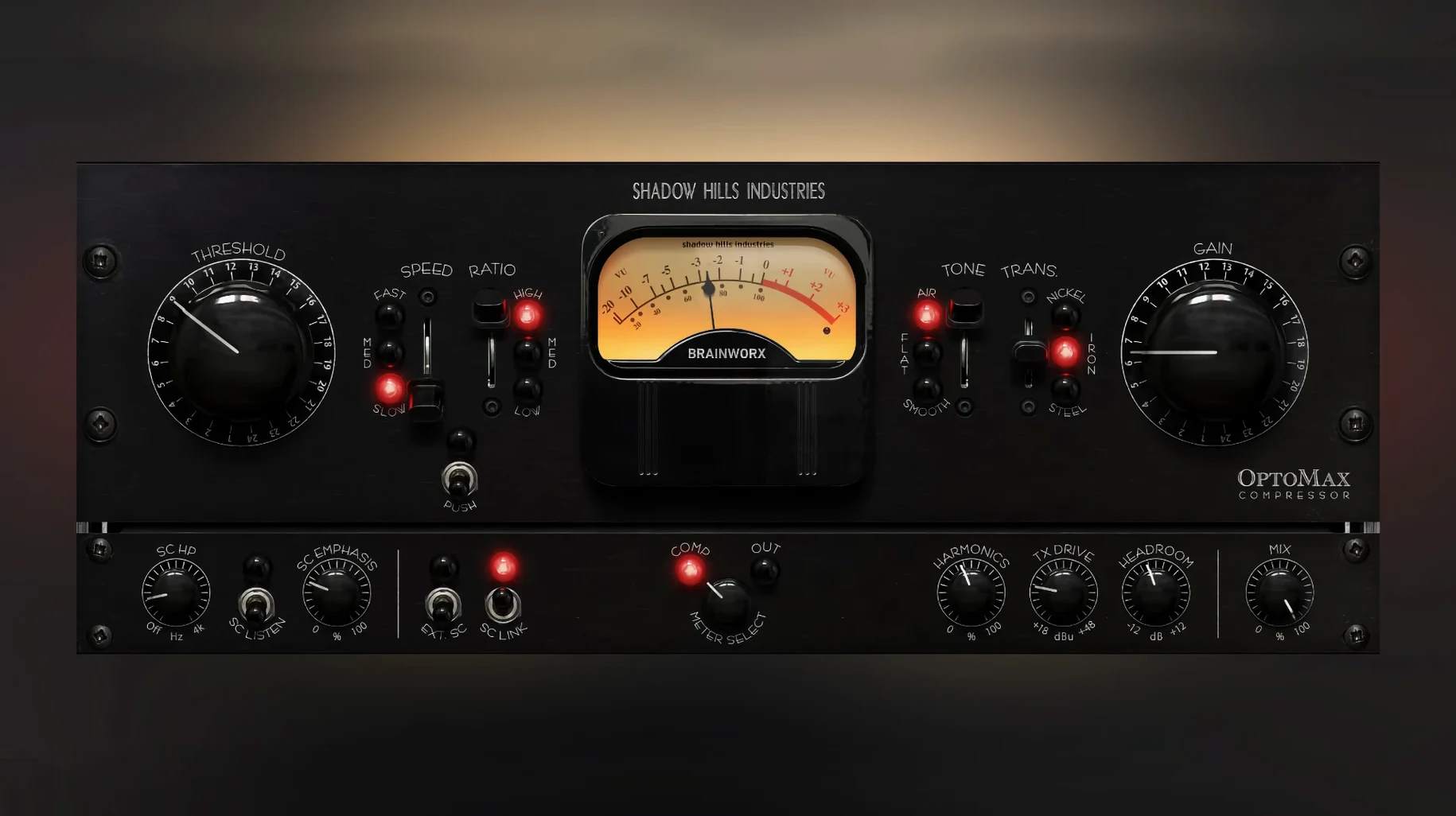
Version 1.0.0 lands as the initial release, and a 1.0.1 fix already patches a Pro Tools gain reduction meter issue. The OptoMax models an optical circuit built for two distinct behaviours: gentle, transparent leveling when the ratio stays low, and a firmer grip on peaks when you push it higher. The knee slides from soft to hard, so the transition into compression can be almost invisible or deliberately snappy depending on what the track needs.
Three transformer emulations—nickel, iron, and steel—shift the sonic signature considerably. Nickel keeps the low end tight and the top open. Iron softens transients with a rounder midrange push. Steel adds a grittier, more focused weight that suits drum groups or a full mix that wants some attitude. A parallel Mix knob blends the compressed signal against the dry, which is useful when a vocal needs control but not obvious processing artefacts.
The Shine control tilts the high-frequency response, adding air without a separate EQ. Paired with the advanced sidechain filter, you can compress a bassline based on the kick’s attack while Shine lifts just enough harmonic presence above the crossover point. The detector circuit listens to the filtered signal, leaving the full-bandwidth audio path intact.
Across a stereo bus or an individual instrument, the OptoMax preserves natural dynamics while levelling uneven passages. The optical model’s release curve has a two-stage shape—fast initial recovery then a slower tail—that rarely pumps, even at 6 to 8 dB of reduction.
Nickel transformer starts with a forgiving two-stage release
Most sessions with the OptoMax start from the Nickel transformer and a medium ratio. The optical detector’s two-stage release means the first few dB of reduction disappear without the track sounding squeezed, so it is safe to dial in more than you think you need and then back off.
A bass DI that was recorded slightly uneven is a good test case. Insert the plugin, leave the transformer on Nickel, set ratio to 4:1 and attack to the slow position. Push threshold until the meter shows 3–5 dB of reduction on the loudest notes. The initial transient passes through largely untouched because the optical circuit’s attack is program-dependent, then the body of the note settles into a controlled level. Switch to the fast response setting and the compressor grabs sooner—useful on a slappy bass part where the pick attack needs taming. Engage the high-pass sidechain filter at around 120 Hz and the compressor stops reacting to the low E and A string thumps, keeping the sustain even without thinning the bottom.
On a vocal bus, the Shine control earns its place quickly. With the transformer on Iron for a softer midrange, set Shine to +2 dB and the top end opens without the sibilance spike a shelf EQ would bring. The parallel Mix knob at 60–70% wet keeps the original transients present, so the compressor does the levelling work while the dry signal preserves the sense of distance and room tone. A second instance on the drum group, Steel transformer, fast attack, ratio at 6:1 and Mix at 50%, delivers parallel crush that glues overheads to close mics without burying the snare wire.
Give the optical model a few bars before judging release
The plugin rewards a slower setup routine than a typical VCA compressor. Give the optical model a few bars of programme material before judging the release curve—it needs a moment to settle into the two-stage shape. A loop that plays the loudest section of a chorus is the right place to audition threshold and ratio choices.
Start every new track with the Nickel transformer. It is the most neutral of the three and reveals how much of what you hear is the compression itself versus the transformer colour. Once gain reduction behaviour is set, cycle through Iron and Steel. The difference is immediate: Iron rounds off transients and pushes the 800 Hz area forward; Steel tightens the low end and adds a focused, slightly aggressive weight. On a full mix, Steel at 2–3 dB of reduction often sounds like a console insert—not because it mimics a console, but because the midrange density it introduces resembles what happens when a desk is driven near nominal level.
The sidechain filter is worth assigning to a key input early. Sending the kick drum to the sidechain while the OptoMax sits on a bass group cleans up the low-frequency overlap faster than manual fader rides. Set the filter to high-pass mode, tune it to 80–100 Hz, and the detector ignores sub information below the kick’s fundamental, reacting only to the beater click. The bass ducks with the kick and returns on the two-stage release without an obvious pump.
Save three user presets after the first evening: one for vocal levelling, one for drum parallel compression, and one for mix bus glue at a low ratio. Revisiting those after a few days of critical listening often reveals that the threshold on the mix bus preset can come up another 1–2 dB without the stereo image narrowing.
Zero gain reduction meter while audio is compressed
The gain reduction meter reads zero while the audio is clearly compressed. This is the Pro Tools meter bug that version 1.0.1 fixes. In any host, switching the meter source from gain reduction to output and back usually resets the display. The compression itself is still active—trust your ears and the output meter until the update is applied.
The Shine control introduces harshness on a bright source. Shine is not a simple high shelf; it interacts with the transformer selection. On Steel, the high-frequency emphasis can become brittle above +3 dB. Dial Shine back to +1 dB and engage the Softness mode, which applies a gentler curve to the same frequency band. On a strident acoustic guitar, Shine at +1.5 dB with Softness engaged lifts air while the 4–6 kHz zone stays controlled.
The compressor pumps on a full mix despite low ratio settings. Check the sidechain filter. If it is set to off, the detector reads every kick drum and bass note at full amplitude, which can cause the optical release to swing too wide between hits. Engage the high-pass filter at 60 Hz and the detector ignores sub-bass transients, leaving the two-stage release to work on midrange and high-frequency content. Pumping nearly always traces back to low-frequency energy dominating the detector circuit.
Parallel Mix introduces phasing when combined with another instance. The OptoMax maintains phase coherence at all Mix positions in a single insert, but chaining two instances—one at 100% wet for tone, one at 40% wet for dynamics—can produce comb filtering at certain settings. Stick to a single instance and use Mix for parallel behaviour, or commit the wet signal to audio before adding a second layer of processing.
Some users searching for a shadow hills mastering compressor mac solution discover the OptoMax covers the optical half of that hardware chain. The full mastering compressor includes a discrete VCA section as well, so the plugin sits best as part of a broader dynamics toolkit rather than a complete mastering bus replacement.
Dense arrangements avoid cumulative pumping
Mixing engineers working with dense arrangements get the most mileage from the OptoMax. The optical timing constants handle layered backing vocals, stacked synth parts and multi-miked drum kits without the cumulative pumping that faster VCA or FET compressors can introduce across many tracks. A session with sixteen instances scattered across groups and individual channels remains manageable because the two-stage release prevents low-frequency buildup in the detector sidechain from cascading across the mix.
Mastering engineers who already own the Shadow Hills Mastering Compressor hardware—or who have searched for a shadow hills mastering compressor mac plugin to replicate parts of that chain—find the OptoMax slots neatly into the optical role. Pair it with a discrete VCA-style compressor downstream and the combination approximates the dual-stage topology of the original unit. The three transformer options provide the tone-shaping that mastering decisions often hinge on, particularly when a project arrives mixed through clean converters and needs a touch of analogue-style weight without a full console emulation.
Electronic producers working with samples and soft synths extract value from the sidechain filter and Mix control. A synth bass that feels static against a programmed kick drum tightens up when the kick keys the sidechain and the parallel Mix blends the dry attack back in. The Steel transformer on a drum bus adds the kind of midrange push that helps programmed drums cut through a dense arrangement without requiring additional saturation plugins further down the chain.
Post-production engineers handling dialogue and voice-over appreciate the optical release curve for its invisibility. The slow, medium and fast response settings cover everything from gentle narration levelling to tighter control on ad spots where breaths and plosives need reigning in. Shine with Softness engaged lifts intelligibility in the 8–10 kHz range without the sibilance issues a standard high shelf would exacerbate on a condenser microphone recording.
- macOS 12 or later
- Apple Silicon or Intel processor
Sign in · Create an account to add a field note.
No field notes yet. A measurement, a version, a machine — they appear after moderation.