VST Plugins
Pulsar Audio IPA 1.0.9
VST PluginsUpdated
| Requirement | On file |
|---|---|
| macOS | macOS 11 or later |
| CPU | Apple Silicon |
| Download | 75 MB |
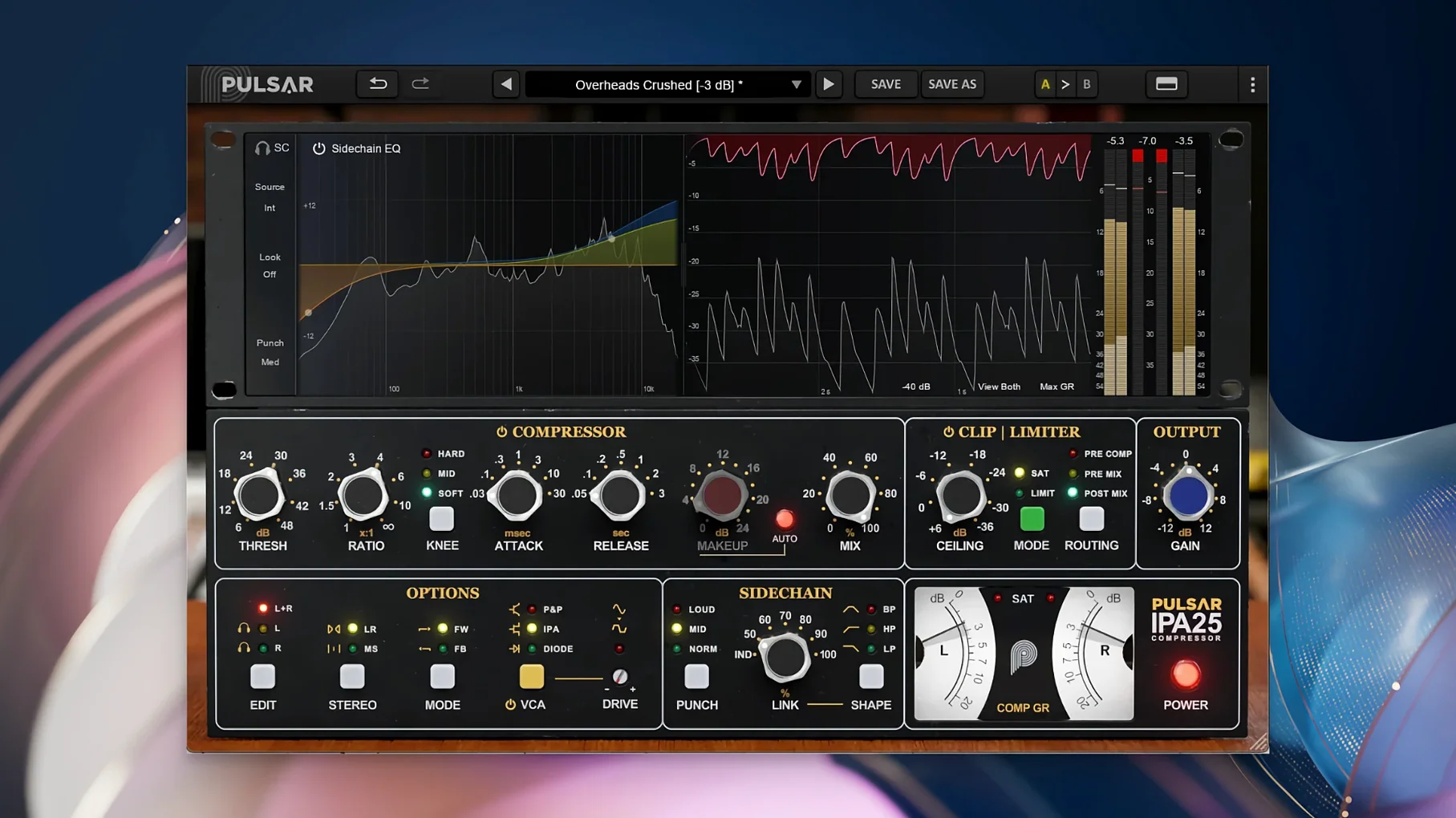
Anyone who has worked with an API 2500 knows the weight it brings to a drum bus or a 2-track return. Pulsar Audio IPA is a plugin built around that same multi-VCA feedback compressor topology, but opens it up to moves the hardware never made. Where the console original stays glued to a stereo buss, IPA shifts comfortably between individual tracks, group channels and the master fader, adding Mid/Side routing and a visual sidechain EQ that the physical unit never offered.
- Three jobs across a session: use the feedback detection for punchy, transient-forward compression on individual drums; switch to the smoother feed‑forward mode for bass lines and vocal levelling; push the ratio and soft-clip stage for mix‑bus glue.
- Sidechain EQ you can see. A band‑shaped display lets you carve the detector signal — pull one frequency range out of the gain‑reduction circuit without sonically filtering the output.
- Mid/Side processing. Treat the centre and the stereo spread as separate paths inside one instance. Narrow a wide vocal double or tighten a reverb tail without touching the mono core.
- Soft-clip and limiter section. After the compressor stage, an integrated clipper rounds off peak energy before the final look‑ahead limiter catches the remainder.
- Classic VCA snap with modern recall. The distinct grab and release curve of a multi‑VCA circuit is retained, minus the recall drift and inter‑channel offsets of an aging hardware unit.
The interface treats ratio, threshold and attack as a single unified control set, while the sidechain filter, M/S matrix and output stage sit within one window. That keeps routing obvious when you move it from a snare channel to a stereo overhead bus ten minutes later.
A Bus‑Processing Walkthrough: Gluing a Rock Mix
Put IPA on the master buss after your corrective EQ. Set the VCA mode to P&P/Mu — the feed‑forward topology gives a smoother, more programme‑dependent reaction that suits a full stereo mix. Pull the threshold down until you see 2–3 dB of gain reduction on the loudest chorus hits. Leave ratio at 2:1. The default attack of 10 ms lets transients through cleanly; a medium release around 100 ms keeps the compression breathing with the tempo rather than pumping against it.
Now open the sidechain EQ. The low‑end of a rock mix — kick and bass guitar working together — often triggers the detector too hard, making the whole mix duck when the kick hits. Tap the HP filter on, set it to 80 Hz with a 12 dB/octave slope, and watch the gain‑reduction meter settle. The kick still punches, but the compressor no longer responds to sub‑bass energy it does not need to control. If the snare is getting lost, add a small bell cut around 3 kHz in the sidechain and the compressor releases its grip on the midrange slightly.
Engage the soft‑clip stage with the threshold set just above the compressor’s output peaks — the meter in the right‑hand section shows when it starts working. Drive into it 1 dB at most. The final limiter catches any remaining overs with 0.5 dB of ceiling reduction. Switch to Mid/Side view and nudge the side channel level up by half a decibel to preserve stereo width that compression naturally tucks in.
Direct Value Entry for Matching Gain Reduction Across Instances
- Control‑click a knob to enter a value directly in the text field that appears. Useful for matching gain‑reduction amounts across multiple IPA instances on different drum mics.
- The VCA mode switch is automatable. You can jump from IPA mode for the verse to P&P/Mu for the chorus inside the same plugin instance — no need to split processing across two inserts.
- Hold Option while dragging the threshold and the output gain compensates inversely. Pulsar calls it “auto‑gain” but it is really a quick level‑match assist; fine‑tune afterwards.
- The sidechain EQ display shows the actual filter curve applied to the detector, not the audio path. The shaded area is your control signal. Drag nodes directly on the graph rather than using the knobs below; it is twice as fast once you get the hang of the band‑select behaviour.
- Mid/Side linking is not forced. You can compress the mid channel at 4:1 while the side runs at 1.5:1. The link percentage slider at the bottom of the M/S panel blends detector signals rather than hard‑switching between modes.
Drum Bus in a Small‑Room Studio
A producer tracking live drums in a converted garage has overheads that pick up the low‑ceiling slap and a kick that rings at 110 Hz for longer than the part needs. IPA sits on the drum bus after the gate and before the room reverb send.
They choose IPA mode — the feedback‑style detection that the hardware API 2500 is known for — because it grabs the body of the kick and snare without softening the stick attack. Ratio is pushed to 4:1, attack shortened to 3 ms, and the threshold pulled until the snare transients are shaving 6 dB. The release stays fast at 50 ms so the compression resets before the next backbeat.
The sidechain EQ gets a narrow cut at 110 Hz, exactly where the kick rings. The compressor no longer over‑reacts to that resonant tail, and the whole drum image tightens without the thud of a static EQ on the audio itself. A second bell cut around 400 Hz reduces boxiness the room mic introduced. The clipper catches the occasional stick hit that punches through, and the overheads feel more controlled without sounding processed.
How IPA Sits Among Similar Compressors
SSL‑style bus compressors (e.g. the native plugin versions) tend to use a feed‑forward VCA with a fixed 3:1 ratio and a linear release curve. They provide the snap and glue associated with console buss inserts but lack the feedback‑mode option and the variable ratio behaviour of a multi‑VCA design like the API 2500 topology IPA draws from. If you want the compressor to grab harder on peaks and let go more gradually — useful on drum rooms and rock vocals — IPA’s feedback mode is the differentiator. The SSL‑style units also do not offer Mid/Side splitting or a sidechain EQ with a graphical display inside the same window.
Compressors modelled on the Fairchild 670 or other variable‑mu tube designs share IPA’s programme‑dependent release but achieve it through tube gain‑reduction curves rather than VCA feedback paths. A Fairchild‑style plugin will colour the low end with transformer saturation and a softer top end; IPA keeps the midrange forward and the transients sharper until you engage the soft‑clip stage. The tube units also tend toward slower attack times — often 1 ms minimum versus IPA’s sub‑millisecond capability — making them less suitable for catching very fast drum transients without a look‑ahead design.
Another API‑inspired plugin, the Lindell SBC, sticks closer to the original 2500 feature set: linked stereo operation, a thrust filter to reduce low‑frequency pumping, and a set of fixed ratio options. It does the hardware homage well but does not include an integrated clipper, a visual sidechain EQ, or Mid/Side routing. IPA is the choice when you need the VCA grab but also want to shape the detector signal with surgical precision and handle stereo width inside the dynamics processor itself rather than with a separate utility plugin.
- macOS 11 or later
- Apple Silicon or Intel 64‑bit processor
- Host application supporting VST 2.4, VST 3, AAX Native or Audio Unit
Sign in · Create an account to add a field note.
No field notes yet. A measurement, a version, a machine — they appear after moderation.