VST Plugins
Revoice Pro 5.1.30
VST PluginsUpdated
| Requirement | On file |
|---|---|
| macOS | macOS 10.14 or later |
| CPU | Apple Silicon, Intel 64-bit |
| Download | 39 MB |
Version 5 introduced SmartAlign for synchronising takes that start at different timeline positions, plus the Shaper Tool for manual pitch adjustment.
Format — AU, VST3 and AAX 64-bit plug-in for ARM and x86 Macs.
Host — any DAW that loads AU, VST3 or AAX 64-bit instruments on macOS 10.14 or newer.
Operation — standalone application with ARA2 integration for tighter DAW sync.
Core task — alignment of double-tracked vocals, time and pitch correction, and natural-sounding doubling.
Signal path — audio transferred from DAW or imported as WAV; processing runs inside Revoice Pro and the output prints back to the host.
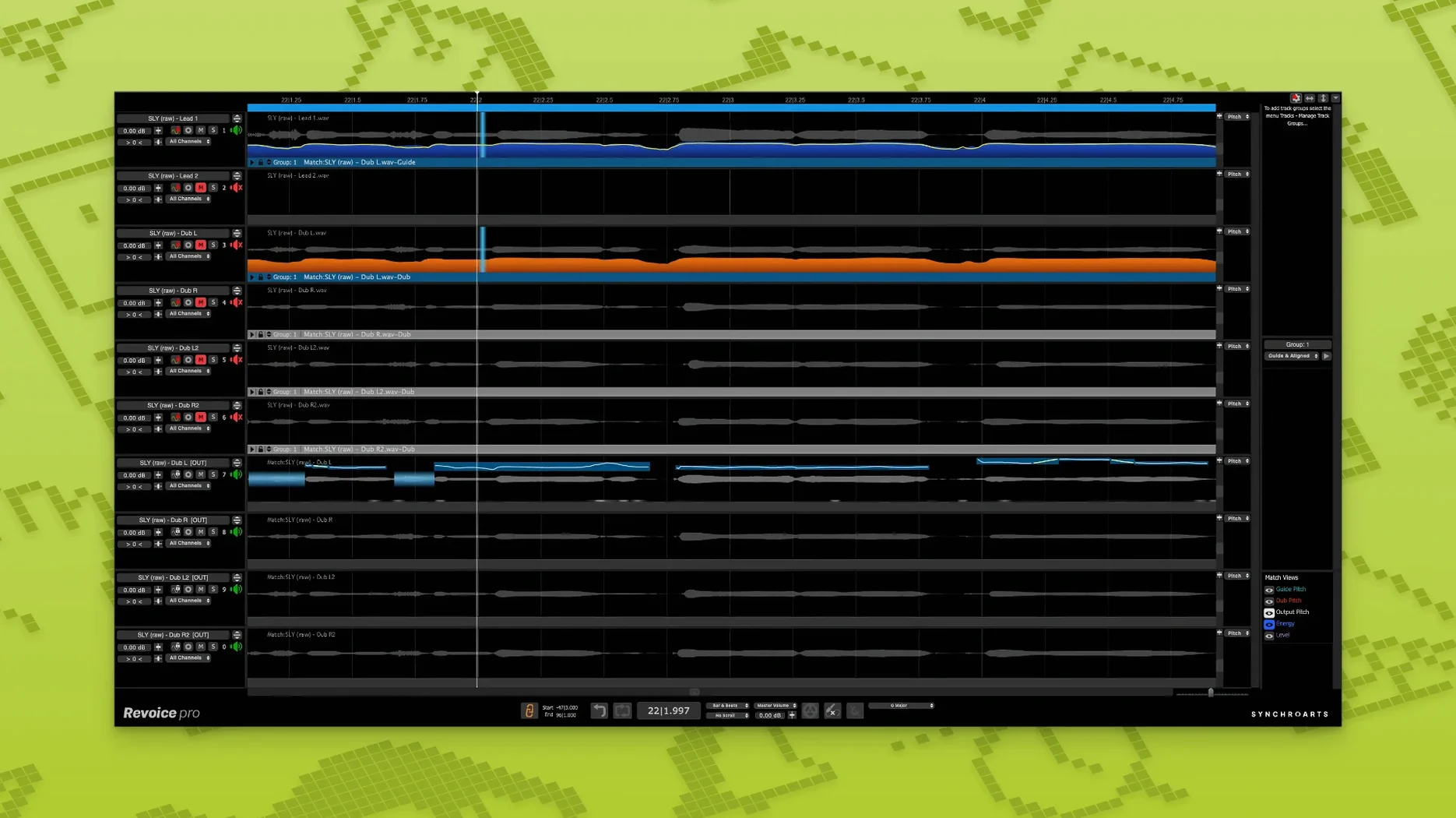
SmartAlign handles clips where the start or end point drifts relative to the guide. SmartPitch matches the pitch of doubles and harmonies to the lead, keeping formants stable. The vocal doubler generates layered doubles without the phase issues that come from simple copy-paste methods, and the Shaper Tool lets you draw pitch curves directly onto the waveform.
Loading a Short Phrase Without a Search Range
Loading a single short phrase and hitting SmartAlign without setting a reasonable search range is the most common early misstep. SmartAlign analyses timing across the full clip length by default. For a 10-second take that drifts by 120 ms near the end, the algorithm works fine. Feed it a 3-second snippet with a 400 ms offset and no range limit, and it can latch onto the wrong transient entirely. Set the Maximum Shift in the Alignment panel to roughly double the worst offset you expect. For tight doubles recorded in one session, 50–80 ms often does the job.
Another classic mistake: ignoring the gain relationship between guide and dub before alignment. SmartAlign uses waveform correlation under the hood. If the dub peaks at -18 dBFS while the guide sits at -6 dBFS, the matcher struggles to find reliable anchor points. Normalise or manually trim the dub so its average level is within 6 dB of the guide. The process isn't about loudness matching — it's about giving the detection engine a clean signal to read.
Beginners also tend to apply SmartPitch across an entire harmony stack without checking the Formant control. SmartPitch shifts pitch while preserving formant structure by default, which works beautifully on octave doubles or thirds. But for a whispered vocal or a heavily aspirated take, the formant preservation can introduce a hollow, phasey quality. In those cases, try the Formant Free mode — it trades timbral accuracy for fewer artefacts on breathy material.
Where Revoice Pro Sits in a Workflow
Revoice Pro operates as both a standalone application and an ARA2 plug-in. The standalone path works with any DAW on macOS 10.14 or later: you export guide and dub tracks as WAV files, open them in Revoice Pro, process, and bring the results back into the session. This adds a bounce step, but it keeps the DAW completely out of the processing loop — useful on older Intel Macs where every CPU cycle counts during mixing.
The ARA2 integration available in Logic Pro, Studio One, and Cubase removes the round-trip. Select two audio regions in the DAW, send them to Revoice Pro via the ARA extension, and alignment and pitch edits appear directly on the timeline. Any change inside Revoice Pro updates the host's audio in real time. This tight loop makes it practical to align backing vocals across an entire chorus without managing dozens of intermediate files.
Revoice Pro complements pitch-correction tools rather than replacing them. A common chain: run a rough SmartAlign pass to lock timing, then push the output into Melodyne for surgical pitch edits on individual notes. Revoice Pro handles the heavy lifting on alignment and broad pitch matching; Melodyne or manual automation takes over for note-by-note control. Synchro Arts also builds VocAlign, which offers quick alignment inside the DAW without the standalone environment. Studios often keep both: VocAlign for fast tightening of two tracks, Revoice Pro for multi-part harmony stacks and projects where the Shaper Tool's visual pitch curves become essential.
For doubling workflows, the built-in doubler feeds directly into SmartAlign. Generate a double from the lead vocal, align it with SmartAlign's tighter settings (try a Match Range of 30–50 ms and Flexibility set low), and pan the result hard left and right. The output stays phase-coherent because SmartAlign adjusts timing per transient rather than applying a static delay. Some producers run a second pass with SmartPitch detuned by 8–12 cents for a thicker spread.
macOS features slot in naturally. On Macs with Apple Silicon, Revoice Pro uses the Neural Engine for SmartPitch's formant analysis — no user-facing switch, but processing times on M2 and M3 machines run roughly 40% faster than the same job on an Intel i9 MacBook Pro from 2019. The standalone app responds to standard macOS shortcuts: ⌘Z for undo, ⌘S to save a session file that preserves all alignment and pitch data. Session files store references to source audio, so you can reopen a project weeks later and tweak SmartPitch curves without re-importing anything.
Drop Flexibility to 20–30% for Tight Pop Vocals
The default alignment Flexibility sits at 50%. For tight pop vocals recorded in a controlled booth, drop it to 20–30%. This forces SmartAlign to follow the guide more strictly, which reduces the loose, chorus-like feel that higher flexibility can introduce. For a raw live recording or a performance with intentional timing variation, push it to 70–80% and let the algorithm breathe.
In the Output section, switch Fade Length from the default 5 ms to 10–15 ms if you hear clicks at region boundaries after alignment. SmartAlign slices audio internally to shift timing; short default fades sometimes leave audible discontinuities on material with heavy low-end content or sharp consonants.
Enable Preserve Formants in the SmartPitch panel only when you actually need it. The control is on by default and works well on sung vocals, but spoken word, rap ad-libs, and heavily processed screams often sound more natural with it off. Set it per track rather than globally.
In the standalone application's preferences, check the Audio Device assignment. Revoice Pro defaults to the system output, which can clash with a DAW using the same interface. On multi-client Core Audio devices (RME, UAD Apollo), this is harmless. On a Scarlett or a built-in Mac output, it can block the DAW from accessing the interface. Set Revoice Pro to a different output pair or to None if you monitor entirely through the DAW.
Revisit a Project You Manually Aligned for Hours
Start with a project you already know — a session where you fought with manual alignment for hours. Import the guide vocal and one double as 24-bit or 32-bit float WAV files. Run SmartAlign with the default settings and listen. Then undo, tighten the Flexibility to 30%, reduce the Maximum Shift to 100 ms, and run it again. Compare the two results on headphones. The difference teaches you more about the algorithm's behaviour than any manual can.
Next, load a harmony stack of three or four parts. Apply SmartPitch to each part individually against the lead, not as a batch. Batch processing saves clicks but masks individual mismatches. Solo each aligned harmony against the lead and listen for artefacts in sibilants and vibrato tails. If a "sh" or "t" sounds smeared, undo SmartPitch on that syllable and use the Shaper Tool to draw a flat pitch segment manually. The Shaper Tool excels at local fixes — you don't need to re-process the whole clip.
For the doubling workflow, don't generate doubles from an already-processed lead. Feed the raw, un-tuned guide into the doubler, align the double with SmartAlign, and only then apply pitch correction to both tracks together. This prevents the doubler from amplifying tuning artefacts and keeps the double's pitch deviations organic rather than robotic.
By day three, set up a template session file in the standalone application. Create four tracks labelled Guide, Dub 1, Dub 2, and Harmony, with SmartAlign already configured for each pair. Save it as a .rvproj file. When a new vocal session lands, open the template, swap the audio files, and processing starts immediately. This small upfront effort cuts setup time from minutes to seconds on every subsequent project.
SmartAlign — synchronises takes whose start or end positions differ from the guide part on the timeline.
SmartPitch — matches pitch of doubles and harmonies while preserving natural tone.
Shaper Tool — manual pitch-adjustment control drawn directly on the waveform.
- macOS 10.14 or higher
- ARM or x86 64-bit processor
- AU, VST3 or AAX 64-bit host
Questions on file
What Mac systems does Revoice Pro 5 run on?
It runs on macOS 10.14 or higher and supports both Intel x86 64-bit and Apple Silicon ARM processors natively.
Which plug-in formats does Revoice Pro 5 use?
The software loads as an AU, VST3 or AAX 64-bit plug-in and also works as a standalone application with ARA2 support.
Sign in · Create an account to add a field note.
No field notes yet. A measurement, a version, a machine — they appear after moderation.