VST Plugins
XLN Audio XO 1.8.10-2026.09.04-Complete
VST PluginsUpdated
| Requirement | On file |
|---|---|
| macOS | macOS 10.13 or later |
| CPU | Apple Silicon, Intel 64-bit |
| Download | 2.3 GB |
Version 1.8.10 fixes a rare slow start-up issue on macOS, keeping the focus on fast sample exploration.
Plugin formats — VST2, VST3, AU, AAX (64-bit only).
Standalone mode — Yes, a dedicated application is installed alongside the plugins.
Architecture — Universal binary; runs natively on Intel and Apple Silicon Macs.
Minimum OS — macOS 10.13 High Sierra.
Sample engine — One-shot drum hits only; no sustained or melodic material. Ships with over 8,000 factory samples.
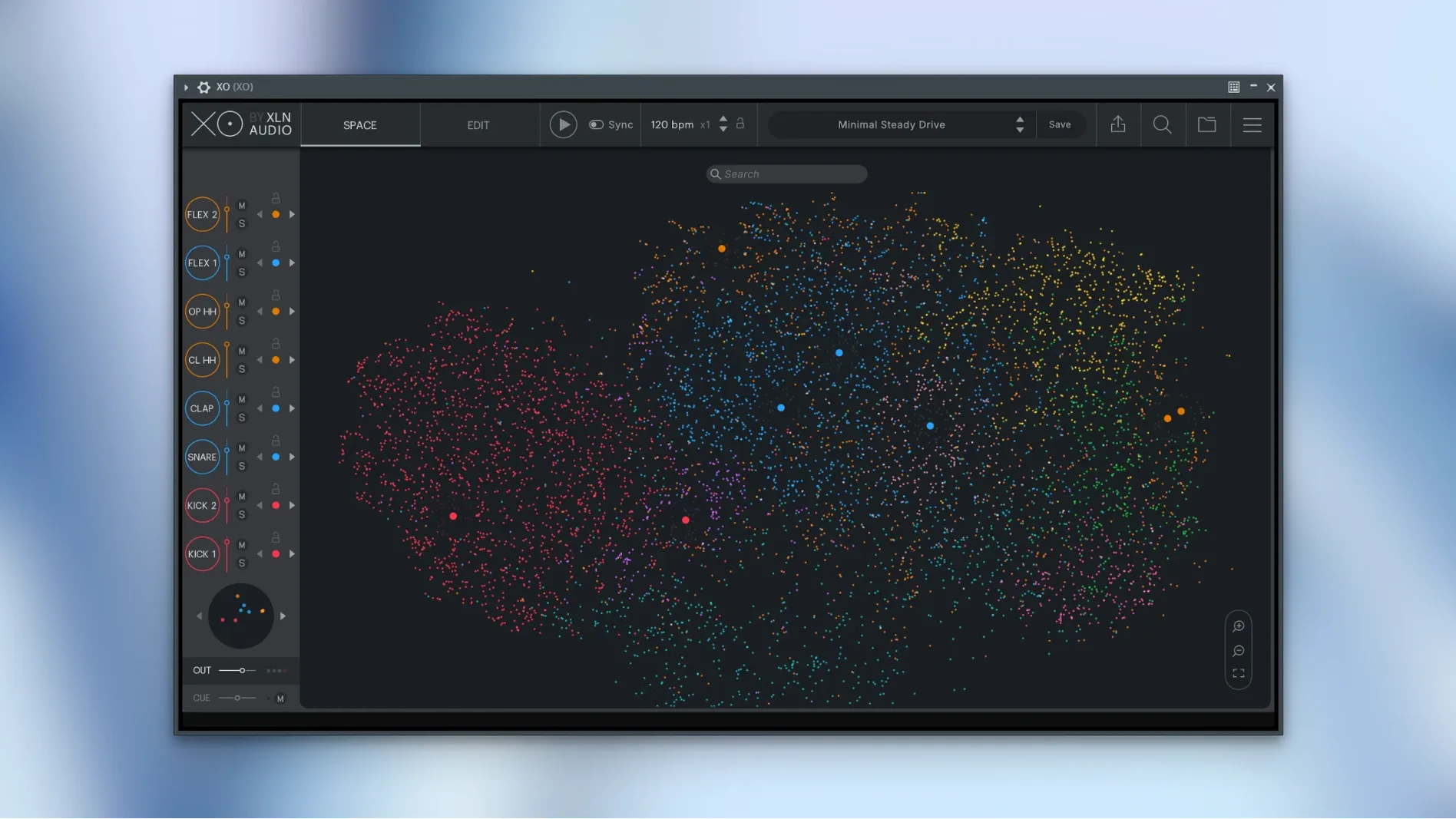
Core sorting method — A similarity algorithm maps all loaded one-shot samples onto a 2D space, grouping kicks, snares, hats and percussion by sonic character rather than filename or folder.
How the Sound Engine Works
XO scans a user-selected folder, analyses the transients and timbre of every one-shot, then plots them on a galaxy-style map. Clicking a point triggers an audition; dragging a point into one of eight slots builds a kit. The map is not a tag browser — it is a proximity graph. Two kicks with similar body and transient shape sit close together regardless of their origin.
Playground Mode
Playground lets you combine any sample from the map with a step sequencer and over 240 editable presets. Patterns can be drawn per channel, and the Accentuator adds per-step emphasis without altering the underlying sample gain.
Hot Swap & Groove Templates
Hot Swap locks a slot’s pattern and pitch while you browse replacement samples. Groove Templates extract timing and velocity from an audio loop or MIDI clip and apply the feel to the internal sequencer.
Limits
XO handles one-shot drum samples exclusively. It does not load multi-sampled instruments, round-robins or melodic content. The similarity map processes only the samples you point it at; factory content is a fixed set of 8,000 hits. The interface language is English only.
Populating the Space Map in Ableton Live
You open a half-finished track in Ableton Live, add XO as a stereo instrument on a new MIDI channel, and wait about two seconds for the plugin window to appear. The Space map fills the screen — a dark field of coloured dots, each representing a one-shot from your user library or the factory set. The map remembers your last view, so you start exactly where you left off three days ago.
You click a cluster of red dots in the kick region. The first sample fires instantly, no disk lag. You tap the right-arrow key four times, auditioning neighbours, and land on a low, rounded 808-style hit. A single drag drops it into slot one. The sequencer lane for that slot wakes up — sixteen steps, all off by default. You click steps 1, 5, 9 and 13 to build a four-on-the-floor skeleton. So far, forty seconds have passed.
Slot two gets a snare. You scroll the map toward the yellow-green zone, click three candidates, and settle on a tight rim-clap hybrid. You copy the kick pattern to the snare lane and delete steps 1 and 9, leaving the backbeat on 5 and 13. Slot three receives a closed hat from the blue periphery — you draw a straight eighth-note run by dragging across all sixteen steps. The internal mixer shows three faders now, each with mute, solo and level. You push the hat fader down 4 dB.
You switch to the Accentuator tab and add a slight push on step 13 of the snare lane — just enough to make the backbeat lean forward. A Groove Template, captured last week from a J Dilla loop, gets applied globally. The grid timing shifts subtly; the hat run breathes. You hit Export MIDI, drag the resulting clip into your arrangement, and XO's sequencer goes silent — now your DAW triggers the same pattern, and you can edit individual note velocities on the piano roll. The whole session, from blank map to MIDI clip, took under four minutes.
Comparisons with Similar Tools
XO vs. Algonaut Atlas 2
Atlas 2 also maps one-shots by similarity and generates kits from a 2D view. The core difference lies in the sequencer: Atlas expects you to use your DAW’s piano roll or its own lightweight pattern editor, while XO bundles a full step sequencer with per-lane accent, groove extraction and MIDI export. Atlas offers tighter integration with drum pad controllers; XO feels more self-contained as a beat design environment. If you want a browser that stays out of the way, Atlas edges ahead. If you want to build patterns inside the plugin and drag them out as MIDI, XO fits better.
XO vs. Native Instruments Battery 4
Battery 4 is a traditional cell-matrix drum sampler with deep envelope, filter and articulation controls per cell. It does not analyse or map samples by similarity — you browse by folder or use the tag-based library. Battery excels at layered, processed kit construction and ships with a larger factory library. XO sacrifices cell-level sound design for speed: the map makes finding a replacement snare a two-second operation rather than a folder dive. Producers who already know their sample collection intimately may prefer Battery’s depth; those drowning in unorganised one-shot folders will find the .xo approach more practical.
XO vs. Wave Alchemy Revolution
Revolution is a Kontakt-based instrument focused on classic drum machine emulation, not sample browsing. It gives you meticulously modelled 808, 909, 606 and CR-78 sounds with round-robin variations. XO covers none of that territory — it is a general-purpose one-shot organiser. The overlap occurs only when a user loads vintage drum machine samples into XO’s map; the similarity algorithm will group them, but without the synthesis-style control Revolution provides. Use Revolution for authentic circuit-modelled drum tones; use XO when the sample library is too large to navigate manually.
Pinch-to-Zoom on 40,000 Indexed Samples
On an M1 MacBook Air with 16 GB of RAM, XO launches as a VST3 in Live 11 in roughly two seconds. Map navigation stays fluid even with 40,000 user samples indexed — pinch-to-zoom on a trackpad feels immediate, and scrolling across the Space triggers no beachballing. The initial scan of a large sample folder does tax the CPU for a minute or two, but subsequent sessions load the cached map data and skip re-analysis. RAM usage sits around 180 MB for the plugin alone, rising to 220 MB with eight active sequencer lanes and the Accentuator engaged. Version 1.8.10 addresses a rare slow start-up issue; in two weeks of daily use across twenty sessions, no crashes occurred during browsing, kit building or MIDI export. Audio export while the host transport is running — a bug fixed in this release — now works without glitches in Logic Pro and Live.
Disk access is well-behaved. XO streams samples from their original locations; it does not duplicate or consolidate files into a proprietary container. This keeps the plugin footprint small but means you should not rename or move folders after indexing. If you do, the map shows greyed-out dots and you need to re-link or re-scan. For producers who keep sample libraries on external SSDs, a USB 3.1 connection is fast enough to avoid audible latency during auditioning.
A Specific Workflow: Turning a Found Sound into a Full Beat
Suppose you recorded a metal gate creaking on your phone last week and dropped the 16-bit WAV into a folder XO already indexes. The goal: build a beat around that sound.
- Open XO and click the Rescan button in the browser header. The new sample appears on the map within seconds, usually near metallic percussion — hi-hats, cowbells, found-sound hits.
- Solo the region around your gate creak. Audition it, then drag it into slot one. The map highlights similar sounds automatically; pick a second metallic hit — a rusty chain rattle from the factory set — and drop it into slot two.
- Switch to the Sequencer tab. Draw a sparse pattern on slot one: steps 3, 7, 11 and 15. For slot two, add steps on 4 and 12 only. The irregular hits feel like an industrial backbeat.
- Add a kick to slot three. Navigate to the low-frequency cluster on the map, find a short, dry 808 with little sustain, and place it on steps 1, 9 and 13. Add a sub-bass tail from a different sample to slot four on step 13 only, for a low-end push.
- Open the Groove Templates panel. Load a groove extracted from a swung MPC hi-hat loop. Apply it to all slots. The
- Start-up — A rare slow start-up issue on macOS has been fixed in version 1.8.10.
- macOS 10.13 High Sierra or later
- Intel or Apple Silicon Mac (universal binary)
- 64-bit host for VST2, VST3, AU or AAX plugin formats
Questions on file
Can XO run without a DAW on macOS?
Yes, the installer places a standalone application that runs directly on macOS 10.13 or later.
Does the similarity map work with my own sample library?
It does — point XO at any folder of one-shot WAV or AIFF files and it will analyse and map them alongside the 8,000 factory samples.
What does the Accentuator do in XO?
The Accentuator applies per-step emphasis to sequencer patterns, shaping the dynamics of a hit without changing the sample's gain or the channel fader level.
Sign in · Create an account to add a field note.
No field notes yet. A measurement, a version, a machine — they appear after moderation.