VST Plugins
Xpand!2 2.3.1
VST PluginsUpdated
| Requirement | On file |
|---|---|
| macOS | macOS 13 or later |
| CPU | Apple Silicon |
| Download | 1.2 GB |
macOS 13+ and Apple Silicon Only
Xpand!2 requires macOS 13 or later and runs natively on Apple Silicon. There is no Intel build for current versions, so older Macs are out of luck.
Open the four-part rack
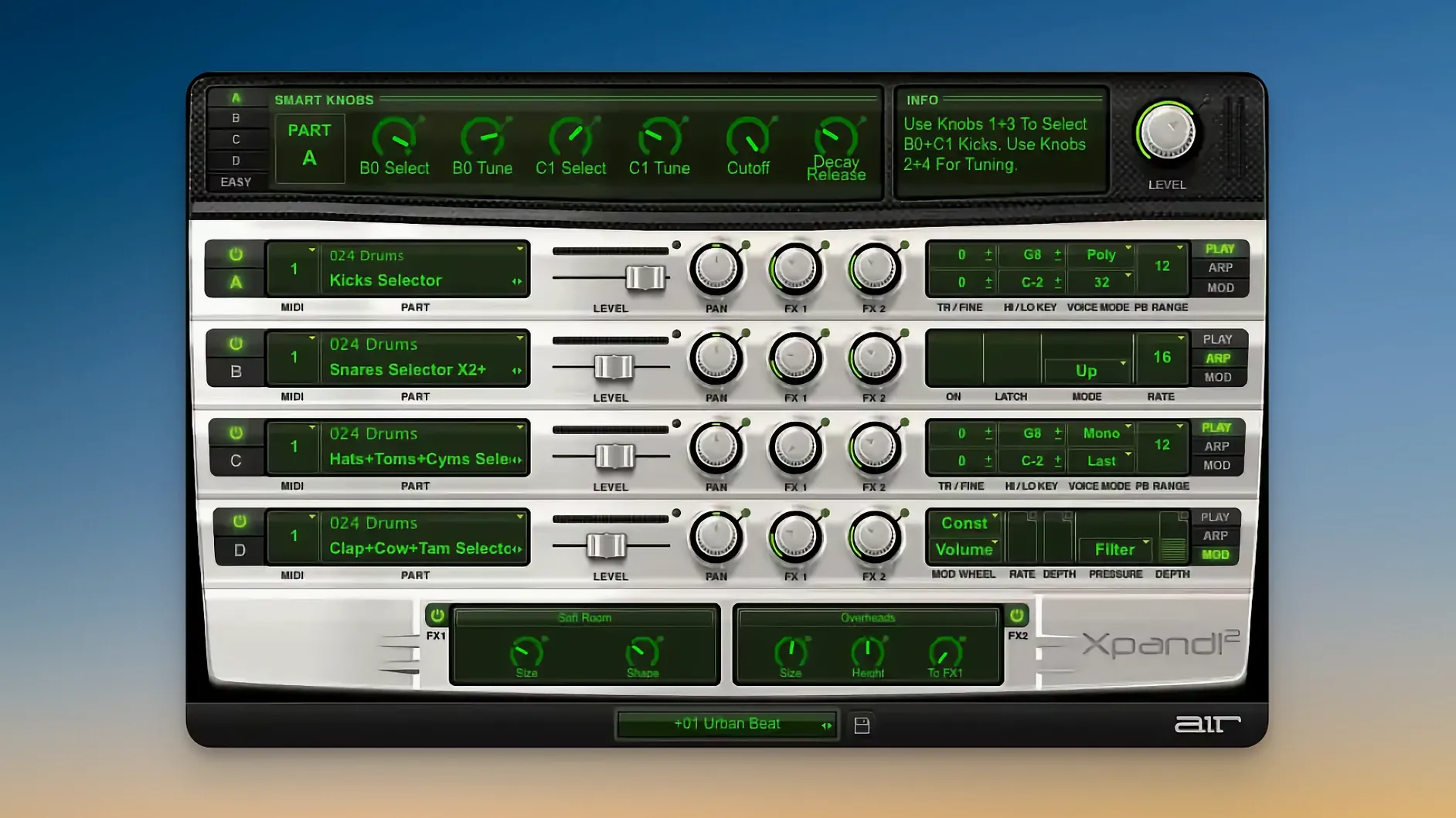
Each patch layers up to four independent parts. Set per-part note ranges, poly or mono voice mode, and route each through its own arpeggiator, modulation, and effects chain.
Browse 29 categories of sound
More than 2,500 presets sit behind a scalable, Retina-ready interface. Six smart controls give quick access to timbre changes without deep menu diving, and 50 effects—including the Chaos Delay—handle space and texture.
How Xpand!2 Sits in a Mac Production Setup
Xpand!2 loads as an AU or VST3 instrument inside Logic Pro, Ableton Live, Studio One, and other DAWs that support modern plug-in formats on Apple Silicon. Because it is multitimbral, a single instance can feed four independent MIDI tracks in Logic without needing four separate instrument channels. Set each slot to its own MIDI channel, route the DAW tracks accordingly, and you have a compact four-layer stack running inside one plug-in window. No extra bussing or submix trickery required.
MIDI Learn works across all assignable parameters. Right-click any knob or fader and move a hardware controller to link it. The mapping persists with the DAW session, not globally, which avoids conflicts when you reuse the plug-in inside different projects. Aftertouch and pitch bend pass through per slot, so a controller with poly aftertouch—like a Roli Seaboard or a Novation Launchpad Pro in MPE mode—can push vibrato or filter sweeps on one part without nudging the other three.
On the macOS side, Xpand!2 integrates with the standard Audio MIDI Setup utility for MIDI device routing and follows Core Audio sample-rate changes automatically. Retina scaling on a Studio Display or MacBook Pro screen stays crisp from 100% up to 200%, and the scalable interface remembers its size setting per session. QuickTime audio export workflows, screen recording with internal audio via Loopback or BlackHole, and stem printing all work without artefacts as long as the DAW handles offline rendering correctly—which Logic and Live do on Apple Silicon.
Audition Layers with the Arp + Pad Tag
Skip the preset scroll-a-thon. Instead, pick a patch tagged with Arp + Pad or Bass + Lead in the category browser and switch off three of the four parts. Play a few bars. Then bring back one part at a time while adjusting its volume fader and note range. That single exercise teaches more about how Xpand!2 layers sound than an hour of random browsing.
Set the arpeggiator sync to an uncommon division—like 1/8 dotted or 1/16 triplet—and route the arpeggiated part to a delay effect slot set to a different timing. The rhythmic tension that creates is surprisingly useful for ambient intros and breakdowns, and it is something none of the factory presets exploit fully.
Tag five presets as favourites early. The Favourites bank is bare on first launch, and populating it takes seconds. Use it as a scratchpad for sounds you reach for during late-night sessions. The category browser sorts by name only; favourites give you a faster path back to specific patches without typing in the search field.
Assign the six smart controls to a physical MIDI controller immediately, even if you only map three of them. The smart controls remap per preset, but the MIDI Learn assignments stick per slot. Pick Cutoff, Resonance, and one effect send as a starting trio and you will have broad timbral control over any patch without touching the mouse.
Double-Click a Slot to Mute It Instantly
- Double-click a part slot to mute it instantly—faster than dragging the volume fader and handy during arrangement when you want to audition a single layer in context.
- Cmd-click on the arpeggiator Rate knob resets it to 1/16 notes. The same reset shortcut works on most continuous dials in the plug-in.
- Shift-drag a note-range boundary to snap it to the nearest octave, which is quicker than typing exact MIDI note numbers when you are building keyboard splits on the fly.
- The Chaos Delay effect has a Feedback Tone control that applies a gentle low-pass or high-pass filter to repeated taps. Set it to high-pass, crank feedback just short of self-oscillation, and you get a shimmer trail that works like a poor person's pitch-shifted reverb without any extra plug-in.
- Right-click the preset name display to reveal the last ten loaded presets—a recent-history list that is not documented in the manual but persists during a session.
- Option-click a part's Solo button (where available) solos that part and unsolos all others with one click, a small workflow gain when comparing layers.
Missing Plug-in After Native Apple Silicon Install
Plug-in not found in the DAW after installation. Xpand!2 installs the AU component to /Library/Audio/Plug-Ins/Components/ and the VST3 to /Library/Audio/Plug-Ins/VST3/. Apple Silicon hosts need to run natively, not under Rosetta. If Logic Pro fails to scan the plug-in, open Logic's Plug-in Manager, look for Xpand!2 under the AIR Music Technology group, and tick the checkbox to force a rescan. A restart of the DAW usually completes the validation. Ableton Live users should check Preferences → Plug-ins → Rescan if the VST3 does not appear.
Stuck notes or hanging arpeggios. Monophonic parts set to Last- or Highest-note priority can hold a note if a MIDI note-off message gets lost—common when stopping playback mid-arpeggio. Tap the panic button (the small exclamation mark icon near the master volume) or send an All Notes Off message from the DAW's transport. Prevent it by setting poly mode on parts that do not strictly need monophonic behaviour.
Arpeggiator drifts out of sync with the project tempo. Xpand!2 reads tempo from the host, but some DAWs do not send tempo information to plug-ins during pre-roll or count-in bars. Start playback from a bar line. If drift persists, toggle the arpeggiator Sync button off and on; this re-locks the internal clock to the host.
Presets sound different after loading a saved project. The plug-in state recalls correctly, but the global Effects Bypass button can be engaged by accident during a session and saved with the project. Check the bypass state first. Also, MIDI Learn assignments saved in the DAW session can load with a different controller channel if a USB MIDI device has been reconnected to a different port—re-teach the parameter in that case.
High CPU load with four slots active. Xpand!2 runs well on M-series chips, but stacking four polyphonic parts with long reverb tails and Chaos Delay can push real-time audio threads. Set polyphonic slot voice counts to 8 or 16 unless the part genuinely needs 64. Freeze or bounce a part once the MIDI is finalised—the freeze function in Logic and Live renders Xpand!2's output reliably.
How Xpand!2 Compares with Similar Mac Instruments
Next to UVI Falcon, Xpand!2 feels deliberately pared back. Falcon gives you sixteen parts, a deep semi-modular architecture, scripting, and granular and additive synthesis engines. Xpand!2 does four parts with subtractive, FM, wavetable, and sample engines. Falcon rewards deep sound design sessions; Xpand!2 rewards speed. If you want an evolving texture with six modulation sources per oscillator, Falcon wins. If you need a layered string-and-voice pad in sixty seconds, Xpand!2 is the more direct tool.
Compared with Native Instruments Kontakt 7, the difference is scope. Kontakt is a sampler ecosystem with an enormous third-party library market. Xpand!2 is a closed synth with a fixed 2,500-preset library. Kontakt excels when you need real-time scripting, round-robins, and deep multisample articulation control. Xpand!2 covers bread-and-butter synth sounds without any library management overhead. Many producers who grab an xpand 2 mac build keep it precisely for those quick keyboard and pad duties, then reach for Kontakt only when a project asks for a specific sample library. The two coexist in a project rather than competing.
Beside Arturia Analog Lab V, Xpand!2 trades preset count for raw editability. Analog Lab V comes with thousands of presets drawn from Arturia's modelled synth recreations, but it restricts deep editing of the underlying engines. Xpand!2 gives you full access to synthesis parameters per part—oscillator type, filter, envelopes, modulation—plus independent arpeggiators and effects. Analog Lab V integrates tightly with Arturia's controller keyboards; Xpand!2 works with any MIDI Learn-compatible controller. If someone searches for an xpand 2 torrent to explore a standalone workhorse synth without a bundled hardware dependency, they usually value the editing freedom over the preset count.
SynthMaster 2 shares some architectural overlap—multi-mode synthesis, arpeggiator, effects—but leans toward deeper modulation routing and a denser interface. Xpand!2's four-part rack feels lighter and loads faster. SynthMaster 2 suits modulation nerds; Xpand!2 suits composers who layer sounds quickly, print the track, and move on. On an Apple Silicon Mac, both run natively, but Xpand!2's preset browser and smart controls feel more at home in a fast turnaround setting.
- macOS 13 or later
- Apple Silicon Mac
Questions on file
Does Xpand!2 work on an M1 or M2 Mac?
Yes. Version 2.3.1 supports Apple Silicon natively and requires macOS 13 or later.
How many presets does Xpand!2 include?
It ships with more than 2,500 presets sorted into 29 categories, covering a wide range of instrument types.
Sign in · Create an account to add a field note.
No field notes yet. A measurement, a version, a machine — they appear after moderation.