VST Plugins
VocalSynth 2 2.6.1
VST PluginsUpdated
| Requirement | On file |
|---|---|
| macOS | See the sheet |
| CPU | Apple Silicon, Intel 64-bit |
| Download | 259 MB |
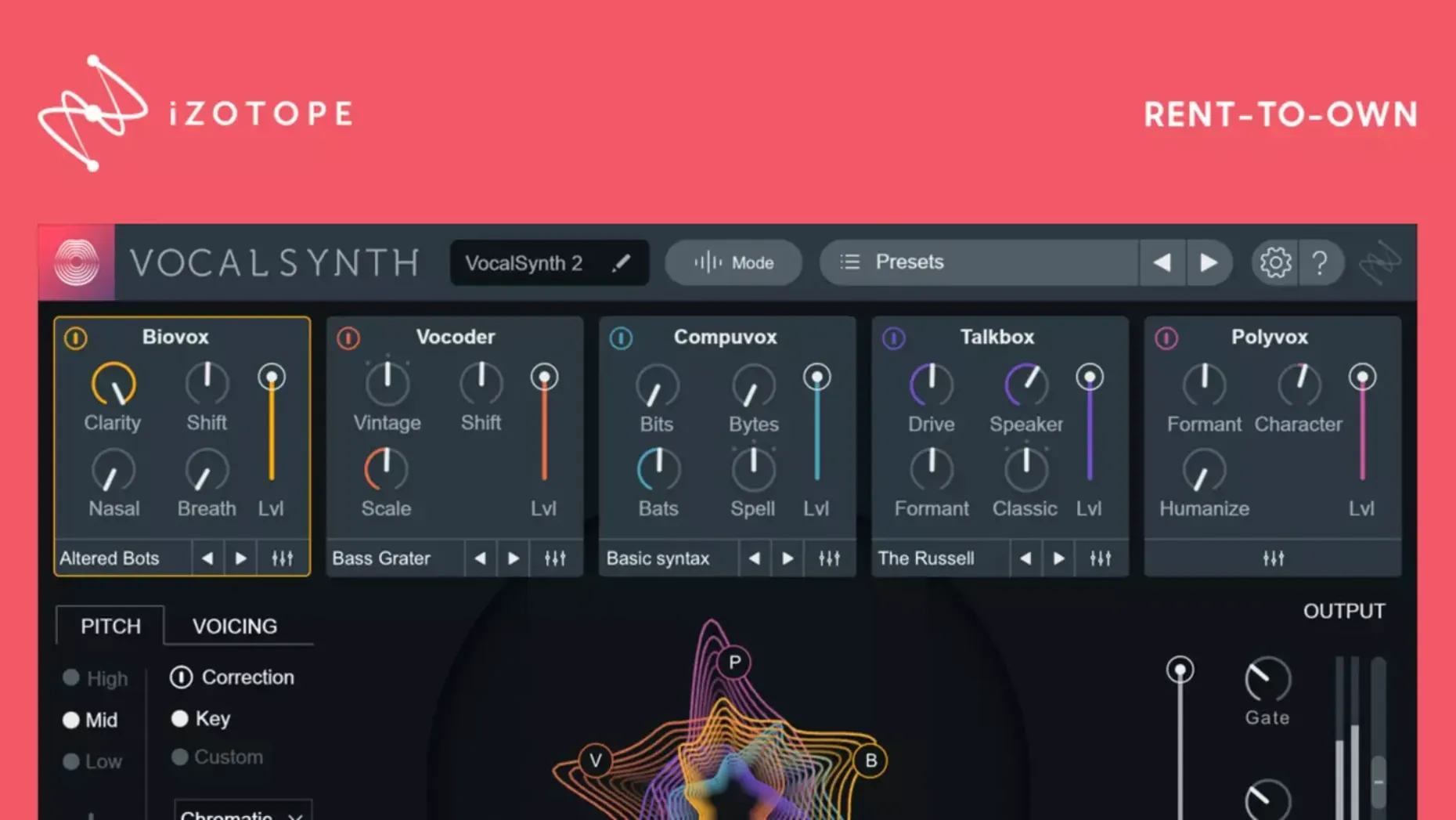
VocalSynth 2 runs on both Apple silicon and Intel 64-bit Macs, loading as an AU, VST3, or AAX plug-in. The architecture splits processing across five interchangeable modules—Vocoder, Compuvox, Polyvox, Talkbox, and Biovox—layered in parallel and mixed through a central matrix. In practice, that means you are not committing to a single effect chain; you are balancing raw, synthetic character against the vocal’s original formants. Three routing modes dictate how the plug‑in reads its input: Auto follows pitch and amplitude from the vocal itself, MIDI forces the modules to track incoming note data, and Sidechain lets a separate audio signal drive the processing. A spectral display maps vowel characteristics in real time, stretching formant bands horizontally so you can see the shape of an “ee” versus an “ah” and adjust effect parameters relative to those shifts. The plug‑in also talks to other iZotope titles through inter-plug‑in communication, which matters if you are already routing audio inside Neutron or Ozone.
- Five effect modules share a single voice input and blend into one stereo signal.
- Auto, MIDI, and Sidechain modes change how the engine follows pitch and envelope.
- The spectral display reacts to vowel formants, giving visual feedback for timbre shifts.
- Biovox applies a biomechanical vocal tract model rather than standard filtering.
- Signal modulation controls push vibrato, chorus, and widening effects per module.
Version 2.6.1 fixed a hiccup where an existing authorisation was not recognised after an update from 2.5.0. If you work on a Monterey 12.3.x system—added in 2.5.0—the current build keeps that compatibility intact. The sound sits between a surgical channel strip and a creative re-synthesiser, so it lands on processed hooks faster than building a vocal chain from separate pitch and formant plug‑ins.
Module Switching Is Now Instant on M-Series Macs
The move to native Apple silicon in version 2.5.0 altered how the plug-in behaves during ordinary sessions. On an M-series Mac, module switching no longer routes through Rosetta, which means the spectral display redraws without the slight lag that Intel-translated builds sometimes showed when you dragged a formant band while audio was playing. The Monterey 12.3.x support matters for engineers who held off updating their studio machines; VocalSynth 2 runs on that system without the AU validation quirks that affected some earlier macOS point releases.
Version 2.6.1 addressed a narrower but equally practical problem. After updating from 2.5.0, some users opened a project and found the plug-in behaving as if it had never been authorised. The fix means you can update mid-project without budgeting time for re-activation or restoring preference files. For anyone who keeps a template with VocalSynth 2 already inserted across multiple vocal tracks, that single change removes the main reason to delay the update.
Five Modules at Once Won't Surprise Your CPU Meter
VocalSynth 2 is not a lightweight insert. Running all five modules simultaneously on a dense project will show a measurable CPU cost, though the load stays predictable because the processing architecture is parallel rather than cumulative in the way a long serial chain would be. On Apple silicon, the native build spreads the module load more evenly across cores; on Intel machines, the same session may push the CPU meter higher without audible dropouts at moderate buffer sizes.
Stability in daily use comes down to how you route it. Inserting the plug-in directly on a vocal track and switching between Auto and MIDI modes mid-playback is smooth. Using the Sidechain mode with a drum loop as the driver can introduce small timing offsets if the sidechain source has heavy latency-inducing plug-ins upstream, but the plug-in itself does not add perceptible delay beyond what the host reports. Memory use stays modest—the spectral display buffers audio for visual feedback, but the footprint remains small enough that multiple instances in a single project are workable.
Workflow: Turning a Spoken Line into a Pitched Hook
Start with a dry vocal take, spoken rather than sung. Insert VocalSynth 2 on the track and set the routing mode to MIDI. Create a MIDI track in your DAW, route its output to the vocal track, and draw a simple four-note pattern that follows the harmonic rhythm of your chorus.
- Open the Vocoder module and raise its level to around 60% in the mix matrix, leaving the dry vocal at 40%.
- Switch the spectral display to vowel view and watch how the formant bands shift as the spoken words move through different vowel sounds.
- Adjust the formant shift parameter until the synthetic layer sits a fifth above the original vocal, then pull it back slightly so the words stay intelligible.
- Add Biovox at 20% mix to introduce a subtle throat-like resonance that fills the gap between the dry vocal and the vocoder layer.
- Apply the built-in chorus from the modulation section, keeping the rate low so the widening effect reads as texture rather than pitch wobble.
The result is a pitched, synthetic vocal hook derived from a non-melodic source. You can refine it further by sidechaining a percussion loop to the Talkbox module, which makes the effect breathe in time with the groove.
A Working Session in Practice
A typical session starts with the plug-in already instantiated on a vocal bus from a saved template. You load the project, confirm the authorisation is recognised—no prompt, no delay—and press play. The spectral display lights up as the first vocal phrase enters, and you watch the formant bands stretch and compress. That visual feedback becomes the starting point: a wide band on an open vowel tells you where the Polyvox module will thicken the sound most, while a narrow band suggests the Compuvox module will add the clearest synthetic edge.
You begin by muting modules rather than deleting them. Vocoder and Talkbox off, Biovox at 30%, dry vocal at 70%. The vocal gains a slightly mechanical resonance without losing its natural phrasing. You then switch routing to MIDI for a bridge section, play a simple chord progression on a controller, and the vocal follows the notes while retaining its original consonants. The transition feels immediate—no re-loading, no parameter reset. By the end of the session, you have three distinct vocal treatments saved as snapshots within the plug-in, each one recallable from the same insert. That kind of variation, reached without opening another plug-in or rebuilding a chain, is what makes the module layout worth learning.
Authorisation — Fixed a case where existing authorisation was not recognised for some users after updating from version 2.5.0.
- macOS (Apple silicon and Intel 64‑bit supported)
Sign in · Create an account to add a field note.
No field notes yet. A measurement, a version, a machine — they appear after moderation.