VST Plugins
uJAM Cinedream 1.0.1
VST PluginsUpdated
| Requirement | On file |
|---|---|
| macOS | macOS 10.13 or later |
| CPU | Apple Silicon, Intel 64-bit |
| Download | 3.5 GB |
Composers and sound designers who need moody, slow-burn guitar beds tend to reach for Cinedream. These definition lines cover what most people ask before they install it.
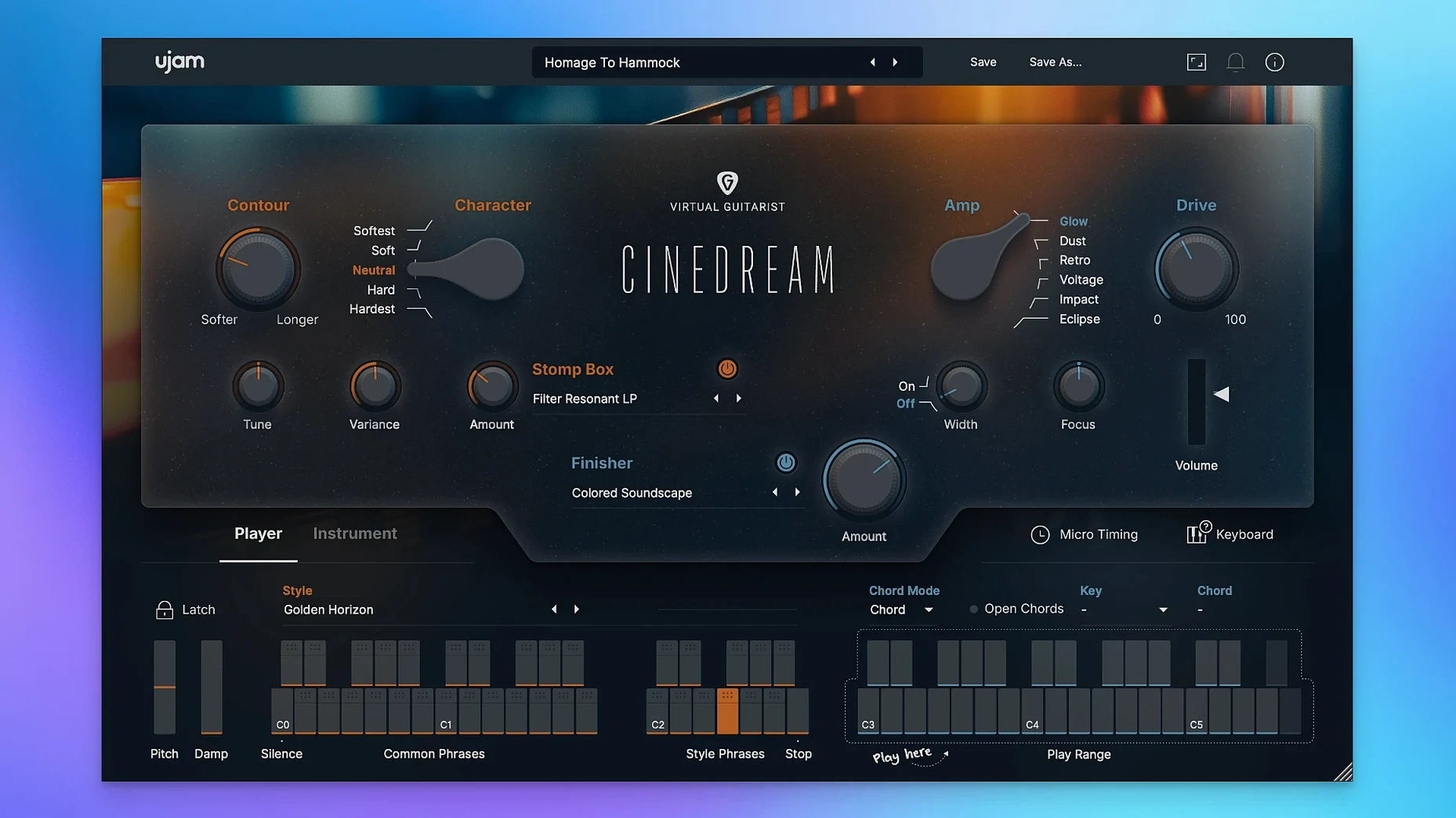
Instrument type — A virtual guitarist that plays itself. You hold a chord and it generates a shifting, processed guitar part. No picking patterns to program.
Sound source — A real guitar processed for cinematic work. The raw tone sits somewhere between a clean DI and a washed-out pad, shaped for atmosphere rather than lead lines.
Plug-in formats — VST2, VST3, AU2, and AAX. It loads in Logic, Ableton Live, Pro Tools, and most other DAWs on a Mac.
Apple silicon — Runs natively on M-series chips and via Rosetta on older Intel Macs. One installer covers both architectures.
Display — Needs at least 1280 × 768 pixels. The interface scales to fit, but a smaller screen will clip the controls.
Internet — The official page lists an internet connection as a requirement. Activation and content download need it; offline use after that depends on the host.
A Cinedream Track in Seven Minutes
Here is how I drop Cinedream into a cue and get a useable texture before the idea fades. The goal is a 45-second ambient bed under dialogue — no melody, just movement and weight.
- Insert Cinedream on a stereo instrument track. Logic Pro names it "VG-CINEDREAM" in the mixer by default.
- Open the Style browser and pick Slow Washed. It sits in the Ambient category and leans soft from the start.
- Hold a Dm7 chord on the MIDI keyboard. Cinedream starts evolving immediately — a slow attack, some harmonic drift, no rigid strumming.
- Dial the Tone knob back to 09:00. The factory preset runs a little bright for dialogue beds; cutting the top opens space for the voice.
- Push the Space slider to roughly 40%. That blends in a long, modulated reverb tail that fills gaps between chord changes without washing out the detail.
- Record four bars of Dm7, then four bars of Fmaj7, then loop. The part breathes — it is never the same bar twice.
- Add a low-cut EQ in the DAW at 180 Hz. Cinedream's low-mids can pile up against a score's cello or bass synth.
That is seven minutes from empty project to a bed that sits under dialogue. The Style engine does the heavy lifting; your job is taste and filtering.
Stacking Ambience Behind a Guitar That Already Cuts
Cinedream is not a do-everything guitar plug-in. It works best as one layer in a stack where other tools handle definition.
With Other Plug-ins
I often route Cinedream into a convolution reverb — something like Space Designer in Logic — with a medium hall impulse response. The built-in Space control is useful during writing, but a dedicated reverb on a send gives cleaner tails and better pre-delay control for final mixes.
For lo-fi cues, a tape emulation after Cinedream does a lot. A touch of wow and flutter breaks up the digital sheen that processed guitars can pick up. Soundtoys EchoBoy or the stock Logic Tape Delay set to 15 ms slapback with modulation works without adding obvious repeats.
With macOS Features
AU2 support means Cinedream loads in GarageBand on a Mac without extra steps. For quick sketches on a laptop, that removes the need to launch a full DAW. MIDI clips recorded in GarageBand transfer into Logic later with the Cinedream instance intact — same plug-in ID, same preset recall via the AU preset system.
On Apple silicon Macs, the native ARM binary keeps CPU draw low enough that a 2023 MacBook Air runs four or five instances without hitting the system overload warning. Intel Macs with Rosetta 2 add roughly 10–15% overhead based on activity monitor readings, but preset changes and Style switching stay snappy on anything from a 2018 Mac mini upward.
Pairing with Other UJAM Instruments
UJAM's Virtual Guitarist series shares a common preset architecture. A style you learn in Cinedream transfers to Amber or Sparkle — the knob layout and MIDI response are identical. For a cue that needs a clean picked guitar on the verses and a washed-out texture on the chorus, you can duplicate the MIDI region, swap the plug-in on the second track, and the part translates without editing note data.
Loading a Style, Holding a Chord, and Printing a Cue in Seconds
Media composers on tight deadlines — Cinedream eliminates the time sink of programming guitar parts note by note. For a 60-second social media spot that needs "emotional guitar ambience," you load a style, hold a chord, and print the audio. The result is not a bespoke session-guitarist performance, but it is broadcast-ready in the context of a mix with synths and percussion.
Sound designers building evolving drones — The chord engine never repeats exactly. Layering two instances with different Style settings and panning them hard left and right creates a stereo field that shifts constantly. Add volume automation in the DAW and you have a drone that changes character over 90 seconds without manual crossfades or sample switching.
Bedroom producers who do not play guitar — The MIDI keyboard is the only input device. You do not need to know chord voicings a guitarist would use; a simple triad triggers complex harmonic movement inside the engine. The Tone and Character knobs cover the ground between "clean DI" and "angry amp" without touching an amp sim.
Silencing a Hung Drone After a Style Change
Stuck notes on preset change. Switching styles while a MIDI note is held can leave a drone ringing. The quick fix: send an All Notes Off message (double-tap the transport stop in Logic, or press the panic button if your DAW has one). To avoid it entirely, lift your hands off the keyboard before changing the Style dropdown.
First-launch content scan. On a fresh install, Cinedream takes 20–30 seconds to validate its sound library. The plug-in window appears blank during that scan. It is not frozen — wait it out. Subsequent launches are instant, but any macOS system update that touches the Audio Unit cache can trigger a rescan.
High latency in large sessions. The processing chain inside Cinedream adds roughly 12–15 ms of latency at a 512-sample buffer. For tracking, enable Low Latency Mode in Logic or reduce the buffer to 128 samples. The Style engine's timing locks to the host transport either way, so playback stays tight even when the buffer moves around.
DAW doesn't see the plug-in. After installation, some hosts need a forced rescan. In Ableton Live, hold Option and click "Rescan" in Preferences > Plug-ins. In Logic, quit and reopen — Logic scans new Audio Units on launch. If Cinedream still does not appear, check that the .component file landed in /Library/Audio/Plug-Ins/Components/ and not the user Library by mistake.
Mod Wheel Unlocks Picking Intensity, Not Just Volume
- Mod wheel controls dynamics. Push the mod wheel up on your controller while a chord is held and Cinedream opens up the picking intensity and harmonic complexity. It is not a simple volume change — the internal engine shifts the virtual player's attack and the post-processing saturation together. Pull it back for a pad; push it forward for something closer to a crescendo.
- The Character knob is a macro. It blends drive, compression, and EQ in one sweep. At 07:00 it is nearly DI. At 05:00 it is saturated and mid-forward. For dialogue beds, keep it below 10:00. For a cue that needs the guitar to cut through synths, push it past 02:00 and pull the Tone knob back to compensate.
- DAW tempo syncs the evolution. The chord engine locks to the host BPM. Double-time the session tempo and Cinedream's internal movement speeds up proportionally — useful for action cues where the same style needs to feel more urgent without changing presets.
- Preset recall via AU standard. Cinedream stores presets in the system-wide Audio Unit preset format. That means a .aupreset file saved in Logic loads in any other AU host — MainStage, Studio One, Reaper — with all knob positions and the selected Style intact.
- Command-click resets a knob. Hold Command and click any control to snap it back to its default value. Useful when the Space slider has drifted and you cannot remember where you started.
- macOS 10.13 or later
- Intel or Apple silicon Mac
- 8 GB RAM
- 4 GB free disk space
- 1280 × 768 minimum display resolution
- Internet connection
Questions on file
Does Cinedream work on an M1 or M2 Mac without Rosetta?
Yes. UJAM provides native Apple silicon support, so it runs directly on M-series chips. Intel Macs use the same installer under Rosetta.
Sign in · Create an account to add a field note.
No field notes yet. A measurement, a version, a machine — they appear after moderation.