VST Plugins
Tone Empire EDYN 1.0.2
VST PluginsUpdated
| Requirement | On file |
|---|---|
| macOS | macOS 10.14 or later |
| CPU | Apple Silicon, Intel 64-bit |
| Download | 198 MB |
EDYN runs on any Mac with macOS 10.14 or later, natively on both Intel and Apple Silicon processors. The plugin ships in VST3, AU, and AAX formats, so it drops directly into Logic Pro, Ableton Live, Pro Tools, and any other DAW that supports those standards. Version 1.0.2 irons out a handful of host-specific bugs: AU validation passes cleanly in Logic Pro on macOS Sequoia, parameter automation behaves correctly in Pro Tools, and offline rendering on the master output no longer falls over. The interface scales to high-resolution displays, and the developer has trimmed CPU load on Apple Silicon.
Bright Mids and Fast Transients from the 1204 Console
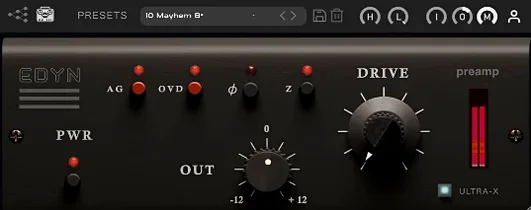
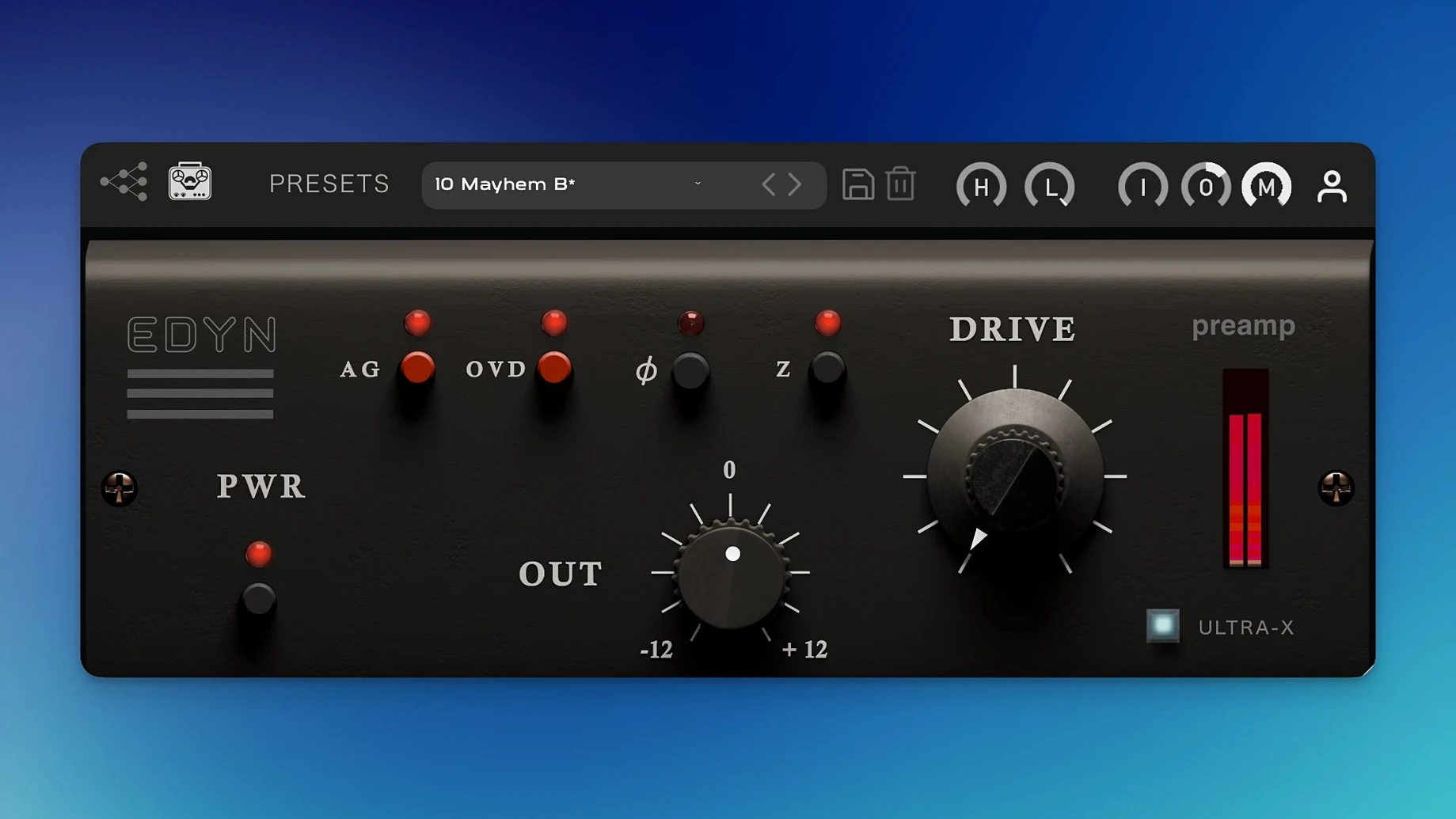
Tone Empire modeled EDYN on the Electrodyne 1204 console, a discrete transistor design from the late 1960s. The preamp stage pushes a bright midrange with a fast transient response—snare hits and picked acoustic guitar stay tight rather than softening. The low end runs deep without turning flabby. Switching the input impedance between 50 ohms and 200 ohms alters the way a connected dynamic or ribbon mic loads the circuit; the lower setting darkens the signal slightly, while 200 ohms opens the top end. The Drive module handles saturation, and engaging the OVD overdrive mode pushes the gain into clipped, harmonically dense territory that works on drums and bass.
Limits
The interface language is English only. EDYN does not model every section of the original console—it focuses on the preamp and drive stages, so do not expect channel EQ or bus summing. The 50-ohm and 200-ohm impedance settings are fixed toggles rather than a continuous sweep, which matters if you blend hardware mics and want an in-between value. The 1.0.2 release addresses crashes with multiple instances in Logic Pro, but large session counts on older Intel machines may still call for freezing tracks.
Drum Bus Drive: A Step-by-Step Workflow
Start with a stereo drum bus already balanced for level and panning. Insert EDYN on the bus as the first processor. Set the input impedance to 200 ohms—this keeps the overheads open and preserves cymbal detail before saturation enters the picture. Pull the high-pass filter up to 40 Hz to clear subsonic rumble from the kick drum mic. Leave the low-pass filter at its maximum setting; you want the full top end passing through the Drive stage unhindered.
Bring the Drive knob up slowly while the chorus section of the track loops. Around the 10 o'clock position, the snare body thickens without losing its snap. At 2 o'clock, the kick drum gains a dense, rounded weight that sits the kit deeper in the mix. Engage OVD mode for the last eight bars of the song—a fill-heavy outro where the drummer lays into the toms. The overdrive clips the tom transients in a way that glues the close mics to the room mics, almost like tape compression but with a sharper midrange push. Dial the Mix control back to 60% wet to retain some of the unprocessed attack. The output level has dropped due to the gain staging; compensate with the Output knob so the post-EDYN level matches the bypassed level exactly. Toggle phase inversion off—the default setting works here—and A/B the result against the dry bus. The difference is not subtle. The kit sounds like it was tracked through a console from 1969.
A Typical Mix Session
You open a project in Logic Pro on a MacBook Pro with an M1 Pro chip. The session contains 24 tracks: vocals, drums, bass, two guitars, a handful of synth parts, and three auxiliary sends for reverb and delay. You instantiate EDYN on four channels in this order.
First, the lead vocal. Impedance at 50 ohms, high-pass at 80 Hz. Drive pushed to 11 o'clock for a gentle harmonic lift that helps the vocal cut through the doubled acoustic guitar without EQ. The gain compensation keeps the fader position meaningful as you ride the verse.
Second, the bass DI track. OVD mode on, impedance at 200 ohms. The low-pass filter comes down to 3 kHz to keep the saturation focused on the fundamental and first harmonic. The bass sits tighter against the kick drum within ten seconds of adjustment.
Third, the drum room mic. Drive at 3 o'clock, Mix at 50%. The parallel blend preserves the natural ambience of the room while the saturated half adds sustain to the crashes and floor tom. Phase inversion is on because the room mic was recorded out of polarity with the overheads.
Fourth, a synth pad that felt thin in the arrangement. Drive at 9 o'clock, no filtering. The subtle transistor coloration gives the pad a tactile presence without pushing it forward in the stereo field. CPU load across four instances on Apple Silicon stays under 3% in the Logic performance meter. Version 1.0.2's optimisation work shows here—previous builds would spike during offline bounces, but the bounce completes without artefacts.
How EDYN Fits a Larger Setup
EDYN earns its place early in the signal chain, before corrective EQ and dynamics. Think of it as the first gain stage after the recorded audio: it imparts a console-like imprint that subsequent processors then react to. A compressor placed after EDYN will grab a signal that already carries harmonic density, which changes how the threshold and ratio behave. An EQ after EDYN shapes a tone that has more midrange information to work with.
On macOS, EDYN integrates with Logic Pro's native plug-in latency compensation, so parallel routing with the Mix control causes no phasing issues. The AU version exposes all parameters for automation—version 1.0.2 fixed the Pro Tools automation bugs that plagued earlier releases, and Logic users benefit from the same stable parameter mapping. You can automate the Drive knob to push a guitar solo section or pull back for a verse without glitching.
The plugin also plays well with hardware-style workflows. If you route a dynamic mic through an outboard preamp and into your interface, inserting EDYN as the first software insert on that channel effectively gives you a second gain stage with impedance switching. The 50-ohm setting mimics the load behaviour of vintage American consoles and can tame a bright condenser mic before it hits your digital EQ. This combination—hardware preamp into EDYN into a clean digital fader—replicates the gain structure of a hybrid studio without the console footprint.
Exporting stems with EDYN printed is straightforward. The offline rendering fixes in 1.0.2 mean a full multitrack bounce with EDYN on eight channels completes without the dropouts that plagued version 1.0.1 on the master output. For users working with older Intel machines, freezing tracks with EDYN active reduces session CPU load while keeping the sonic imprint locked in. Some producers looking for a similar console character search for an age of empire 2 mac download to build a retro gaming setup alongside their audio rig, but EDYN stays firmly in the plugin domain where it belongs—no crossover, just a coincidence of search terms that occasionally lands people on the same forums.
- Rendering — Offline rendering on the master output no longer produces errors.
- Logic Pro — AU validation passes on macOS Sequoia; multiple instances no longer crash the host.
- Pro Tools — Parameter automation now records and plays back correctly.
- Performance — Apple Silicon optimisation reduces CPU load.
- Interface — The UI scales for high-resolution displays.
- macOS 10.14 or later
- Intel or Apple Silicon processor
- VST3, AU, or AAX-compatible host
Sign in · Create an account to add a field note.
No field notes yet. A measurement, a version, a machine — they appear after moderation.