VST Plugins
uJAM Symphonic Elements BRAAASS 1.3.1
VST PluginsUpdated
| Requirement | On file |
|---|---|
| macOS | macOS 10.15 or later |
| CPU | Apple Silicon, Intel 64-bit |
| Download | 3.5 GB |
What Macs does it run on?
BRAAASS runs on any Mac with macOS 10.15 (Catalina) or later. It loads as an AU, VST3, or AAX plug-in and is compiled as a universal binary, so it runs natively on both Intel processors and Apple Silicon chips without translation.
Where do I put it in a session?
Place it on an instrument track when you need a brass line that sits in a finished mix with minimal effort. It works well as a layer behind orchestral samples or on a dedicated bus fed from multiple MIDI tracks when you need consistent ensemble width across several cues.
What kind of jobs does it handle best?
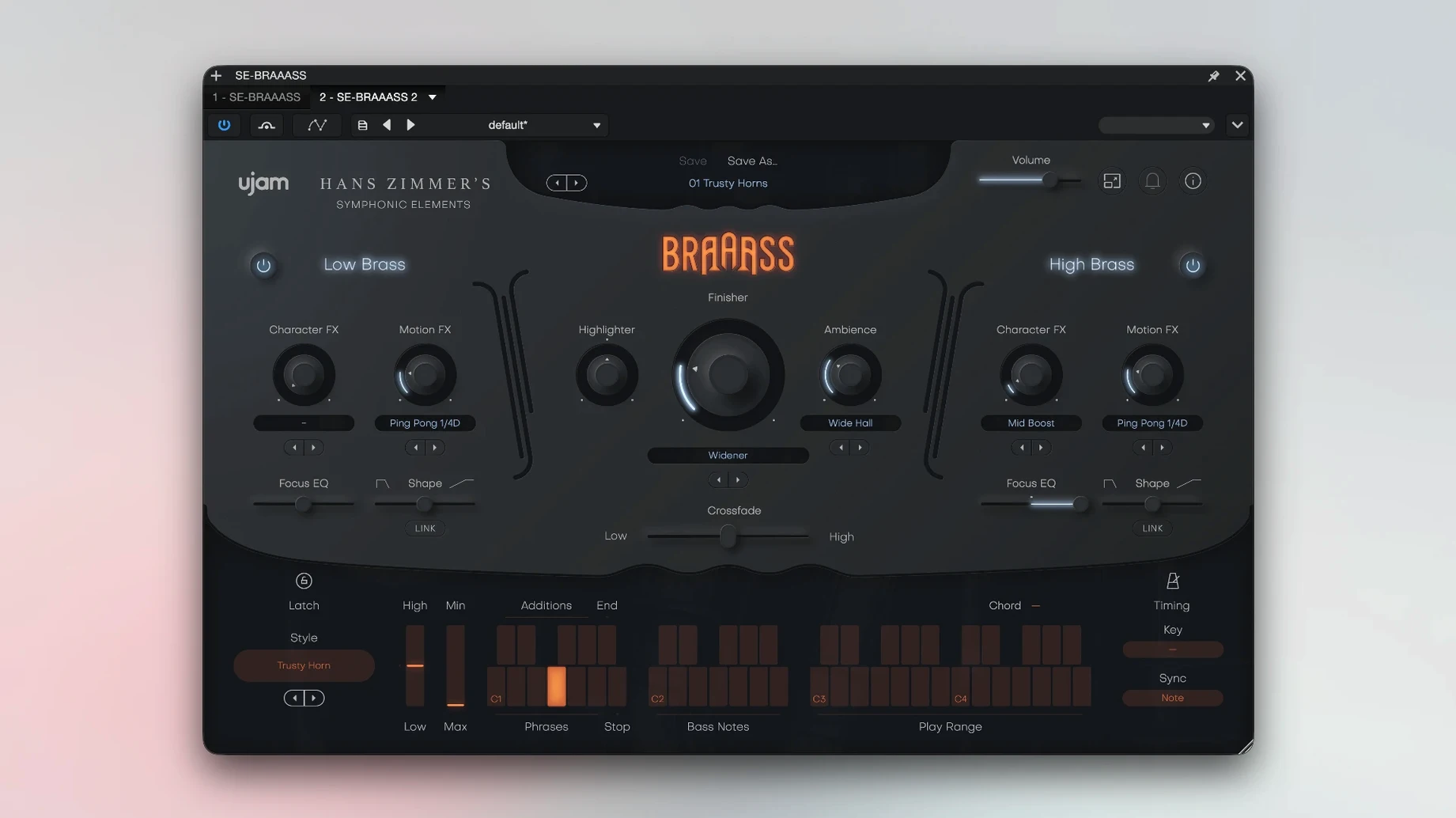
It covers short stabs, swells, and sustained drones without writing a single automation lane. The split low and high frequency sections with crossover fading let you balance a low brass bed against a fanfare top line on one track. The Finisher knob pushes it from dry studio tone into processed cinematic territory, which suits trailer-style cues and underscore beds.
What is it not built for?
It is a phrase instrument, not a multi-sample library. You cannot play individual articulations or map separate trumpet, trombone, and horn parts across a keyboard. For exposed solo lines or detailed orchestral mock-ups where you control every note length and dynamic, you would reach for a dedicated brass library instead.
A session from first load to final render
You add an instrument track, point it at BRAAASS, and the plug-in window opens to a dark, uncluttered interface. The first thing that hits you is the browser: 78 styles organised by character — bold, tense, lyrical, aggressive. You pick one, hold down middle C, and a full brass phrase plays back, locked to your DAW tempo. No keyswitches, no articulation maps. It just lands in the groove.
You drag the crossover slider to balance the low brass (tubas, cimbassos, trombones) against the high section (French horns, trumpets). The transition is smooth, almost like you are blending two separate stems inside a single plug-in instance. You pull the low side down a touch to leave room for a sub-bass synth, then push the high side up 3 dB for a sharper attack on the fanfare figure.
Next you reach for the Finisher knob — a single macro that chains compression, saturation, EQ, and stereo widening under the hood. At 30% it tightens the transients and adds a subtle room tail. At 70% the tone hardens into something more compressed and forward, the kind of sound that cuts through a dense action cue. You settle on 45%, then flip the reverse switch on one phrase to create a short riser for the bar before the chorus.
Latency is low enough that you do not bother freezing the track. You record a simple MIDI part — mostly held notes and a few stabs — and the phrases trigger reliably on each note-on. By the time you hit playback on the full arrangement, the brass sits where you want it: present but not overpowering, cinematic without sounding like a preset demo.
Pre-purchase compatibility checks
Apple Silicon native performance
Yes. The plug-in ships as a universal binary, so it runs natively on Apple Silicon. There is no Rosetta overhead, and AU validation passes without issues on current versions of Logic Pro, Ableton Live, and Cubase. On an M2 MacBook Air with 16 GB of RAM, a single instance uses roughly 200–300 MB, which leaves headroom for other instruments.
Can I write my own brass lines note by note?
Not exactly. This is a phrase instrument, not a conventional multi-sample library. Each of the 78 styles gives you six pre-recorded phrases that adapt to tempo and follow the pitch of the MIDI note you play. You can combine phrases, reverse them, and shape them with the crossover and Finisher controls, but you cannot program individual articulations or build a melody from single samples. If you need that level of control, you pair BRAAASS with a traditional brass library and use it for the ensemble gestures.
Dialogue-friendly underscore drone recipe
That is one of its stronger use cases. Select a style with long sustains, pull the crossover fully to the low section, and hold a single note. The low brass bed sits under dialogue without drawing attention. You can shape the tone further with the Finisher, adding grit or softening the attack depending on the scene.
A drone-to-stab workflow in five minutes
You start with a blank project and a single instrument track. The brief is a 45-second teaser that needs tension in the first half and a payoff hit in the second.
- Pick a low sustain style. In the browser, you filter for styles marked “tense” and audition three options by holding C3. The second one — a slow, pulsing low brass cluster — fits. You set the crossover to 90% low, 10% high. The high section adds just enough air to stop the drone from feeling muffled.
- Shape the drone. You record a single MIDI note across eight bars. With the Finisher at 25%, the tone stays clean but gains a subtle stereo spread. You automate the crossover to creep from 90% low to 60% low over four bars, gradually introducing more trumpets as the cue builds.
- Add motion with reverse. On bar seven, you duplicate the MIDI clip, engage the reverse button, and trim the note to a half-bar length. The phrase plays backwards, creating a rising swell that pulls the listener into the hit.
- Stack the hit. For the payoff, you load a second instance of BRAAASS on a new track, this time with an aggressive short-stab style. You lean the crossover 70% high for a cutting fanfare top, dial the Finisher to 60% for crunch, and place a single staccato MIDI note on the downbeat of bar nine.
- Blend and print. Both instances feed a shared brass bus with a touch of hall reverb. You level the drone track to sit under the percussion, push the stab track 2 dB hotter, and bounce the section. Total time from first note to rendered stem: just under five minutes.
- macOS 10.15 (Catalina) or later
- Intel or Apple Silicon processor
- AU, VST3, or AAX plug-in host
Questions on file
Which series does BRAAASS belong to?
It is the brass entry in uJAM's Symphonic Elements series, using recordings sourced from Hans Zimmer's personal collection.
How many presets does it include?
The instrument ships with more than 250 designer presets covering short phrases, swells, and drones.
Does the interface support languages other than English?
No, the interface is available in English only.
Sign in · Create an account to add a field note.
No field notes yet. A measurement, a version, a machine — they appear after moderation.