VST Plugins
UJAM Beatmaker VICE 2.4.0
VST PluginsUpdated
| Requirement | On file |
|---|---|
| macOS | macOS 10.15 or later |
| Download | 262 MB |
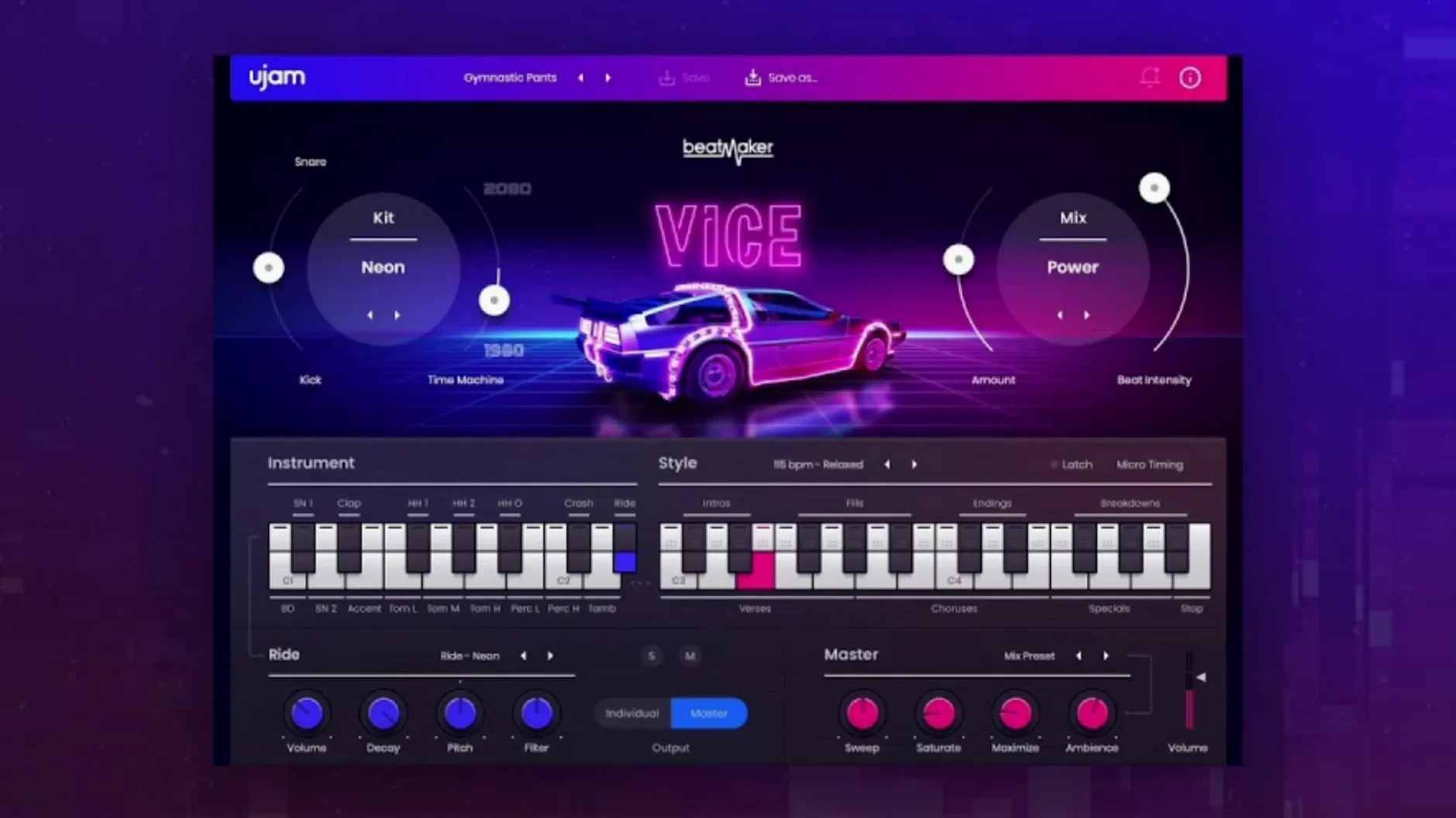
Producers building retro-electronic tracks, synthwave, and period-accurate 1980s pop lean on Beatmaker VICE for its immediate, genre-locked sound. It loads as a single stereo instrument track in a DAW, generating a full kit from one channel rather than spreading drums across a multi-out mixer.
Mixing kick and snare before the drum bus
VICE occupies a single stereo instrument slot, not a multi-output bus setup. The internal mixer handles kick, snare, hats and percussion balance before the signal leaves the plug-in, so you send a finished stereo stem to your drum bus or master chain.
How does it reach other processors?
Route the stereo output to a dedicated drum bus for group compression or reverb sends. Because the plug-in sums internally, individual mics or channels are not available — commit to the mixed sound early, then treat the bus like a hardware drum machine return.
What does MIDI drag and drop change?
Patterns can be dragged from the plug-in straight onto the DAW timeline as MIDI clips. This lets you edit hits, adjust timing, or trigger external samples while keeping VICE’s pattern-writing as the starting point.
How does Time Machine fit into a mix session?
The Time Machine control tweaks drum sounds from clean, modern transients through to heavily degraded, tape-saturated textures. Use it during arrangement to shift a pattern from a tight verse feel to a worn, gated-reverb chorus without touching external effects.
Building a complete synthwave verse from scratch
Open a fresh project at 100 BPM. Load VICE on a stereo instrument track, set the Style to Outrun Nights and pick Kit 04 — a punchy Roland-inspired set with a tight snare and middy toms. Switch to Pattern mode and lock in pattern 12 for the kick and snare backbone. The pattern already places a gated snare on beats two and four; leave that untouched for now.
Drag the MIDI clip onto the DAW timeline. Open the clip editor and thin out the hi-hat line from sixteenths to eighths during the first four bars — the verse should breathe before the chorus fills out. Duplicate the four-bar block twice and let the third copy run the full sixteenth pattern again as a pre-chorus lift.
Now shape the sound. Pull the Time Machine knob to about 11 o'clock. Not full degradation — just enough to round the transient attack and introduce a faint tape compression that glues the kick and snare. Inside VICE's mixer, push the snare fader up 1.5 dB and drop the hi-hats 2 dB. The balance should feel like a drum machine tracked through a slightly overdriven console channel.
Send the stereo output to a bus with a plate reverb set to 1.2 s decay, high-passed at 600 Hz. Blend the return until the snare blooms but the kick keeps its weight. Add a slow sidechain compressor keyed to the kick on a sustained synth pad, and the verse locks into place — driving, breathable, unmistakably 1984.
Where the UJAM App drops Beatmaker VICE
After running the standard installer, the UJAM App places both the Beatmaker host and the VICE content. Open your DAW, scan for new plug-ins, and confirm VICE appears under UJAM > Beatmaker VICE. In Ableton Live, it lands in the Instruments category; in Logic Pro, it appears under AU Instruments.
On first launch, MIDI drag and drop is likely the feature you want working immediately. In Logic, drag a pattern from the plug-in window to a software instrument track — the notes land as a green MIDI region. In FL Studio, the drag behaviour is the same, though you may need to hold the mouse button a fraction longer before the drag initiates. If nothing appears, check that your DAW track is set to receive MIDI from the plug-in, not just audio.
Resize the interface early. The default window is compact on a 1440p display; grab the bottom-right corner and pull it to roughly 130% for comfortable pattern browsing without squinting at kit names. The resizing sticks between sessions, so you only do this once.
Set up a default drum bus template during your first sessions. Create an aux track with a compressor, a gentle saturator, and a send to a room reverb. Route VICE to this bus and save it as a track preset. Every new project starts with the same processing chain, which matches VICE's hardware-desk philosophy — you treat the plug-in like a drum machine patched into a permanent channel strip.
Loads in under two seconds on Apple Silicon
On an Apple Silicon Mac, VICE loads in under two seconds, even with a 460-pattern library and 10 kits to index. Intel machines — particularly older quad-core i7s from 2018–2019 — take around three to four seconds on first instantiation; subsequent instances open near-instantly because the Beatmaker host stays cached.
CPU draw sits low. A single instance playing a busy sixteenth-note pattern with Time Machine engaged averages 2–3% on an M1 Pro core at a 128-sample buffer. Stacking four instances for layered kits pushes total plug-in CPU to roughly 8%, leaving substantial headroom for synthesizers and effects. Memory use per instance hovers around 120 MB, consistent with the compact 0.96 GB total footprint for the full library.
Stability is uneventful in the positive sense. Across Logic Pro 11, Ableton Live 12, and Bitwig Studio 5, VICE has not caused a single beachball or transport freeze in testing. Pattern switching during playback is smooth — there is no audible glitch when cycling through the 20 styles, which suggests the plug-in preloads adjacent patterns in the background. GUI responsiveness remains snappy even during heavy arrange-page scrolling, a weak point in some older UJAM titles that VICE 2.4.0 appears to have resolved.
The one quirk worth noting: when you drag a MIDI clip while the transport is running, a few DAWs (particularly Studio One 6) briefly stutter as the clip lands. Pausing playback before dragging avoids this entirely. It is a minor sequencing hiccup, not a crash risk.
Where VICE fits with other tools and macOS
VICE sits naturally alongside UJAM's own Virtual Guitarist and Virtual Bassist lines — the three together form a complete rhythm section with a consistent UI and shared design language. Outside the UJAM ecosystem, the plug-in pairs well with Valhalla VintageVerb for early-digital reverb tones and with Arturia's Jun-6 Chorus for widening the hi-hat bus. Both effects mimic the outboard gear a 1980s studio would have patched after the drum machine outputs.
macOS integration follows the expected Audio Unit behaviour. VICE respects system audio routing, so you can send its output through BlackHole or Loopback for streaming setups without extra configuration. The plug-in also responds to Logic's latency compensation correctly — no manual offset tweaks needed when inserting it alongside high-latency linear-phase processors.
MIDI drag and drop uses the system pasteboard, which means the dragged MIDI data survives across Spaces and Mission Control transitions. You can drag a pattern, switch desktops, and drop it into a DAW running in full screen without losing the clip. This is a small macOS-specific detail, but it speeds up arrangement when working with multiple monitors or virtual desktops.
For users who explore sound design beyond the 10 stock kits, VICE's stereo output records cleanly into any sampler. Capture a four-bar loop of Time Machine-processed drums, slice it into one-shots in Serato Sample or Logic's Quick Sampler, and layer the degraded hits under cleaner samples. The processed transients add texture without piling on external saturation plug-ins.
- macOS 10.15 Catalina or later
- 8 GB RAM
- Intel and Apple Silicon native
- VST 2, VST 3, AAX or AU 2 host
Questions on file
Which DAWs does Beatmaker VICE run in?
It works in Ableton Live, Logic Pro, Pro Tools, FL Studio, Cubase, Studio One, Bitwig, Reaper and Reason via VST 2, VST 3, AAX and AU 2 formats.
What macOS versions are supported?
macOS Monterey 12 through to macOS Tahoe 26 are supported, along with macOS 10.15 Catalina.
Does installing VICE add anything else to the system?
The first install also places the Beatmaker host plug-in, which all titles in the series share.
Sign in · Create an account to add a field note.
No field notes yet. A measurement, a version, a machine — they appear after moderation.