VST Plugins
UJAM Symphonic Elements STRIIIINGS 1.3.1
VST PluginsUpdated
| Requirement | On file |
|---|---|
| macOS | macOS 10.14 or later |
| CPU | Apple Silicon, Intel 64-bit |
| Download | 4.4 GB |
The current build runs on Intel and Apple Silicon Macs, supports macOS 10.14 through to macOS 26, and requires a 64-bit host.
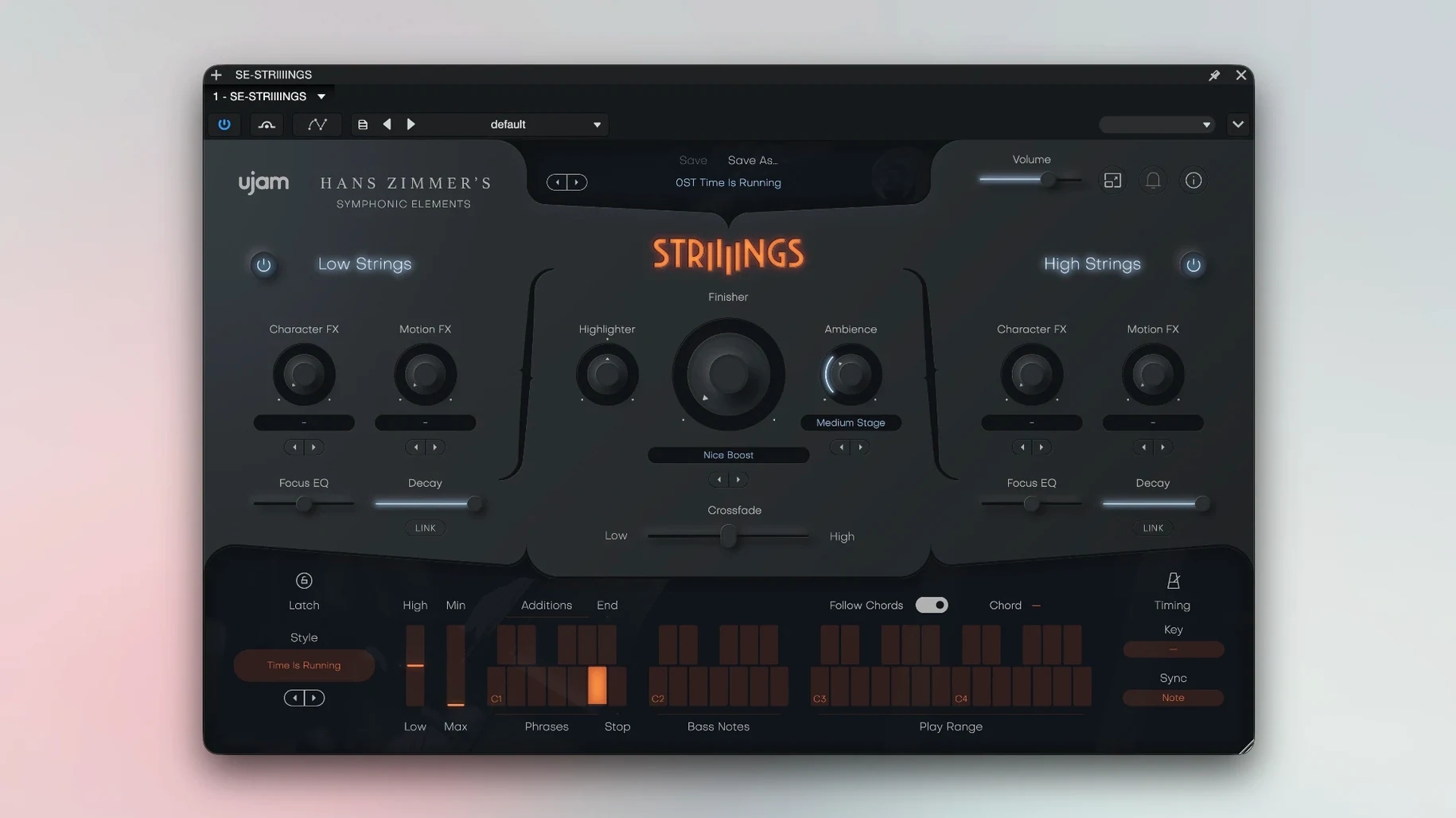
STRIIIINGS — Cinematic string-section instrument with a sound-design layer.
Source material — Recordings from Hans Zimmer's string library.
Sections — Two independent zones: a high ensemble and a Low Strings patch covering basses and celli.
Presets — More than 200 sound-designer patches organised by mood and genre.
Engine — 64-bit plug-in; AU, VST3, and AAX formats.
The library pairs a core orchestral texture with a synthesis and processing layer. Each section moves independently: you can blend a clean sustain from the high strings with a processed, modulated low end, or swap the roles entirely. The preset collection leans into hybrid territory — bowed textures run through filters, pitch shifts, and rhythmic gates — but the raw samples hold enough detail for straight scoring work.
STRIIIINGS on a deadline — a short scenario
A game composer picks up a short teaser trailer at 10 pm, due the next morning. The brief asks for tension that swells into a melodic pay-off, but there is no time to sketch out a four-part arrangement or audition a dozen string libraries. She drops STRIIIINGS onto an instrument track in Logic, pulls up a preset called something like Rising Tide, and holds a single minor-third dyad. The low strings enter with a slow attack while the high section fades in two bars later with a glassy, processed overtone — the crossfade already mapped to mod wheel. She prints the part, adds a sub-boom and a reversed cymbal, and the cue is done in under twenty minutes. That speed is the whole point of the instrument: a handful of notes already sound like a produced cue because the recording stage, the mix, and the sound-design processing live inside the patch.
Chords Overload the Full-Ensemble Engine
Most early frustrations with STRIIIINGS come from treating it like a conventional string library. A few patterns show up repeatedly.
- Playing too many notes at once. The engine sums a full ensemble sound, not individual desks. A four-note chord in the low register can already sound thick; stacking six or seven voices across both sections often turns the output into low-mid mud. Two to four voices, spread across an octave or a tenth, usually deliver more punch with less cleanup later.
- Ignoring the section balance. A preset may load with the Low Strings patch 6 dB hotter than the high layer. If you do not check the independent volume faders before reaching for EQ, you end up carving frequencies the mix fader could have fixed in one second.
- Using the mod wheel as an on/off switch. The crossfade responds to continuous controller data — riding it slowly reveals intermediate textures that a quick flick misses. Beginners often park the wheel at minimum or maximum and wonder why the preset sounds static.
- Applying external reverb too early. Many presets already carry hall ambience baked into the sample recordings, plus an internal reverb send. Slapping a long algorithmic tail on top before auditioning the dry/wet balance inside the plug-in frequently washes out the transient detail that gives the High Strings patch its bite.
Will It Run on Apple Silicon Without Rosetta
Does it work in a native Apple Silicon session without Rosetta?
Yes. Build 1.3.1 ships a universal binary. The plug-in runs natively on ARM Macs inside any 64-bit host that itself runs native — Logic Pro, Cubase 13, Ableton Live 11 and later, and Bitwig all qualify. There is no separate installer for Intel versus Apple Silicon; the same package covers both.
How much RAM does it actually use in a project?
The developer quotes 4 GB as a minimum, which is realistic for a single instance with a moderate preset. Loading a dense patch with both sections active and the internal effects engaged typically sits between 1.8 GB and 3.2 GB of resident memory on an Apple Silicon Mac, depending on how many voices the DAW pre-loads. Two or three instances on an 8 GB machine will push the system into swap; on a 16 GB Mac that is rarely an issue unless the session already carries a full orchestral template.
Can you load your own samples or import external impulse responses?
No. STRIIIINGS is a closed instrument. The sample pool, the convolution engine, and the modulation architecture are not user-accessible beyond the controls shown on the interface. If you need a custom string texture, you bounce the output and treat the audio on a separate track.
Which plug-in formats are included?
The current package installs AU, VST3, and AAX components. VST2 is not supplied, so hosts that rely solely on the older VST2 wrapper — some older builds of Pro Tools on Windows, for example — will not see the plug-in. On macOS, AU and VST3 cover every major DAW on the compatibility list.
Trim the Preset Output Before It Clips
Out of the box, several defaults are worth a quick adjustment before the plug-in goes into a template.
- Output level trim. Many presets peak close to –3 dBFS internally. Set the master volume to –6 dB or lower to give the channel fader in your DAW some room before hitting the insert chain.
- Velocity-to-volume mapping. By default, velocity influences amplitude more than timbre, which can make soft passages disappear in a dense mix. Tighten the dynamic range from the plug-in's internal dynamics control so that low velocities still carry weight, then use expression (CC11) for swells instead of relying on key velocity alone.
- Reverb send amount. The internal ambience is routed as a send, not an insert, and some presets default to a 70–80% wet mix. Pulling it back to 40–50% keeps the size without blurring the attack of the High Strings articulation.
- Crossfade curve. The crossfade between Low and High Strings patches defaults to a linear taper that can feel abrupt around the midpoint. If your controller supports it, adjusting the curve to a gentler exponential shape inside the plug-in (or in the DAW's MIDI mapping) gives smoother blends during long crescendos.
Once those four tweaks are saved into a default user preset, STRIIIINGS slots into a template much faster — drop it in, check the output meter, and the instrument sits in the mix without immediate corrective surgery.
- macOS 10.14 through macOS 26
- Intel or Apple Silicon Mac
- 64-bit host (AU, VST3, or AAX)
- 4 GB RAM
Questions on file
Which DAWs does STRIIIINGS run in?
It loads in Ableton Live, Logic Pro, Pro Tools, FL Studio, Cubase, Studio One, Bitwig, Reaper, Reason, and any other 64-bit host that supports AU, VST3, or AAX formats.
Sign in · Create an account to add a field note.
No field notes yet. A measurement, a version, a machine — they appear after moderation.