VST Plugins
Synapse Audio The Legend HZ v2.0.2.R1 2.1
VST PluginsUpdated
| Requirement | On file |
|---|---|
| macOS | macOS 10.14 or later |
| CPU | Apple Silicon, Intel 64-bit |
| Download | 472 MB |
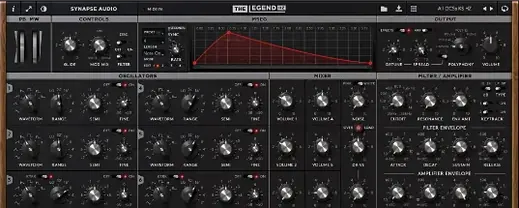
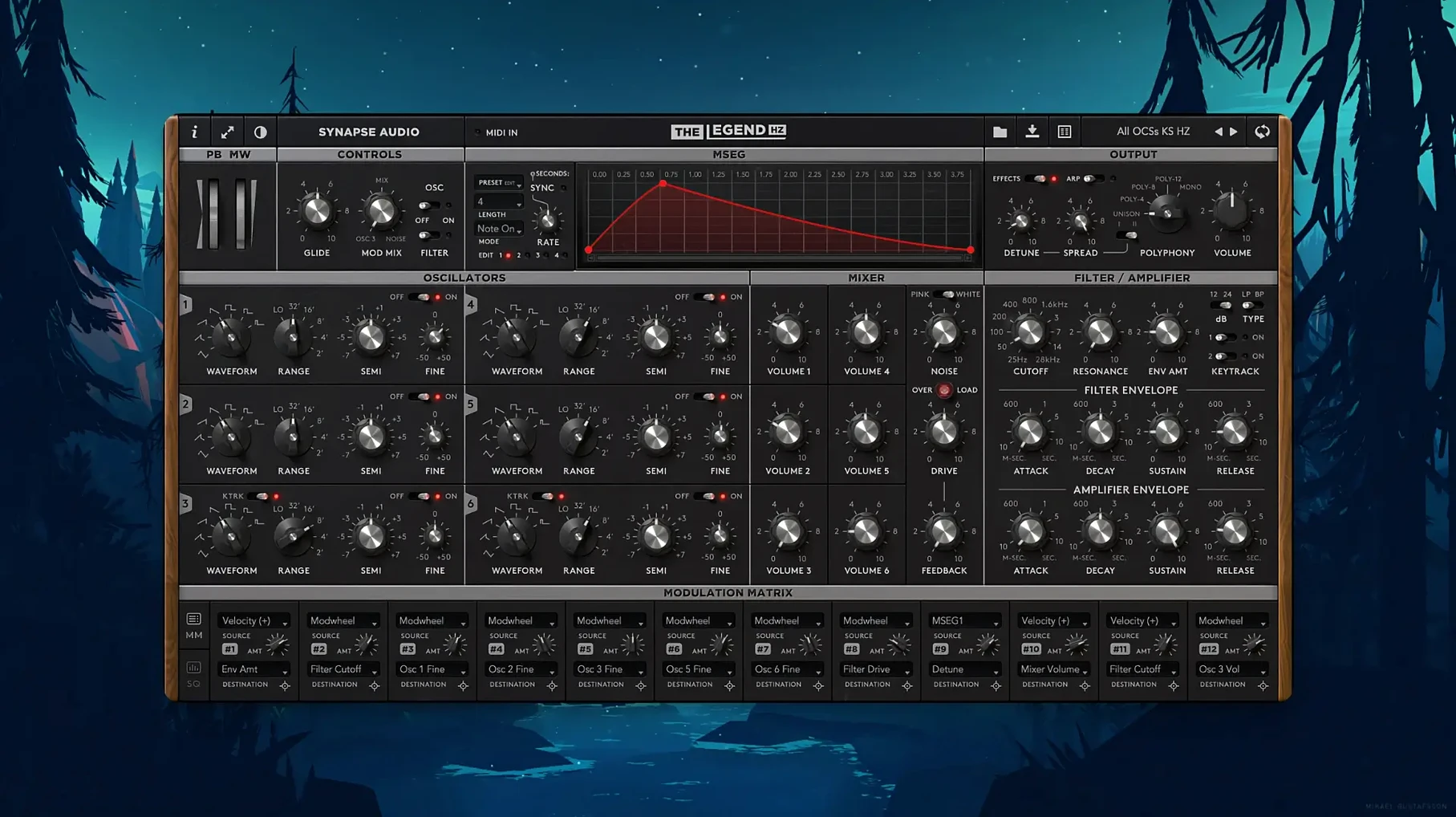
The Legend HZ by Synapse Audio is a software instrument modelled on a classic Minimoog-style signal path, expanded with six VA oscillators and modern digital control. It occupies a specific set of roles in a session: it handles thick mono bass and cutting leads, but its 12-voice polyphony and onboard sequencer pull it onto stereo buses and arpeggiated pads as well.
- Mono bass and lead tracks. The dual-filter architecture and oscillator sync deliver the kind of focused low end and biting midrange that sits under a vocal or cuts through a dense chorus without additional EQ.
- Stereo unison pads. With up to 12 voices and six oscillators per voice, a single instance can fill a stereo bus with detuned, swirling pads that normally require a layered stack of synths.
- Arpeggiated textures. The built-in arpeggiator and sequencer turn simple held chords into rhythmic, evolving lines that work on chorus hooks or transitional FX buses.
- MPE controller tracks. Per-note pitch bend, slide and pressure are supported, so a LinnStrument or ROLI Seaboard track gets independent articulation per voice — useful for expressive lead lines.
- Drum bus saturation. The v2.1 compressor saturation stage can be driven hard. Placed on a drum bus, it adds glue and harmonic density in a way that resembles pushing an analogue console channel.
Patch compatibility with the original The Legend means existing soundbanks drop straight in, while the back-panel paragraphic EQ in v2.1 lets you shape the output for a specific bus without reaching for a separate plugin. It runs on Intel and Apple Silicon Macs from macOS 10.14 onward, in VST, AAX and Audio Unit formats.
Conservative Defaults That Hide the Engine’s Character
A few defaults in The Legend HZ lean conservative. Tweaking them early unlocks the character the engine is built for.
- Voice allocation. The global voice count defaults to a lower polyphony setting. Raise it to the full 12 voices from the back panel. On an Apple Silicon Mac, the CPU hit is modest, and you avoid note-stealing on sustained pads with long release times.
- Unison detune amount. The unison mode ships with a tight stereo spread. Pull the detune knob to around 11 o'clock for a wider, chorused drift without losing the fundamental pitch. For bass patches, reduce it further — too much detune on a sub line muddies the low end.
- Oscillator phase reset. By default, oscillators free-run. Enable phase reset per oscillator from the front-panel menu if you want identical attack transients on every key press — critical for punchy EDM plucks and tight arpeggio lines.
- Compressor saturation routing (v2.1). The back-panel compressor defaults to a clean setting. Switch the saturation stage to post-compression and raise the input gain until the meter shows 3–4 dB of reduction. The harmonic thickening is noticeable on sustained chords without obvious distortion.
- MPE pitch bend range. The MPE implementation uses a ±48 semitone default. For standard lead playing on a Seaboard or LinnStrument, ±12 semitones feels more controllable and avoids unintentional octave jumps on light pressure slides.
A Film Composer's Go-To for Tension Cues
A composer working on a thriller score needs a low, evolving drone that shifts timbre over 30 seconds without repeating. The Legend HZ handles this in a single instance. They load the "Dark Pulse" factory preset as a starting point, then assign the 914 Fixed Filter Bank's high band to aftertouch. The six oscillators are detuned in pairs across three octaves, and the paragraphic EQ on the back panel cuts a narrow 3 dB notch at 400 Hz to leave room for the dialogue stem. As the scene builds, they ride the mod wheel — mapped to filter cutoff — and the filter bank's resonant peaks sweep upward, adding metallic overtones. The whole cue runs from one held chord and continuous controller data, no automation lanes needed.
Producers Who Pair Analogue Modelling With Hardware
The Legend HZ suits a narrower set of users than a general-purpose wavetable synth, and those users tend to work in specific ways.
- Producers mixing analogue-modeled instruments with hardware. The oscillator drift modelling and saturation stage sit well alongside physical analogue gear. Users tracking a Moog Sub 37 or a Eurorack bass voice find The Legend HZ blends without the brittle top end that some software synths introduce.
- Hans Zimmer-style hybrid composers. The 914 Fixed Filter Bank is a direct reference to the hardware unit Zimmer uses. Anyone building orchestral-hybrid templates with heavy low-brass reinforcement and synth bass doubling gets the same resonant band-pass shaping in the box.
- Keyboard players with MPE controllers. Per-note expression on six oscillators per voice is an unusual combination. A player who performs lead lines with independent vibrato and timbre per finger gets more out of this than they would from a standard poly-synth preset pack.
- Sound designers rebuilding classic patches. Patch compatibility with the original The Legend means libraries built over years load without translation. Someone maintaining a personal archive of Minimoog-style patches can migrate them and then extend each one with the extra oscillators and EQ.
A Workflow: Bass Patch from Scratch to Finished Stem
Here is a start-to-finish workflow for building a sub-bass patch that sits under a pop chorus and printing it to a stem.
- Initialise and set gain structure. Select an empty init patch. Reduce oscillator output to -6 dB on each of the three active oscillators to leave headroom for the filter drive and compressor saturation stages downstream.
- Stack the fundamental. Set Oscillator 1 to a sawtooth wave at 32' pitch. Oscillator 2 copies the sawtooth at 16', detuned by +4 cents. Oscillator 3 runs a triangle wave at 16' with no detune. The triangle fills the sub-frequency body while the detuned sawtooths create a slow phasing beat around 80–100 Hz.
- Shape the filter envelope. Route all oscillators through the 24 dB ladder filter on the left channel. Set cutoff to 120 Hz, envelope amount to 65%, attack to 0 ms, decay to 280 ms, sustain to 30% of cutoff range, release to 180 ms. The fast decay and moderate sustain produce a percussive "bwwaa" articulation that follows the kick drum pattern.
- Tighten with the paragraphic EQ. On the back panel, engage the paragraphic EQ in v2.1. Add a high-pass filter at 35 Hz with a 12 dB/octave slope to remove subsonic rumble. Place a narrow +2 dB bell boost at 800 Hz — this helps the bass poke through on small speakers without muddying the 100 Hz region.
- Apply compressor saturation. Set the back-panel compressor to a 4:1 ratio, attack at 10 ms, release at 100 ms. Drive the input until the gain reduction meter hovers around 3 dB. The saturation stage adds second-harmonic content that makes the bass audible on devices with limited low-frequency response.
- Sequence and bounce. Program a simple eighth-note pattern in the DAW, with velocity modulating filter envelope amount. Engage the onboard arpeggiator if you want rhythmic variation. Print the stem through the Audio Unit version, 24-bit, with a 2-bar tail to capture the release tails.
- Equaliser — Added a paragraphic equalizer on the back panel.
- Compressor — Added a compressor saturation stage.
- Tuning — Added MTS-ESP microtuning support.
- Presets — Added 50 factory presets by Kevin Schroeder.
- macOS 10.14 or later
- Intel 64-bit or Apple Silicon processor
Questions on file
Does The Legend HZ load patches from the original The Legend?
Yes. All patches and soundbanks created for The Legend are fully compatible with The Legend HZ.
Can The Legend HZ respond to MPE controllers?
Yes, it supports MPE for per-note pitch bend, slide and pressure control.
What synth formats does The Legend HZ run in on macOS?
It is available as VST, AAX and Audio Unit plug-ins for Intel 64-bit and Apple Silicon Macs.
Sign in · Create an account to add a field note.
No field notes yet. A measurement, a version, a machine — they appear after moderation.