VST Plugins
Superior Drummer 3.4.4
VST PluginsUpdated
| Requirement | On file |
|---|---|
| macOS | macOS 10.13 or later |
| CPU | Apple Silicon, Intel 64-bit |
| Download | 625 MB |
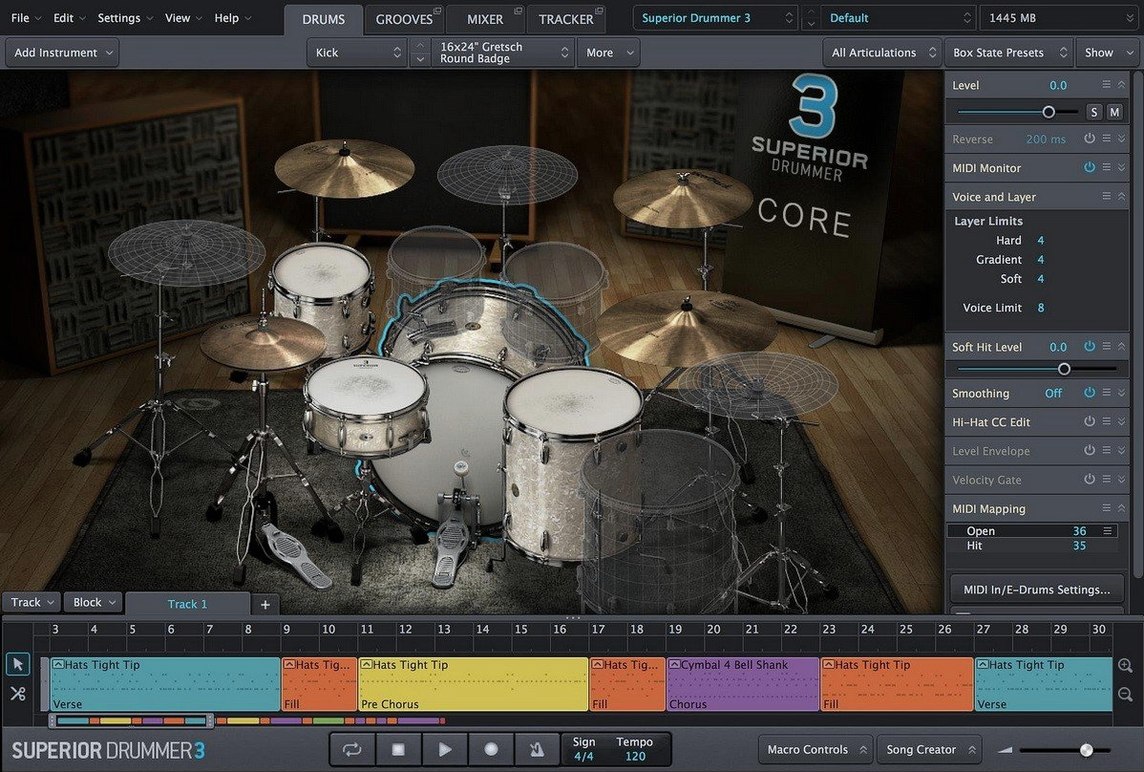
35 mixer effects sit inside the built-in desk — EQs, compressors, saturators and convolution reverbs that all process audio at 64-bit resolution. For an experienced user, the signal flow matters more than the sample library. Each channel strip can route to any of 16 stereo outputs, and the internal bussing lets you print wet/dry stems without leaving the plugin window.
The audio-to-MIDI converter is the tool that changes how you work with existing recordings. Feed it a drum loop or a full kit stem, and the detection algorithm maps kick, snare, toms and cymbals to MIDI notes with velocity data intact. It is not a crude trigger system — the transient analysis separates direct hits from bleed, which means a mic'd-up Abbey Road Modern Drummer session tracked in a live room can become a clean MIDI performance in under a minute.
Mac users need a 64-bit host on macOS 10.13 or later, running either Intel or Apple Silicon natively. The 230 GB core library loads from SSD without choking the disk I/O, and the instrument stack supports round-robin layering up to six articulations per pad. For percussive sound design work, the envelope shaper and pitch editor per mic channel turn acoustic close-mic samples into entirely synthetic transients — useful when blending live room tones with electronic kits.
Version 3.4.4 is a maintenance update. Note that from Q2 2025 onward, any Superior Drummer 3 expansion product will require version 3.4.0 at minimum, so keeping the base install current is no longer optional if you plan to add libraries.
Under-Four-Second Splash Screen on an SSD
Open your DAW, insert Superior Drummer 3 on an instrument track, and let the 230 GB library initialise — on a modern SSD, the splash screen clears in under four seconds. The default kit loads with the Basic Rock preset, which maps a full acoustic kit across the MIDI keyboard. Tap a few pads on your controller or click the on-screen drums. You will hear close mics, overheads and room channels summed through the internal mixer, with the master bus compressor already ticking over at a gentle 2:1 ratio.
Replace the snare first. Right-click the drum and pick from the library browser — Superior Drummer lists every articulation with metadata: shell material, head type, tuning and damping. The search field accepts terms like "maple 6.5 brass hoops", and the results narrow as you type. Drag a replacement onto the pad, and the new sample loads with its full mic complement. The overhead and room channels update automatically, so the stereo image does not fracture when you swap a single drum.
Build a groove in the grid editor or drop a MIDI clip onto the track. Open the internal mixer by clicking the mixer tab. Each drum has its own channel strip with insert slots, sends and a fader. Push the snare through the FET-style compressor on insert slot two, dial the attack back to 10 ms to let the transient through, and pull the threshold down until the meter shows 4 dB of reduction. The difference is immediate — the snare tightens up without losing the rim crack.
Route the kick to a separate output. Click the output assignment dropdown at the bottom of the kick channel, select "Out 3/4", and in your DAW create an aux track receiving those channels. Now the kick lives outside the plugin, where you can process it with your own outboard emulations or sidechain it to the bass bus. Superior Drummer's internal bussing still feeds the master channel, so you get both the processed stem and the untouched drum group in parallel.
To capture a live recording, drag an audio file of a drum loop into the audio-to-MIDI converter window. The waveform appears with transient markers overlaid — kick hits in red, snares in yellow, hi-hats in green. Click "Analyze", and within seconds a MIDI clip appears on the track above. The velocity curve is not flat; soft ghost notes register at 40-50, backbeats at 110-120. Hit play, and Superior Drummer triggers its own samples with the timing and dynamics of the original performance. What was a lo-fi phone recording of a practice pad is now a playable groove running through a $200,000 console emulation.
Find the Missing 230 GB SDX Payload
Library content missing after installation. The disk image contains the plugin installer and a separate sound library payload. If you ran only the first installer, the 230 GB of samples never landed on your drive. Locate the "SDX" folder in the downloaded package and run its installer, or copy the folder manually to an external SSD and point Superior Drummer to it in Settings > Libraries. The software scans the path recursively, so a single parent folder under "Toontrack/Superior Drummer 3" works cleanly.
Audio-to-MIDI detection miscategorises toms as kicks. The default detection sensitivity is optimised for close-mic'd recordings. On a full kit stem with heavy room bleed, low toms and floor toms often trigger kick markers, especially when the drummer strikes them dead centre. Drop the "Low Frequency Sensitivity" slider from its default of 80% to around 55%, and increase the "Transient Threshold" by 3-5 dB. Re-run the analysis. The algorithm then distinguishes the slower attack slope of a tom from the sharper impulse of a beater on head.
Plugin not appearing in Logic Pro on Apple Silicon. Logic runs natively on ARM, and an x86-only build of Superior Drummer will not show up unless the DAW opens under Rosetta. Check the plugin file in /Library/Audio/Plug-Ins/Components. If the Finder's "Kind" column reads "Intel", you have the older binary. The version 3.4.4 package includes a universal binary — reinstall and confirm the component file now shows "Universal". No Rosetta required after that.
Hi-hat articulations cut off abruptly. The choke behaviour is tied to MIDI note assignments. If your controller sends a closed hat note while an open hat sample is still ringing, Superior Drummer interprets it as a choke command. This is by design, but some electronic kits map the foot controller to the wrong note. In the mapping page, check that CC4 (foot controller) sends values 0-127 and that the "Open/Half-Open/Closed" range brackets match your pedal's physical travel. Adjust the "Open" threshold to 90 and "Closed" to 10 — the transition between articulations smooths out.
Disk streaming crackles on large sessions. The default preload buffer is 32 kB per voice. With a 14-mic kit playing 16th-note fills at 180 BPM, the disk I/O queue overflows on spinning drives and older SATA SSDs. Bump the "Disk Streaming" buffer to 128 kB in Settings, and set "Max Voices" to 512 if you rarely exceed three simultaneous kits. The RAM footprint increases by roughly 200 MB, but the dropouts stop.
Unlabelled Velocity Spread Unlocks Subtle Sample Variation
The "Velocity Spread" knob on each pad is easy to miss because it sits unlabelled in the envelope section. Dragging it from 0% to 15% introduces subtle sample variation — Superior Drummer pulls from adjacent velocity layers, so a snare hit at velocity 100 might trigger the 95 or 105 sample instead of the exact match. The result is a drum performance that breathes naturally, without the machine-gun repetition of fixed-velocity triggering.
Right-clicking any fader in the mixer resets it to unity gain. Holding Option while dragging a fader moves it in 0.1 dB increments, which is the precision you need when balancing close mics against overheads — a 1.2 dB shift on the snare bottom mic changes the wire rattle significantly.
The "Bleed Control" section, hidden under the mic channel dropdown, lets you reduce kick drum spill in the tom mics without gating. Set the bleed reduction to -6 dB for targeted frequencies between 60 Hz and 120 Hz. The tom transients remain intact, but the low-end rumble from the kick that muddies tom fills disappears.
Command-click a drum pad to solo it — every mic channel for that drum plays in isolation. Command-Option-click solos the close mics only, muting overhead and room channels. This is faster than hunting for solo buttons in a 32-channel mixer when you are checking phase alignment between the snare top and bottom mics.
The "Kit Piece Lock" icon looks like a small padlock in the drum assignment panel. Click it on your kick and snare before browsing presets, and those two drums stay put while the rest of the kit changes with each preset load. You can audition a dozen different tom and cymbal combinations without ever losing your carefully dialled-in kick and snare sound.
Switch Cache Mode to SSD Before You Play a Note
Before you play a single note, open the Settings pane and confirm the "Cache Mode" is set to "SSD" not "HDD". The SSD mode adjusts the read-ahead algorithm for the lower latency of solid-state storage — the difference is about 12 ms of preload time per voice, which stacks to a meaningful delay when 80 voices fire simultaneously during a tom fill.
Map your controller immediately, even if you plan to program drums in the piano roll. The mapping page lists every articulation by MIDI note, and Superior Drummer's default map follows the General MIDI standard loosely — the snare sits on D1, but the rimshot is on C#1 and the sidestick on E1. Load the "Roland TD-50" preset from the mapping dropdown if you use a V-Drums kit; the hi-hat CC messages line up without further tweaking. For finger drumming on a pad controller, select "4x4 Grid" and the eight most-used articulations spread across two rows of pads.
Download the two free SDX library demos from your Toontrack account. They run as fully functional 30-day trials and add about 7 GB of additional samples to your library. The demo kits use the same mixer architecture, so any channel strip presets you build on the core library translate directly to the expansion content.
Spend thirty minutes building a single kick drum from scratch. This teaches you the signal path faster than reading the manual. Start with the close mic, add the subkick channel at -6 dB, blend in the overheads at -12 dB, and route the room mics to a parallel bus with an 1176-style compressor slamming at 20 dB of gain reduction. By the time the kick thumps through your monitors, you will understand the routing matrix better than after three hours of watching tutorials.
Save your first custom kit preset with Command-S and name it "Reference Kit". As you tweak over the following weeks, this snapshot becomes your baseline for A/B comparisons. The preset saves every parameter — mic levels, insert effects, routing assignments and pad mappings — so loading it resets the entire instrument to a known state.
Building a Drum Performance from a Raw Audio Stem
Someone sends you a live drum recording: a single stereo WAV of a four-minute song, miked with two overheads and a kick mic, no multitrack. The performance is good but the sound is thin — the room was untreated drywall, and the cymbals are washy above 8 kHz. You need a finished drum track that sits in a dense rock mix.
Drag the audio file into your DAW session and trim the silence at the start and end. Insert Superior Drummer 3 on a new instrument track and open the audio-to-MIDI window. Import the trimmed stem. Set "Detection Mode" to "Full Kit", drop the "Cymbal Sensitivity" to 65% to avoid false triggers from snare wire buzz, and hit "Analyze". The detection run takes about 20 seconds for a four-minute track.
Inspect the resulting MIDI clip. The kick pattern is solid — every downbeat registers correctly. The snare detects all backbeats but misses two ghost notes in the verses. Open the MIDI editor, locate bar 17 and bar 33, and draw in the missing notes at velocity 45. The hi-hat detection captures the closed and open articulations but misinterprets a splash hit in bar 42 as a crash. Drag that note from A#1 (crash) to G#1 (splash) in the piano roll.
Load the "Vintage Rock" kit preset. Swap the default snare for a 6.5x14 aluminium shell with coated head — type "aluminium" in the browser search, audition three candidates, and pick the one with the brightest rimshot. The kick drum stays on the default 22x18 maple because it already has the sub-bass weight the recording lacked.
In the mixer, push the kick close mic through the dbx 160-style compressor on insert one, with the threshold set so the needle moves only on the hardest hits. The subkick channel gets a 4 dB boost at 60 Hz with a bell curve, Q of 0.7. On the snare channel, insert the transient shaper and increase the attack by 3 dB while pulling the sustain back by 2 dB — the snare cracks through the guitars without ringing into the next beat.
The overhead channels need taming above 10 kHz. Insert the channel strip EQ on the overhead bus, enable the high-shelf band at 9.5 kHz, and pull it down 4 dB with a gentle 0.5 Q. The washy cymbals settle into the mix without losing air. Add the convolution reverb on send 1, dial in the "Medium Wood Room" impulse response, and set the send level on the snare top and tom close mics to -14 dB. The dry signal stays dominant; the reverb adds a sense of space that the original recording lacked entirely.
Route the kick and snare to separate DAW outputs for final processing. Kick goes to Out 3/4, snare to Out 5/6. Create two aux tracks in your DAW, insert your preferred console emulation and a limiter on each, and blend the processed stems under the main drum bus at -10 dB. The parallel compression adds density without squashing the transients that Superior Drummer preserved from the original performance.
The entire job — from receiving the stem to a mix-ready drum track — takes under fifteen minutes once you know the tool. The MIDI conversion saved you an hour of manual transcription, the kit replacement turned a thin recording into a studio-quality sound, and the internal mixer kept everything inside one plugin window rather than spread across twelve aux tracks and twenty insert slots.
- Version 3.4.4 — Maintenance release available now.
- Version 3.4.0 minimum — Required for all Superior Drummer 3 products shipping from Q2 2025 onward.
- macOS 10.13 or later
- Intel or Apple Silicon Mac
- 64-bit host application (AU, VST, or AAX)
Questions on file
Can Superior Drummer 3 turn drum audio into MIDI?
Yes. The built-in audio-to-MIDI converter detects kick, snare, toms and cymbals from a drum stem or loop and outputs a MIDI file with velocity data, filtering out bleed from the transients.
What are the Mac system requirements?
It requires macOS 10.13 or newer, a 64-bit host application, and runs natively on both Intel and Apple Silicon Macs.
Does the software include a mixer for processing drum sounds?
It includes a full built-in mixer with 35 effects — EQs, compressors, saturators and convolution reverbs — plus 16 stereo output busses for routing.
Sign in · Create an account to add a field note.
No field notes yet. A measurement, a version, a machine — they appear after moderation.