VST Plugins
Steinberg SpectraLayers Pro 13.0.20-All-in-One
VST PluginsUpdated
| Requirement | On file |
|---|---|
| macOS | macOS 12 or later |
| CPU | Apple Silicon, Intel 64-bit |
| Download | 3.9 GB |
SpectraLayers Pro runs on current Apple Silicon and Intel Macs, with macOS 12 as the minimum. That covers most machines in active studio use, and the installer is a straightforward disk image you run through the standard procedure.
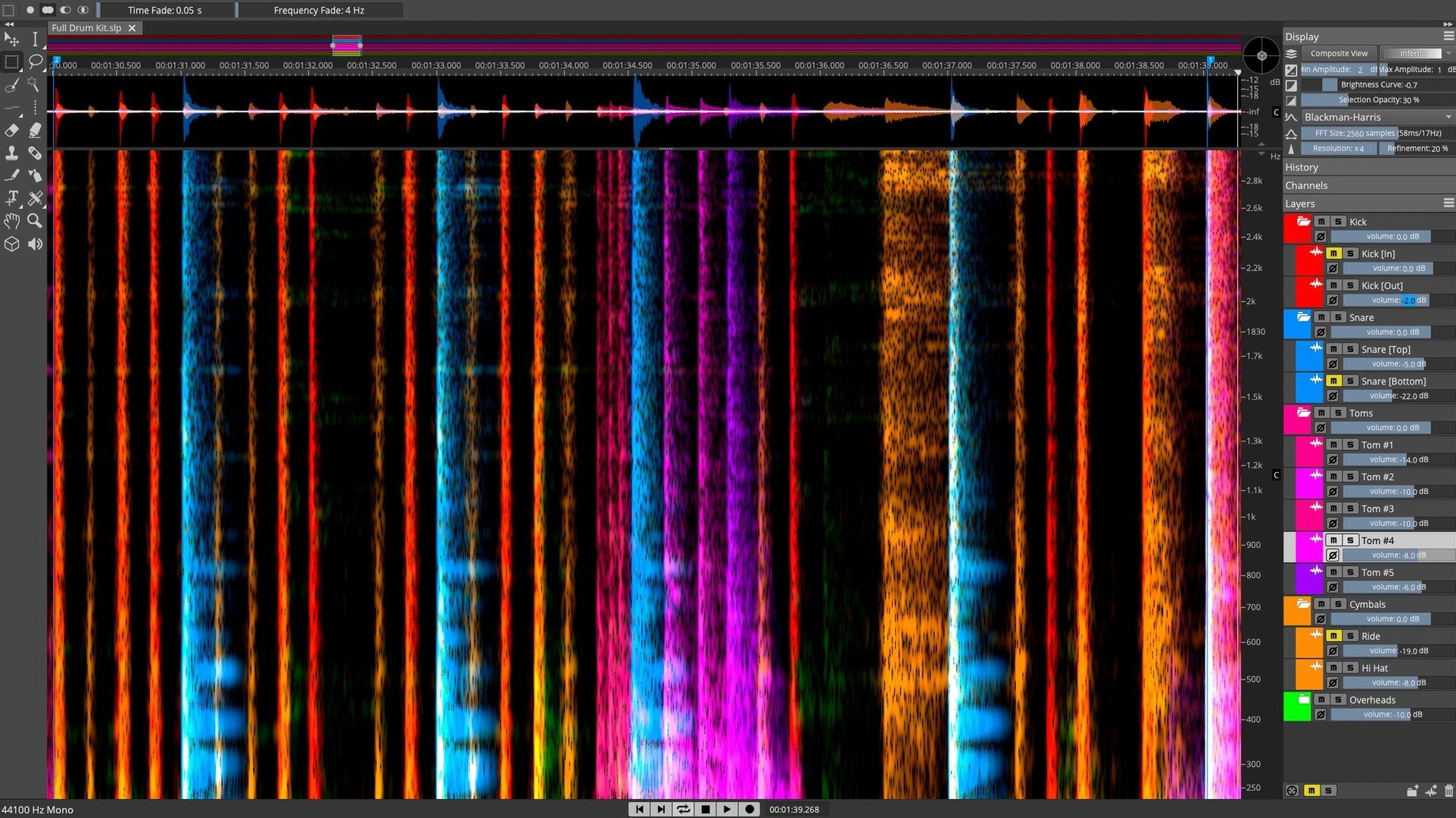
In a session, the plugin sits where you need direct access to audio data rather than waveform-level tweaks. You can unmix a full mix into stems with AI-based component separation, then edit those layers as if each one were a separate track. A bus with a difficult vocal can go through the Voice Denoiser to isolate the human voice from background noise before further processing.
ARA 2 integration with Cubase and Nuendo means the spectral view stays in sync with the host project without manual round-tripping. Manual editing tools cover the finer work: selecting, copying, and shaping spectral data directly, which helps when you need to remove a single resonant frequency or rebuild a transient.
Unmixing a Stereo Mix into Stems — Start to Finish
Here is a concrete walkthrough of a common task: pulling a finished stereo mix apart into vocal, drums, bass, and other stems. The source file sits at 24-bit, 48 kHz, typical of project exports.
- Drag the stereo file onto the SpectraLayers Pro timeline. The spectral display renders in a few seconds, showing frequency on the vertical axis against time. Wait for the full analysis pass to complete.
- Open the Unmix panel — the one labelled Unmix Tracks, not the component-level one. Select the preset Vocals, Drums, Bass, Other from the dropdown.
- Hit Run. Processing time depends on the Mac; on an M1 Max with 32 GB RAM, a four-minute track takes roughly 25–30 seconds. The layers appear as separate sub-tracks beneath the original file.
- Solo each layer to check for artefacts. Bass separation tends to be clean; vocals can leave faint cymbal bleed above 8 kHz. That is where manual editing comes in.
- Select the vocal layer, switch to the Lasso tool, and draw around the bleed region in the spectral view. Press Delete. The unwanted frequencies vanish without affecting the rest of the vocal body.
- Group the layers into a Layer Group so volume and time adjustments stay linked. Export each layer individually as 24-bit WAV via File → Export Layers.
The whole process — from import to exported stems — runs inside fifteen minutes for a typical song-length file. No external routing, no real-time bounce. If the mix has heavy reverb tails across the stereo field, expect the "Other" layer to carry most of that wash; you can dampen it later with a gate in the DAW or trim it directly in the spectral view.
Tighter Phase Coherence in Unmixed Stems
Version 13 brought a rewritten unmixing engine. The practical difference in daily use is tighter phase coherence in the separated stems. Earlier versions, especially in the 12 line, could produce comb-filter artefacts when stems were summed back together. That is largely gone.
The Pattern Finder tool got a sensitivity tweak. You now mark a sound event — say, a chair squeak at 2.3 kHz — and SpectraLayers scans the entire file for similar spectral fingerprints. Results appear in a list you can audition one by one. Before 13.0.10, the algorithm leaned too heavily on amplitude matching; now it weights the spectral shape more heavily, so quiet repetitions of the same event still register.
The Voice Denoiser moved from a global process to a per-layer process. In a multitrack project, you can now apply it to a vocal stem without touching the instrumental layers. That cuts down on the need to export, clean, and re-import.
ARA 2 integration in 13.0.20 is faster on project reload. In Cubase 13, reopening a session that contains SpectraLayers instances now recalls the spectral data in under two seconds per instance, down from four or five in the previous major version.
Bump the Undo Limit Before You Edit
Set the Undo limit before you start editing. The default is 32 steps, which fills fast when you are learning the selection tools. Bump it to 64 in SpectraLayers Pro → Settings → Editing. On a machine with 16 GB RAM or more, you will not feel the memory hit.
Map a secondary display to the spectral view if you have one. The 3D visualisation looks impressive, but for actual editing work, a flat 2D spectrogram on a 1440p or 4K monitor shows far more detail. Drag the spectral pane to the second screen and keep the layers list on the main display.
Learn two keyboard shortcuts on day one: B toggles the Brush tool, E toggles the Eraser. Most manual repair work reduces to painting frequency data in or out. The brush size adjusts with the bracket keys [ and ], same as in Photoshop.
When you first run the AI unmixing processes, the app downloads model data in the background. Let it finish. Interrupting it mid-download can leave incomplete model files that produce garbled separation results — a reinstall of the application fixes it, but the download is roughly 900 MB and worth letting complete overnight.
Runs as a Standalone App and an ARA 2 Plugin
Does it run standalone, or only as a plugin? Both. SpectraLayers Pro is a full standalone application. The ARA 2 plugin connects to Cubase and Nuendo, but you can open the app independently, edit files, and save them without ever launching a DAW. Many users who work with spectralayers mac in post-production run it standalone for batch repair jobs.
Will it replace my DAW's editing tools? It is not designed to. Think of it as a supplement for spectral-level work. You still do arrangement, mixing, and standard editing in the DAW. SpectraLayers handles the jobs where waveform view is not enough: removing a cough from a live recording, isolating a single instrument from a mix, cleaning up dialogue hum.
How much disk space does the spectral data consume? A four-minute stereo file at 48 kHz produces roughly 200–300 MB of spectral project data. The original audio stays untouched; the app works non-destructively. If you save projects with full spectral layers, budget about 1 GB of disk space per ten minutes of source material.
Does it handle MP3 or compressed formats? Yes, but you lose precision. The spectral view is built from the decoded PCM stream, so compression artefacts show up as faint horizontal lines in the 16 kHz range. Working from lossless sources gives a cleaner editing surface.
Recovering an Empty Spectral View After a Crash
ARA sync drops after a Cubase crash. When Cubase recovers, the SpectraLayers instance sometimes shows an empty spectral view. Save the Cubase project, close it, reopen it, and the spectral data reloads from the ARA state. If that fails, remove the SpectraLayers extension from the Cubase project, re-insert it, and the link re-establishes. No audio data is lost — the plugin state file persists separately.
Unmixing runs slowly on Apple Silicon. Check that you are running the ARM-native build. The disk image contains both architectures, but some users who carried forward older preferences from the Intel version end up launching under Rosetta. Right-click the app, choose Get Info, and confirm Open using Rosetta is unchecked.
Layers panel disappears. The workspace layout occasionally resets after a display configuration change. Hit Window → Workspace → Reset to Default. That restores the layers list, tool palette, and spectral view in the standard arrangement without affecting your open project.
Pattern Finder returns too many false matches. Tighten the Similarity threshold slider in the Pattern Finder panel. The default is 70%, which catches variations in dynamics; moving it to 85% restricts matches to events with nearly identical spectral contour. Useful when a snare hit repeats with consistent timbre but you want to skip ghost notes.
Exported stems sound quieter than the original. The unmixing process does not apply loudness normalisation. The separated layers sum to the original level, but individually they are lower in RMS. In the export dialog, enable Normalise to -1 dBFS peak per layer if you need stems at production level without additional DAW gain staging.
For repair jobs on buses and individual tracks, the workflow is the same: separate, isolate, then shape what remains.
- Version 13.0.20 — installer release notes published; no feature changes listed.
- macOS 12 or later
- Apple Silicon or Intel
- Interface language: English
Questions on file
Does SpectraLayers Pro work on Apple Silicon Macs?
Yes, version 13 supports both Apple Silicon and Intel Macs running macOS 12 or later.
Can SpectraLayers separate a mixed song into individual stems?
Yes, it includes AI-based track-to-stems unmixing, which works with full mixes as if they were separate tracks.
Sign in · Create an account to add a field note.
No field notes yet. A measurement, a version, a machine — they appear after moderation.