VST Plugins
Slate Digital Submerge 1.0.5
VST PluginsUpdated
| Requirement | On file |
|---|---|
| macOS | macOS 11 or later |
| CPU | Apple Silicon |
| Download | 38 MB |
A synth pad is washing across a chorus when the kick drum enters. Instead of routing a compressor to a silent bus and adjusting attack and release by ear, the engineer drops Submerge onto the pad track. The kick track is selected as the audio trigger source, Threshold is pulled down to -18 dB, and the pad breathes in time with the downbeat — no extra routing required.
| Detail | Spec |
|---|---|
| Version | 1.0.5 |
| Architecture | Apple Silicon |
| macOS minimum | 11 |
| Trigger modes | Audio, MIDI, Auto (tempo-synced) |
| Processing | Mid/Side support |
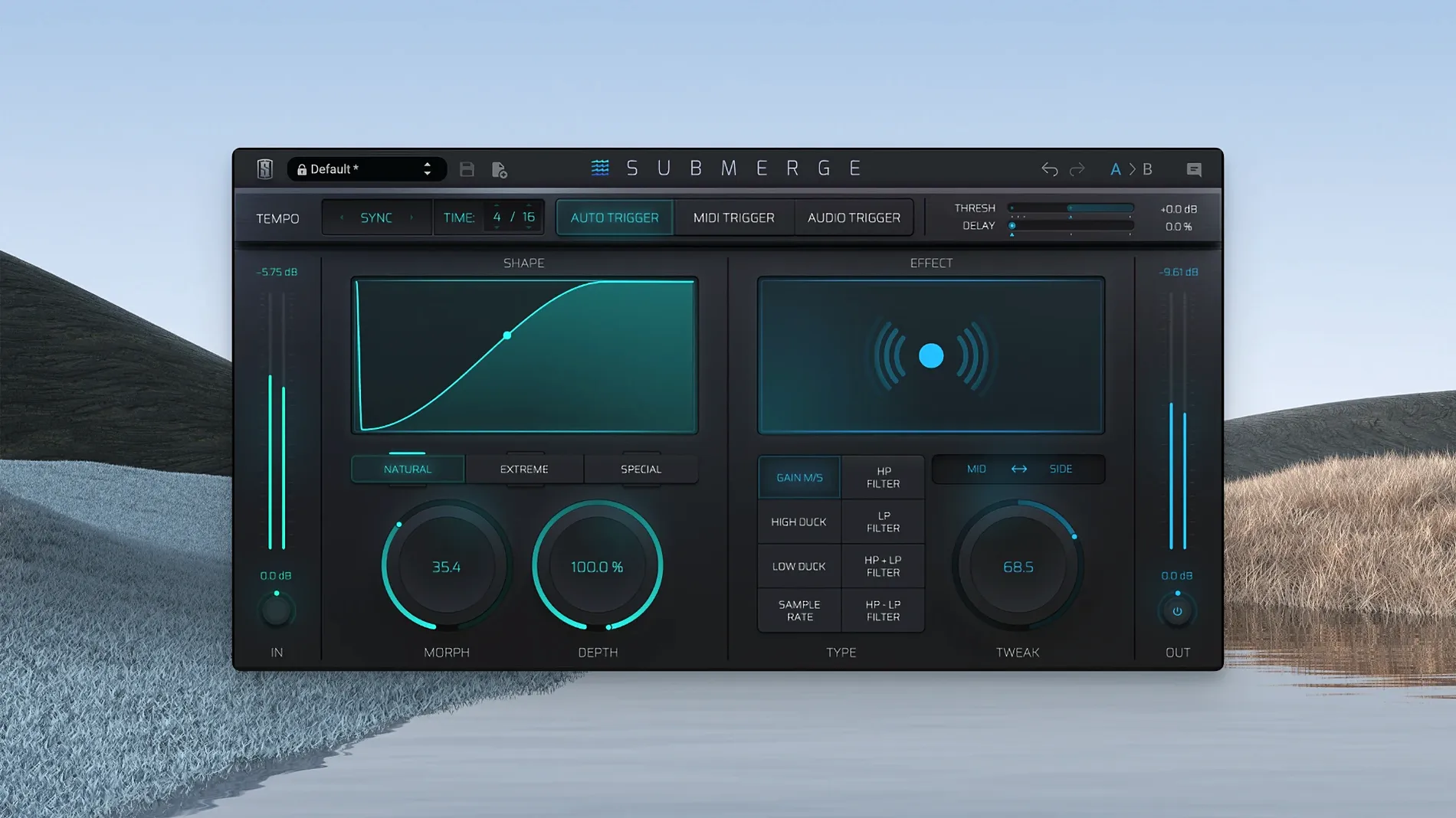
Submerge sits on the track or bus that needs to move out of the way. The plug-in offers three trigger paths. Audio mode listens to a sidechain input, MIDI mode follows incoming note data, and Auto mode generates an internal envelope locked to the project tempo — useful when no distinct trigger track exists. The core control set is compact: Threshold defines the trigger sensitivity, Speed sets the envelope response, Morph shifts the curve shape from a rounded dip to a sharp cut, and Depth determines the maximum gain reduction. Holding the Shift key inverts the entire curve, turning a duck into a push on the beat. An onboard effects section with eight processors — including sample-rate reduction — lets the user degrade or colour the modulated signal without leaving the plug-in window. Mid/Side processing confines the attenuation to the centre or the sides, keeping stereo width intact while the middle ducks. The workflow replaces multi-bus sidechain setups with a single insert point, and the tempo-synced auto trigger makes it possible to dial in rhythmic movement before any audio hits the timeline.
Envelope Control Handles Ducking a Compressor Can’t
Does Submerge replace a traditional compressor sidechain setup entirely? In many cases, yes — but not in all. It handles ducking and pumping with envelope control that a standard compressor cannot replicate without careful tweaking of attack, release and threshold curves. If the goal is transparent gain reduction triggered by another track, a conventional compressor may still be the cleaner tool. Submerge is built for movement that you hear, not movement you hide.
Another common question concerns latency. Because the plug-in operates on the track being ducked rather than requiring a routed bus with look-ahead, the processing adds only the delay inherent to its internal oversampling. On an Apple Silicon Mac running a DAW at 48 kHz, that stays under 2 ms in Audio trigger mode. Auto mode introduces no additional trigger latency because the envelope is calculated from the tempo grid, not from an incoming signal.
Users sometimes ask whether the eight built-in effects are gimmicks or genuinely useful. The sample-rate reduction effect alone can turn a clean sidechain dip into a lo-fi tape stop motion, and the high-pass filter inserted post-ducking removes low-end clutter without needing a separate EQ instance. They are not replacements for full-featured modulation or distortion plug-ins, but they prevent the need to stack three or four utilities just to audition a textured pump.
Extreme Curve Tightens Attenuation for EDM Pumping
The default curve type is Natural, which produces a rounded attenuation shape suitable for subtle ducking. Switching to Extreme tightens the envelope and makes the gain reduction more aggressive — better for EDM pumping where the effect is part of the groove rather than a mix-clearing tool. Custom curve mode lets the user draw the envelope shape manually, a feature worth exploring once the basic response feels predictable.
The Morph control is easily overlooked. At lower values it softens the transition into ducking; at higher settings it snaps the envelope into a harder shape. For a kick drum pushing a bass line out of the way, setting Morph around 60–70% gives a tighter pocket without audible clicks. For pad ducking behind a vocal, keeping Morph under 30% preserves a more natural breathing quality.
Mid/Side processing defaults to Mid-only attenuation, which ducks the centre of the stereo field while leaving the sides untouched. If the material is a wide synth pad with a strong centre vocal, this setting works immediately. For tracks with hard-panned elements — double-tracked guitars, for example — switching to Side attenuation or enabling linked Mid/Side ducking prevents the sides from masking the trigger signal. The difference is audible within seconds, and it is one of the few settings that changes the spatial character of the mix without touching a pan pot.
Audio‑Triggered Envelope vs. Drawable LFO Curves
Cableguys VolumeShaper approaches the same problem from a different angle. It uses drawable LFO curves synced to tempo, giving precise visual control over volume modulation — but it lacks audio-triggered envelope following. Submerge offers both tempo-synced triggering and real-time audio sidechain input, which makes it more flexible during live playback or when the trigger source varies in level. VolumeShaper is stronger for surgical, repeatable shaping; Submerge adapts to the dynamics of the performance.
Devious Machines Duck operates as a dedicated ducker with a clean interface and low CPU usage. It focuses on transparent attenuation and includes look-ahead to catch transients. Where Submerge diverges is in the creative domain — the eight onboard effects, the curve inversion via Shift-click, and the Mid/Side routing give it a wider palette for sound design. Duck is the pragmatic choice for broadcast-style voice-over attenuation; Submerge leans toward musical movement.
Xfer Records LFOTool also covers tempo-synced volume modulation with a flexible graph editor, and it adds filter modulation and pan shaping. However, it does not process audio-triggered envelopes natively without additional routing. Submerge consolidates trigger detection, envelope shaping and effects in a single window, which reduces the time spent setting up parallel processing chains. For a producer who wants pumping that responds to an incoming kick rather than a static grid, Submerge fills the gap that LFOTool leaves open.
Low Threshold and Deep Depth Ignore the Release Phase
The most frequent error is setting the Threshold too low and the Depth too high without listening to the release phase. A Depth setting of -24 dB with a fast Speed value can pull the signal down hard and release it abruptly, creating a choppy artefact rather than a smooth pump. Start with Depth around -8 dB and Speed at a moderate setting, then increase Depth gradually while the full mix plays. The ducking should feel like the track is breathing, not like someone is muting and unmuting a channel.
Another common oversight is ignoring the Auto trigger mode when no sidechain source is available. Producers accustomed to routing a silent kick track for sidechain purposes often assume Submerge requires the same setup. Auto mode generates its own trigger envelope from the project tempo, so a rhythmic duck can be dialled in before any audio is placed on the timeline. This is especially useful during arrangement stages when the kick sample has not been chosen yet.
Some users activate Mid/Side processing and leave the Side channel unattenuated while ducking the Mid channel heavily. On headphones, the effect can sound wider and cleaner. On a club system summed to mono, the side information collapses and the ducking becomes inconsistent. Always check Mid/Side ducking in mono before committing to a print.
Finally, the Shift-click curve inversion catches people off guard. Holding Shift flips the envelope so that the signal pushes instead of ducks. Without realising it, a user can invert the curve and wonder why the bass line is jumping forward on every kick hit. A quick check of the curve display — which reverses visually when inverted — clarifies the state. The feature is powerful for creating pumping accents on off-beats, but it needs to be engaged deliberately.
- macOS 11 or later
- Apple Silicon processor
Questions on file
How does the Auto trigger mode work in Submerge?
Auto mode generates an internal envelope that synchronises with the project tempo, removing the need for an external audio or MIDI trigger source.
Can Submerge process only the mid or side signal?
Yes, the plug-in supports Mid/Side processing so you can apply ducking to the centre channel while leaving the stereo sides unaffected, or vice versa.
What happens when I hold the Shift key in Submerge?
Holding Shift inverts the modulation curve, changing the effect from standard ducking into a pushing accent on the beat.
Sign in · Create an account to add a field note.
No field notes yet. A measurement, a version, a machine — they appear after moderation.