VST Plugins
Slate Digital Fresh Air 1.0.9
VST PluginsUpdated
| Requirement | On file |
|---|---|
| macOS | macOS 11 or later |
| CPU | Apple Silicon |
| Download | 40 MB |
Mixes that feel dull or closed‑in often lack energy in the upper octaves. Cranking a shelf EQ can introduce brittleness, while static exciters tend to wash out the source. Slate Digital attacked this with a processor that listens to the incoming signal and applies high‑frequency lift only where the material can take it.
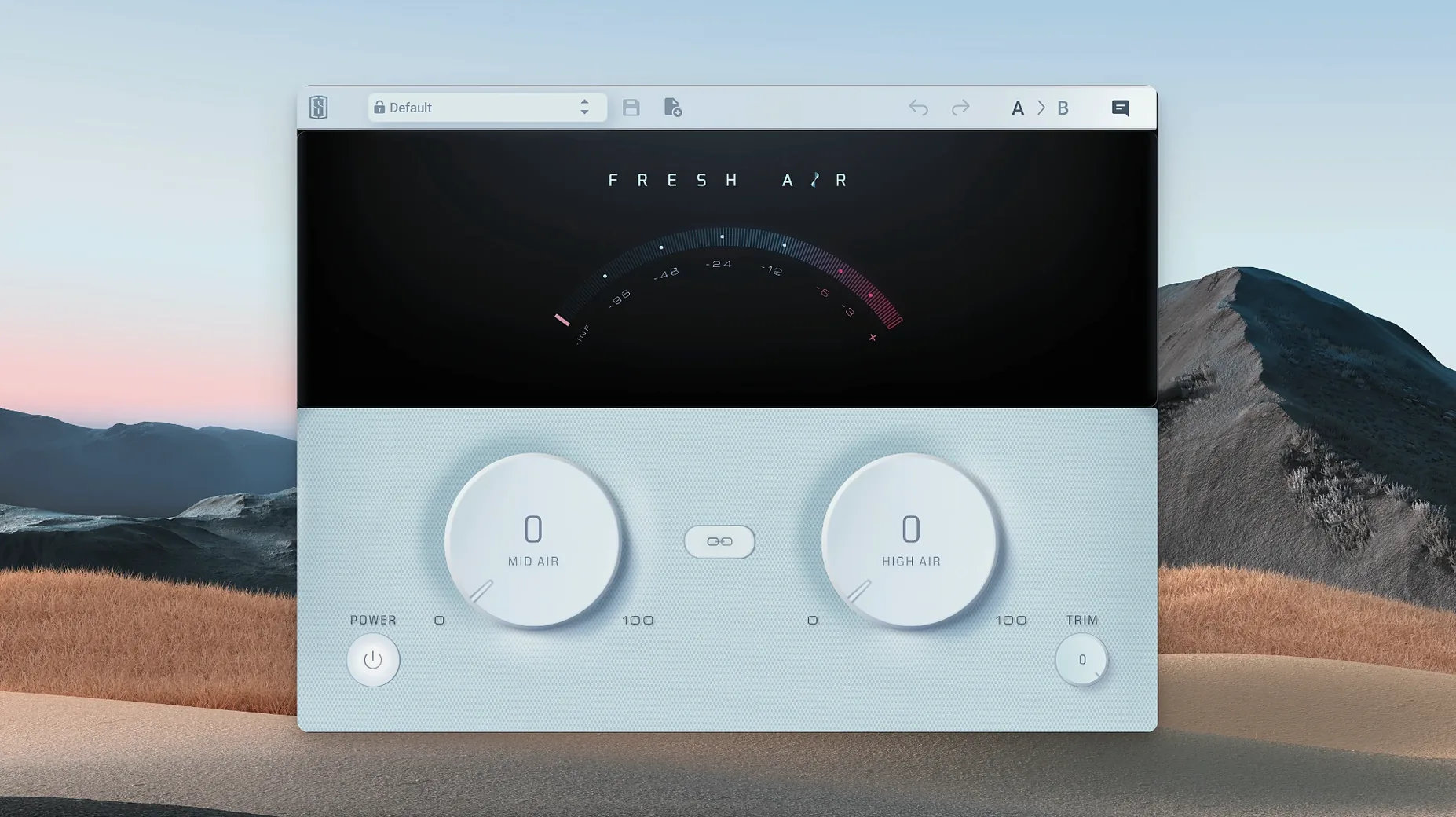
The plugin centres on two controls: Mid Air and High Air. Mid Air pushes upper‑mid presence forward, which helps a vocal cut through a dense arrangement or gives snare wires extra crack. High Air reaches further up for the sheen you would expect from a well‑maintained tape machine or a quality console’s air band. A Link button ties the two knobs together so you can sweep both ranges with a single turn, and a Trim control pulls the output level back into line when the processing adds gain.
Place Fresh Air on a drum bus and dial Mid Air clockwise until the stick attack of the kit becomes tactile; then nudge High Air to open the cymbals without making them sibilant. On a full mix, small moves go a long way — half a dB of linked lift often restores the sense of space that gets lost during tracking. The dynamic nature of the algorithm means transients stay sharp while sustained material receives the bulk of the enhancement.
The processor runs on Apple Silicon Macs under macOS 11 and appears as a standard VST, AU or AAX plug‑in. It ships with a single English‑language interface and fits into any insert slot where a mix needs top‑end extension without the usual phase or fatigue penalties.
Window-Size Memory Fix and Workflow Tidying
Version 1.0.9 landed as a maintenance release that tidied up a handful of workflow annoyances rather than rewriting the signal path. The most visible fix addresses the plugin window refusing to remember its size between sessions — prior builds would snap back to a default small size on reopening, forcing a resize every time you loaded a project. Now the window state sticks, so a Full HD screen layout stays put.
Apple Silicon native support arrived in an earlier point release, but 1.0.9 cleaned up a specific edge case where the AU version could report a one‑sample timing discrepancy under heavy Rosetta‑wrapped session loads. Translation: users running hybrid plug‑in chains on M‑series machines no longer see a tiny timing offset creep into delay‑compensated buses.
Less flashy but equally practical, Slate Digital tightened the iLok handshake so Fresh Air no longer occasionally drops its activation when the machine wakes from deep sleep. If you leave a session open overnight, the plugin stays authorised rather than flashing a silent bypass.
Proportional Gang Control via the Link Button
The Link button does more than gang the two knobs. Click it once and the ratio between Mid Air and High Air freezes at whatever offset you have dialled in — turn either control and the other follows proportionally, not just 1:1. This means a vocal preset with Mid Air at +3 and High Air at +1.5 will keep that 2:1 relationship as you nudge both upward on a different singer.
Double‑clicking any knob returns it to zero instantly, which is standard across many plugins but not always listed. Right‑clicking the Trim control toggles between dB and a simple clip indicator mode that shows only when the output exceeds 0 dBFS — useful on a master bus where you want a warning rather than a constant meter.
The interface is fully keyboard‑navigable. Tab cycles through the four controls, arrow keys adjust values in fine increments, and holding Shift while tapping an arrow jumps in coarser steps. This becomes relevant when you are riding Mid Air during playback and do not want to reach for the mouse.
Oversampling First, Then Trim and Air
Fresh Air ships with a default state that leaves Trim at unity and both Air controls at zero. The first change worth making is not on the plugin at all — it is in your DAW's oversampling settings. The processor does not oversample internally, so running a session at 44.1 kHz can fold back aliasing from extreme High Air boosts on bright sources like hi‑hats or acoustic guitar. Bumping the project to 88.2 kHz or engaging your host's per‑plugin oversampling (where available) cleans this up audibly.
Inside the plugin, pull Trim down by 3 dB before you start dialling. Fresh Air applies makeup gain that can push an already‑hot channel into clipping, and backing off early prevents the loudness illusion from steering your decisions. Once the tone is set, bring Trim back up to match perceived level, not peak level — your ears will tell you when the bypassed and processed signals sit at the same apparent loudness.
Set the Link button behaviour to your default workflow and leave it. If you regularly process full mixes, keep Link engaged so both bands rise and fall together; if you work on individual drums and vocals, unlink by default and treat Mid Air and High Air as independent tools. The plugin remembers this preference per instance, not globally, so saving a default preset with your chosen link state saves a click every time.
How Fresh Air Fits with Other Apps and macOS
Fresh Air sits neatly alongside any convolution reverb or delay because it processes only frequency content, not time relationships. Insert it after a reverb return to give the tail more definition without pulling the dry signal forward — Mid Air at +1.5 on a plate return makes the vocal sit in the room rather than behind it.
On macOS, the plugin respects Audio Unit host callbacks for latency compensation. Logic Pro users can place Fresh Air on a parallel aux send, dial both controls to +5 or higher, and blend the over‑processed signal underneath the dry track for a trick that mimics parallel compression but works on top‑end density instead of dynamic range. The Trim control keeps the aux return from overloading the summing bus.
Fresh Air also pairs well with Slate's own Virtual Mix Rack, which is how many users first encounter it. Dropping Fresh Air into a VMR slot after an EQ module lets you shape tone with surgical precision before handing off to the dynamic exciter for broad‑stroke lift. Outside the Slate ecosystem, it works as a standard insert in Ableton Live, Studio One, Cubase and any other AU/VST/VST3/AAX host that supports 64‑bit processing on Apple Silicon.
macOS accessibility features recognise the plugin's controls as standard stepper elements, so VoiceOver users can adjust Mid Air, High Air and Trim with system‑level navigation. The interface does not use custom‑drawn knobs that break screen reader focus, which is still rare among audio plugins.
iLok Activation Lapse Silences the Plugin
Plugin appears in the DAW but produces no sound. This usually means the iLok activation has lapsed. Open iLok License Manager and confirm Fresh Air shows a green dot next to the licence. If it does not, sign into your iLok Cloud session or connect an iLok dongle with the activated licence. Machine activation also works offline but requires a one‑time internet check during setup.
High Air introduces a faint whistling on cymbals. Back the control off by 1 dB and engage a low‑pass filter after Fresh Air at 18 kHz or wherever your monitoring chain stops. The processor can excite frequencies above your hearing or speaker range that still interact with downstream plug‑ins, and a gentle cut prevents ultrasonic build‑up without dulling the audible sheen.
Session recall on a different Mac loads Fresh Air in bypass. The second machine likely lacks the iLok licence. Either move the iLok dongle across or activate iLok Cloud on the new machine. Fresh Air does not support licence‑free recall — if the authorisation is missing, the host will bypass it silently rather than emitting noise or crashing.
Mid Air and High Air interact strangely on a bass‑heavy track. The dynamic algorithm analyses the full‑band signal to decide where to apply lift. A kick drum with heavy sub energy can cause the detector to pull back on mid‑range presence. Insert a high‑pass filter before Fresh Air at around 200 Hz on the side‑chain input if your DAW supports plug‑in side‑chaining; if not, duplicate the track, high‑pass the duplicate, and process only the filtered copy.
Trim control does not prevent clipping on the master bus. Trim adjusts output level after the processing stage, but it does not act as a brickwall limiter. If your pre‑Trim signal exceeds 0 dBFS by a large margin, reducing Trim simply lowers an already‑clipped signal. Place a true peak limiter after Fresh Air on the master bus and use Trim to hit the limiter at a sensible level.
- macOS 11 or later
- Apple Silicon processor
Sign in · Create an account to add a field note.
No field notes yet. A measurement, a version, a machine — they appear after moderation.