VST Plugins
Slate Digital Murda Melodies 1.1.1
VST PluginsUpdated
| Requirement | On file |
|---|---|
| macOS | macOS 11 or later |
| CPU | Apple Silicon |
| Download | 179 MB |
Producers chasing warped loops and unstable melodic textures tend to reach for Murda Melodies. Built with Murda Beatz, the plugin chains multiple effects into a single window aimed at pushing a clean melody somewhere darker.
Mono-to-Stereo and Native Apple Silicon Support
- Plug-in formats: AU, VST, VST3, AAX.
- macOS requirement: macOS 11 or later, native Apple Silicon support (added in version 1.0.8).
- Channel handling: Mono-to-stereo operation was added for AU and AAX in version 1.0.8.
Building a Sound — Workflow Order
- Load a preset from the bank of more than 50 custom starting points. Each one sets up a distinct combination of the internal effects, from subtle detune to outright pitch collapse.
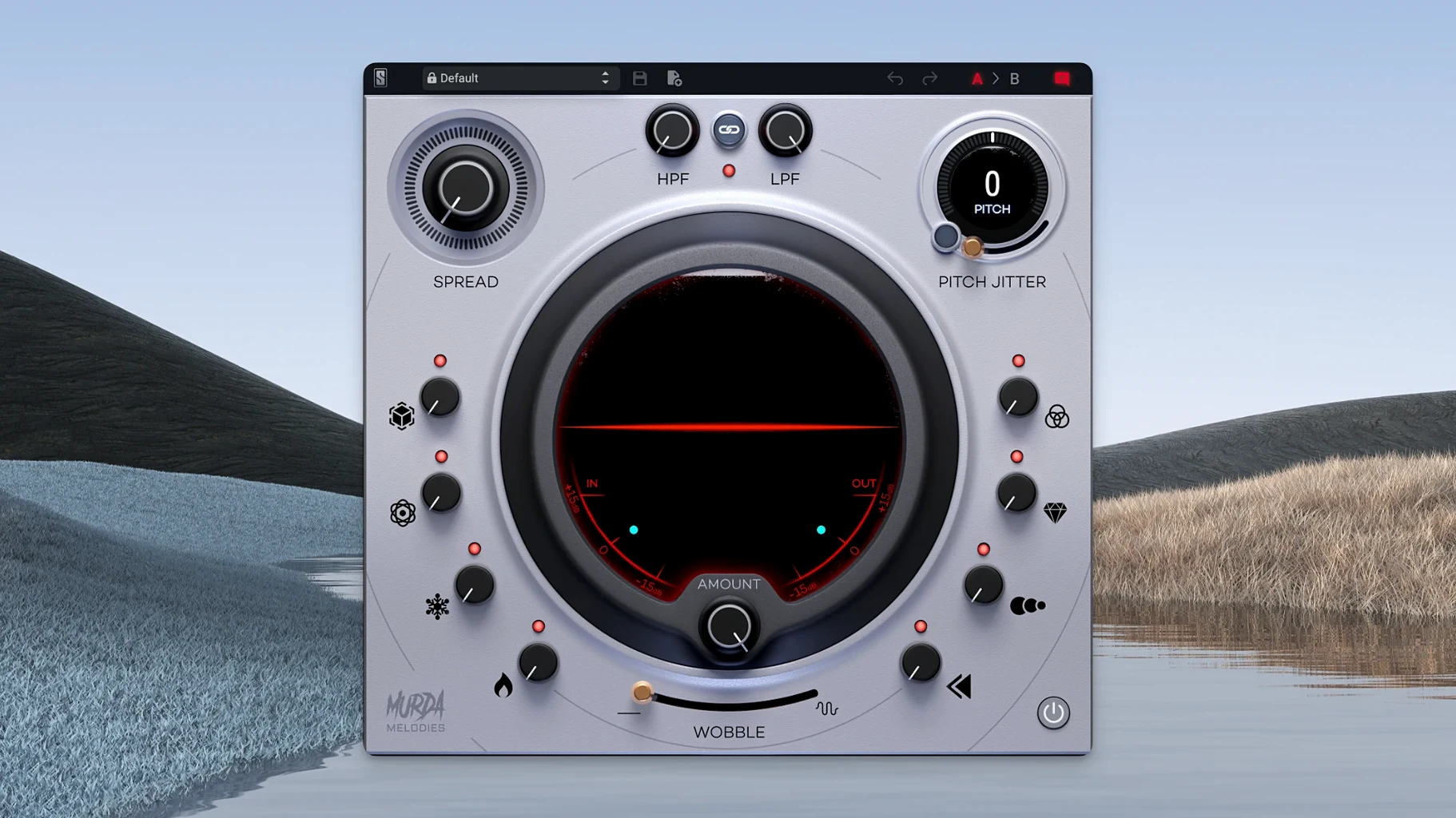
- Adjust the Pitch Jitter control to introduce nonlinear artefacts. Small values add a worn-tape instability; higher settings fracture the pitch into unpredictable glitches.
- Dial in the vinyl wobble effect to layer slow modulation underneath the jitter. This section mimics a warped record, pushing the stereo field off-centre and adding low-end warble.
- Blend the processed signal back against the dry source to keep the original transient definition intact while the effects fill the space around it.
The control set is deliberately constrained. Murda Melodies does not try to be a modular multi-FX rack — it focuses on a specific chain of degradation tools that interact predictably, making it quick to land on a useable texture without patching six separate plugins.
Silence After Loading a Preset
A few recurring issues surface in user reports, most of them tied to host expectations rather than the plugin itself.
Silence after loading a preset. The pitch shifter defaults to a ±0 position, but some presets push it to an extreme octave shift that can leave a melodic line sitting outside the audible range. Check the pitch knob first — a 4-octave span means a single twist can send a hi-hat pattern into sub-bass territory or a bass line into the stratosphere. Pull it back toward centre before assuming the plugin has failed to process.
Stereo image collapse in mono. The stereo widener is mono-compatible by design, but driving it hard while the vinyl wobble is active can create phase cancellations that thin out the signal when summed to mono. If the track needs to survive a club PA or a phone speaker, ease back the widener to roughly 40% and keep the wobble rate slow — fast modulation multiplies the phase interaction across the frequency spectrum.
DAW-specific hiccups. Some hosts on Apple Silicon still run AU plugins inside a compatibility layer by default. If Murda Melodies shows up as an Intel binary in Activity Monitor, force your DAW to open under Rosetta or confirm the AU cache has been rescanned since the 1.0.8 update. For Logic Pro users, a full AU validation reset (Logic Pro menu → Settings → Plug-in Manager → Full Audio Unit Reset) clears stale cached metadata.
Latency spikes with the reverse processor. The reverse effect needs a lookahead buffer, so inserting Murda Melodies on a live track while monitoring will introduce noticeable delay. It performs best during mixing or sound design, not while tracking. If your DAW supports per-track latency compensation, keep it engaged; if not, print the processed audio and nudge it back manually.
Double-Click Knobs to Reset Defaults Fast
Several details in the interface reward the first week of exploration.
Double-clicking any knob returns it to its default value — a faster reset than the modifier key most DAWs use for fine adjustments. The pitch control snaps to semitones when holding Shift while dragging, making octave jumps precise without squinting at the readout. Right-clicking the preset browser opens a floating menu that skips the arrow-based navigation, shaving seconds off patch auditioning during a fast session.
The high-pass and low-pass filters are placed at the output stage, not the input. That means you can drive the pitch jitter and vinyl wobble into harsh, aliased extremes and then shave off the brittle top end with the low-pass filter without touching a separate EQ plugin. A common move: crank the jitter until the transients crack, then roll the filter down to 6–8 kHz to turn the debris into a lo-fi haze that still sits in a mix.
The plugin also remembers its last state when you close and reopen a session, so a preset tweaked during late-night experimentation does not vanish if you forget to save a user patch. That state is stored in the DAW project file, not in a separate preset folder, making session portability straightforward.
Feed Short Dry Material to Isolate Pitch Jitter
Start by feeding Murda Melodies short, dry material: a four-bar MIDI loop bounced to audio, a one-shot vocal stab, a simple sine arp. Complex polyphonic sources can overwhelm the pitch jitter and wobble interactions, making it hard to isolate what each knob contributes. Once the behaviour is clear on sparse material, dense signals become more predictable.
Spend ten minutes auditioning presets with the mix knob at 50% rather than 100% wet. Many of the factory patches — crafted by Murda Beatz and the Slate Digital team — sound radically different at half blend, revealing textures that a full-wet playback masks. This is especially true for the reverse and delay combos, where the dry signal anchors the rhythm while the processed tail floats behind it.
If you are building a trap or R&B beat from scratch, insert Murda Melodies on a dedicated FX return rather than directly on the melodic bus. Sending a clean copy of the melody to the return lets you automate the send level per section — dry and upfront in the verse, submerged and unstable in the hook. The plugin’s internal delay syncs to host tempo, so rhythmic repeats stay locked without manual calculation.
Runs as a Native ARM Binary for Efficient Resource Sharing
Murda Melodies integrates cleanly with macOS audio routing. On Apple Silicon machines running macOS 11 or later, the plugin loads as a native ARM binary in any AU, VST, VST3 or AAX host, meaning it shares resources efficiently alongside other native plugins in a session. No bridging overhead, no extra latency introduced by translation layers.
For producers who build beats in one environment and mix in another, the VST3 and AU formats cover the two most common macOS workflows: VST3 for cross-DAW portability (Ableton Live, Bitwig, Studio One) and AU for Logic Pro’s native plug-in architecture. A session built with the VST3 instance in Ableton on a MacBook can be rebuilt with the AU version in Logic on a desktop without parameter discrepancies — the preset format is identical across both.
The plugin also plays well with standalone sound design setups. Loading Murda Melodies inside a lightweight AU host like Hosting AU lets you process samples outside a full DAW, recording the output directly into Finder via a system audio capture utility. Combine that with macOS’s built-in Audio MIDI Setup to create an aggregate device that routes the processed signal into a second recording app, turning the plugin into a self-contained texture generator.
When used inside a Complete Access subscription alongside other Slate Digital tools, Murda Melodies sits naturally in a chain that includes virtual analogue processing and bus compression — the degradation it adds contrasts with the cleaner modelling elsewhere in the suite. A common patch: an 808 pattern through Murda Melodies for wobble and grit, then into a bus compressor to glue the movement back into the low end.
- macOS 11 or later
- Apple Silicon or Intel processor
- AU, VST, VST3 or AAX host
Questions on file
Does Murda Melodies run natively on Apple Silicon Macs?
Yes, native Apple Silicon support was introduced in version 1.0.8.
What plug-in formats are included?
Murda Melodies ships as AU, VST, VST3 and AAX plug-ins.
Sign in · Create an account to add a field note.
No field notes yet. A measurement, a version, a machine — they appear after moderation.