VST Plugins
Supertone Air 1.0.1
VST PluginsUpdated
| Requirement | On file |
|---|---|
| macOS | macOS 10.13 or later |
| CPU | Apple Silicon, Intel 64-bit |
| Download | 408 MB |
A production sound file lands on your timeline with the exact room tone the director wants. The ADR recorded later in a booth sounds flat and disconnected. Rather than manually building a reverb tail and EQ curve by ear, you load Supertone Air on the dry track, feed it a snippet of the original location audio, and let the plug-in map the acoustic profile across in a few seconds.
Capturing a room signature with Acoustic Scene Transfer
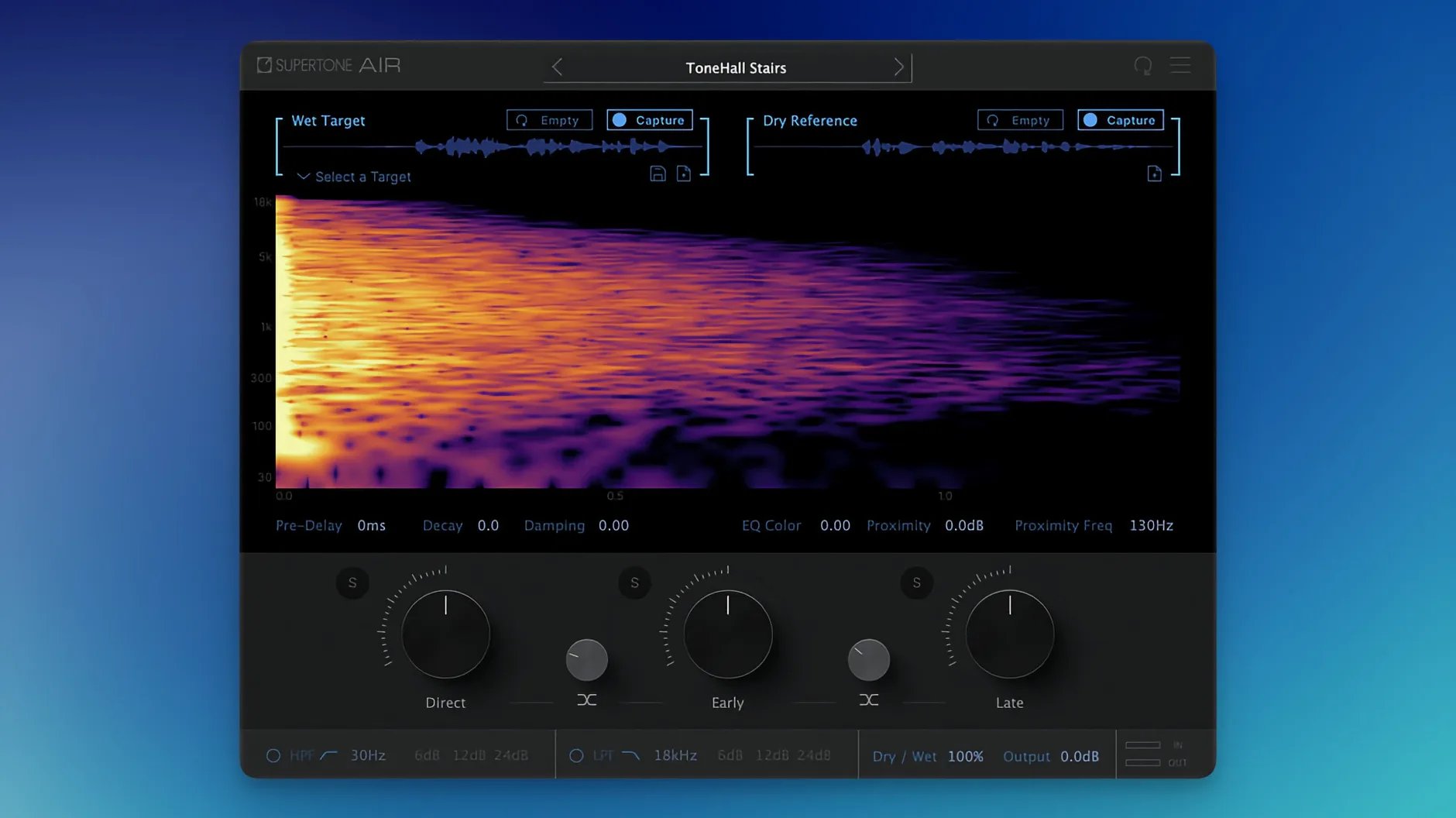
At its core, Air runs an Acoustic Scene Transfer neural network that analyses two signals in parallel. The reference input takes a short segment of the production dialogue — typically 2–5 seconds is enough — and the target input receives the dry ADR. Once analysis completes, the plug-in generates a composite reverb and EQ profile drawn from the reference. The processing covers decay time, high-frequency damping, early reflection density, and a proximity parameter that shifts the sense of distance between speaker and microphone. Results stay coherent at 44.1 kHz, 48 kHz, and 96 kHz sessions, and the engine runs natively on Apple Silicon without a Rosetta translation layer.
Dial refinement and practical limits
The matched output is not a binary on/off state. Three reverb controls let you shorten the tail, darken the damping further, or pull the voice slightly forward in the virtual space without breaking the captured identity. These adjustments prove useful when the reference room signature is close but needs a minor tweak to sit against the rest of the mix. The plug-in does not handle noise reduction or spectral denoising — it assumes the dry recording is already clean. It also works strictly as a dialogue tool; feeding it sustained musical material tends to produce unpredictable results because the neural networks were trained on speech patterns. For post-production editors moving between Pro Tools, Logic, and other DAWs, Air ships as AAX, VST3, and AU formats on macOS 10.13 and later.
Renamed plug-in file breaks old DAW sessions
The update to 1.0.1 [GUISEPPE] brought two changes that matter more in practice than the short release notes suggest. The plug-in file name shifted from Air to Supertone Air. That sounds cosmetic, but anyone who had both Supertone Air and Sound Particles Air installed on the same machine knows the previous naming collision caused genuine headaches. Some DAWs would load the wrong plug-in, others would refuse to scan either. The renamed file means the two now sit cleanly side by side in the plug-in list without arbitration.
The installation issue that blocked users with a prior Sound Particles Air installation has been resolved. In the earlier build, the shared plug-in identifier sometimes prevented Supertone Air from appearing in Pro Tools or Logic after installation. With 1.0.1, the installer no longer conflicts, and the plug-in passes AU validation and AAX scanning on the first attempt. If you are still running the initial release, moving to the current version clears the interference without needing to uninstall Sound Particles Air first.
Too-short reference clips hollow out the result
One recurring snag is a thin or phasey result when the reference clip is too short. The neural network needs enough signal to separate direct sound from reflections — a single word or a percussive consonant rarely gives it enough to work with. The fix is simple: feed it 3–5 seconds of continuous speech from the same angle and distance. A longer reference consistently produces a denser, more stable reverb match.
Another issue surfaces when the reference was recorded with a lavalier and the ADR on a large-diaphragm condenser. The proximity parameter helps but cannot fully compensate for radically different polar patterns and off-axis colouration. In those cases, most engineers add a gentle high-shelf cut after Air in the chain — around 1–2 dB above 8 kHz — to bring the ADR closer to the body of the lav signal before the match runs.
Users occasionally report that the plug-in introduces a short processing delay when used as a real-time insert. Air is optimised for AudioSuite offline rendering, and using it in real-time on a busy session can push the CPU enough to cause dropouts at low buffer sizes. The practical workflow is to capture the profile in real-time while auditioning, then commit the result via AudioSuite once the match feels right.
It activates offline and captures outdoor spaces
Does it need an iLok or always-online connection? No. Activation is handled locally, so a machine without internet access after installation runs Air without trouble.
Can it match outdoor spaces, or only rooms? It captures whatever acoustic signature is present in the reference — outdoor slap from buildings, forest trails, car interiors. The network does not distinguish between interior and exterior; it simply profiles the reverb and EQ characteristics it measures.
Will it work on a Mac with an M1 or M2 chip? Yes. The plug-in includes native ARM support, so it loads without Rosetta in any DAW that itself runs natively on Apple Silicon.
Does it handle stereo or only mono dialogue tracks? Air works on mono sources, which covers the vast majority of dialogue editing. It does not process stereo interleaved files as a single instance, though you can route dual-mono channels through separate inserts if needed.
Fitting Air into a working chain
In a typical ADR repair chain, Air sits early — after broadband noise reduction but before any final EQ or compression. The logic is straightforward: you want the reverb and room tone printed into the dry signal before dynamics processing reacts to the added tail. Placing Air after a compressor can exaggerate the reverb envelope in ways that sound artificial.
The plug-in also plays well with clip-based effects in Pro Tools. Because Air exports its captured space as a WAV file, you can take a room profile from one session and reuse it across an entire episode without re-analysing the reference each time. Exported Air profiles share cleanly between workstations running the same version, which helps when an assistant editor does the matching passes and hands the session off to the re-recording mixer.
For editors who lean heavily on offline workflows, Air fits naturally alongside RX modules and other AudioSuite processors. A common move is to batch-process a full reel of ADR clips in one pass: load the reference once, capture the profile, then select all the dry clips on the track and run AudioSuite across the selection. The processing time per clip is short enough that an entire reel finishes in under a minute on current Apple Silicon machines.
Outside Pro Tools, the AU version integrates into Logic's selection-based processing, and the VST3 build works in Nuendo and Cubase's direct offline processing window. The reverb and EQ controls remain available during offline preview, so you can adjust decay or damping while auditioning the result before committing. Users who want to share profiles across DAWs can save the Air profile file from any format and load it into another — the profile format is cross-platform between AAX, AU, and VST3 instances.
- Plug-in file name — changed from Air to Supertone Air.
- Installation conflict — fixed an issue that blocked installation when Sound Particles Air was already present.
- macOS 10.13 or later
- Apple Silicon or Intel processor
- DAW supporting AAX, VST3, or AU plug-in formats
- Session sample rates: 44.1 kHz, 48 kHz, 96 kHz
Sign in · Create an account to add a field note.
No field notes yet. A measurement, a version, a machine — they appear after moderation.