Mac Apps
AmpliTube 5.8.2
Mac AppsUpdated
| Requirement | On file |
|---|---|
| macOS | macOS 10.15 or later |
| CPU | Apple Silicon, Intel 64-bit |
| Download | 3.1 GB |
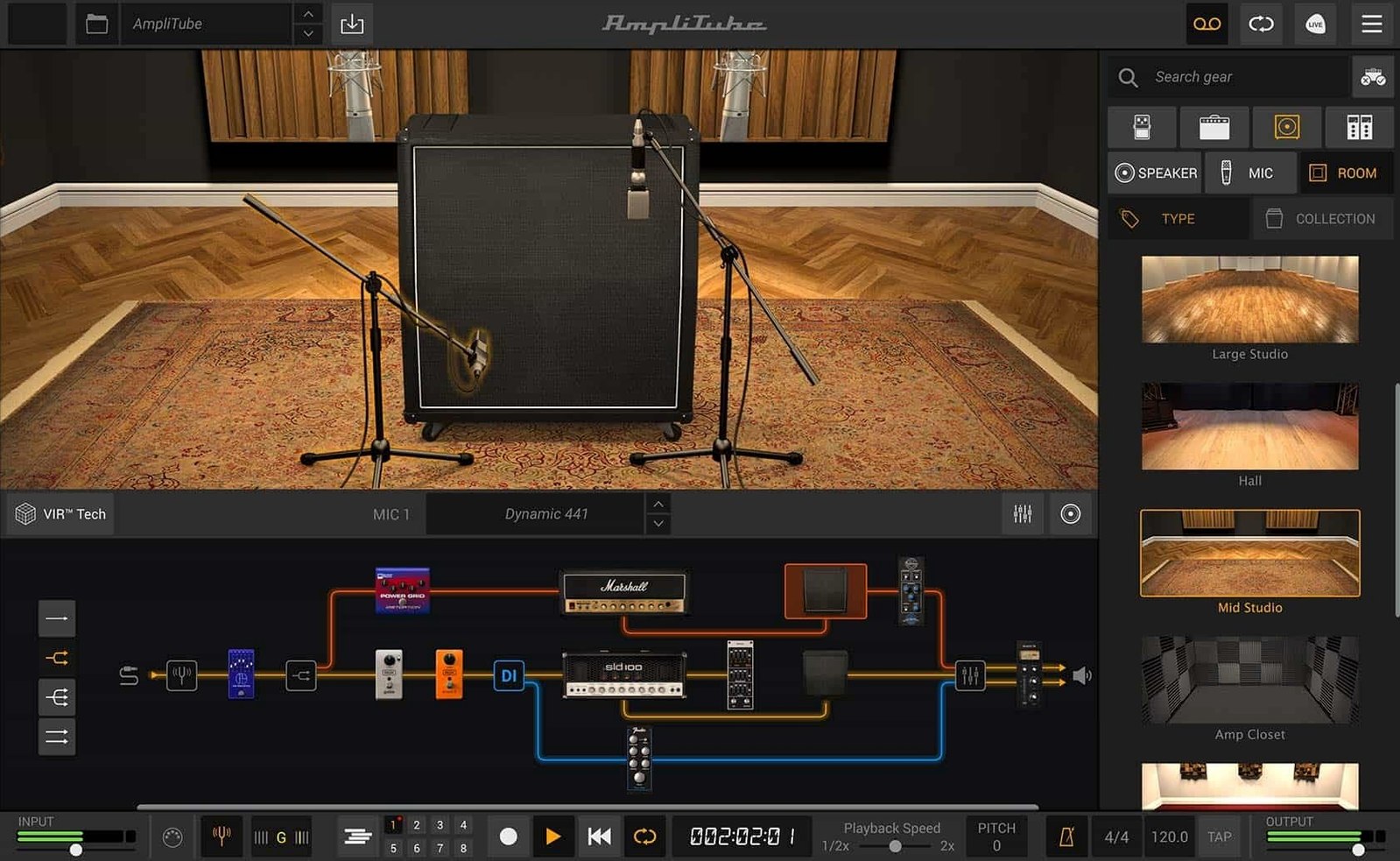
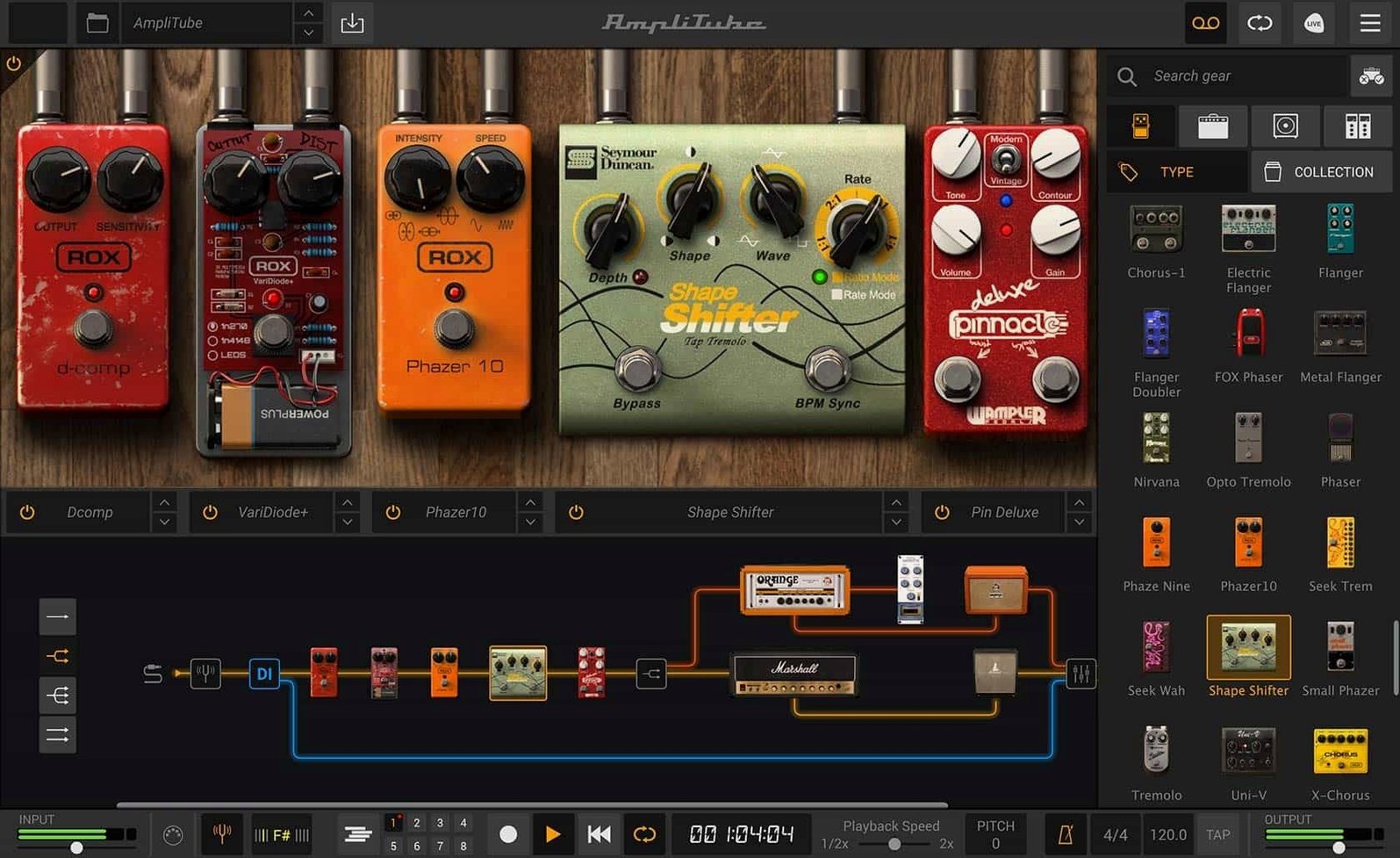
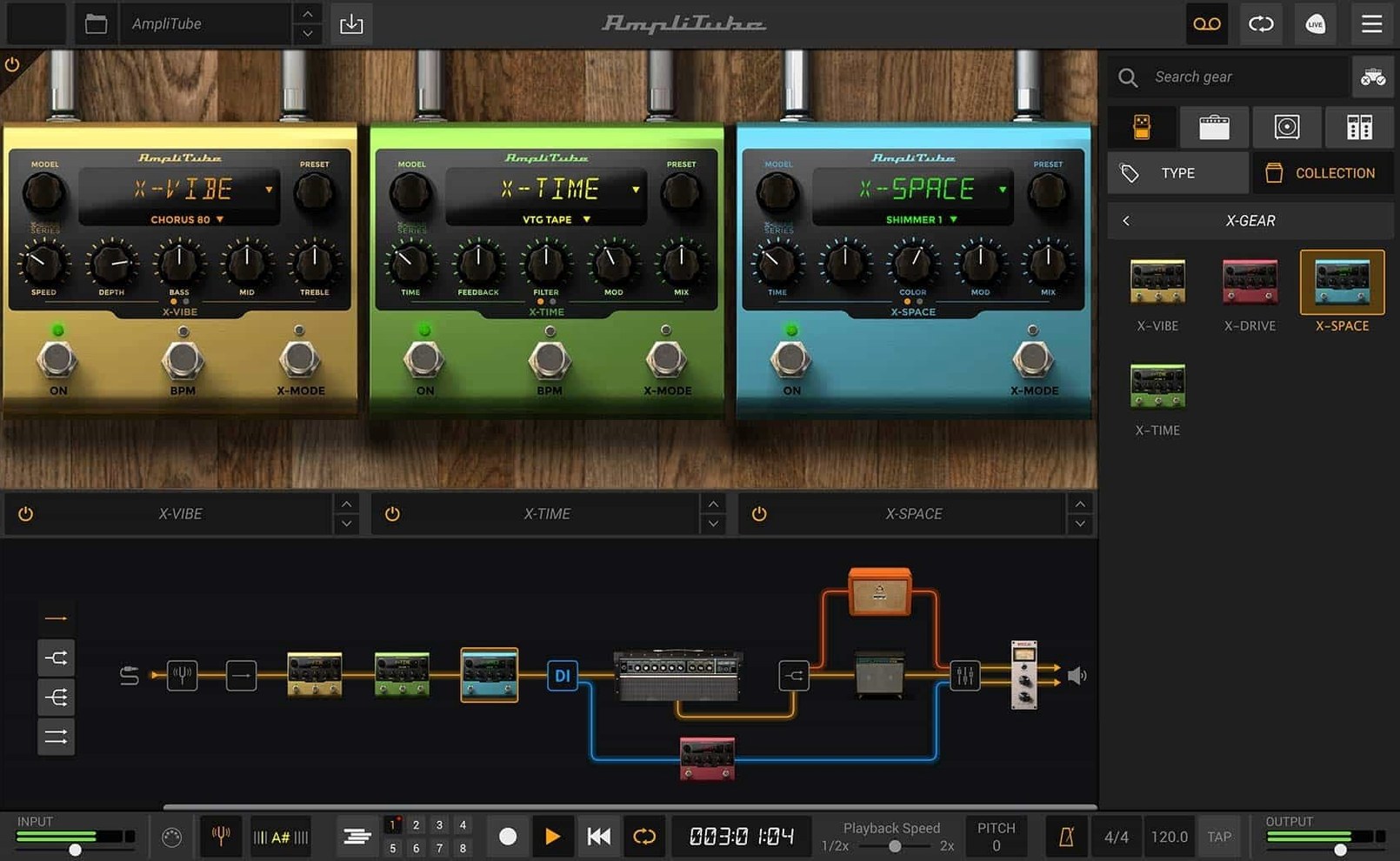
If you treat a DAW as a studio control room, AmpliTube operates as the live room next door — a self-contained rig of modelled amplifiers, cabinets, and effects you can route in ways a physical setup rarely allows. Version 5.8.2 continues that approach with a signal chain built around drag-and-drop series and parallel routing, plus a mixer that carries its own effects rather than relying on downstream processing.
Build Parallel Rig Paths Without Extra DAW Routing
- Building layered tones via parallel amp and cabinet paths without extra bussing in a host DAW.
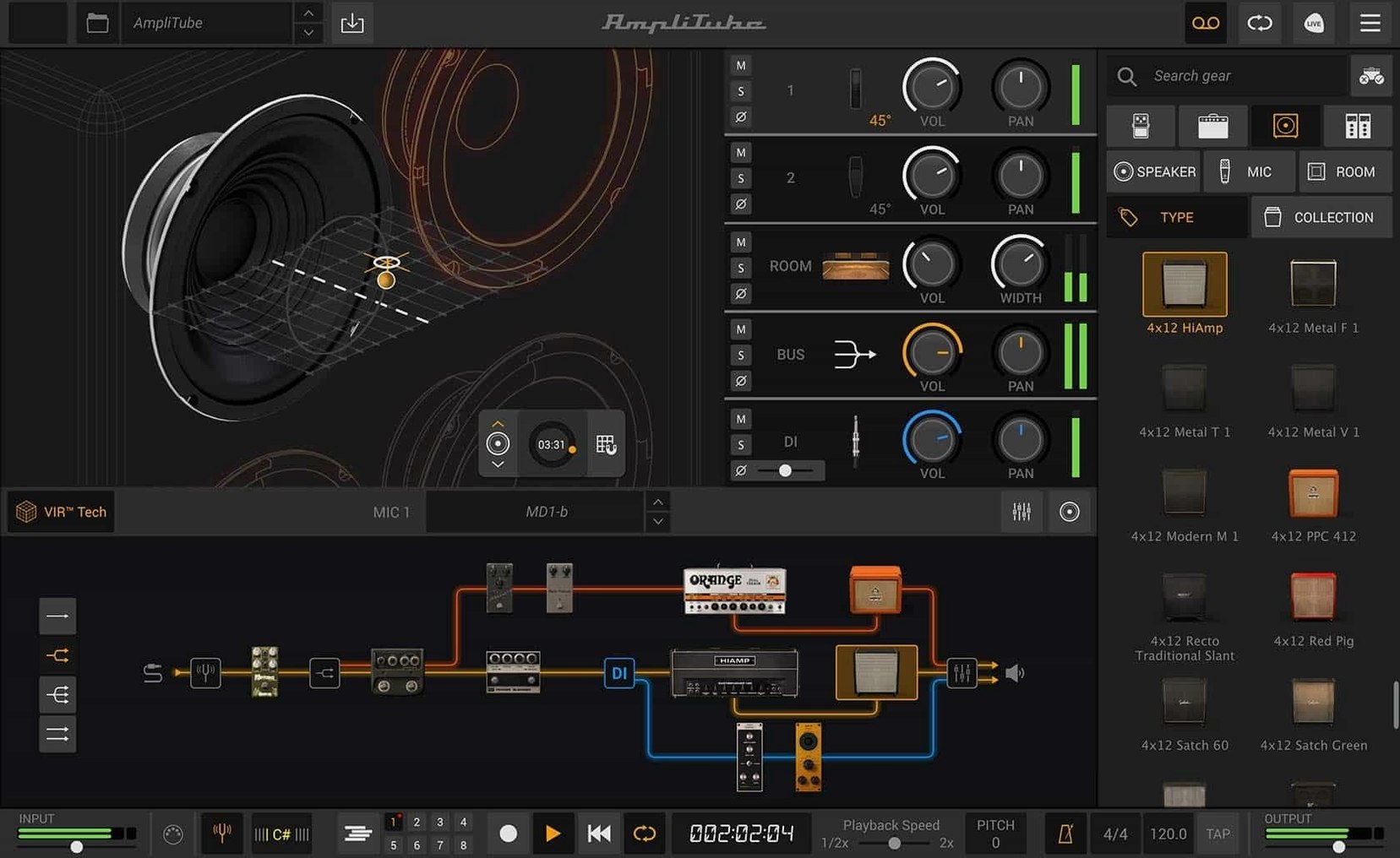
- Auditioning cabinet and mic combinations quickly through the VIR (Volumetric Impulse Response) section, which draws from more than 100 redesigned cabinets.
- Inserting rack-style processing — 23 new rack effects are available — directly into a guitar chain before hitting the amp stage.
- Mixing a processed amp signal with a direct DI signal using the redesigned mixer, all within a single plug-in window.
5 Amps Included—The Full Catalog Depends on Your Edition
- The 5 included amp models give a starting point, but the full catalogue is tied to the specific edition installed.
- Two new pedals extend the front-end options; a larger collection requires the Max configuration.
- Running multiple instances with complex parallel routing and VIR cabinets can load the CPU noticeably on older Mac hardware.
Installing and opening it for the first time
The disk image contains a standard installer — mount it, run the package, and let it place the standalone app and plug-in components where they belong. After installation, launch the standalone version once before opening a DAW. That first launch prompts AmpliTube to scan its gear library and build the internal model index. Skipping straight to a plug-in scan inside Logic or Ableton Live occasionally leaves models missing from the browser, and a single standalone cold start avoids that.
The plug-in formats land in the usual directories: AU components in /Library/Audio/Plug-Ins/Components, VST and VST3 in their respective folders, AAX in the Avid path. Most DAWs pick them up on the next rescan, though Digital Performer users may need to re-examine the AU cache manually. The standalone app lives in /Applications and works without a host — useful for practice, tone tweaking, and late-night headphone sessions where loading a full project feels excessive.
Preferences to Change Before You Play a Note
AmpliTube ships with sensible defaults, but a few preferences reward immediate attention.
Audio buffer and sample rate
Open the standalone app's audio preferences and set the buffer size to 128 samples if your interface handles it. The factory default of 256 samples adds roughly 6 ms of round-trip latency at 44.1 kHz — playable, but noticeable through fast staccato lines. Drop to 64 samples for tracking DI parts with tight transients, provided no crackling appears. Match the sample rate to your usual project rate. Mismatched rates between AmpliTube and a DAW session cause subtle pitch shifts that are easy to miss until double-tracking sounds sour.
Oversampling behaviour
The cabinet section includes an oversampling toggle. It is off by default to keep CPU load modest, but enabling it cleans up aliasing in high-gain amp models noticeably above 8 kHz. For sessions where a single guitar track carries the song, switch it on. For dense projects with six or seven instances, leave it off and apply it only during the final bounce pass.
IR loader path preferences
If you plan to load custom impulse responses, point the IR browser to your IR folder immediately. AmpliTube remembers the last directory visited, but setting a default folder in the cabinet section's file menu saves repeated navigation. Organise IRs into subfolders beforehand — the browser reads folder structures flat, and a single directory with 400 files becomes tedious within the first week.
AU and VST3 Behavior in Logic Pro
AmpliTube behaves as a well-mannered AU and VST3 citizen. In Logic Pro, the plug-in appears under Audio Units → IK Multimedia. The stereo version loads by default; a mono-to-stereo instance exists for tracks recorded in mono that need stereo cabinet processing. Insert it on an audio track with input monitoring enabled and you hear the processed signal immediately.
On Apple Silicon Macs, the application runs natively — no Rosetta translation layer involved. That matters when stacking instances: native ARM code keeps per-instance CPU draw roughly 30% lower than the Intel build running under Rosetta, based on the activity monitor readouts from an M1 Pro during a 12-track session. The AUHostingService process handles plug-in sandboxing as usual, and AmpliTube stays within its allocated memory ceiling without spilling into swap under normal use.
With the I/O plug-in utility in Logic or the External Effect device in Ableton Live, you can route a physical pedal chain through AmpliTube's power amp and cabinet section — a hybrid setup where a real overdrive hits the front of a modelled amp. The mixer's DI blend control then mixes the raw pedal output with the fully processed signal, giving a parallel path without an external splitter.
macOS Audio MIDI Setup recognises the standalone app as a regular audio destination. Configure an aggregate device that combines your interface inputs with the Mac's built-in output, and AmpliTube can feed a processed guitar signal into a video call or screen recording without loopback software. The latency sits at whatever the buffer setting dictates, so keep it low if the signal accompanies speech.
A session from a specific kind of user
Consider a bassist recording remotely for a producer who sends half-finished rock tracks as stems. The bass sits in a mix with two layered rhythm guitars, drums, and a scratch vocal. The brief asks for a clean DI signal, a lightly driven amp tone, and a third "grit" layer that only appears in choruses — all from one take, so re-amping later is possible.
The bassist opens AmpliTube on a mono audio track in Logic. A split at the input sends the raw DI to the mixer's first channel, panned centre and kept dry. Path A runs through the SVT-style amp model with the gain at 11 o'clock, a 4×10 cabinet from the VIR section, and a condenser mic placed at the edge of the cone for a round low end with some finger noise retained. Path B feeds a parallel chain: a bass overdrive pedal into a 1×15 cabinet with a dynamic mic on the grille, high-passed at 120 Hz to avoid mud, and gained until the needle nudges into soft clipping.
The mixer blends path A at -2 dB, path B at -10 dB, and the DI at -6 dB. During the verse, path B stays muted via automation written onto AmpliTube's mixer mute button — Logic records the parameter move as standard AU automation. When the chorus hits, the mute releases and the gritty layer pushes the bass forward without eating headroom. The producer receives three separate audio streams (DI, clean amp, grit layer) printed to stems, plus the original raw DI for re-amping through their own chain later. One plug-in, one take, three usable layers.
Drag-and-Drop Signal Chains Matured by 5.8.2
Version 5.8.2 did not redesign the interface, but refinements under the hood affect daily workflow in small, cumulative ways.
The drag-and-drop signal chain routing, introduced earlier in the 5.x cycle, matured by 5.8.2 to the point where chaining a compressor into two parallel amps and summing them through the mixer no longer requires workarounds. Early 5.x builds occasionally lost the routing map when a session moved between Intel and Apple Silicon machines; that bug disappeared by 5.8.2, making cross-studio project transfers reliable.
The redesigned cabinet section with VIR technology shifted how users audition tones. Instead of cycling through 100+ cabinets by name alone, the graphical browser shows cabinet dimensions and mic positioning visually. A practical consequence: dialling in a close-miked 1×12 sound versus a room-ambient 4×12 sound now takes three clicks instead of a dozen drop-down menu selections. The two new rooms added to the cab section give ambient options beyond the standard studio room impulse, which helps when a track needs space without a separate reverb plug-in.
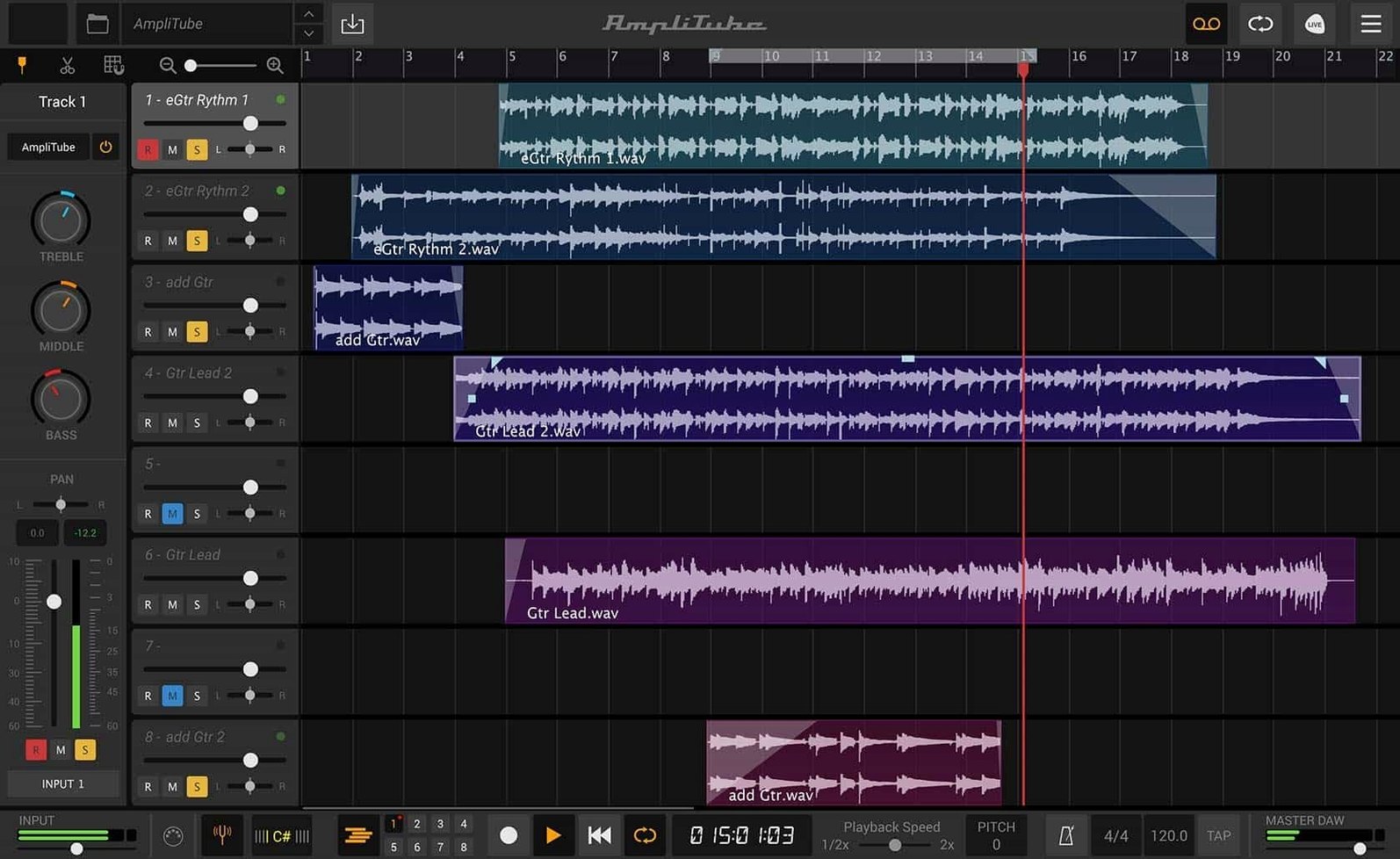
The mixer gaining built-in effects — rather than relying on post-processing in the DAW — consolidated the plug-in window. Previously, adding subtle slapback delay to a guitar tone meant inserting a delay plug-in after AmpliTube. Now the mixer channel strip carries its own effects, so a complete guitar sound lives inside one instance. This simplifies track templates and reduces the plug-in count in a project by two or three slots per guitar track.
The mixed DI signal feature, refined in recent builds, lets users blend the raw input with the processed output using a single fader in the mixer. For bass and clean guitar parts, this preserves transient attack that heavy amp modelling sometimes softens. For re-amping workflows, the DI path stays phase-coherent with the processed path because both run through the same plug-in buffer, avoiding the sub-sample offsets that occur when splitting signals across separate DAW channels.
Loading times improved between the initial 5.0 release and 5.8.2. On an M1 machine, the standalone app reaches the ready state in roughly 8 seconds compared to the 14–16 seconds early versions required. The gear browser populates incrementally rather than blocking the UI, so you can start dragging pedals before every model thumbnail renders.
Custom IR loading stabilised. Earlier builds sometimes truncated long impulse response files — anything above 500 ms risked a silent tail. Version 5.8.2 handles IRs up to 1.5 seconds without issue, which matters for room captures and convolution-based reverb impulses loaded into the cabinet slot.
Things worth knowing after the first week
The CPU hit from a single instance is modest — around 8–12% on a recent Apple Silicon core with a full amp-cabinet-rack chain engaged. Stacking eight instances with VIR cabinets and oversampling enabled can push total AUHostingService load past 70%, at which point Logic's processing threads start queuing. Freeze tracks you are not actively editing, and keep oversampling off during composition passes.
The AAX format installs by default even on systems without Pro Tools. The components are small enough to ignore, but purists can deselect AAX during installation via the Customise button in the installer — the option exists, it is simply easy to skip past.
If you use AmpliTube alongside other IK Multimedia products — T-RackS, SampleTank — the authorisation system shares a common backend. The installation order does not matter, but running the IK Product Manager once after installing AmpliTube ensures all model licences register correctly before a session deadline looms.
For those exploring the broader gear catalogue, the free CS edition includes 42 models — enough for a workable clean-to-crunch range. The full MAX configuration expands that to over 400 gear models across 11 collections, including artist-specific packs. The two new pedals and five amp models mentioned in the feature list sit inside that larger set, and the browser greys out any model not currently authorised rather than hiding it, which makes window-shopping the full catalogue straightforward.
Signal chain — drag-and-drop routing with configurable series and parallel paths, plus mixed DI signal support.
Cabinet section — new VIR technology driving over 100 redesigned cabinets.
Mixer — redesigned panel with built-in effects.
- macOS 10.15 or later
- Intel or Apple Silicon Mac
- 64-bit application
Sign in · Create an account to add a field note.
No field notes yet. A measurement, a version, a machine — they appear after moderation.