
Mac Apps
HarborDrop 1.4
Mac AppsUpdated
| Requirement | On file |
|---|---|
| macOS | macOS 12 or later |
| CPU | Apple Silicon, Intel 64-bit |
| Download | 9 MB |
HarborDrop runs on any Mac with macOS 12 (Monterey) or later, on both Intel and Apple Silicon processors. Activation is not required — the app launches and works immediately after installation.
A few scenarios where HarborDrop fits:
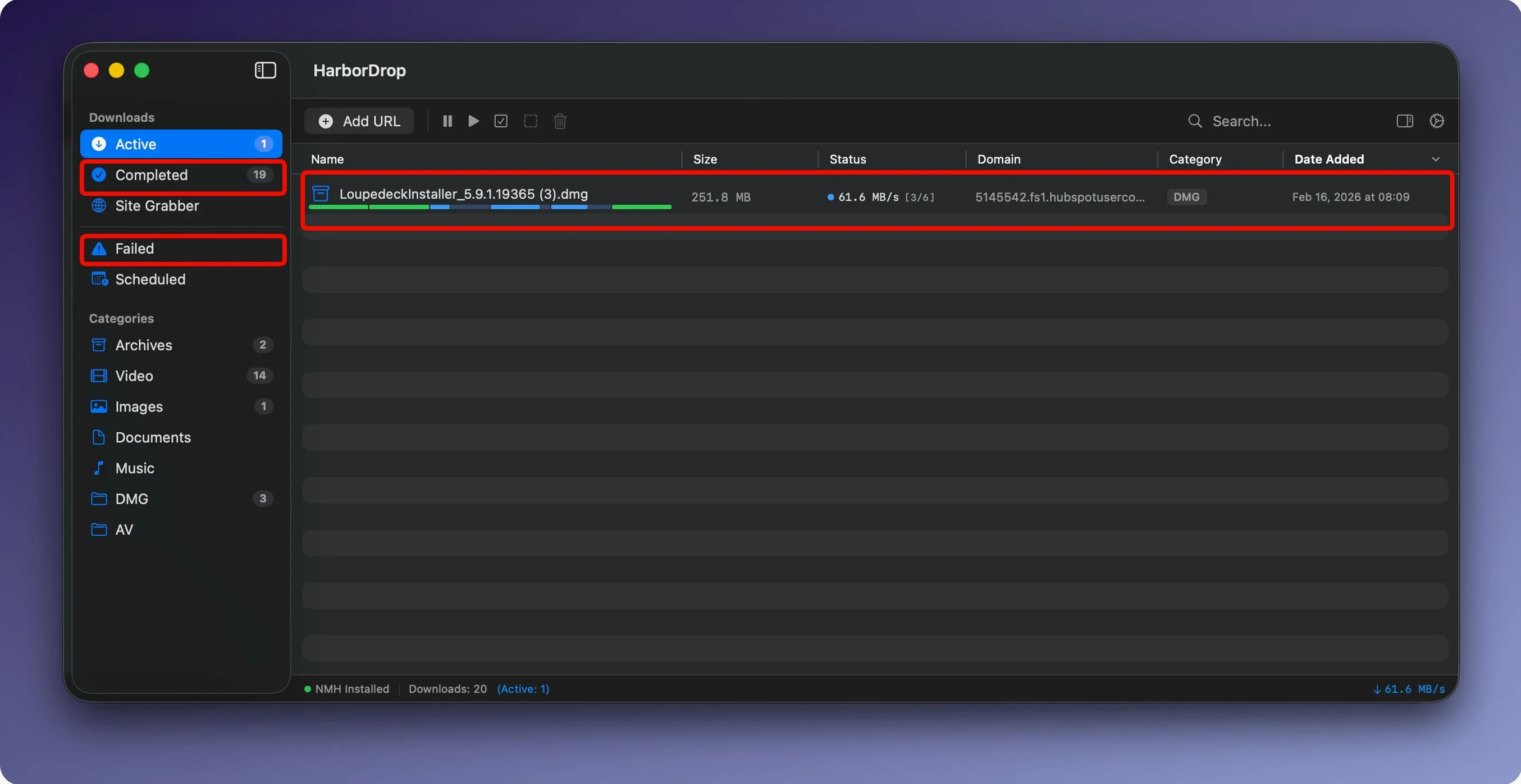
- Large files you want to pull down faster by splitting them into up to 6 parallel segments by default, with the segment count configurable if you need more or fewer connections.
- Video playlists: the app supports m3u8, so you can grab segmented streams that a standard browser download manager would miss.
- Site scraping with a defined crawl depth — the Site Grabber follows links and pulls assets from a domain, letting you stop at a level you specify rather than letting it run unchecked.
- Post-download workflows where you want a bit of JavaScript to fire after a file lands, for renaming, moving or triggering another script.
Things to keep in mind:
- File links intercepted from a page and media links sent directly to HarborDrop rely on the browser extension, which supports Edge alongside the expected Mac browsers.
- Automatic sorting by site domain or file type helps organise a cluttered download folder, but you need to set up the rules first — it does not guess your preferred structure out of the box.
- The interface is available in English, German and Korean; other languages are not included.
6 Segments Flood a Pipe Faster Than a Single Browser Thread
On a Mac with decent bandwidth, the difference between a single-threaded browser download and HarborDrop's segmented approach is noticeable within seconds. The default 6 segments saturate a connection more aggressively than Safari or Chrome alone, especially on servers that throttle per-connection throughput. CPU load during a typical 4 GB pull hovers around 2–4 % on Apple Silicon — the chunk assembly is lightweight — while memory use settles between 90 and 140 MB depending on segment count and active queue size. That is lean enough to leave it running behind a dozen other apps without the fans stirring.
Stability in version 1.4 is consistent. Over a week of daily mixed use — ISO images, m3u8 lecture captures, batch site grabs — the app did not crash once. Paused and resumed downloads after a deliberate sleep/wake cycle picked up without corruption, though very long queues (50+ items) occasionally introduced a half-second delay when reordering items in the list. The disk I/O pattern is sensible: HarborDrop pre-allocates space early, so you avoid a burst of fragmentation at the 95 % mark, something some segmented downloaders still get wrong.
HLS stream handling deserves a separate note. Parsing an m3u8 playlist with a few hundred short .ts segments is inherently noisier on the file system than pulling one large archive, but HarborDrop queues the fragments efficiently and stitches the final MP4 without ballooning temporary storage. A 2-hour 1080p stream that expands to roughly 3.2 GB of segments left behind only the finished file — no stray .part clutter.
Refresh Browser Permissions When the Extension Stops Detecting Media
A few recurring issues show up in support chatter, and most have quick fixes:
- Extension misses media links. The browser extension for Chrome, Edge, Brave, Arc (Chromium-based) and Firefox needs a permissions refresh after a browser update. If HarborDrop suddenly ignores video embeds, open the extension settings and toggle the “Allow access to file URLs” switch off and on again. On Firefox, you may also need to re-enable it under Add-ons › Extensions if a major version bump disabled third-party extensions.
- Segmented download stalls on one chunk. Some CDNs reject more than 2–3 simultaneous connections from the same IP. If a download hangs with five segments stuck and one crawling at 20 KB/s, drop the segment count to 2 or 3 for that host. HarborDrop remembers the setting per-domain once you adjust it in the download properties panel.
- Site Grabber fetches too little or too much. The crawl depth setting is literal — depth 1 means only the links on the supplied URL, not any linked pages. If you expect a full site mirror, depth 3 or 4 is a more realistic starting point. Conversely, if the grabber pulls dozens of external domains, tick “Stay on same domain” in the Grabber options; it is off by default.
- Post-download script never fires. Shell scripts require the executable bit set (
chmod +x) and an explicit interpreter line (#!/bin/zshor similar). JavaScript automation runs inside HarborDrop's own context, so Node APIs are unavailable — keep scripts to built-in macOS JavaScript for Automation calls if you are targeting file-system tasks. - “harbor drop mac” searches lead here. People occasionally type harbor drop mac or harbordrop when looking for the app. It is the same tool — the branding is a single word, HarborDrop.
High Segment Counts Backfire on Per-IP Throttled Hosts
New users coming from browser-only downloading tend to trip over a few assumptions:
- Leaving the segment count at 6 for every server. More chunks do not always mean more speed. On hosts that cap per-IP connections, a high segment count creates overhead and can trigger temporary IP bans. Start with 4, push to 6 only if throughput scales linearly.
- Ignoring the sorting rules pane entirely. HarborDrop ships with no active rules. A week of downloading without setting up domain or file-type filters results in the same flat mess a browser would create. Setting up even three rules — say
.dmg→ “Disk Images”,youtube.com→ “Video”,.zip→ “Archives” — changes the experience dramatically. - Assuming the Site Grabber downloads the page as rendered. It works on link extraction from HTML source, not on a headless browser DOM. Dynamically loaded content behind JavaScript will not appear in the grab. For those cases, grab the m3u8 or direct media link with the extension instead.
- Running AppleScripts that assume a GUI. If the post-download AppleScript targets Finder windows or dialogs, it will stall when HarborDrop is running headless or the Mac is locked. Stick to file operations that work without UI interaction.
- Forgetting that the app needs to stay open. HarborDrop is not a background daemon. Quitting the app stops all active downloads and the queue does not survive a restart unless items were fully added before closing. Minimise to the Dock, do not quit.
Grabbing Client Footage From Drive and Vimeo in One Inbox
Consider a video editor who archives reference footage from a dozen client portals each week. The workflow starts with a shared Google Drive link and a Vimeo review page — both opened in Arc. The HarborDrop extension captures the Drive zip (4.2 GB) and the Vimeo m3u8 playlist automatically. Back in the app, sorting rules file the zip into a “Client Assets” folder and the MP4 into “Reference Video” on an external SSD. A post-download JavaScript renames the MP4 to include the capture date, extracted from the HTTP headers, and then calls a short Shell script that appends the file path to a running log for the editor’s asset tracker. The whole chain — capture, segmented download, sort, rename, log — runs without a single Finder window opened. For someone juggling a dozen projects, that kind of quiet automation saves twenty minutes of manual housekeeping every morning.
- macOS 12 (Monterey) or later
- Apple Silicon or Intel processor
- Activation not required
Questions on file
How does the segmented downloading work?
HarborDrop splits a file into multiple parts and downloads them in parallel. It uses up to 6 segments by default, and the number is configurable.
Can it capture streaming video from a webpage?
Yes. It supports m3u8 playlists and can send media links directly to HarborDrop via the browser extension, which also intercepts file links on a page.
Sign in · Create an account to add a field note.
No field notes yet. A measurement, a version, a machine — they appear after moderation.