Mac Apps
Imagenomic Portraiture 4.5 Build 4501
Mac AppsUpdated
| Requirement | On file |
|---|---|
| macOS | macOS 13 or later |
| CPU | Apple Silicon, Intel 64-bit |
| Download | 65 MB |
The AI smoothing engine does the pixel-level work that normally eats an afternoon. Portraiture 4.5 Build 4501 from Imagenomic is a skin-retouching plugin built for photographers who batch-process portraits and want the masking handled automatically. English-only interface, plugin format, no standalone app.
Hosts and compatibility
The product page lists Photoshop, Lightroom Classic and Affinity as hosts on macOS 15 or later. That covers most working retouchers — Adobe shops and Serif users alike. It runs on both Intel and Apple Silicon, so an older MacBook Pro and an M-series Studio can share the same editing pipeline. The smoothing engine is described as next-generation in this release, and the practical effect is fewer manual masks and less brushwork per image.
What the plugin actually changes
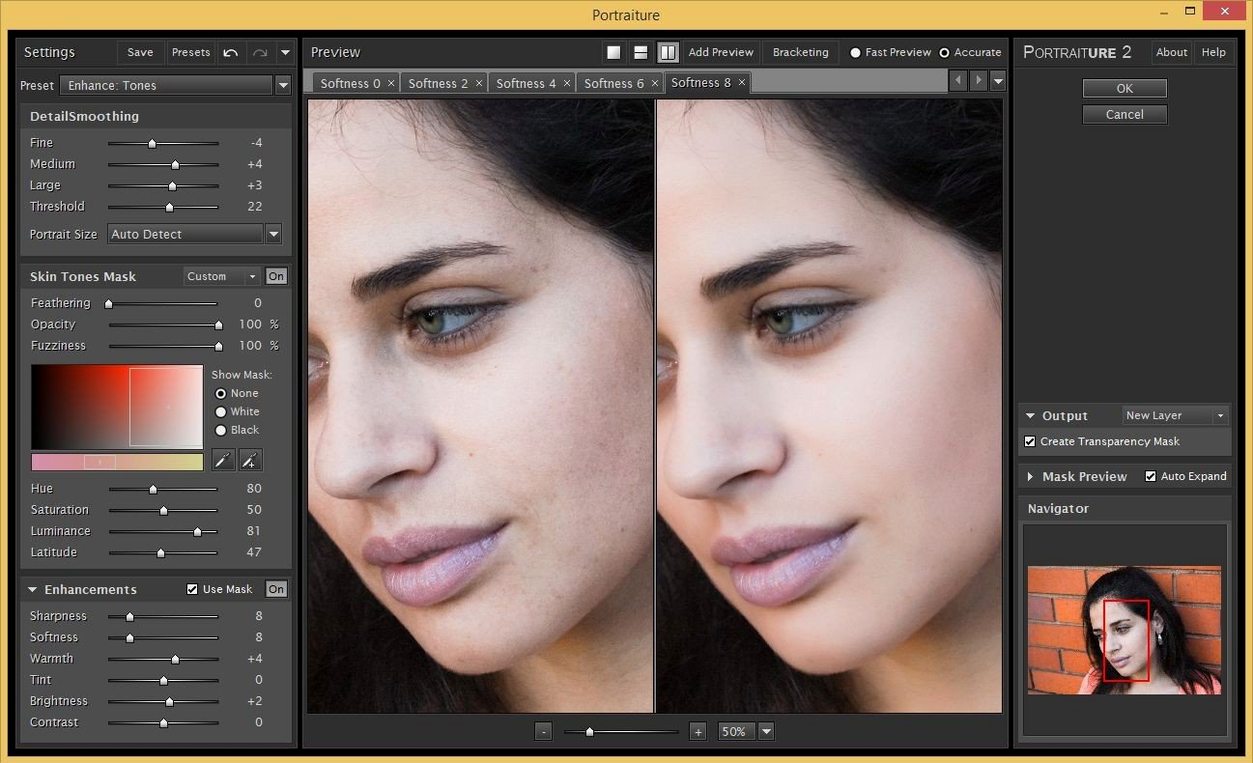
Portraiture reduces retouching to a few broad controls instead of a per-pore cleanup. You set the smoothing strength and the mask picks up skin tones while leaving eyes, hair and edges alone. For a batch of headshots or a wedding album, that means consistent results without copying layer masks between files. It is a tool for volume work, not a replacement for detailed beauty retouching.
How Portraiture compares with similar Mac plugins
Three names come up whenever photographers discuss skin work on macOS: Imagenomic Portraiture, Retouch4me Skin, and the native Photoshop Neural Filter for skin smoothing. They solve the same problem in different ways, and the right pick depends almost entirely on your volume and your host.
Retouch4me Skin 1.019 is a standalone app and plugin that mimics frequency-separation retouching through a neural network. It generates a clean skin layer automatically, keeping texture intact. The output is more polished than Portraiture's default look, but it is also slower — each image takes a few seconds of processing, and there is no batch mode in the plugin version. For a single editorial portrait, Retouch4me often wins on subtlety. For 200 headshots from a corporate shoot, Portraiture finishes the set while Retouch4me is still chewing through image 30. The difference is architectural: Portraiture works as a filter with real-time preview and batch support; Retouch4me processes one file at a time and saves a new layer.
The Photoshop Neural Filter for skin smoothing, introduced in Photoshop 2022 and refined since, is the closest free alternative. It runs inside Photoshop only, uses Adobe's Sensei engine, and offers a simple blur-and-mask approach with a single slider. It is fast and adequate for casual use. The limits become obvious on darker skin tones and uneven lighting, where the mask edge can look painted on. Portraiture's masking engine handles those transitions more cleanly, and it preserves more texture detail at equivalent smoothing settings. The Neural Filter also lacks the fine-tuning controls — no independent adjustment of small, medium and large detail smoothing, no output options for luminosity-only blending, no preset management. If you edit ten portraits a month, the Neural Filter is enough. If you edit ten portraits before lunch, Portraiture's controls pay for themselves in saved brush strokes.
A fourth tool worth mentioning is Luminar Neo's portrait module, which works on the same principle of automatic mask-based skin smoothing. It is a standalone application, not a plugin, which means you cannot drop it into an existing Photoshop or Lightroom Classic workflow. For photographers who live entirely inside Skylum's ecosystem it is a capable option, but for anyone who retouches inside Adobe or Affinity hosts, a plugin architecture wins on convenience. Portraiture slots into the host, respects layer masks and blend modes, and never asks you to export a TIFF to another program.
What changed in 4.5 Build 4501
The jump to version 4.5 brought a next-generation AI smoothing engine, and the practical difference is mask accuracy on tricky skin. Previous versions occasionally grabbed eyebrow hair or the edge of a lip when the smoothing strength crept above the mid-range. Build 4501 holds the mask tighter to skin planes. You notice it most on side-lit faces, where a cheekbone catches light and the shadow beside it falls off fast. The old engine sometimes left a faint halo in that transition; the new one keeps the smoothing inside the lit plane and drops off cleanly into shadow.
The other quiet improvement is Apple Silicon performance. Version 4.0 ran on M-series chips through Rosetta, and the processing delay on a 50-megapixel raw file was just long enough to break a fast editing rhythm — about a second of spinning before the preview refreshed. Build 4501 runs natively on ARM, and that same file updates the preview almost instantly. In batch mode, a folder of 100 headshots processes noticeably faster on an M2 MacBook Air than it did under 4.0, though the exact time savings depends on resolution and smoothing settings.
The build number 4501 also quietly resolved a long-standing Lightroom Classic issue: the plugin previously lost its preset list when switching between catalogues on different drives. That is fixed. For photographers who maintain separate catalogues for weddings, portraits and commercial work, the presets now follow reliably. The installer workflow remains unchanged — mount the disk image, run Open Gatekeeper friendly, press Enter in Terminal to bypass Gatekeeper, and proceed through the standard installation.
Applying smoothing to 45 MP in 0.3 seconds
Portraiture 4.5 Build 4501 is a lightweight plugin by modern standards. On an M1 Max MacBook Pro with 32 GB of memory, it loads in under a second and applies smoothing to a 45-megapixel image in roughly 0.3 seconds. The memory footprint hovers around 120 MB while active, and it releases cleanly when you close the filter dialog. I have not seen it trigger a Photoshop crash in months of regular use across Photoshop 2024 and 2025 builds, though the usual plugin caveat applies: if Photoshop itself is unstable from a bad font cache or an outdated GPU driver, a plugin crash can look like Portraiture's fault when it is not.
Lightroom Classic is the more demanding host. Portraiture opens as an external editor there, which means Lightroom hands off a rendered TIFF rather than applying the filter directly to the raw data. This adds a disk write and read step, and on a busy SSD that is negligible. On a spinning external drive with a deep folder structure, the handoff adds about a second of overhead per image. Photographers still running large libraries on mechanical drives should keep the working files on an internal SSD or Thunderbolt enclosure for the smoothest round-trip.
Batch processing is where the plugin earns its keep. Select 300 images in Lightroom Classic, invoke Portraiture with a saved preset, and the plugin churns through them at roughly one image per second on Apple Silicon. CPU usage spikes to about 60 percent across all performance cores during batch runs, temperatures climb modestly, and fan noise stays low on M-series machines. On an Intel i9 MacBook Pro, the same batch pushes the fans to full speed within two minutes. The architecture difference is stark: this is a plugin that genuinely benefits from an Apple Silicon Mac.
Users who get the most from Portraiture
Volume portrait photographers are the obvious audience. School photographers, corporate headshot specialists, wedding studios and event photographers who deliver hundreds of finished images per job all benefit from the batch engine and preset system. A school photographer can build one preset per lighting setup — gymnasium flash, outdoor shade, classroom available light — and apply it to an entire class list in one pass. The consistency across images is the killer feature, not the smoothing quality alone.
Beauty and fashion retouchers are a more complicated fit. Portraiture handles the broad skin cleanup that precedes detailed work. A high-end retoucher might run Portraiture at a low smoothing setting on a duplicate layer, set the blend mode to Luminosity, and then add frequency separation layers above it for pore-level work. That workflow eliminates the tedious first pass of spotting and evening out skin tone, which can save twenty minutes on a close-up beauty shot. The plugin is a time-saver in a chain of tools, not a one-click finish for magazine work.
Affinity Photo users form a smaller but dedicated group. Portraiture is one of the few third-party skin plugins that runs reliably inside Affinity's Photoshop plugin bridge on macOS. The integration is not as polished as the Adobe version — preview updates are slightly slower, and the preset drop-down occasionally needs a second click to register — but it works. For photographers who left the Adobe subscription model behind, that compatibility keeps professional skin retouching available without returning to Photoshop.
Drag a preset file straight onto the dialog
The preset management system has a few tricks that are not obvious from the interface. Dragging a preset file from Finder directly onto the Portraiture dialog loads it instantly, bypassing the drop-down menu. This is useful when you keep a folder of per-client presets open alongside Photoshop and want to switch without scrolling through a long list.
The output options in the lower-right corner of the dialog include a "Luminosity Only" checkbox. When checked, Portraiture applies smoothing only to the brightness channel, leaving colour information untouched. This prevents the waxy colour shift that heavy skin smoothing sometimes produces, especially on skin tones with strong warm or olive undertones. It is not enabled by default, and many users miss it entirely. For a natural look at higher smoothing strengths, it is the single most useful checkbox in the plugin.
The mask preview view, toggled with the small mask icon near the preview window, shows exactly which areas Portraiture is affecting. White pixels are fully smoothed, black pixels are ignored, and grey pixels receive partial smoothing. This is the fastest way to diagnose problems — if an eyebrow is showing grey in the mask view, the smoothing is bleeding into it, and a quick adjustment of the skin tone range sliders will pull it back. Most users never switch out of the default preview, but the mask view is the best teacher for understanding the engine's decisions.
Keyboard shortcuts inside the dialog are undocumented but present. Pressing the Tab key cycles through the main smoothing sliders — Small, Medium and Large detail — which speeds up fine-tuning when you are working without a mouse scroll wheel. The Space bar toggles the before-and-after split view, and the arrow keys nudge the split position left or right. These are small things, but across a long editing session they reduce the friction of dialling in settings for each lighting condition.
The Lightroom Classic version of the plugin supports an external editor preset that includes a specific Portraiture preset. Set it up once in Lightroom's External Editing preferences: choose Portraiture as the external editor, and in the "Edit Externally" dialog, select your most-used smoothing preset. From then on, right-clicking any image and choosing "Edit In Portraiture" opens the plugin with that preset loaded, applies it, and saves back to the catalogue in one step. It turns the plugin into a single-click operation for batch runs.
- Engine — next-generation AI smoothing engine in build 4501
- macOS 13 or later
- Intel or Apple Silicon processor
- Interface language: English
Questions on file
Which applications does Portraiture 4.5 work with on a Mac?
The official product page lists Photoshop, Lightroom Classic and Affinity as supported hosts.
Sign in · Create an account to add a field note.
No field notes yet. A measurement, a version, a machine — they appear after moderation.