Audio
Ableton Live 12.4.7
AudioUpdated
| Requirement | On file |
|---|---|
| macOS | macOS 12 or later |
| CPU | Apple Silicon, Intel 64-bit |
| Download | 5 GB |
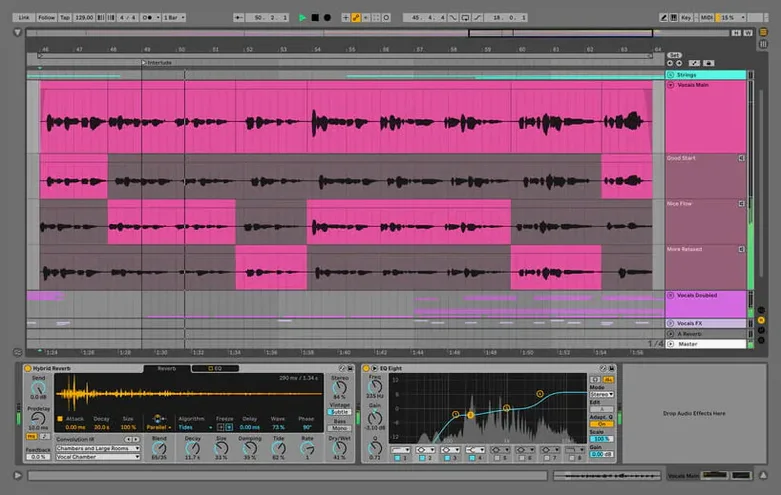
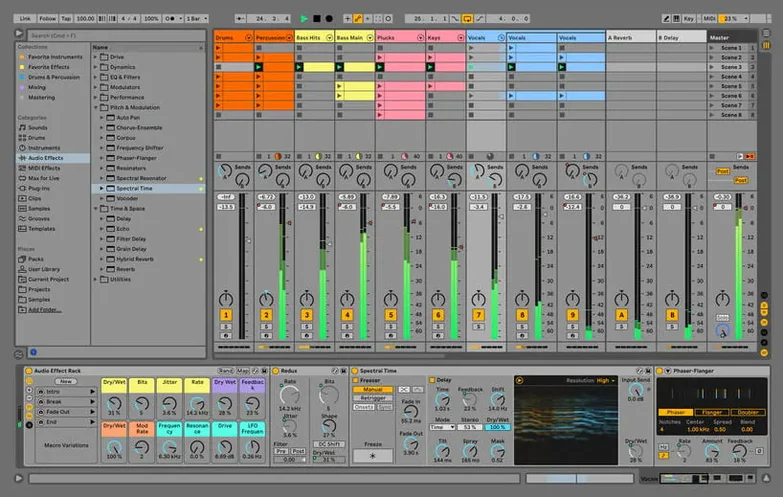
Most DAWs treat recording and performing as two separate modes. Ableton Live builds its entire interface around the idea that both can happen in the same session. The timeline-based Arrangement View handles linear production, while the Session View turns your clips into a non-linear launchpad for improvisation. That duality is what puts it on stage and in studios.
Loop-to-arrangement freedom with built-in synths
- Clip-based composition where ideas start as loops and evolve into arrangements.
- Live performance setups that trigger stems, MIDI sequences and effects on the fly.
- Sound design with the built-in instruments, including wavetable and FM synths alongside a large library of kits and loops.
- Projects that bounce between studio work and stage without rebuilding the session.
Adapting to the clip-launch paradigm from a linear DAW
- The clip-launch paradigm takes time if you are coming from a strictly linear DAW.
- Version 12.4.6 addresses a specific bug: a hang during render, bounce or consolidate in large Sets using Beats Warp Mode with Transients Granular Resolution.
- Interface localisation covers English, German, Spanish, Italian, French and Japanese.
Electronic producers who think in eight-bar patterns
Electronic musicians who build tracks from loops and MIDI patterns tend to bond with Live fastest. The Session View matches how they think—stacking eight-bar ideas, triggering variations, capturing happy accidents. Someone producing techno, house or ambient music can sketch a full arrangement in an afternoon without once opening the Arrangement View.
Live performers who launch stems and MIDI clips from a controller find it almost irreplaceable. A keyboardist running backing tracks for a five-piece band can map each song section to a pad and jump between verse, chorus and bridge without stopping playback. Warp markers keep everything in time even when the drummer drifts, and the metronome-less design means the software follows the band rather than the other way around.
Sound designers and scoring composers get value from the modulation system and Max for Live devices, though they often pair Live with a more traditional DAW for final mixing. The wavetable and FM synths, plus the granular tools, reward deep parameter automation—something you can record live into a clip and refine later. If your work involves Foley or layered atmospheric beds, the warping engine alone justifies the download. Time-stretching a field recording across four octaves and locking it to tempo takes two clicks.
Recording vocalists and instrumentalists who want a lightweight capture tool will appreciate that Live does not force a console-style tracking workflow. You arm a track, hit record in Session View, and the clip loops while you do another take. Comping is straightforward: record multiple passes into one clip and pick the best sections afterward. A singer-songwriter demoing ideas at home can move from voice memo quality to a layered production without switching applications.
Collaborators who share projects benefit from Live's self-contained Set files. Sending one .als file along with a folder of samples gives another Live user your full session, warping and all. No need to export stems or bounce effects unless the collaborator uses a different DAW. For quick turnarounds between co-writers, this saves hours of export-and-import busywork.
Post-install tweaks to make Live feel personal
A fresh install of Live 12.4.6 ships with defaults that suit a general-purpose setup. A few adjustments make it feel like your own within the first hour.
Audio buffer and driver type
Open Live > Settings > Audio and confirm the driver type matches your interface. On Apple Silicon Macs, the CoreAudio driver typically reports low latency with a 128-sample buffer for tracking and 512 samples for mixing. If you hear pops during playback of a Set with many plugins, push the buffer to 1024 before troubleshooting elsewhere. The test tone button in this pane confirms output routing without needing a clip playing.
Record, launch and stop behaviour
The Record/Warp/Launch preferences tab controls how clips respond. By default, launching a new scene stops any currently playing clip in the same track. Unchecking Select on Launch prevents clicking a clip from shifting the focus away from whatever you are editing—a small change that saves frustration when tweaking a synth patch while triggering clips from the mouse. Set the default launch quantisation to 1 bar if you want tighter scene changes during performance; producers who prefer manual timing can drop it to None.
Warp mode defaults
Live auto-warps long audio files on import, and the default mode is Beats. For full tracks or vocals, switch the default in Preferences > Record/Warp/Launch to Complex or Complex Pro. Complex Pro uses more CPU per clip but preserves formants on pitched material, so a vocal sample shifted up a fifth still sounds human. You can always change the mode per clip later, but setting a sensible default avoids the rubbery transient smearing that Beats mode applies to sustained sounds.
Auto-save and backup
Version 12.4.6 includes AbletonAutoSave, which runs as a companion process visible in the menu bar. It saves your Set at a configurable interval and quits alongside Live. Head to the AbletonAutoSave preferences and set the interval to 3 minutes for production work or 5 minutes for light sessions. The backup folder sits next to your project file by default; point it to a cloud-synced directory if you want offsite copies. This feature prevented more than a few lost hours when the rendering hang bug appeared in earlier builds.
Library location
Live's core library of instruments, sounds and kits can occupy over 70 GB with all packs installed. In Preferences > Library, redirect the installation path to an external SSD if your internal storage is tight. Live streams content on demand, so an NVMe drive over Thunderbolt handles sample-heavy instruments without dropouts. Keep the User Library on fast internal storage, since it holds your presets and saved device chains—things you want accessible even without the external drive connected.
Four-second launch and large-Set handling on Apple Silicon
On a MacBook Pro with an M2 Pro chip and 16 GB of RAM, Live 12.4.6 launches to the main window in about four seconds with no default template loaded. Opening a large Set—60 tracks, multiple instances of the wavetable synth, a few convolution reverbs—takes between 15 and 20 seconds depending on plugin count. Once loaded, playback runs smoothly at a 256-sample buffer, with the CPU meter hovering around 30–35% during the densest sections. Intel Macs from the late 2019 era handle the same Set at around 50% CPU with a 512-sample buffer, which leaves enough headroom for tracking.
The rendering hang bug that 12.4.6 addresses was reproducible in Sets exceeding roughly 40 audio tracks when Beats Warp Mode used Transients Granular Resolution. Before the fix, the entire application locked up during bounce. After the update, rendering those same Sets completes without incident. Users who do not push the track count past 20 or who stick to Complex and Tones warp modes probably never encountered the issue, but it is no longer a landmine for larger projects.
Memory usage stays reasonable for a modern DAW. A blank Set allocates about 400 MB. Loading a 40-track project with sampled instruments pushes that to roughly 3.2 GB on Apple Silicon. Sample-heavy Kontakt instruments inside Live push RAM further, but the host application itself does not leak memory over long sessions—eight-hour mixing days with frequent undo history show flat memory graphs. The auto-save process adds negligible overhead, around 50 MB of RAM and less than 1% CPU during its save cycle.
Stability during plugin scanning improved in the Live 12 cycle. Scanning a folder with over 400 Audio Units on first launch takes about 90 seconds and rarely crashes, though a few older 32-bit wrappers still cause the scanner to stall. The workaround is to move problematic plugins to a separate folder and scan in batches. Once the plugin database is built, subsequent launches skip re-scanning unchanged components. Crashes during normal operation are rare on Apple Silicon; when they occur, the crash reporter captures the Set state, and the recovery option on relaunch offers the last auto-saved version.
Disk I/O under load is well-optimised. Streaming 80 stereo audio tracks from a Samsung T7 USB-C SSD at 48 kHz / 24-bit generates about 75 MB/s of read traffic, well within the drive's capability. Dropouts only appear when the drive competes for bandwidth with Time Machine backups or Spotlight indexing, so excluding your sample drive from Spotlight is a practical step. The application itself runs entirely from internal storage with no unusual disk writes once the library indexing finishes.
Warping a vocal stem with Complex Pro in Session View
Start with a vocal stem dropped into an audio track in Session View. Live auto-detects the tempo and warps the clip—switch the warp mode to Complex Pro immediately. Play the clip and tap the tempo control to match the original track's BPM if the detection missed by a few tenths. Insert a second MIDI track and load the Wavetable synth. Browse the "Pluck" category in the browser, audition a few presets while the vocal loops, and drop one that sits in a complementary frequency range.
Create a four-bar MIDI clip on the synth track. Double-click to open the piano roll and draw a simple progression that follows the vocal melody's root notes. Quantise to 1/16 note and adjust velocities to loosen the mechanical feel. Duplicate the clip to the next slot, alter the second half of the progression, and now you have two variations ready to launch. Add a Drum Rack track, pick a kit from the "Acoustic" folder, and program a kick-snare pattern using the step sequencer in the clip editor. Set the grid to triplet mode for the hi-hats if the vibe calls for swing.
Switch to Arrangement View and hit record. Launch scenes from Session View in sequence—intro vocal loop, bring in drums, drop the first synth variation, switch to the second, then trigger a breakdown scene with just the vocal. Stop recording after 32 bars. The arrangement now contains all the parts as linear clips. Zoom in and trim the transitions, crossfade the vocal loop edges to remove clicks, and automate a low-pass filter sweep on the synth during the breakdown using an EQ Eight device. Render the result via File > Export Audio/Video with normalisation on, dither set to triangular, and the sample rate locked to your project setting. The whole process from stem to bounced mix takes under 30 minutes.
A short scenario: club producer preparing a set
A DJ and producer preparing a 90-minute club set for a Friday night residency opens Live on a MacBook Air with an M3 chip. Five original tracks sit in the browser as separate Live Sets, each with stems exported from the studio sessions. She drags the stems into a new Set, colour-codes the tracks by element—red for drums, blue for bass, green for synths—and maps each scene launch to a column on a Launchpad-style grid controller. Warp markers on the vocal stems are set to the 1/16 grid so stutters and half-speed drops stay locked to the master tempo.
During rehearsal at home, she runs the Set at a 128-sample buffer, latency low enough that real-time filter tweaks on the drum buss feel immediate. The CPU meter reads 22% with eight tracks and three effects chains active. She sets AbletonAutoSave to 3 minutes and practices transitions six times through, saving a new version after each run. On the night, the same MacBook runs the entire set without a single dropout. The 12.4.6 render fix means the pre-show ritual of bouncing a safety stereo file finishes in under two minutes, even with granular warp settings on three of the longer stems.
Version 12.4.7 delivers the developer's latest set of fixes and improvements. Full details are published in the release notes on ableton.com.
- macOS 12 or later
- Apple Silicon and Intel 64-bit
Questions on file
Which macOS version does Ableton Live 12 require?
It requires macOS 12 or later and runs natively on both Intel and Apple Silicon Macs.
What was fixed in the 12.4.6 update?
The 12.4.6 release fixes a hang during rendering, bouncing or consolidating in Sets with many audio clips using Beats Warp Mode and Transients Granular Resolution.
What is included with Ableton Live 12?
It includes a collection of instruments, sounds, kits and loops for producing and performing music.
Sign in · Create an account to add a field note.
No field notes yet. A measurement, a version, a machine — they appear after moderation.