Audio
Guitar Pro 8.1.5-31
AudioUpdated
| Requirement | On file |
|---|---|
| macOS | macOS 10.13 or later |
| CPU | Apple Silicon, Intel 64-bit |
| Download | 1 GB |
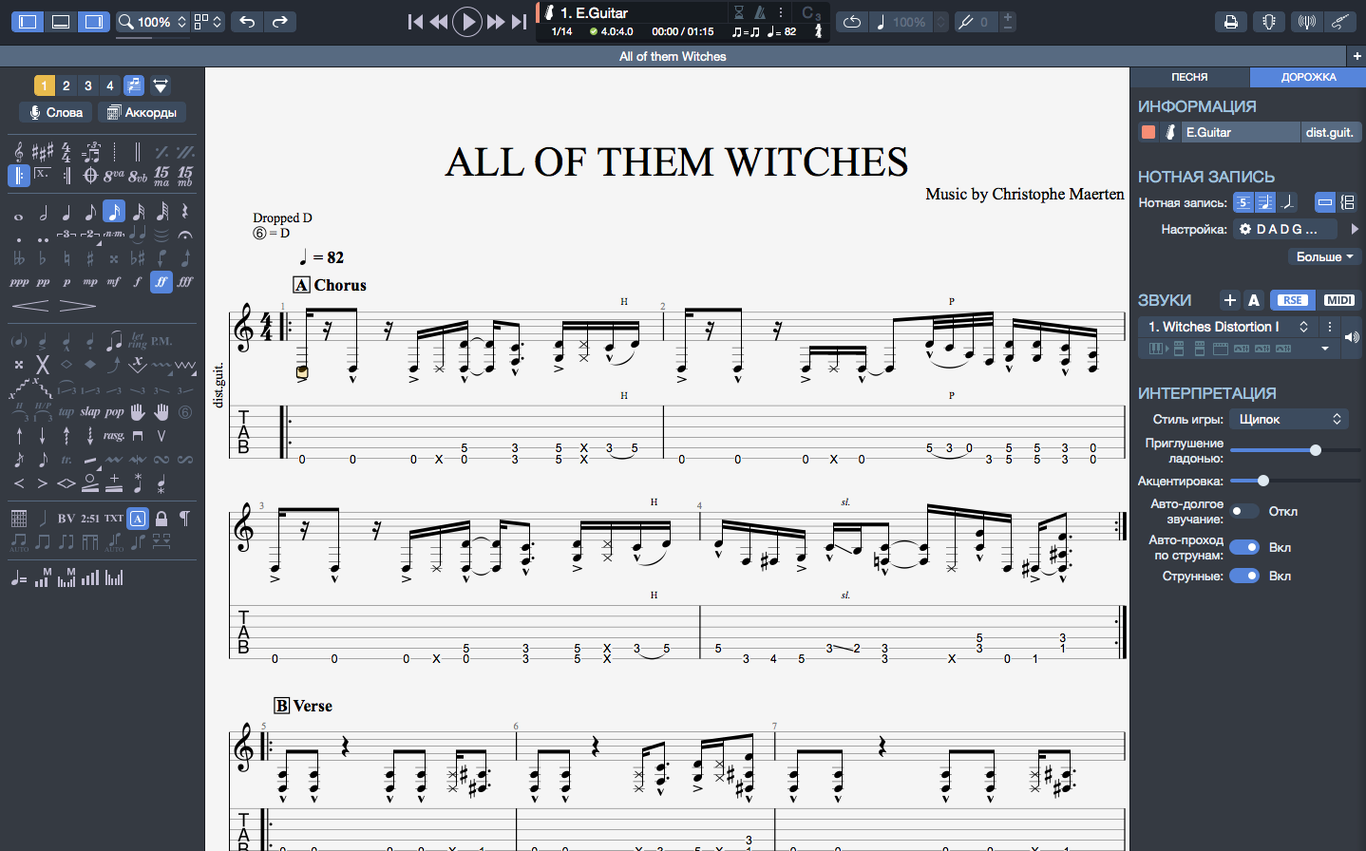
Guitarists transcribing solos, bassists mapping out lines, and teachers preparing lesson sheets all rely on a dedicated notation editor. Guitar Pro 8 handles the heavy lifting of tablature and sheet music creation on macOS. Version 8.1.5 tightens a few loose ends in the editing engine.
Editing and playback workflow
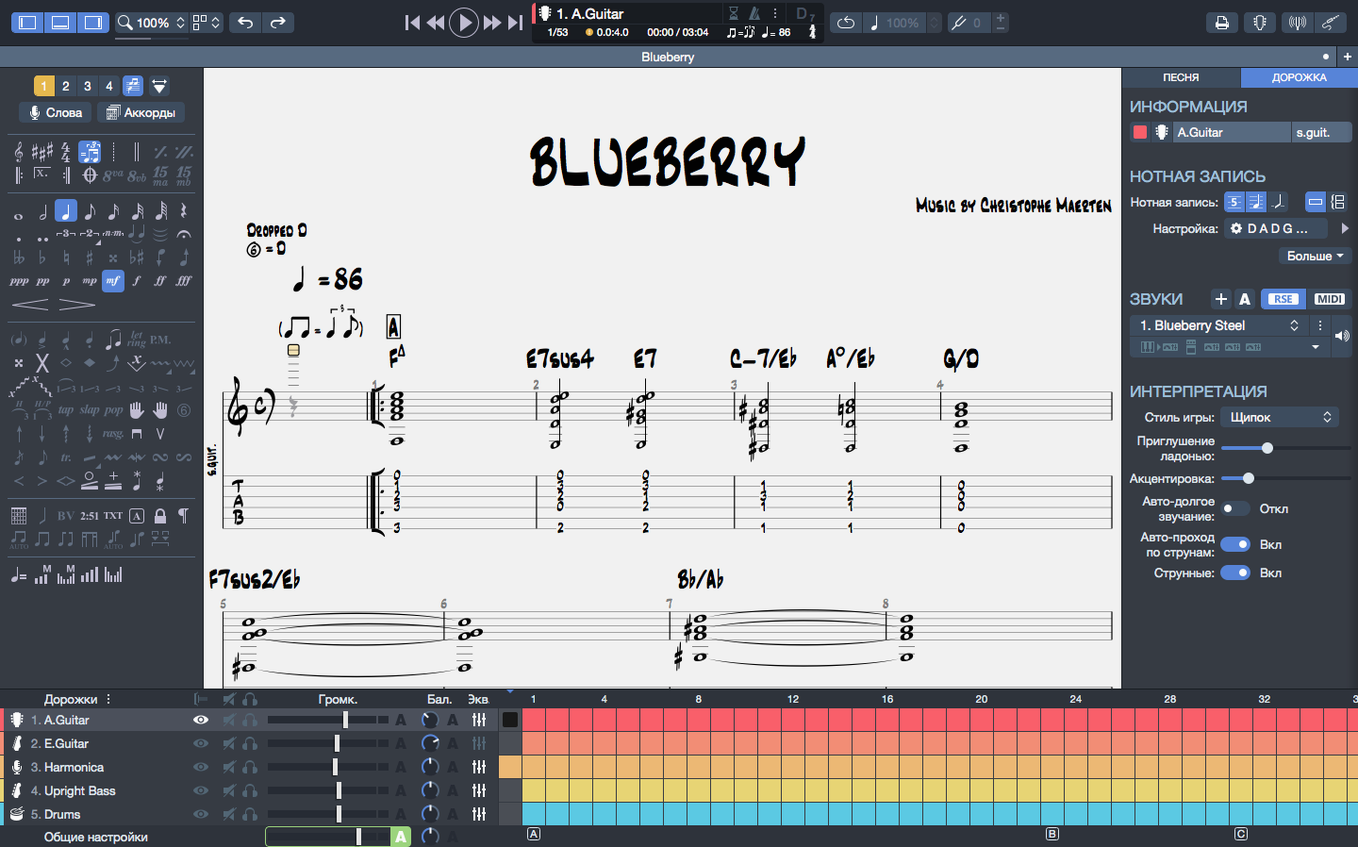
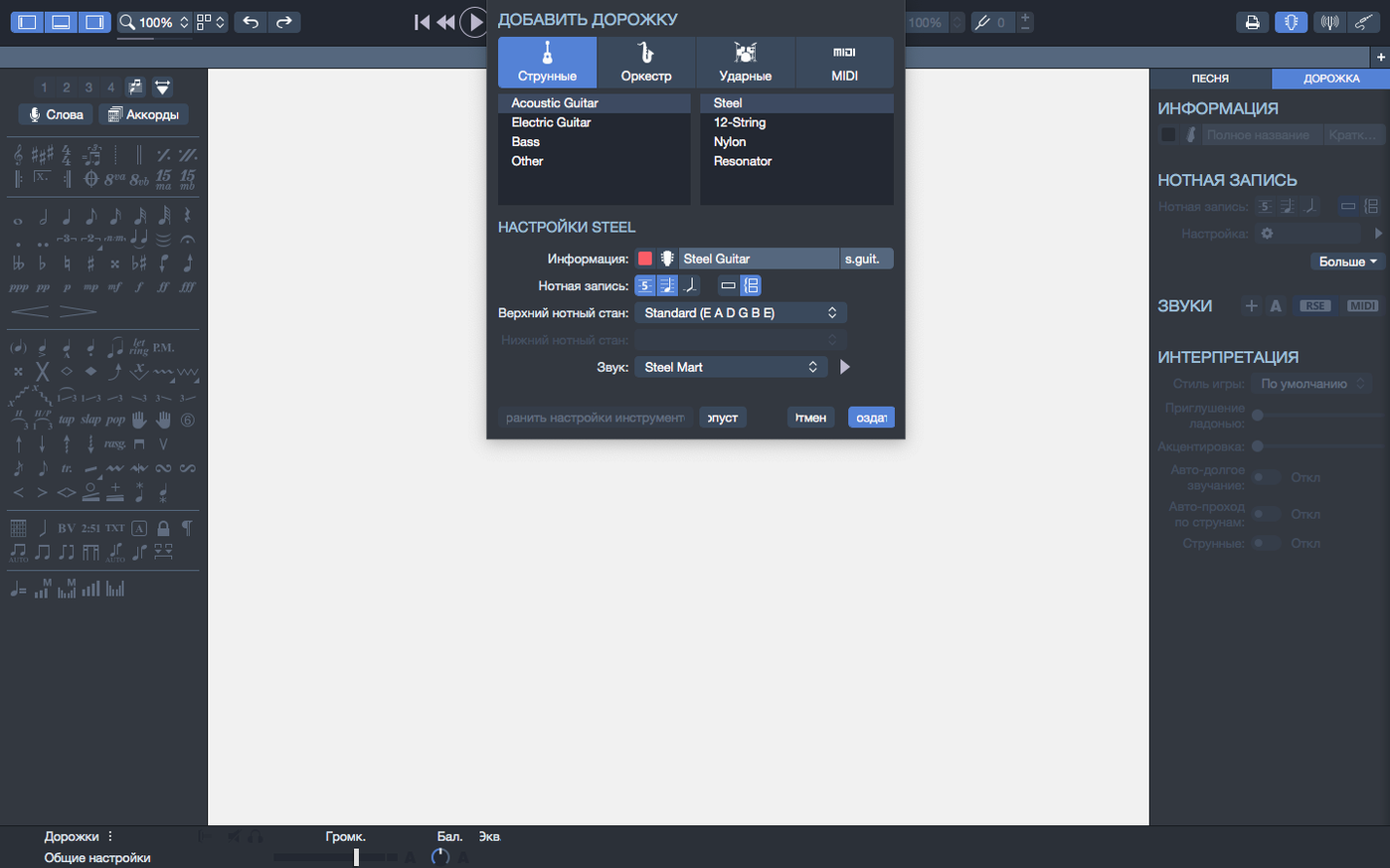
- Set up a new score and pick the instrument track. The metronome and chord builder sit in the sidebar ready for quick input.
- Enter notes on the tablature grid or standard staff. Stem direction adjustments are now consistent — 8.1.5 fixes several cases where changes wouldn’t stick.
- Hit playback to hear the arrangement. Arpeggios that open a score now trigger correctly from bar one, and audio continuity on macOS holds steady when plugging or unplugging an interface.
- Export the finished sheet as an SVG for clean scaling in print or online.
The interface tweaks in this release adjust contrast and colour for easier reading over long editing sessions. On Apple Silicon, this build is more efficient than earlier releases.
Treating the MIDI playback as your final arrangement
New users often treat Guitar Pro as a playback engine first and a notation tool second. They drop notes onto the tablature staff, press play, and judge the result by how close the MIDI rendition sounds to the original recording. The app can do that, but starting with playback expectations leads to sloppy notation — missing rests, uneven note durations, and chords spelled as stacked notes without regard for voice leading. Fixing those later takes longer than entering them correctly from the start.
Another common slip: ignoring the tempo track. Beginners set a single tempo at bar one and never touch it again, then wonder why the MIDI playback feels robotic through a solo section or a chorus. Guitar Pro lets you insert tempo changes, ritardandos, and accelerandos at any bar line. A two-second edit to ease the tempo around a fill makes the playback breathe — and flags phrasing intentions you might otherwise forget when you hand the chart to another player.
Over-reliance on the default sound bank is a subtler trap. The built-in RSE sounds are serviceable, but many new users never switch instrument presets or adjust the mixer. A bass track left on the default finger bass preset can bury a fingerpicked guitar part. Spending five minutes balancing the faders and swapping presets for each track transforms the reference playback from a tinny obligation into something you actually listen to for arrangement ideas.
The chord builder trips up people who assume it only works vertically. You can select a chord symbol, open the builder, and browse voicings by fretboard position — but beginners often drag the first result onto the score without checking whether the fingering is playable in context. A Cmaj7 at the eighth fret might sound lovely isolated; move to it from an open-position G and the hand jump becomes awkward. Guitar Pro shows you both the chord diagram and its position on the neck. Glance at the preceding bar before committing.
Finally, the "recent files" pinning feature sits unnoticed on the home screen. Users open and close ten scores in a session, then dig through Finder to find the one they need again. Right-click any recent file and pin it. It stays until you unpin it. For songwriters juggling three pieces at once, this saves real minutes over a week.
Weekly transcribers who live in the tablature editor
Guitar Pro rewards three kinds of user disproportionately. The first is the working guitarist who transcribes weekly — session players, cover-band musicians, and teachers who prepare custom charts for students. These users live in the tablature editor, and they notice when stem direction changes fail or arpeggio playback skips a beat. The 8.1.5 fixes matter to them because they hit those bugs on deadline. The app earns its keep by shaving time off the transcription loop: listen, tab, play back, correct, export, repeat.
The second group is songwriters who think in guitar parts but need to communicate them to a band. Guitar Pro is not a DAW, but its multi-track score layout serves a similar organisational role. A writer can map out rhythm guitar, lead lines, a bass figure, and a basic drum pattern across separate tracks, then hear them together. The MIDI playback is crude compared to a recorded demo, but it is precise — everyone sees exactly which notes they own. Export the drum track as a PDF, hand the bassist a tab printout, and the rehearsal starts with questions already answered.
The third group is students working through method books or online courses. Guitar Pro files circulate widely in lesson communities, and the app doubles as a practice tool. Loop a four-bar phrase, slow the tempo to 60%, and play along. The metronome click and the visual cursor moving across the staff provide two cues that a static PDF cannot match. Students on Apple Silicon Macs benefit from the efficiency improvements in this build — battery drain during extended practice sessions is noticeably lower than on the Intel-translated earlier releases.
Users who only need to look up the occasional tab may find the app oversized. A quick browser search for a guitar pro 8 download or a specific file suits them fine. But anyone who edits tabs, writes original material, or teaches regularly will push past the surface features within the first month.
Lifting a 1974 funk bass line without any official tab
Imagine a bassist who wants to lift the line from a funk track released in 1974. No official tab exists, just a worn LP rip and a pair of headphones. The goal is a clean transcription she can share with her band and practise against a click.
She opens Guitar Pro 8 and creates a new score. The template chooser offers a bass-only layout; she picks the four-string bass staff with standard notation above and tablature below. Key signature: E minor. Time signature: 4/4. Tempo: she taps the metronome button along with the recording and settles on 108 bpm.
The first eight bars of the verse are a syncopated fingerstyle pattern. She highlights bar one, presses N to enter note-input mode, and uses the arrow keys to move between strings while tapping numbers for fret positions. The MIDI playback sounds robotic at full tempo, so she drops the speed to 75% in the transport bar and loops the first four bars. Hearing the notes back at reduced speed exposes a missed ghost note on the second beat. She inserts it as a muted string hit, selects it in the inspector, and reduces its velocity to 40 so the playback mimics a light thumb rake.
By bar twenty, the line shifts into a chorus with slides and hammer-ons. She selects the slide tool from the notation palette or hits S to attach a slide between two notes. For the hammer-on, she selects the first note, opens the effects panel, and checks the hammer-on/pull-off box. Guitar Pro draws the curved slur line above the tab automatically.
The original recording has a drum break in bar thirty-two. She inserts a drum track — just kick and snare hits on the downbeats — to mark the bars where the bass rests. The mixer lets her lower the drum track volume relative to the bass so the playback still centres the instrument she is studying.
With the transcription complete, she runs through the whole score at full tempo. Two bars in the bridge feel rushed; she inserts a subtle tempo drop to 104 bpm for four bars, then ramps back to 108. The playback now follows the groove instead of fighting it. She exports the score as an SVG for the band group chat and as a PNG with a transparent background for a lesson handout she is preparing. The whole process — from blank score to shared file — clocks in under forty minutes.
Someone hunting for a Guitar Pro 8 full crack might skip the export step entirely, but the transparency option matters when you overlay notation on a worksheet. Few other notation tools handle SVG output this cleanly.
Lowering the audio buffer for snappier note entry
The default Guitar Pro installation works, but a handful of adjustments make it work the way a serious editor expects.
- Audio buffer size. Under Preferences → Audio, the buffer defaults to a moderate value that works for built-in speakers. If you use a USB audio interface, drop it to 128 samples for tighter playback response, especially when looping short sections. Raise it to 512 if you hear clicks or dropouts on older Intel machines.
- Scroll direction during playback. The default is horizontal scrolling that chases the playhead bar by bar. Switch to vertical scrolling in View → Scroll Mode if you prefer seeing the whole system at once — a personal preference, but one that changes how you read a score during playback.
- Default note duration. New scores default to an eighth note as the shortest entry unit. If you transcribe a lot of funk or metal with sixteenth-note subdivisions, set the default to a sixteenth note in Preferences → Note Entry. You can still override per-note, but the baseline grid shapes how many clicks you spend correcting durations.
- Chord diagram display. By default, chord diagrams appear above the staff for every chord symbol. In a dense chart, this pushes the notation apart and forces more page turns. In Stylesheet → Chord Diagrams, switch to "only at first occurrence" or "none" for lead sheets where the player knows the shapes.
- Pin recent files. Not a preference in the traditional sense, but a behaviour worth adopting immediately. The home screen shows recently opened scores. Right-click any that you return to daily and select Pin. The list stops shuffling as new files push older ones out.
None of these changes are buried — they sit in the main preferences panel or in the view menu — but new users often spend weeks working around defaults that fight their workflow because they never pause to look.
Holding Space for a one-click pitch check
Guitar Pro 8 packs dozens of small accelerators that sit outside the main toolbars. A few stand out for how much time they recover once you know them.
- Quick pitch check. Click any note and press
Spacewhile holdingShift. Guitar Pro plays that single note in isolation. This is faster than starting playback and stopping it again when you want to verify one pitch against a reference track. - Repeat bar paste. Select a bar, copy it with
Cmd+C, then select the target bar and pressCmd+Shift+V. The paste repeats across multiple bars — highlight ten empty bars and the copied bar fills all ten in one action. Useful for rhythm parts that loop unchanged. - Track solo and mute. The mixer panel has dedicated
SandMbuttons per track, but the faster route isCtrl+clickon a track header and selecting Solo from the context menu. The same menu offers Mute. For multi-track scores, isolating a single instrument during editing keeps the playback clean without navigating to the mixer. - Transpose chord names and fingerings together. Highlight a passage, open Tools → Transpose, and check the box labelled Transpose chord names and diagrams. The app shifts everything — notation, tab numbers, chord symbols, and fretboard diagrams — in one step. Skipping that checkbox is a classic mistake that leaves chord names mismatched against the tab.
- Snap-to-grid in the MIDI editor. The piano roll editor respects a grid setting hidden in its toolbar. Set it to a sixteenth note for drum programming or a thirty-second note for detailed lead lines. The default quarter-note grid makes every MIDI edit feel like you are fighting the snap.
- Export presets. The export dialog remembers your last settings, but you can save named presets for different output scenarios — "band chart SVG," "lesson handout PNG with transparency," "MIDI for DAW." Click the preset dropdown at the top of the export window and choose Save current settings as preset. Two clicks later, every export follows the same spec.
- Home screen file pinning. Mentioned earlier, but worth underlining: it is the single most overlooked quality-of-life feature in the app. Pinned files stay visible regardless of how many new scores you open. For anyone working on a setlist, an EP, or a semester's worth of exercises, pinning anchors the workspace.
These shortcuts accumulate. Someone who reaches for the mouse for every note edit and every track mute moves at a different speed from someone who keeps one hand on the keyboard. The difference shows up around the third hour of a transcription session, when the mouse hand starts to ache and the keyboard hand keeps moving. Searching for a Guitar Pro 8 crack download or a Guitar Pro 7.5 crack might get someone through the door, and learning the shortcuts is what keeps them inside the editor instead of drifting back to a text file full of ASCII tab.
- Arpeggios — arpeggiated chords that start a score now play back correctly from the first beat.
- Stem direction — cases where stem directions could not be changed have been fixed.
- Audio routing — playback continuity on macOS is more stable when plugging or unplugging audio devices.
- macOS 10.13 or later
- 64-bit dual-core Intel, AMD, or Apple Silicon processor
- 4 GB RAM
- 2 GB free disk space
- Administrator rights required for installation
Questions on file
Does Guitar Pro 8 run natively on Apple Silicon?
Yes, efficiency on Macs with Apple Silicon processors has been improved to take advantage of the architecture.
What export formats does Guitar Pro 8 support?
Scores can be exported to SVG, which is useful for high-quality scaling in print layouts and web use.
Does the chord builder work for non-guitar instruments?
The chord builder is included in the app and can be used while editing scores for any stringed instrument track you set up.
Sign in · Create an account to add a field note.
No field notes yet. A measurement, a version, a machine — they appear after moderation.