Audio
iReal Pro 2026.3.2
AudioUpdated
| Requirement | On file |
|---|---|
| macOS | macOS 12.4 or later |
| CPU | Apple Silicon, Intel 64-bit |
| Download | 145 MB |
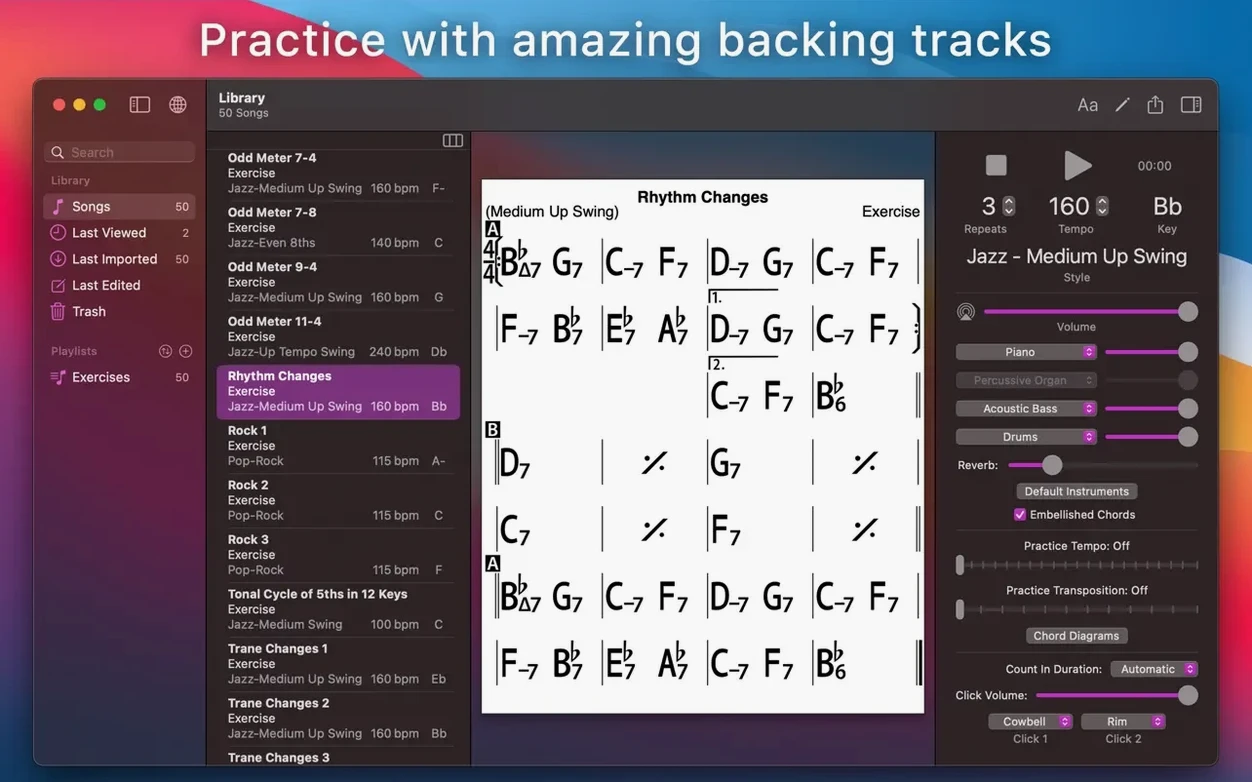
Running through changes alone in a silent room doesn't test your timing the way a rhythm section does. iReal Pro puts a bassist, drummer and pianist in the practice space without the scheduling hassle.
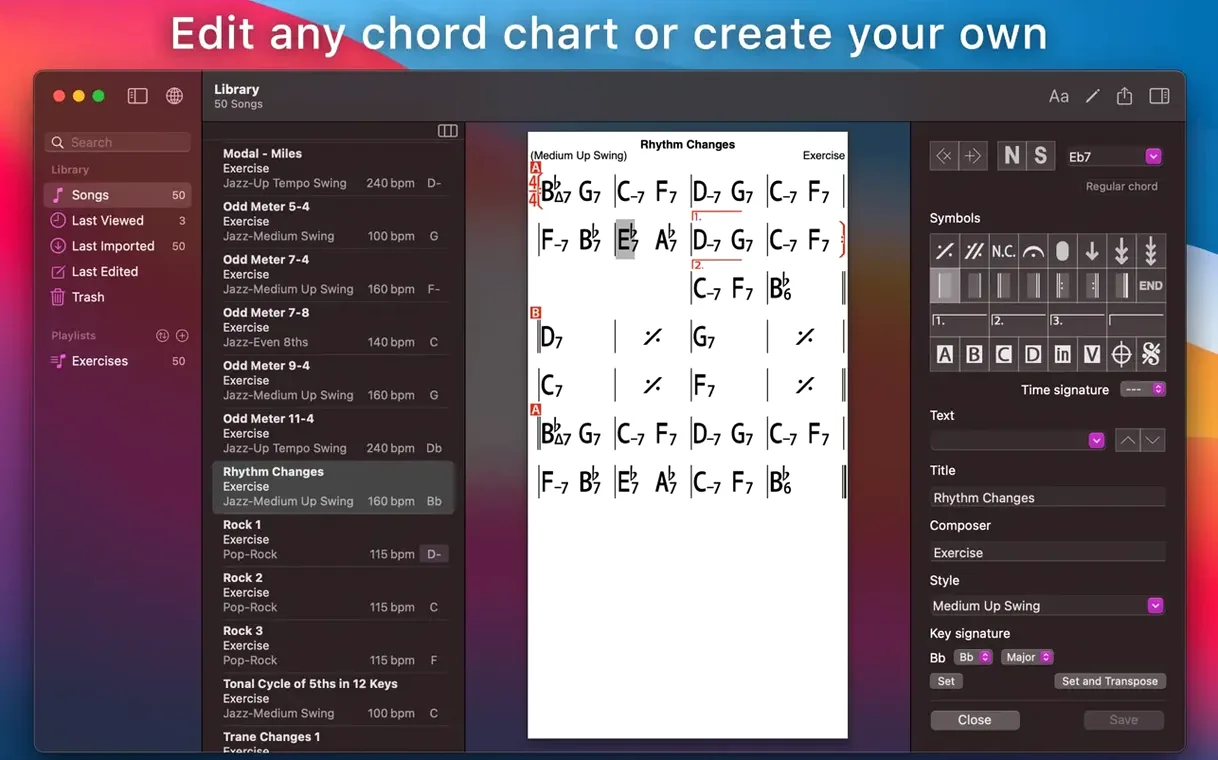
Chord chart — the editable grid where you lay out a song's harmonic structure. You can add repeats, codas and time-signature changes, then see the resulting guitar tab, ukulele tab or piano fingerings for any chord you tap.
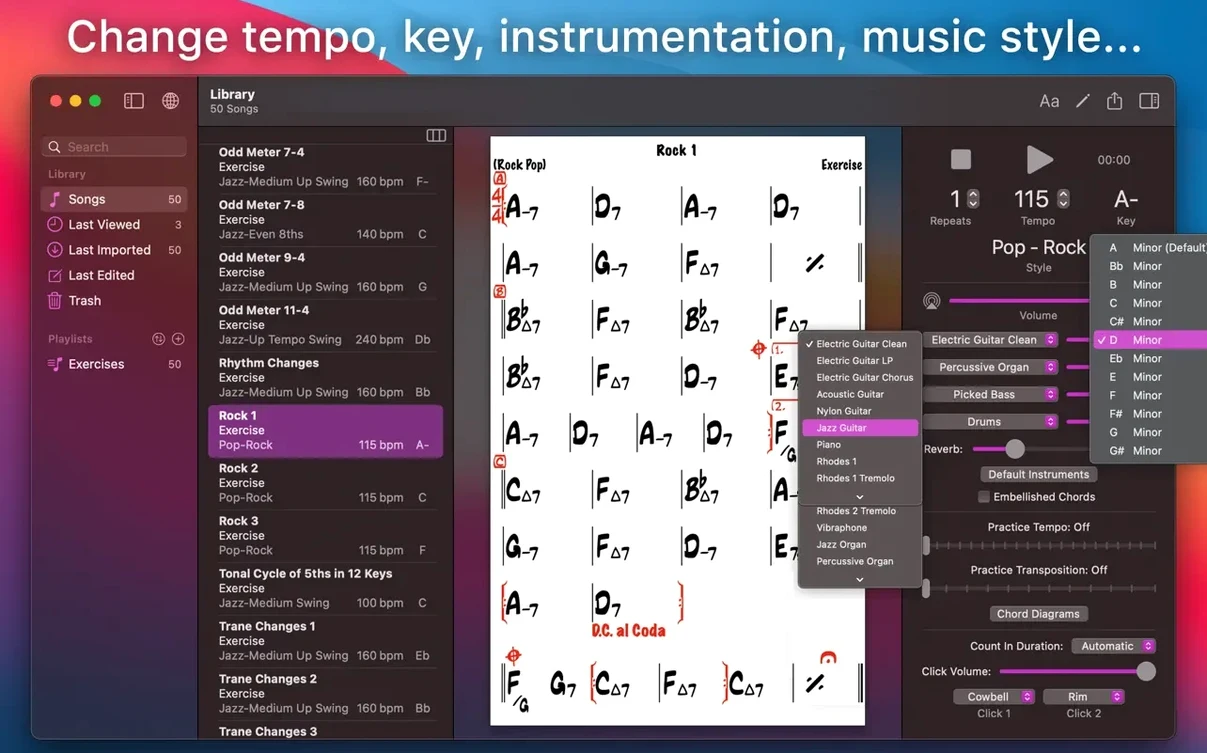
Backing band — the app's playback engine, which renders the chart using one of 51 accompaniment styles. The band simulates a real-sounding trio that follows your form, adjusts tempo and respects the mix levels you set between instruments.
Transposition — shifting the entire chart to a new key or to number notation. Useful when the vocalist calls an audible at the gig.
Export — sending a chart out as a PDF for the rest of the section, or as MusicXML if you need to pull it into a notation editor later.
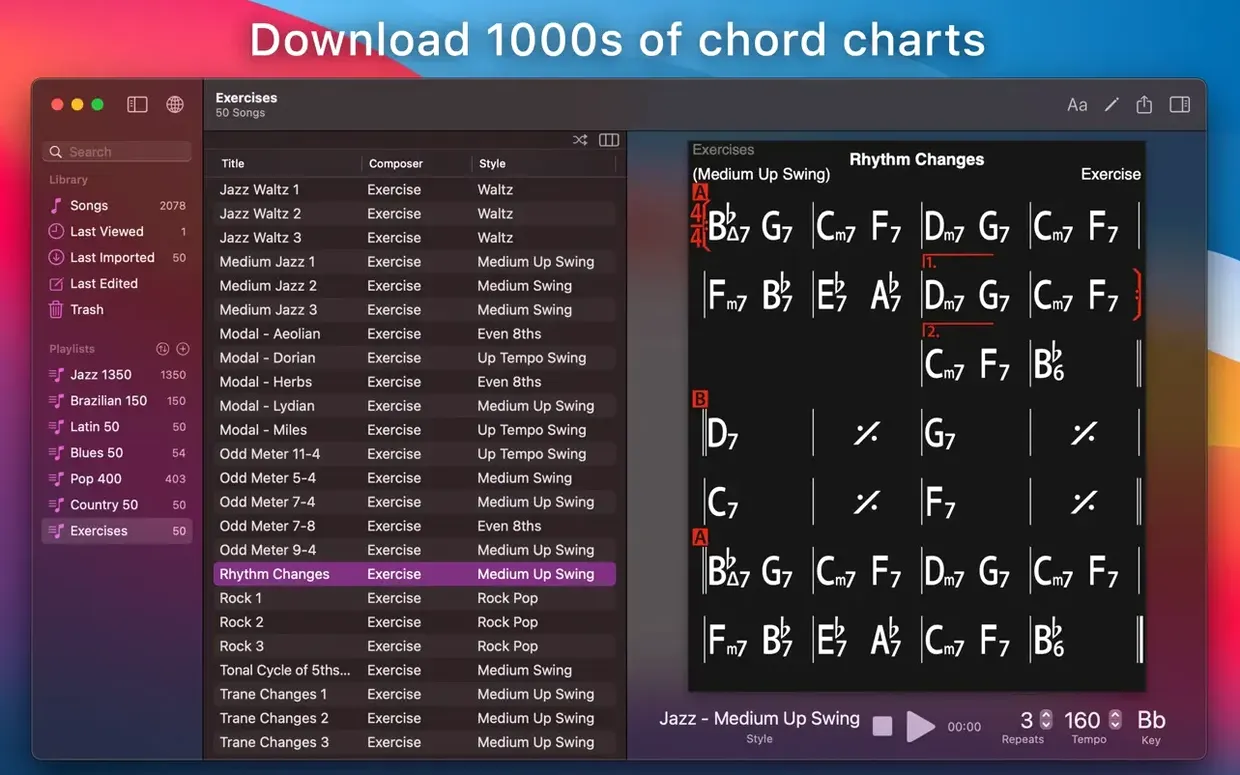
Exercise library — 50 pre-built charts covering common chord progressions. You can run them with the band at any tempo.
Sync — songs and playlists stored in iCloud appear across devices. The Mac version is a separate application from the iOS and iPadOS editions.
How iReal Pro Fits with Other Apps and macOS Features
A chord chart editor sits in a peculiar spot on a Mac — it is not a DAW, not a notation scorewriter, and not a streaming player. That means the way it shares data matters as much as what it does inside its own window.
Exporting a chart as MusicXML is the cleanest bridge to Dorico, MuseScore or Sibelius. The chart lands as notation-ready XML. Rhythmic interpretation is sparse because iReal Pro does not store melody — the receiving application sees chord symbols, form markings and section repeats, which it can lay out as a lead sheet. The reverse path does not exist: the app does not import MusicXML back, so edits made in a notation program stay there.
Audio export is more flexible than it first appears. WAV export gives a stereo mix of the full trio. MIDI export separates each instrument — bass, piano, drums — onto its own track. Drop that MIDI file into Logic Pro or Reaper and you can replace the General MIDI piano with a sampled instrument, tighten the bass quantisation, or use the drum track as a tempo map for a live recording session. The MIDI file includes tempo and time-signature data exactly as the chart defined them, which saves several manual setup steps in the DAW.
With other practice tools, the fit is looser. Anytune or Transcribe! users often run iReal Pro alongside those apps: the backing band provides the pulse while transcription software handles the original recording. macOS audio routing makes this possible without extra hardware — both apps play through the same output, and the system volume mixer sets the balance. No inter-app connection is required, but the workflow works because neither app fights for exclusive access to the audio device.
iCloud sync covers songs and playlists, not preferences. If you set mixer levels or a default playback style on the Mac, those settings stay local. The iOS version will see the same charts but apply its own playback defaults. That distinction matters when moving between a Mac for editing and an iPad for a rehearsal: the chart is identical, but the band might sound slightly different until you match the style and balance.
A less obvious macOS integration is Quick Look. Charts saved as .irb files do not preview in Finder, so you cannot press the spacebar to scan a chart before opening it. Naming discipline becomes essential — a chart called "Autumn Leaves – Eb.irb" tells you more before opening than "Song 47.irb" ever will.
Entering Chords Before Setting 3/4 Time
The most common stumble happens in the first five minutes: entering chord symbols without setting the time signature first. iReal Pro defaults to 4/4, and a chart built in 3/4 against that default will play back with accents in the wrong place. The time-signature control lives in the song settings panel, not on the main editing grid, so new users often miss it entirely. Set the meter before typing a single chord.
Another early mistake is ignoring the player count setting. The app defaults to a trio — bass, piano, drums — but you can mute or solo any instrument from the mixer. A beginner practising a bass line should mute the virtual bassist. A pianist working on left-hand voicings often benefits from dropping the piano track so the real instrument does not clash with the simulated one. The mixer is not just a mixing tool; it is a practice-configuration tool.
Repeats and codas trip up users who treat the editor like a word processor. iReal Pro uses text-based repeat instructions — IN, D.S. al Coda, 1x/2x — typed into the appropriate measure rather than dragged from a palette. Forgetting to place the corresponding coda sign on the target bar leaves the player looping indefinitely or stopping mid-chart. The playback engine follows these markings literally; it will not infer missing structural elements.
New users also overlook the transposition lock. Charts can be transposed for display and playback independently. A chart set to key of C on screen but playing back in Eb is confusing during a live gig. The transpose button in the toolbar controls both display and playback together by default, but a separate global-transpose setting in preferences can override the playback key. Beginners who enable that preference and forget about it spend ten minutes wondering why every chart sounds a semitone off.
A subtler misstep is treating the exercise library as a static set. The 50 exercises are editable charts — you can change the tempo, swap the style or add a fourth on the last bar. A player who only runs them as-is misses a chance to personalise the practice routine. Slow down the ii-V-I exercise, change the style from swing to bossa nova, and suddenly the same progression teaches a different feel.
Playback Stops After a Single Chorus
Playback stops after one chorus. The loop control sits in the player bar, not in the song settings. If the loop button is off, the band plays through the form once and stops. Toggling it on loops indefinitely. The number of choruses can also be set to a fixed count in song settings — check there if the loop button is lit but playback still ends early.
No sound on Mac with Bluetooth headphones. macOS sometimes routes audio to an output that no longer exists — a common scenario after disconnecting AirPods. Open Audio MIDI Setup, check the output routing, or simply toggle the output device in iReal Pro's audio preferences. The app uses the system default device unless a specific output is selected internally.
Charts not appearing on another device after sync. iCloud sync requires the same Apple ID on both devices and iCloud Drive enabled in System Settings. Even with those in place, the sync is not always instant. Forcing a sync from the iReal Pro preferences menu pushes the current library state manually and resolves most lag issues. If a chart still does not appear, check that it was saved to the synced playlist, not to a local-only one.
Exported MIDI sounds different in a DAW. The MIDI file contains General MIDI program-change messages that assume a GM-compatible sound source. A DAW with a modern sample library may map instruments differently. The fix is to reassign the tracks in the DAW — the notes and timing are correct, but the sound patches need manual selection.
Guitar tab displays a voicing that does not match the neck position you want. iReal Pro picks voicings algorithmically based on voice-leading proximity. There is no manual voicing override. The workaround is to use the chord-quality selector — choosing a specific extension often nudges the algorithm toward a different string set. For precise voicings, export the chart and annotate it in a dedicated tab editor.
Song Library Depends on Community Charts
Does the app include songs, or do I need to find them? iReal Pro ships with the 50 exercise charts and a handful of demo songs. The main library comes from user-created charts shared on the community forums. There are thousands available, covering jazz standards, pop tunes, Brazilian repertoire and more. You download them as individual files or bulk playlists and import them into the app. No copyrighted melodies or lyrics are included — only chord progressions, which fall under the fair-use arrangements the community has relied on for years.
How much of a band does it actually simulate? Three instruments — bass, drums and either piano or guitar, depending on the style. It does not simulate a horn section, strings or a vocalist. The 51 styles cover enough ground that a jazz trio practice feels distinct from a rock ballad or a bossa nova session, but the instrumentation ceiling is fixed. If you need a full big band, this is the wrong tool.
Will it run on an Apple Silicon Mac? Yes. The build is universal and runs natively on both Intel and Apple Silicon machines. Performance is not a concern on any Mac that meets the macOS 12.4 requirement — the playback engine is lightweight enough that the fan rarely spins up even during long practice sessions.
Can I use it without an internet connection? Yes. The app works fully offline. iCloud sync and community forum access are the only features that need a network. All 51 styles and the exercise library live on disk once the app is installed, so a rehearsal in a basement with no Wi-Fi is no problem at all.
Band-in-a-Box Generates Full Arrangements with Melody
iReal Pro occupies a narrow niche, but a few other applications overlap with parts of its feature set.
iReal Pro vs. Band-in-a-Box. Band-in-a-Box is the heavyweight in this category on desktop. It generates full arrangements with melody, soloing and far more instrument choices than iReal Pro's trio setup. The trade-off is complexity — Band-in-a-Box loads with hundreds of options and a UI that has accumulated decades of controls. iReal Pro does one thing smaller and cleaner. A musician who wants to type a few chords and play along in thirty seconds will find iReal Pro the quicker path. Someone who wants to generate a finished backing track with real tracks and solo sections will outgrow iReal Pro quickly and need what Band-in-a-Box offers on the Mac.
iReal Pro vs. DrumGenius. DrumGenius focuses on drum loops in classic jazz and blues styles, played by real drummers. It sounds more organic than iReal Pro's MIDI drums, but it does not supply bass or harmonic accompaniment. The two apps complement each other rather than compete — a practice session might use DrumGenius for feel and iReal Pro for harmonic context, with one muted while the other plays.
iReal Pro vs. a DAW with chord-track features. Logic Pro has a chord track and a session-player feature that can generate bass and piano parts from chord symbols. The result sounds more polished and you have full mix control, but the setup time is longer — creating a Logic project, adding session players and mapping out a song structure takes several minutes compared with iReal Pro's near-instant chart-to-playback pipeline. For a quick practice run, the
- macOS 12.4 or later
- Apple Silicon and Intel Macs
Sign in · Create an account to add a field note.
No field notes yet. A measurement, a version, a machine — they appear after moderation.