Audio
Maschine 3.6.0
AudioUpdated
| Requirement | On file |
|---|---|
| macOS | macOS 13 or later |
| CPU | Apple Silicon, Intel 64-bit |
| Download | 1.3 GB |
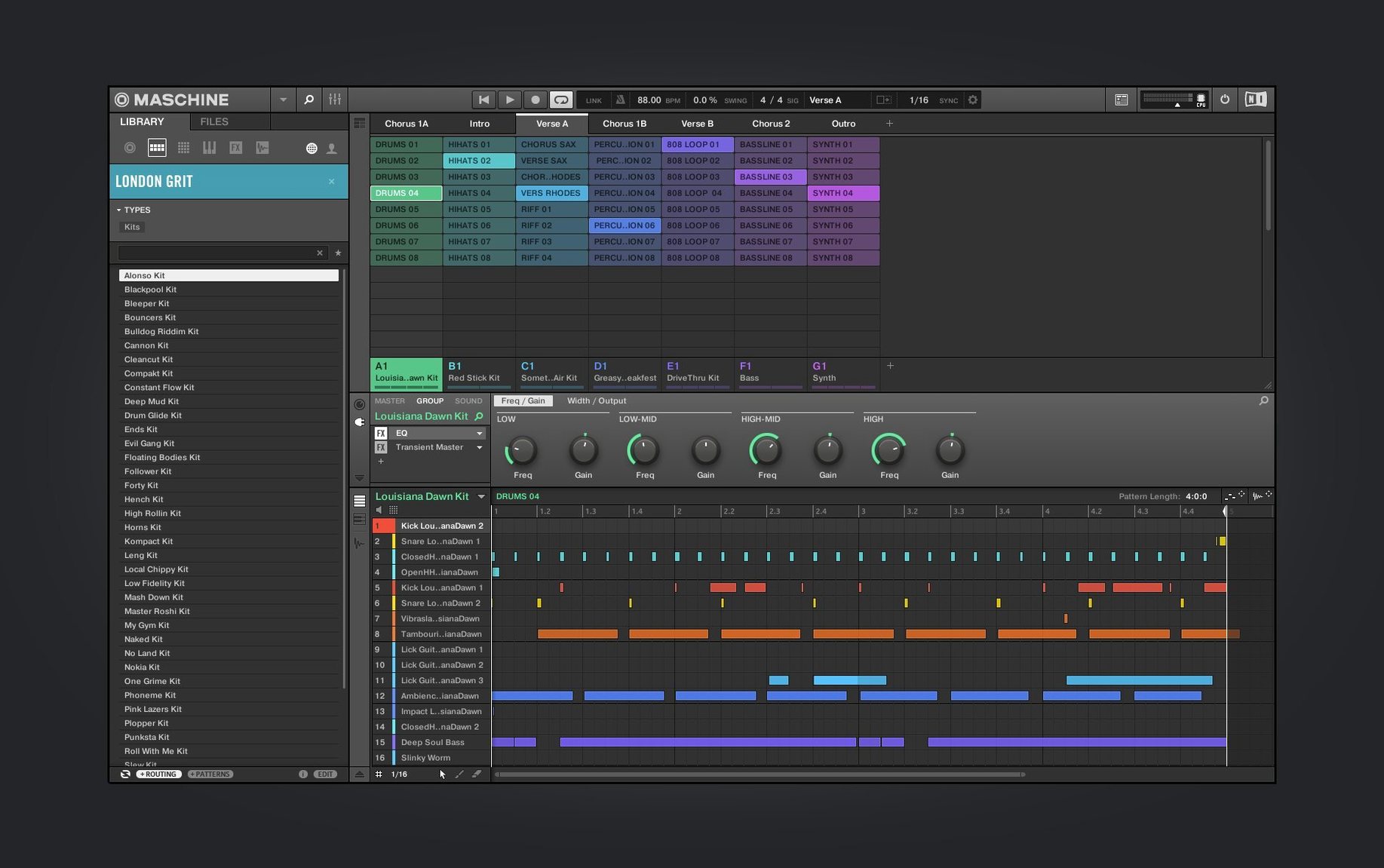
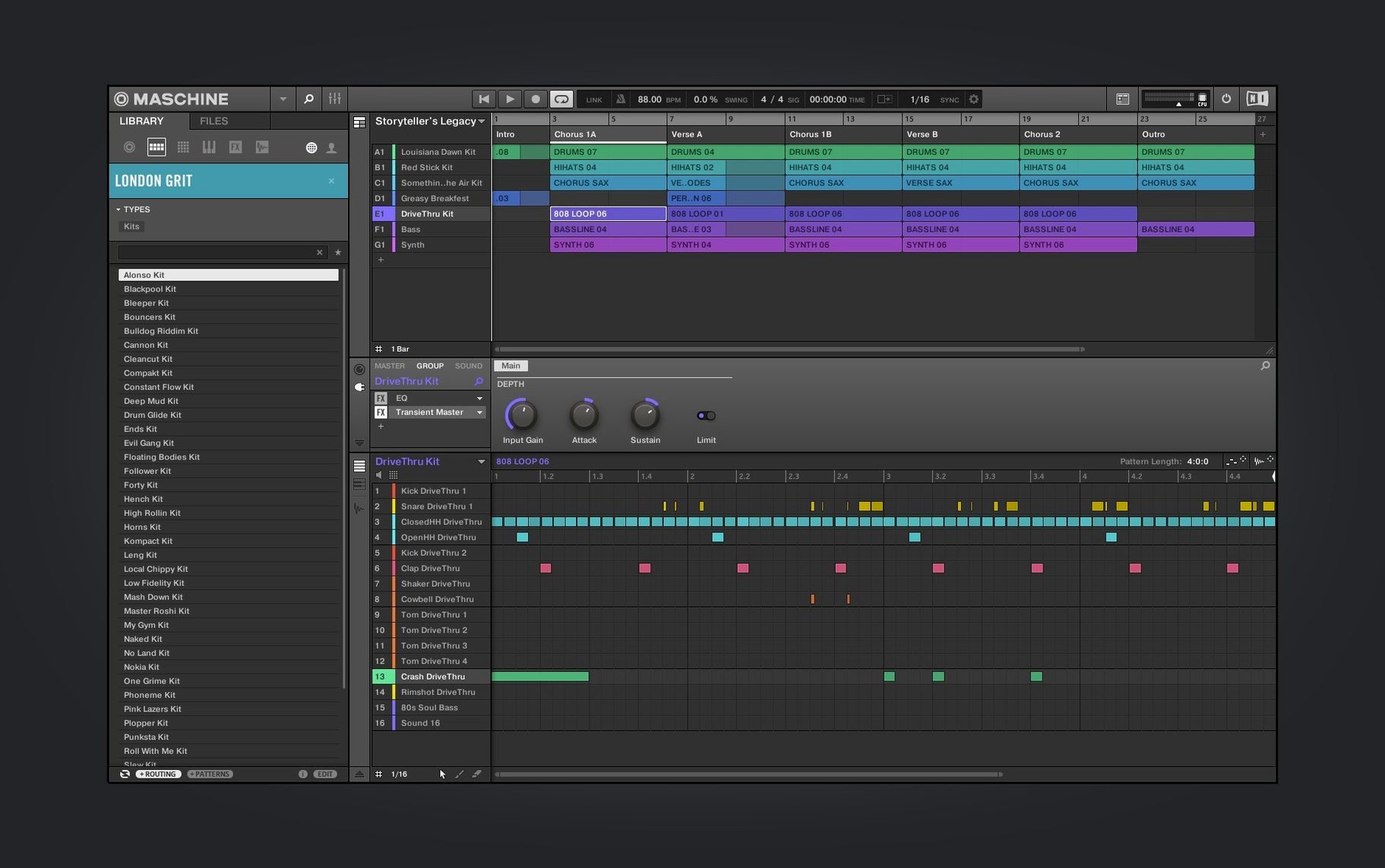
Beatmakers and live performers who build tracks from sampled fragments and sequenced patterns often reach for a system that links hardware with software. Maschine fits that role, pairing a controller with a standalone application that also loads as a plug-in inside a DAW. The current version holds to the same core — a pattern-based sequencer, a high-performance sampler, a built-in audio interface and an integrated drum sequencer — while shifting the on-screen tools you see most often.
Audio and Synth Modules Trade Tabs for a Unified Panel
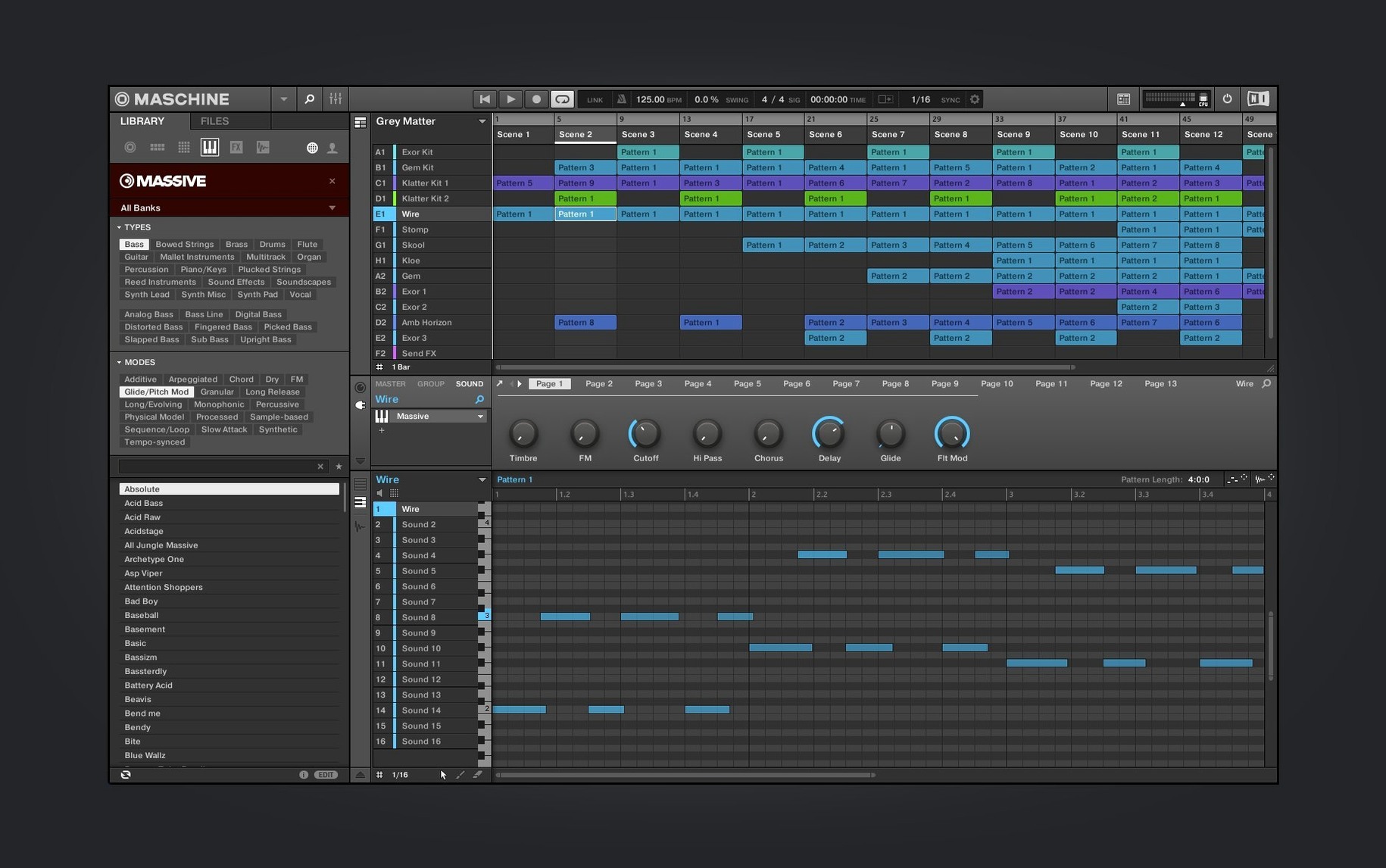
- The Audio, Poly Synth and Drum Synth modules received a redesigned UI. Controls sit in a layout that cuts down on tab switching when you shape a kick, a bass patch or a sampled hit.
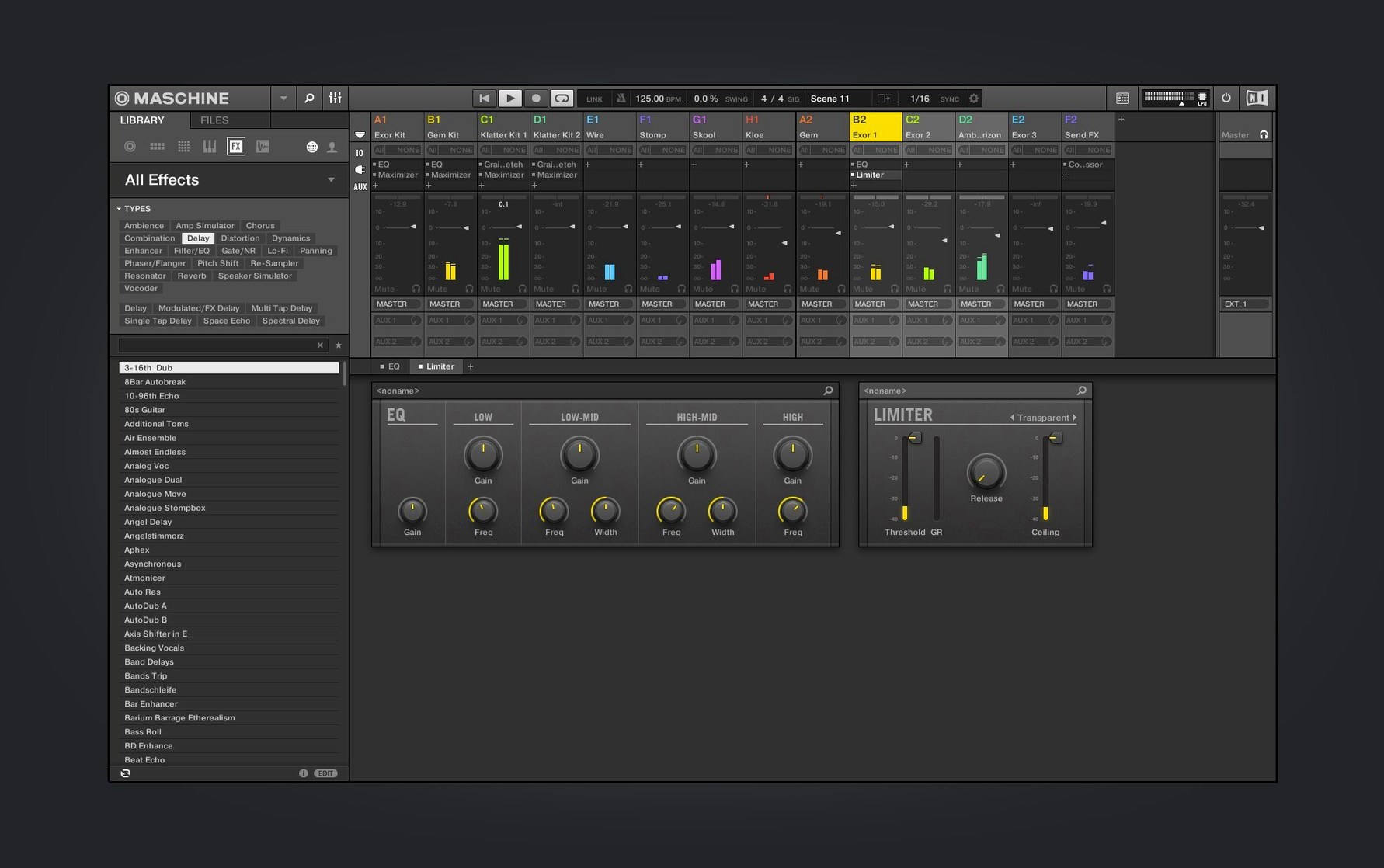
- Mixer view redesign work continued. Channel strips and metering now follow the visual language introduced in earlier 3.x updates, with level readings that are easier to scan during a session.
NKS Connect Lands
Maschine 3.6.0 introduces NKS Mode integration for compatible NKS Connect controllers, starting with the AKAI MPK mini IV. Plug in a supported controller and the software maps key parameters automatically — filter cutoff, envelope stages, effect sends — so you can browse and tweak sounds without touching the mouse. The feature builds on the NKS standard Native Instruments has been expanding across its product line, bringing the hardware-software link to a wider set of devices.
Four-Hour Sessions With a Dozen Groups Stay Snappy
A session that runs four hours with a dozen groups, sliced loops and a chain of effects on the master bus rarely trips the application up. The audio engine keeps latency low enough that tapping a pad and hearing the transient feels immediate — around 6 ms round-trip on an Apple Silicon machine at a 128-sample buffer, assuming a competent audio interface. CPU spikes stay modest. A project with eight drum kits, two poly-synth instances and three sampled instruments typically idles under 30% on an M2 core. Memory use climbs with sample libraries, but the disk-streaming mode prevents the sort of swap-file grinding that used to plague earlier releases.
Stability in version 3.6.0 sits at a point where unexpected quits are rare. The most common hiccup comes when loading third-party NKS libraries that were authored for older plug-in formats; the scan can stall for 20 seconds before the library appears. Other than that, the application survives all-day studio work without a restart. Live performers who run it as a standalone host on stage appreciate that it does not phone home mid-set — once activated, it stays quiet.
Tap the Pad Grid to Skip the New Welcome Screen
Double-click the icon. The new welcome screen appears, offering demo projects and tutorial video links. A producer who knows what they want skips it in under a second. They tap the pad grid to start a blank project.
- Select an empty Group slot and press Browser. The library filters down by type: kicks, snares, hi-hats. A few knob twists audition samples pre-mapped across the pads.
- Tap Record and play a kick-snare pattern live. The step sequencer captures it with velocity data intact. Correct a sloppy hi-hat hit in the piano roll — drag the note a 16th-note left.
- Load a bass sound into a second Group. Switch the Poly Synth module to monophonic mode, pull the filter cutoff down to 380 Hz and add a touch of resonance. Record eight bars.
- Slice an old funk break. The sampler auto-detects 16 hit points. Assign the slices chromatically and trigger them from the pads while the transport runs. Three slices get their own pitch and decay adjustments.
- Open the Mixer view. The redesigned channel strips show peaks clearly. Pan the hi-hat slightly right, drop the bass fader 2 dB, and insert a bus compressor across the drum Group.
- Export a stereo mix at 24-bit/48 kHz. The whole process, from blank canvas to bounced file, takes under 20 minutes.
A Beatmaker's Afternoon
Consider a sample-based hip-hop producer who runs Maschine standalone on a MacBook Pro. They have 40 GB of their own drum hits, plus a folder of vinyl rips from a weekend digging session. They open the software, drag six one-shot kicks onto the first Group and layer two of them with a 15 ms delay on the second transient to fatten the attack. A dusty piano loop gets sliced into 32 pieces; the best three are re-sequenced into a new melodic phrase using the pad grid. By the end of the afternoon, they have three full arrangements — verse, chorus and bridge — each stored as a separate Scene. The Mixer holds EQ and saturation on the drum bus, a tempo-synced delay on the sample Group, and a brick-wall limiter on the master channel to catch stray peaks. They export stems for mixing in another environment later. Nothing crashed, nothing glitched, and the laptop fan stayed silent.
System Requirements, Controller Support and Project Migration
Native Apple Silicon Support From Ventura to Sequoia
The current build runs on macOS 13 Ventura and newer, including Sequoia. Apple Silicon support is native — no Rosetta translation layer needed. Intel machines with 64-bit processors are still supported in this version, so older Mac Pro towers and pre-2020 MacBook Pros remain viable hosts.
NKS Connect Maps the AKAI MPK Mini IV Instantly
Official Maschine hardware — Mikro, MK3, Studio or Jam — communicates over USB with no extra configuration. The new NKS Connect support means certain third-party controllers, starting with the AKAI MPK mini IV, now map to the browser and key sound parameters automatically. Generic MIDI controllers work too, but you will spend time assigning CC numbers by hand.
Maschine 2 Projects Open Directly, 3.6.0 Saves Lock Forward
The application opens Maschine 2 project files directly. Groups, patterns, plug-in settings and automation translate without conversion. A project saved in 3.6.0 will not open in Maschine 2, so keep a backup before migrating.
Does it load VST and AU plug-ins?
Yes. Third-party effects and instruments appear in the plug-in browser alongside Native Instruments' own modules. AU and VST3 formats are supported. Plug-ins that crash during scanning get blacklisted automatically and can be re-enabled from the preferences pane.
Three Roles: Standalone Sketchpad, AU/VST3 Plug-in or Host
Maschine slots into a Mac-based studio in three main ways. As a standalone application, it replaces a DAW for the sketching and beat-construction phase — producers build ideas from scratch without launching a heavier environment. As an AU or VST3 plug-in loaded inside Logic Pro, Ableton Live or Studio One, it becomes a multi-output drum machine and sampler that syncs to the host transport. The 16 stereo outputs appear as separate channels in the DAW mixer, so a kick, snare and hi-hat can each receive their own treatment with the host's effects.
Drag-and-drop audio export ties it to the Finder and other audio editors. Select a pattern, drag it to the desktop, and a 24-bit WAV file lands where you drop it. The same gesture works between Maschine and an open DAW arrange window. For users who prefer hardware sampling, the software can route audio in from a turntable or tape deck through the built-in audio interface, sample it directly into a pad, and have it sliced and mapped within seconds. The combination turns the computer into a fast capture-and-chop station that works alongside outboard gear.
NKS integration extends the ecosystem further. Komplete Kontrol keyboards browse Maschine's library from their own screens, and parameter mapping follows the same NKS standard that Native Instruments uses across its instrument range. A producer who builds a kit in Maschine can later recall its sounds and mapped controls from a Komplete Kontrol keyboard without re-tagging anything. The link is bidirectional: presets saved in Komplete Kontrol appear in Maschine's browser, and vice versa.
Audio, Poly Synth, Drum Synth modules — redesigned UI
Mixer view — redesign work continued
NKS Connect support — added, starting with AKAI MPK mini IV
NKS Mode — integration for compatible NKS Connect controllers
- macOS 13 or later
- Apple Silicon and Intel
Sign in · Create an account to add a field note.
No field notes yet. A measurement, a version, a machine — they appear after moderation.