Mac Apps
Beauty Box Photo 6.0.5
Mac AppsUpdated
| Requirement | On file |
|---|---|
| macOS | See the sheet |
| CPU | Apple Silicon, Intel 64-bit |
| Download | 107 MB |
The current build, 6.0.5, runs natively on both Apple Silicon and Intel Macs — a single 64-bit binary covers the two architectures.
What does the automatic detection actually key on?
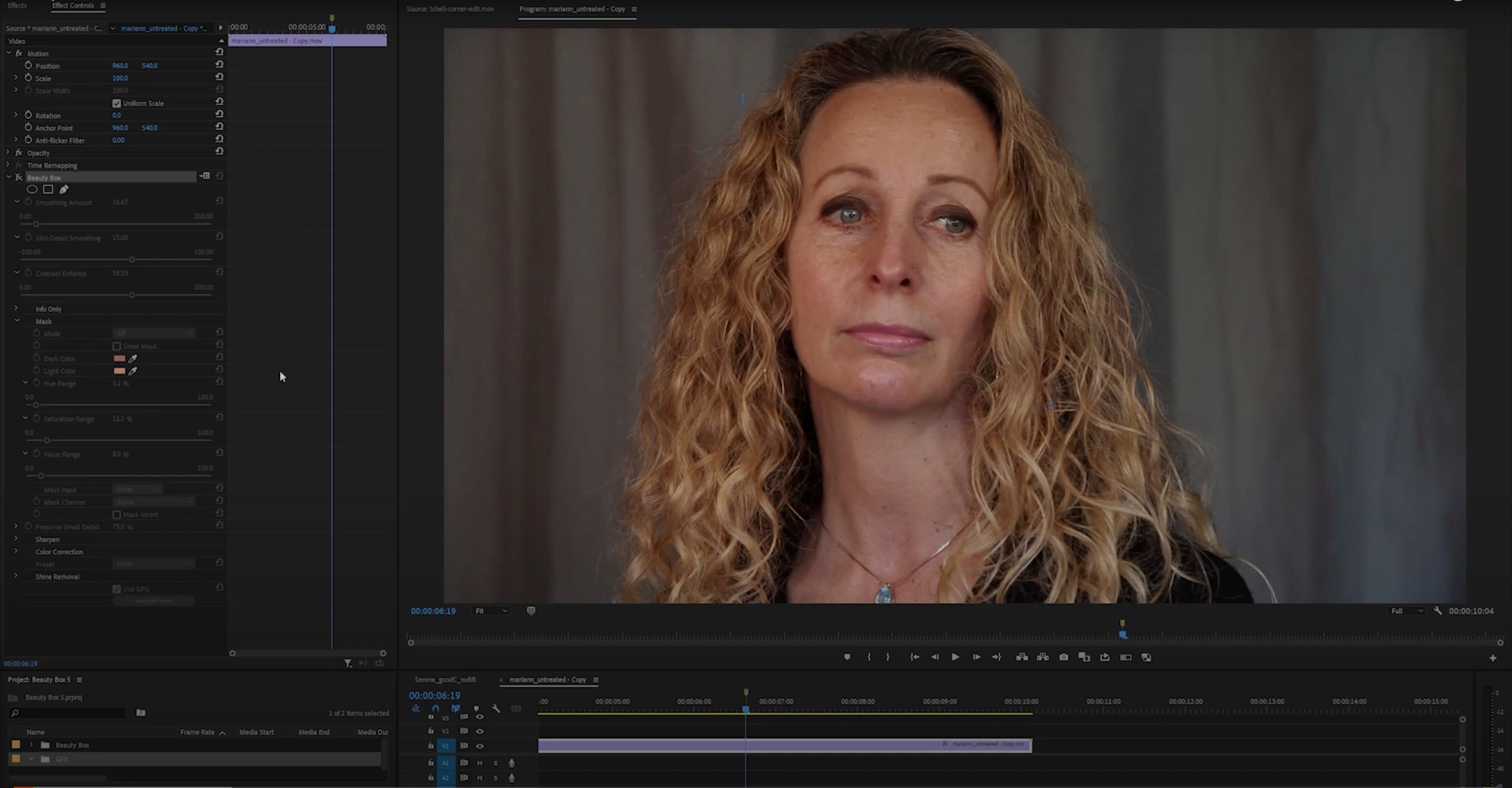
It isolates skin colour by analysing the underlying RGB values, so you don’t paint a mask manually. The algorithm searches for the tonal range you define and confines smoothing to that area.
Which host applications does it load into?
Beauty Box Photo is built for Photoshop. It isn’t a standalone editor — you access its controls through the Filters menu once the plug-in is installed. Premiere Pro and After Effects use a separate Digital Anarchy product; this one stays inside the still-image pipeline.
How much control do you keep over the result?
Three main sliders handle Smoothing, Skin Detail, and Colour Correction. You can pull back the effect with an opacity slider or carve out areas with the built-in mask tool, so the render doesn’t drift into clothing or background textures.
Beauty Box Photo next to other Mac retouching plug-ins
A spec comparison cuts through the marketing faster than any brochure. Here is how Beauty Box Photo 6.0.5 sits against two other plug-ins that run inside Photoshop on macOS — Retouch4me Skin and Imagenomic Portraiture 4.
Retouch4me Skin works frame by frame with a neural network that was trained on manually retouched portraits. It generates a clean layer on top of your original and lets you dial intensity back. The upside is that it handles tricky lighting without needing a skin-colour picker; the trade-off is a heavier GPU load and no built-in mask editor inside the plug-in window. Beauty Box Photo takes the opposite approach — a deterministic colour-range model that you adjust with sliders, plus a mask tool right there in the panel. That keeps the render predictable and fast on machines without a discrete GPU, though it asks you to spend a few extra seconds on setup when the subject stands under mixed gels.
Portraiture 4 shares the same colour-range logic and gives you a similar trio of smoothing, sharpness, and warmth controls. Its standout feature is the preset browser with thumbnail previews, which Beauty Box Photo lacks. On the other hand, Beauty Box Photo pulls ahead on architecture support: Portraiture 4 still ships separate installers for Intel and Apple Silicon, while the Digital Anarchy plug-in bundles both in one binary. If you maintain a fleet of Macs across different chip generations or boot between systems, that single-package handling removes a quiet friction point during deployment.
Apple Silicon previews now redraw inside a second
Version 6.0 brought native Apple Silicon support, and 6.0.5 tidied the installer so the plug-in lands in the correct Photoshop plug-ins folder without manual dragging. The practical effect is straightforward: on an M-series MacBook Pro, the preview redraws in roughly half the time the Rosetta-translated 5.x builds needed. Batch processing inside Photoshop actions also stopped throwing the occasional “filter unavailable” error that some users hit when waking a Mac from sleep with an external display attached.
One behavioural shift worth noting: the default skin-tone range widened slightly in 6.0.x. That means fewer initial adjustments for subjects with olive or deep-brown skin, but it also makes the plug-in a touch more likely to grab warm wooden backgrounds unless you nudge the tolerance slider down. The mask tool got a small quality-of-life improvement too — holding Option while dragging now temporarily switches to the erase mode, which saves switching tools when you need to clear a stray selection around a collar or a hairline.
Repeatable settings for 200-frame weekly workflows
The plug-in makes intuitive sense for two groups. High-volume portrait photographers — school-picture studios, headshot services, event shooters who deliver 200+ frames a week — benefit from the repeatability. The colour-range model means the same Smoothing and Skin Detail values hold across a batch of images shot under the same strobe setup, so you can wrap the plug-in inside a Photoshop action and run it while you make coffee.
The second group is retouchers who want visible proof of what the plug-in did before they commit. Beauty Box Photo applies its smoothing to the current layer rather than generating a separate one, but the opacity slider and the mask preview give you a real-time split view. That workflow clicks for people who learned retouching with frequency-separation methods and want a faster first pass that doesn’t flatten the pores into plastic. If you already use the Pen tool or a Wacom tablet for detailed masking, the plug-in slots into that routine without fighting your muscle memory.
Users who occasionally search for a beauty box 5.0 crack mac or a beauty box torrent are often testing whether the plug-in justifies a spot in their Photoshop stack. The 6.0.5 build removes the friction those older cracked versions created — no Rosetta lag, no mismatched plug-in folders on Apple Silicon. That alone shifts the everyday experience from “does this work?” to “how far can I push the sliders before the skin breaks?”
How Beauty Box Photo fits with other apps and macOS features
Inside Photoshop, it plays well with adjustment layers. A common pattern is to duplicate the background layer, run Beauty Box Photo on the duplicate, then mask the effect onto the skin with a soft brush. From there you can stack Curves, Hue/Saturation, or the Camera Raw filter above it without disturbing the smoothing pass.
Outside Photoshop, the plug-in doesn’t talk to other software directly — it’s an Adobe-only build, so you won’t find it inside Affinity Photo or Capture One. But macOS window management and file handling still help. With Stage Manager or multiple Spaces, you can keep the plug-in’s panel open on one display while Lightroom Classic sits on another, sending TIFFs into Photoshop for the retouch round-trip. If you use Automator or a shell script with the sips command to pre-process RAW files into TIFFs before Photoshop opens them, the plug-in’s single-binary architecture means you don’t have to maintain separate action sets for Intel and Apple Silicon Macs — the same droplet works on both.
For video editors who stumble onto the beauty box for mac premiere pro search phrase, it’s worth knowing that this particular plug-in won’t appear in Premiere’s effect panel. Digital Anarchy sells a separate video-focused filter for that. But the still-image version does pair smoothly with Photoshop’s video timeline: you can apply it to a frame, copy the filter to a clip, and render out a short sequence for a talking-head thumbnail or a YouTube cover still. It’s not a motion tool, but it holds up for the single-frame work that sits between photography and video.
- Apple Silicon or Intel 64-bit processor
- Photoshop (plug-in host)
Questions on file
Does Beauty Box Photo work on a Mac with Apple Silicon?
Yes, version 6.0.5 includes native ARM support alongside x86 64-bit, so it runs without Rosetta on M-series chips.
Sign in · Create an account to add a field note.
No field notes yet. A measurement, a version, a machine — they appear after moderation.