Mac Apps
BetterZip 6.0.6
Mac AppsUpdated
| Requirement | On file |
|---|---|
| macOS | macOS 13.5 or later |
| CPU | Apple Silicon, Intel 64-bit |
| Download | 25 MB |
Version 6.0.6 rolls out a handful of refinements that someone who lives inside archives will notice immediately. The 7z helper moves to v26.03 with Apple Silicon assembler optimisations, so large solid 7z blocks decompress with less CPU drag. The bundled zstd and brotli tools get an update, and the unrar library is refreshed — small housekeeping that keeps extraction speed aligned with upstream improvements. You can now force BetterZip to use a language that differs from the system setting, and a new extraction option strips macOS metadata when you don't want extended attributes and resource forks polluting a clean directory.
Tools that go past simple compression
- In-archive editing. Rename, move or delete files and folders inside an archive without extracting and repacking. The archive stays intact; only the directory entry changes.
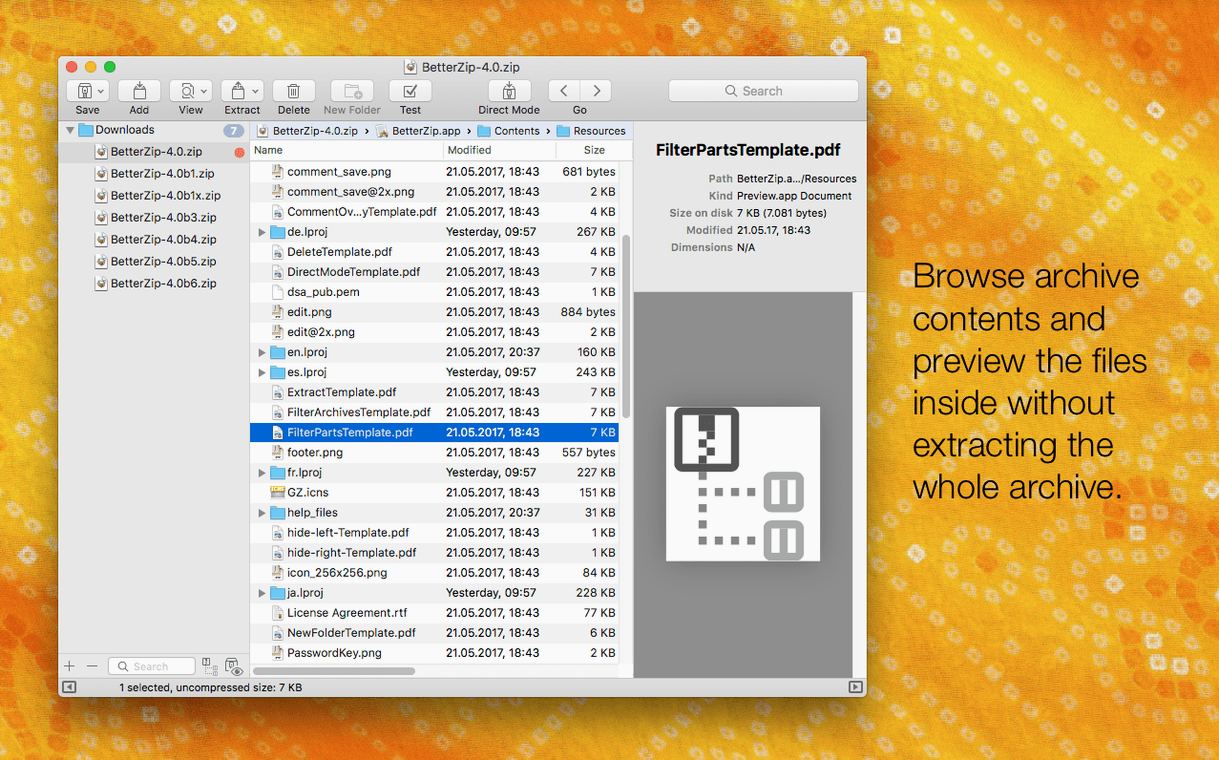
- Quick Look preview. Press the spacebar on any file inside an archive to see its contents before you extract. Works with formats macOS already understands plus text and image files inside 7z, rar and tar containers.
- AES-256 encryption. Create password-protected ZIP archives with the stronger cipher. The built-in password generator produces random strings at a length you specify, so you are not leaning on weak human-chosen phrases.
- 7z management on Mac. Browse, extract and create 7z archives natively — no Terminal workarounds. Solid compression and dictionary sizes are exposed in the save dialogue.
Where the limits sit
BetterZip reads over 30 formats — rar, 7z, tar, gz, bz2, xz, lz4, brotli, zstd, arj, cab and more — but write support concentrates on ZIP, 7z, tar and their gz/bz2/xz variants. If you regularly need to create .rar archives, you will need a separate tool. The 6.0.6 update also patches a rare crash in the helper-tool communication layer, a fix that matters on long-running batch extractions where a dropped connection would previously halt the queue.
How BetterZip fits into the macOS ecosystem
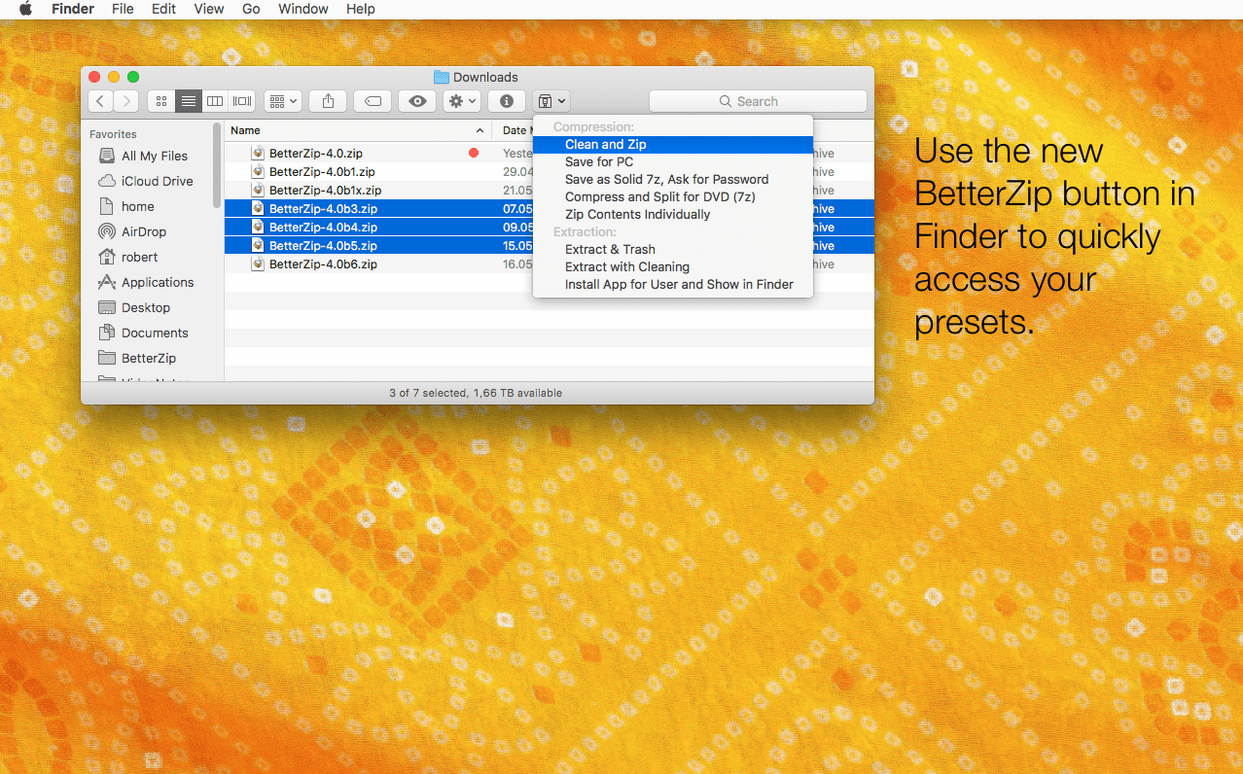
BetterZip does not try to replace the Finder — it extends it. Once installed, a right-click on any supported archive shows the BetterZip contextual menu. From there you can extract, preview or open the archive without launching the main window. The Finder extension also adds Quick Look support at the file-system level, so pressing the spacebar on a .7z or .rar file on your desktop shows its contents inline, the same way you preview a .zip in stock macOS.
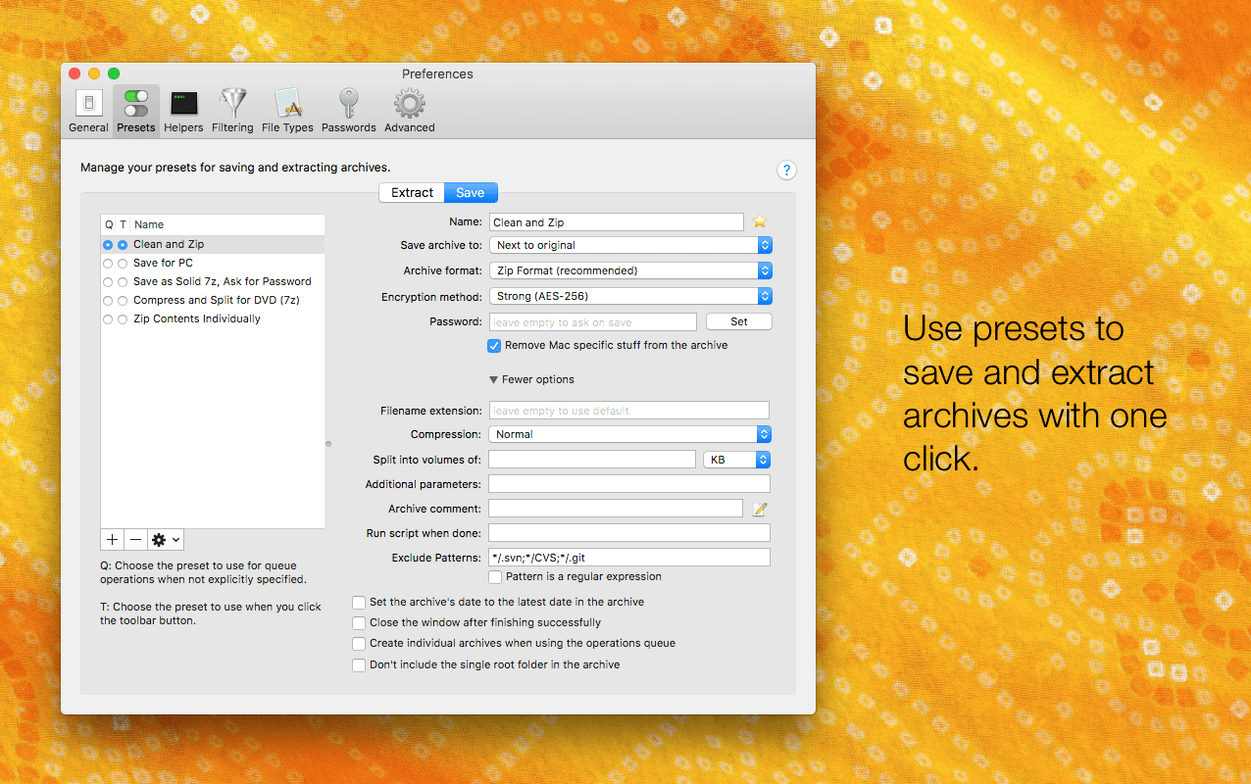
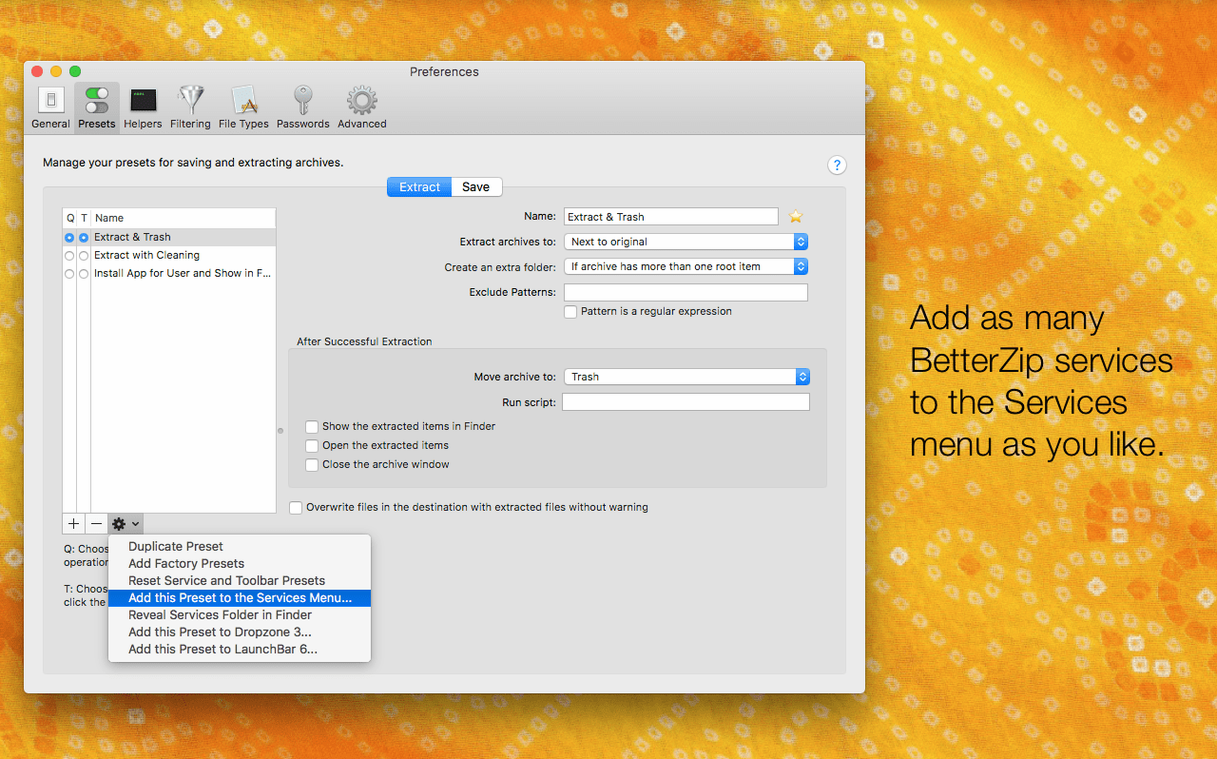
The app hooks into the Services menu too. Select an archive in Finder, open the Services submenu, and BetterZip offers extraction presets — great for triggering a saved configuration without breaking your flow. If you use Automator or Shortcuts, the AppleScript dictionary exposes compression and extraction commands. A common trick: drop a "Create ZIP with AES-256" AppleScript into a Folder Action, and every file saved to that folder gets compressed and encrypted automatically.
For keyboard-centric workflows, the operations queue sits in the menu bar. Drag archives onto it and they process in the background. The queue respects your preset choices — password, format, compression level, destination folder — so you can batch-extract a dozen .tar.gz files while working in another app, with only a subtle progress indicator in the corner of the screen.
Working with third-party tools
BetterZip sends files to external editors through the Open With command. You can set Sublime Text for .conf files, Preview for images, or BBEdit for text, and double-clicking a file inside an archive opens it in that editor. Save your changes in the editor, switch back to BetterZip, and the app asks whether to update the archive with the modified version. No manual extraction, no temp-file hunting.
If your workflow includes command-line tools, BetterZip's helper binaries — the 7z, zstd and brotli tools it bundles — are not exposed to the shell by default. That is by design. The app keeps its own updated versions separate, so a brew upgrade does not break extraction presets. If you do want to point shell scripts at BetterZip's tools, they live inside the app bundle at BetterZip.app/Contents/Helpers/.
A concrete workflow: cleaning a client's project archive
Say a client sends you a 340 MB .zip full of design assets, but the archive includes .DS_Store files, Thumbs.db leftovers, and a 120 MB video file you do not need. You want to strip the junk, rename a few files to match your naming convention, and re-send a lean archive to the team — all without extracting 340 MB to disk.
Here is the step-by-step run:
- Right-click the .zip and choose Open with BetterZip. The archive loads in a flat file list with size, date and compression ratio columns visible.
- Press Cmd-F and search for
.DS_Store. Select all results, press Delete. BetterZip removes the entries from the archive index. Repeat forThumbs.db. - Click the Size column header to sort descending. Spot the 120 MB video file at the top. Select it, press Delete.
- Select the remaining files that need renaming. Press Enter on each and type the new name. The archive directory updates immediately — no repacking yet.
- Press Cmd-S to save. BetterZip rewrites the archive with only the changes needed. The operation takes about 8 seconds instead of recompressing the whole 340 MB payload.
- Close the archive. The resulting .zip is now 190 MB and matches your naming spec. You attach it to a reply and move on.
The time saved versus a manual extract-clean-recompress cycle is substantial, especially when the archive sits on a network share or a slow external SSD. Because BetterZip edits the central directory and only touches changed byte ranges, the I/O stays low.
When a .rar opens empty: older unrar library vs. RAR 5 dictionary sizes
Snag: You double-click a .rar archive and it opens in BetterZip, but the file list is empty or shows garbled names. Fix: The archive likely uses a newer RAR 5 dictionary size that an older unrar library cannot parse. Version 6.0.6 ships an updated unrar library; if the issue persists, check that BetterZip's built-in helper was not overridden by an older Homebrew or MacPorts install. The app uses its own bundled binary unless you manually symlinked something else.
Snag: Quick Look previews show a blank window for files inside a 7z archive. Fix: Solid 7z archives compress files as a single block. Quick Look must decompress the block up to the requested file's position before it can render the preview. On very large solid archives (8 GB or more), this can time out. Extract the file first, or use non-solid compression when creating 7z archives you intend to browse regularly.
Snag: The Finder extension works for .zip but not for .rar or .7z. Fix: Open System Settings, go to Privacy & Security → Extensions → Finder Extensions, and confirm BetterZip is ticked. If it is already enabled, toggle it off, wait five seconds, toggle it on again. macOS sometimes drops third-party Finder extension registrations after system updates.
Snag: Password-protected archives prompt for the password every time you open them, even after you entered it once. Fix: BetterZip does not cache passwords between sessions by design — it is a security boundary. If you open the same encrypted archive repeatedly, add it to the operations queue with the password saved in a preset. The preset stores the password in the macOS Keychain, so subsequent queue runs do not prompt.
Kat’s Monday build dropper: six .tar.xz archives across platforms
Kat runs the build pipeline for a small game studio. Every Monday morning, the continuous integration server drops six .tar.xz archives — debug symbols, asset bundles, platform-specific builds — into a shared network folder, each between 400 MB and 1.2 GB. Kat's Mac mounts the share over a VPN link that tops out around 80 Mbps on a good day.
She opens BetterZip's operations queue from the menu bar, drags the six archives in, and hits Start All. The queue processes them sequentially: extract into /Users/kat/Builds/YYYY-MM-DD/, skip macOS metadata, overwrite existing files. She switches to Xcode while the progress bar ticks along.
Midway through, the VPN drops for twenty seconds. One extraction stalls with a network error. In older versions Kat might have lost the whole queue to a crash, but the 6.0.6 helper-communication fix keeps the remaining five jobs alive. She retries the failed archive once the VPN reconnects — it picks up where it left off because the destination already contains the first half of the extracted files and BetterZip skips them when overwrite is off.
By the time her coffee is cold, all six builds sit in dated folders, ready for the morning diff against last week's symbols. Kat closes the queue and gets back to the crash log that landed in her inbox overnight.
Language — Option to run the app in a language different from the macOS system language.
Extraction — New setting to skip restoring macOS metadata during extraction.
7z helper — Updated to v26.03 with Apple Silicon assembler optimisations.
Stability — Fix for a rare crash when communicating with external helper tools.
- macOS 13.5 or later
- Intel or Apple Silicon Mac
Questions on file
Can BetterZip open password-protected rar and 7z archives on a Mac?
Yes. It prompts for the password when you open an encrypted archive and supports AES-256 encrypted ZIP creation with a built-in strong-password generator.
Sign in · Create an account to add a field note.
No field notes yet. A measurement, a version, a machine — they appear after moderation.