
Mac Apps
Ghost Buster Pro 7.0.0
Mac AppsUpdated
| Requirement | On file |
|---|---|
| macOS | macOS 15.6 or later |
| CPU | Apple Silicon, Intel 64-bit |
| Download | 11 MB |
Ghost Buster Pro is a Mac utility that searches for and removes leftover files from apps that no longer exist on the system.
Leftover file — a support file, preference, or cache that remains after the parent app has been deleted.
One-click deletion — the app can remove all found items with a single action.
Consent model — nothing is erased automatically; the user decides what goes.
Immediate scan — the search starts as soon as the app launches.
A Fresh macOS 27 Icon, Same Core Cleanup Logic
The update brings a new app icon for macOS 27. The core behaviour is unchanged: Ghost Buster Pro still scans for files created by previously installed apps and deletes them only on command.
Nine Interface Languages, macOS 15.6+ on Intel and Apple Silicon
The interface ships in nine languages, including Russian, German, Spanish, Italian, Simplified Chinese, Korean, Polish, French, and English. Requirements list macOS 15.6 or later, with support for both Intel and Apple Silicon machines.
Speed and Resource Footprint
A first scan on a moderately cluttered system — around 400 GB of used space on an Apple Silicon MacBook Air — finishes in under twelve seconds. The app does not index the entire drive; it targets known sandbox paths, application-support directories, and preference folders where orphaned files tend to collect. CPU usage spikes for a few seconds during the scan, then drops to zero. Memory sits at roughly 48 MB while idle, which is modest alongside a browser or a design tool.
Deletion is instantaneous. Selecting a group of items and clicking Delete removes them in a single pass, with none of the staggered progress-bar delays some cleanup utilities introduce. The app does not run a background daemon or a login item, so it adds no weight to the system once you quit it. For a tool you might open once a month, that matters.
Stability has been uneventful in the best sense. Scans on macOS Sequoia complete without hangs, and the interface remains responsive even when a scan turns up over a thousand items. The app asks the operating system for file metadata rather than walking the file system raw, which keeps disk I/O low and avoids tripping system integrity protections.
Picks Up What Dragging an .app Bundle to Trash Leaves Behind
Ghost Buster Pro pairs naturally with manual uninstall habits. If you delete an app by dragging its .app bundle to the Trash, the utility finds what stayed behind. It also complements dedicated uninstallers — occasionally an uninstaller misses a cache buried in ~/Library/Group Containers or a preference file in /Library/Preferences, and a targeted scan picks those up.
The app integrates with Finder via a right-click service: select a folder in Finder, choose Scan with Ghost Buster Pro from the Services menu, and the scan narrows to that location. This is handy when you know a particular app stored data in a custom directory outside the standard paths.
Spotlight and Time Machine are unaffected because the tool only removes files the user explicitly approves. Items deleted with Ghost Buster Pro move to the Trash first, so a local Time Machine snapshot can still recover them within the snapshot window.
For users picking up a ghost buster pro mac build, the app feels native on both architectures — no Rosetta translation on Apple Silicon, no compatibility shims on Intel.
Does It Catch Cache Files That Dedicated Uninstallers Miss?
Does it remove files from apps I still use?
No. The scan checks against a database of known app identifiers. If an app is currently installed, its files are excluded. The tool focuses solely on remnants of apps that no longer exist on the system. A file that belongs to an active app will not appear in the results.
Can it break my system?
The utility restricts itself to user-level and system-level support files — preferences, caches, logs, containers. It does not touch system frameworks, kernel extensions, or anything inside the sealed system volume. The worst-case scenario is that a deleted preference file means a reinstalled app loses a custom setting. That is rare, and the Trash-based deletion gives you a safety net.
How is it different from AppCleaner or CleanMyMac?
AppCleaner works at uninstall time — you drop an app on it before deleting. Ghost Buster Pro works after the fact, finding leftovers from apps already gone. CleanMyMac is a broader suite with maintenance modules, malware scanning, and system optimisation. Ghost Buster Pro does one thing: orphaned file removal, without additional tools or background processes.
Does it need full disk access?
Yes, and macOS prompts for it on first launch. Without that permission, the scan cannot read ~/Library paths where most leftovers reside. The app explains this in a clear dialogue with a button that opens System Settings directly to the right pane.
A Session with Ghost Buster Pro
You have just deleted three apps — a markdown editor, a weather widget, and a screen ruler — by dragging them to the Trash. You remember the markdown editor stored custom templates somewhere, and the weather widget had a large cache.
You launch Ghost Buster Pro. The window opens to a single Scan button. No onboarding, no setup. You click it.
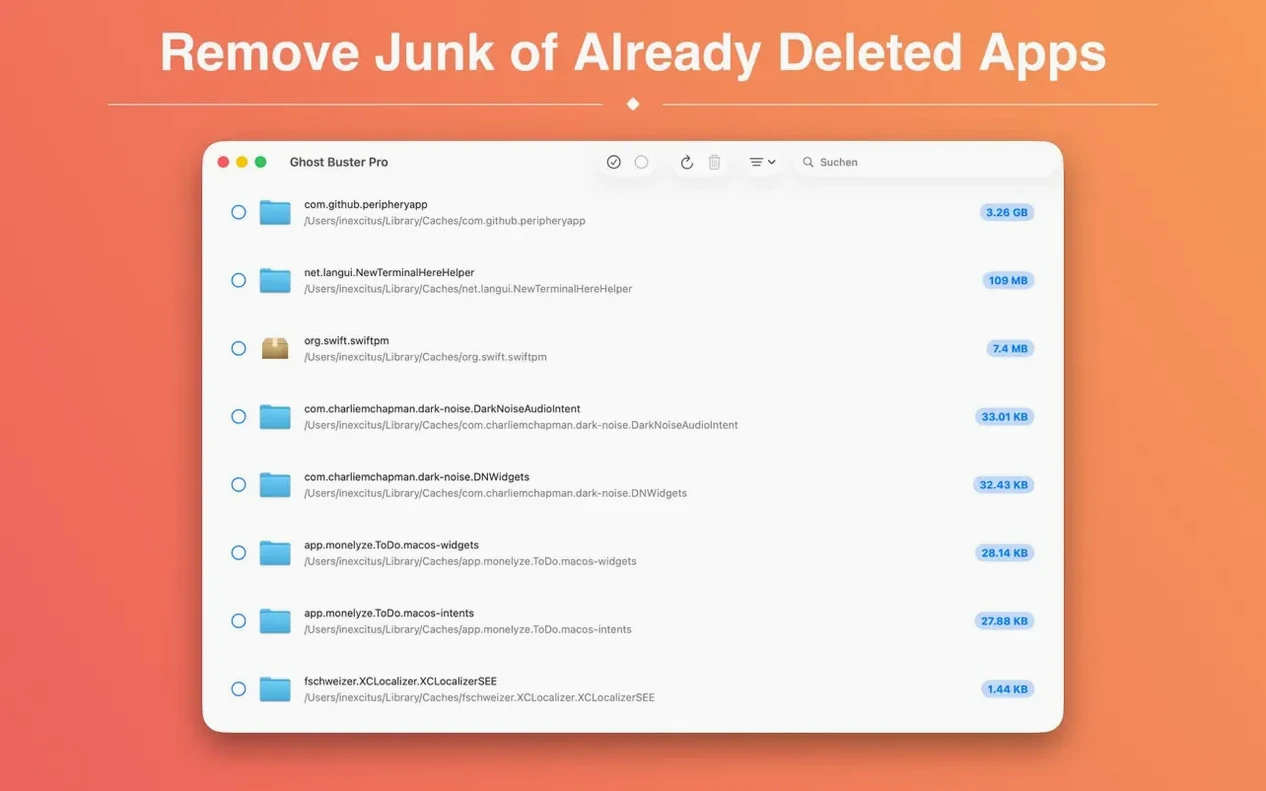
The scan runs for nine seconds. The main pane fills with a list: forty-three items spread across com.markdowneditor, com.weatherwidget, and com.screenruler identifiers. Each row shows the file name, its path truncated to the parent folder, and a size column. The weather widget's cache alone accounts for 340 MB of data — a mix of cached radar images and location data that the app left behind.
You click the header checkbox to select everything, then click Delete. A confirmation dialogue appears with the total count and combined size. You confirm. The list clears in under a second. The items are now in the Trash, where you can review them before emptying.
You close the app. It leaves nothing running. The 340 MB is reclaimed, and the markdown editor's old template folder no longer clutters ~/Library/Application Support. If you ever reinstall the weather widget, it will start fresh with no leftover cache from the previous install.
- Built-in help — a new guide explains how the scan logic works and which items are safe to delete.
- Leftover info button — next to each result, a button now shows the reason the item was flagged as a leftover.
- Apple Silicon requirement — version 7.0.0 needs a Mac with Apple silicon. Intel Macs can stay on the previous release.
- macOS 15.6 or later
- Apple Silicon
Questions on file
Does Ghost Buster Pro delete anything automatically?
No. Files are only removed when the user triggers deletion; the app never erases data on its own.
What kind of files does it find?
It locates support files, preferences, caches, and other leftovers from apps that have already been uninstalled.
Which languages does the interface support?
Russian, English, German, Spanish, Italian, Simplified Chinese, Korean, Polish, and French.
Sign in · Create an account to add a field note.
No field notes yet. A measurement, a version, a machine — they appear after moderation.