Mac Apps
Mission Control Plus 1.27
Mac AppsUpdated
| Requirement | On file |
|---|---|
| macOS | macOS 10.13 or later |
| CPU | Apple Silicon, Intel 64-bit |
| Download | 6 MB |
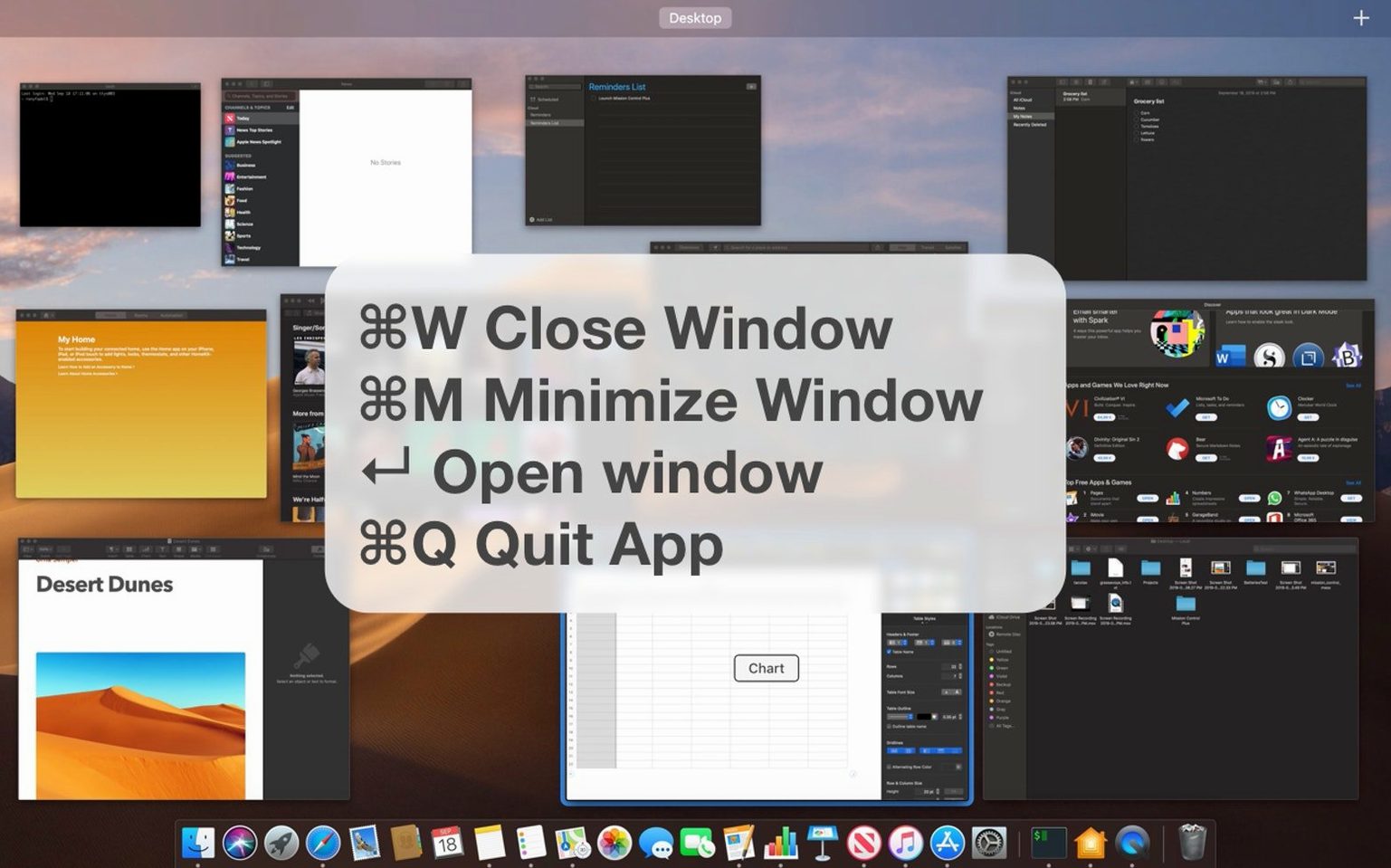
Mission Control Plus 1.27 is a lightweight extension that layers direct window management shortcuts over macOS Mission Control, cutting out the middle steps an experienced user normally repeats dozens of times a day.
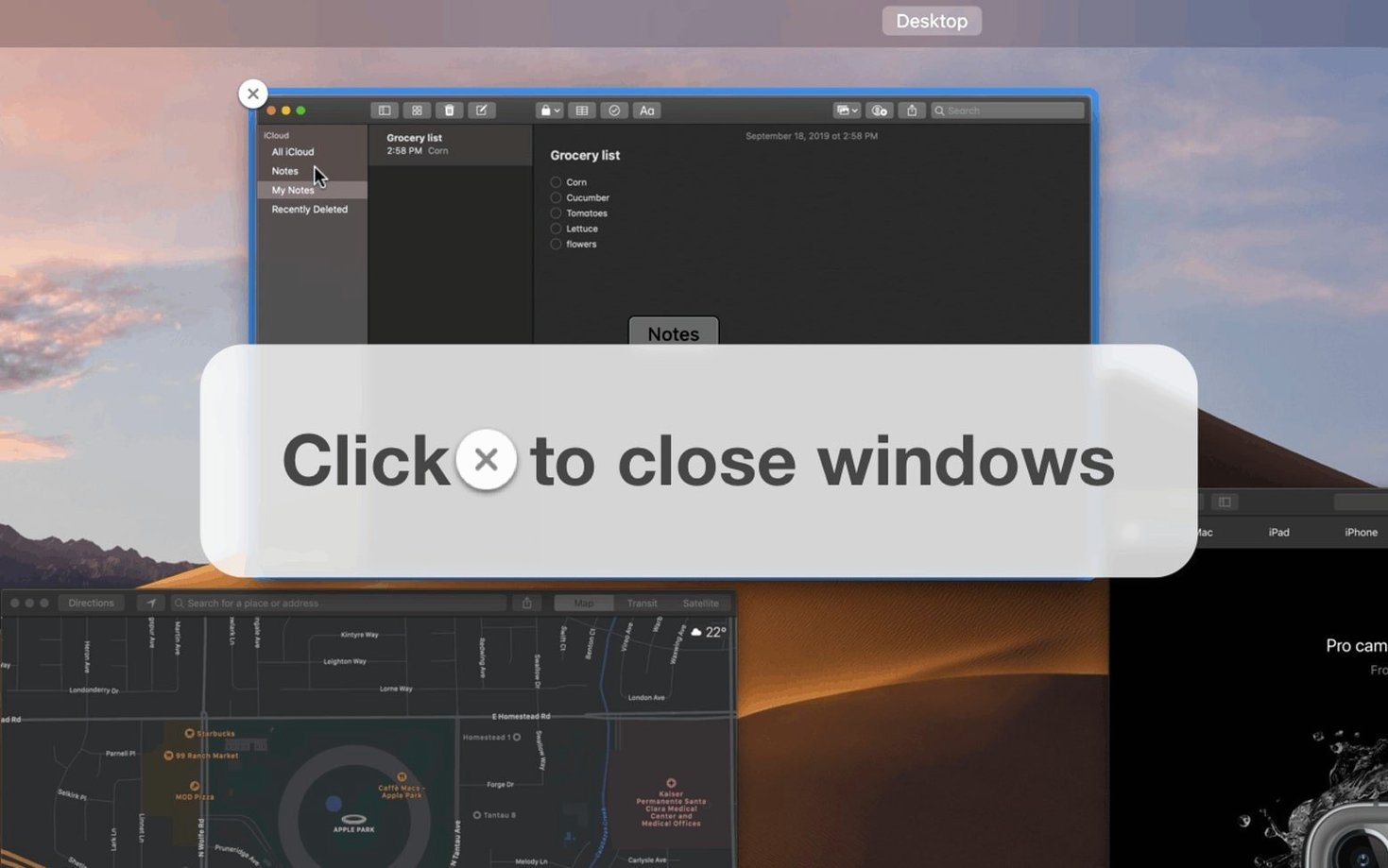
- Close-button overlay in Mission Control. Every window thumbnail gets a visible close button, so you can shut a single window without leaving the bird's-eye view.
- App-kill shortcut. Assign a key combination to quit the frontmost application outright — no Cmd-Q, no menu diving.
- Close-all-windows trigger. One global shortcut instantly closes every open window across all apps, useful as a session reset before context-switching.
- Minimise from the keyboard. Send the active window to the Dock via a custom shortcut, bypassing the mouse entirely.
- Universal binary. Runs natively on Apple Silicon and Intel 64-bit Macs.
The tool doesn't replace Cmd-Tab workflows; it complements them by making Mission Control a genuine window-management surface rather than just a visual overview. Keyboard shortcuts are user-definable, so they can sit alongside existing muscle memory without collisions.
Close Buttons That Survive Rapid Workspace Switching
Version 1.27 didn't rewrite the feature set — it tightened the parts that fray under daily use. The close-button overlay inside Mission Control now appears more consistently after rapid workspace switches, where earlier builds sometimes left thumbnails unadorned for a beat. Keyboard shortcut registration was reworked to avoid a rare conflict with system-level media keys on certain third-party keyboards, a fix that matters most when you're assigning modifiers like Ctrl-Opt-Cmd to the close-all trigger.
The universal binary received a minor tuning pass for Apple Silicon: idle CPU draw dropped enough to be invisible in Activity Monitor, which keeps the app viable on battery. Localisation files for Czech and Italian were corrected in a few menu labels that had carried placeholder strings since the initial multilingual release. Nothing dramatic — just the kind of polish that turns a utility from a weekend install into something that stays in your Login Items.
Pre-Install Concerns Addressed
Does it replace or modify any system files?
No. Mission Control Plus runs as a standalone background process that watches Mission Control's state and injects its overlay through public accessibility APIs. It doesn't patch Dock.app, alter com.apple.dock preferences, or touch WindowServer directly. Uninstalling is a matter of quitting the app and dragging it to the Bin — nothing lingers.
Overlay Drawn After Compositing Keeps Animation Timing Intact
On any Mac that meets the macOS 10.13 baseline, the overlay draws after Mission Control's own compositing pass, so the transition timing stays identical. The close buttons appear a fraction of a second after the thumbnails settle, which on machines with integrated graphics can be perceptible but never blocks input. If you're already running a 60 Hz external display through a hub, you won't notice the difference.
Can the shortcuts conflict with app-specific key bindings?
They can, and the preference pane makes that transparent. When you record a new combination, the app shows whether it's already claimed by a system service. You'll still want to check against your IDE, DAW, or terminal multiplexer bindings manually, but the built-in conflict flag catches the obvious clashes.
Is it just for heavy multitaskers?
The close-button overlay helps anyone who currently moves the pointer to a Mission Control thumbnail and hesitates, trying to remember whether that particular window closes with a click. The keyboard shortcuts are more of a power-user feature, but the overlay alone changes how you prune a cluttered workspace.
Single-Breath Reset for Devs, Sysadmins, and Multitaskers
Developers running multiple simulators, terminals, and editor panes are the obvious audience — the close-all shortcut acts as a single-breath reset between tasks. Sysadmins juggling RDP sessions and SSH windows across several Spaces benefit from the overlay's at-a-glance close buttons, which eliminate the round-trip of selecting a window just to hit Cmd-W.
Writers and researchers who keep reference PDFs, browser tabs-as-windows, and Scrivener open side by side use mission control plus to reclaim screen real estate without touching the trackpad. The minimise shortcut, in particular, removes a distraction without closing it entirely, so a half-read paper slides to the Dock instead of vanishing.
Mac users transitioning from a tiling window manager on Linux often miss the ability to kill a window by keyboard alone. mission control plus macOS gives them a bridge: they stay inside the gesture-driven Mission Control flow but add the deterministic shortcuts they're used to. It's not a tiling replacement, but it cuts the friction enough to make the switch comfortable.
Focused Mission Control Closures vs. BetterTouchTool’s Wider Remit
BetterTouchTool covers a much wider remit — trackpad gestures, window snapping, Touch Bar customisation — and includes a window-management layer that can mimic some of what Mission Control Plus does. The difference is focus. BetterTouchTool's close-window actions work outside Mission Control; Mission Control Plus specialises in what happens inside that view. If you already own BetterTouchTool and have configured its gesture engine deeply, you might not need both. If you want a single-purpose utility that does one thing without touching your existing gesture setup, Mission Control Plus fits cleaner.
Moom and Magnet are window-arrangement tools first. They snap, resize, and grid windows, which is a separate problem from removing them. You can use Moom's keyboard triggers to close windows, but the action happens blind — you're closing the frontmost window without seeing it in context. Mission Control Plus keeps the visual overview central, so you close what you see rather than what happens to be focused. The two categories coexist: snap tools for placement, Mission Control Plus for cleanup.
AltTab (the open-source Cmd-Tab replacement) brings Windows-style window switching with previews and per-window management. Its close-window-from-switcher feature overlaps with the close-button overlay in spirit, though AltTab operates in its own switcher UI rather than extending Apple's Mission Control. Users who've replaced the default switcher entirely might gravitate to AltTab's built-in close actions; those who prefer the stock Mission Control gesture and want to stay there will find mission control plus mac the more natural addition.
- macOS 10.13 or later
- Apple Silicon or Intel 64-bit processor
Questions on file
Does Mission Control Plus replace macOS Mission Control?
No, it extends the built-in Mission Control feature with extra shortcuts and a close-button overlay for window thumbnails.
Which Mac architectures does version 1.27 support?
It runs natively on both Apple Silicon and Intel 64-bit Macs.
Can I close all windows at once with Mission Control Plus?
Yes, it provides a configurable keyboard shortcut that closes every open window across all applications simultaneously.
Sign in · Create an account to add a field note.
No field notes yet. A measurement, a version, a machine — they appear after moderation.