Mac Apps
rcmd • App Switcher 3.5.5
Mac AppsUpdated
| Requirement | On file |
|---|---|
| macOS | macOS 13 or later |
| CPU | Apple Silicon, Intel 64-bit |
| Download | 6 MB |
Runs Natively on Intel and Apple Silicon
rcmd requires macOS 13 or later and runs natively on both Intel and Apple Silicon Macs.
How the Workflow Fits Together
- Hold the right Command key. This is the trigger that separates rcmd from the standard Command-Tab switcher. The left Command key keeps its normal behaviour unless you remap it.
- Press the first letter of an app name. While holding right Command, tap a key — "S" for Safari, "T" for Terminal, "M" for Mail. The matching app comes to the foreground immediately. No grid of icons, no repeated Tab presses.
- Press the same letter again to cycle or hide. If three apps start with "S", tapping the S key repeatedly cycles through them. If an app is already focused, pressing its letter again hides it from view.
- Launch an app that isn't running. If you type a letter assigned to an app that is closed, rcmd opens it on the spot. This turns the switcher into a launcher without a separate shortcut.
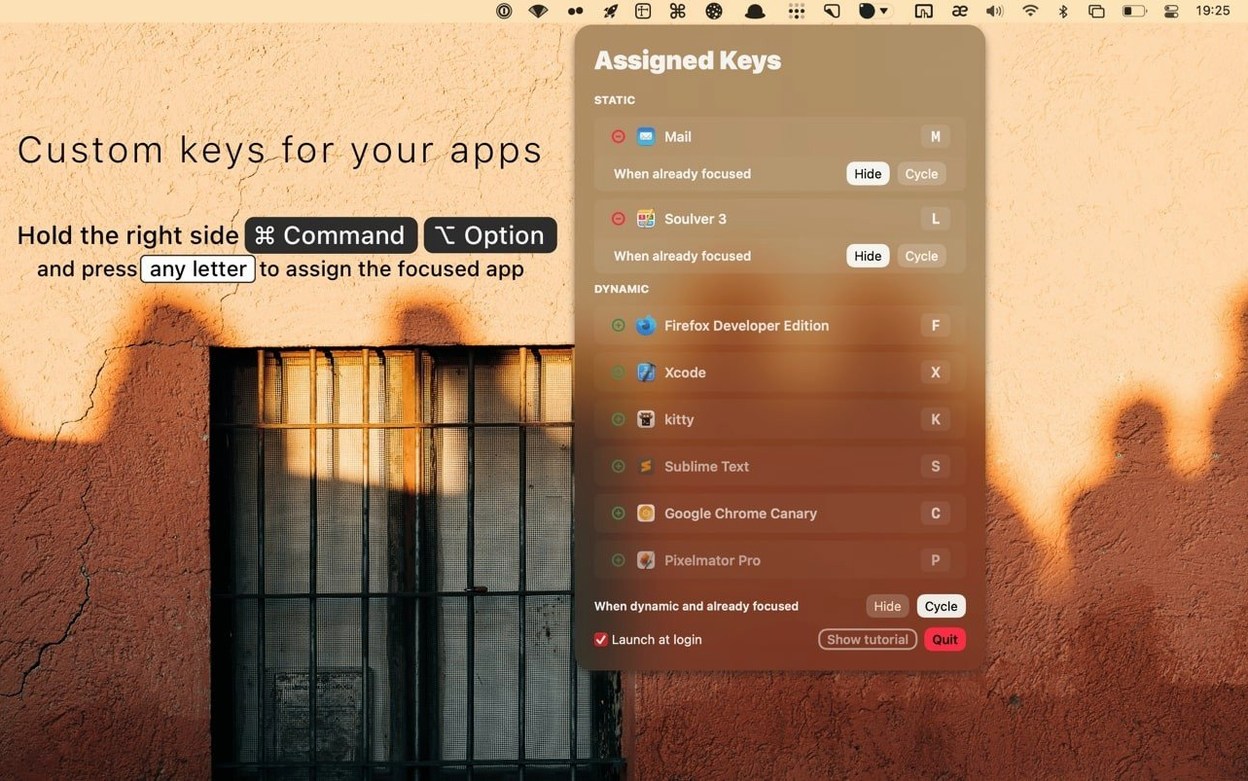
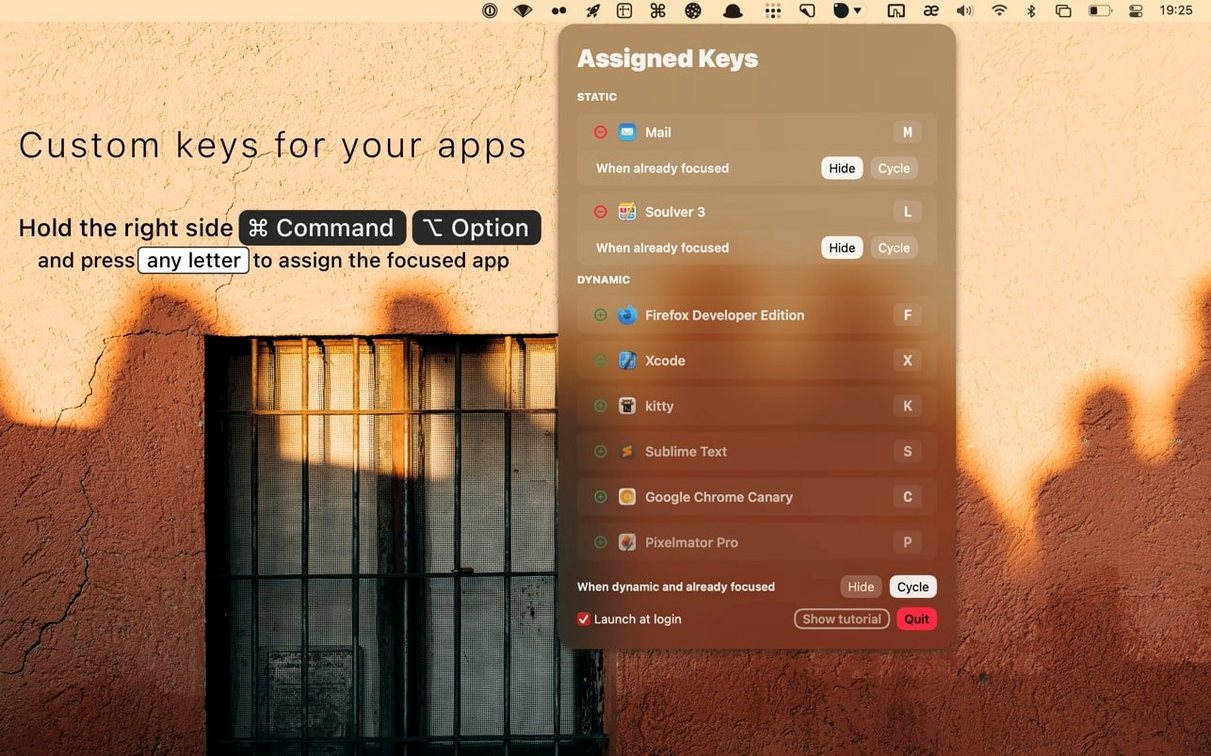
- Assign custom keys with Command-Option. For apps you use constantly, hold Command and Option and press a letter to pin that app to the key permanently. The assignment sticks even when the app quits.
The result replaces the standard Command-Tab switcher with something faster: one hand stays on the right Command key, the other taps a letter. The interface stays out of the way, and you can disable specific letter keys in the settings if they clash with other habits.
Right Command Key Leaves All Standard Shortcuts Untouched
One common question is whether rcmd interferes with existing shortcuts. The left Command key stays exactly as it was — copy, paste, undo and every other shortcut that uses it continues to work. Only the right Command key becomes the trigger, and even that can be changed to a different modifier combination in settings if you prefer. If a particular letter key bothers you, you can disable just that one without losing the rest.
People also ask what happens with apps that share the same first letter — Safari, Slack, Spotify, System Settings. The software keeps a dynamic ranking that learns which app you reach for most often with a given letter. Tap once for the top match; tap again to cycle to the next. The ranking shifts as your habits shift. If you pin an app to a letter with Command-Option, that assignment overrides the algorithm for good.
Another question: does it work across Spaces? Yes. When the target app lives on a different desktop, rcmd switches to the correct Space automatically. You do not need to remember where you left something.
First Days with rcmd
Start with three or four apps you open dozens of times a day. Assign them immediately with Command-Option and a letter — maybe "F" for Finder, "T" for Terminal, "C" for your calendar. These fixed assignments build muscle memory fast. For everything else, let the dynamic algorithm handle the matching for a few days before you decide whether to pin more keys.
Disable letters that clash with ingrained habits. If you reflexively press right Command plus "H" for something else, open the settings and remove that key. The app works better when you remove friction early rather than trying to retrain years of motor memory overnight.
Some people look for an app switcher crack mac workaround when they first hear about rcmd. The installer is a standard disk image — open it, drag the app to Applications, launch from Launchpad. That is the whole process. No activation steps, no extra tools needed.
Switch Directly to Telegram with Right Command + T
You sit down with a browser window open on one Space and a code editor on another. A message arrives in Telegram. Your right thumb drops onto the right Command key, your left hand taps "T", and Telegram appears. You reply, then tap "T" again — the app hides and you are back in the browser.
Next you need the terminal. Right Command down, tap "T" a second time if Terminal sits behind Telegram in the ranking. Or you already pinned Terminal to a different letter — "L" maybe, for "local shell". One chord, no hunting.
Later, you open an app that is not running. Right Command plus "S" brings up Sketch, but Sketch is closed. rcmd launches it without a separate step. You release the keys and wait the two seconds it takes to load. By the time your hands are back on the keyboard, the app is ready.
Throughout the session, the switcher stays invisible. There is no overlay, no grid of thumbnails, no animation to wait through. You hold a key, press a letter, and the window you want is there. When you need to cycle through three apps starting with "S", you tap the letter three times — the rhythm becomes automatic within an hour.
- macOS 13 or later
- Intel or Apple Silicon Mac
Questions on file
Can I stop rcmd from intercepting certain letters?
Yes. Specific keys can be disabled in the app’s settings if you prefer to keep them available for other shortcuts.
Sign in · Create an account to add a field note.
No field notes yet. A measurement, a version, a machine — they appear after moderation.