Audio
Piezo 1.9.10
AudioUpdated
| Requirement | On file |
|---|---|
| macOS | macOS 14.4 or later |
| CPU | Apple Silicon, Intel 64-bit |
| Download | 15 MB |
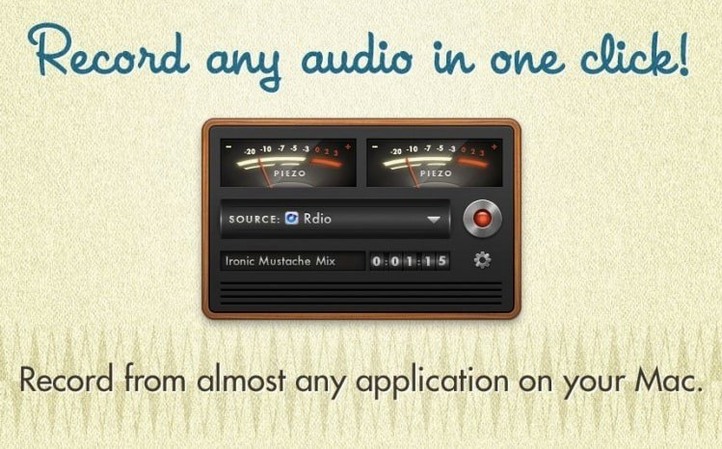
If you use QuickTime to record a screen, you know the checkbox: record from the internal microphone or no audio at all. Piezo addresses precisely that gap. Rogue Amoeba built it to capture sound from a single application or an audio device, so you can grab a call, a stream, or a software instrument without an extra routing layer.
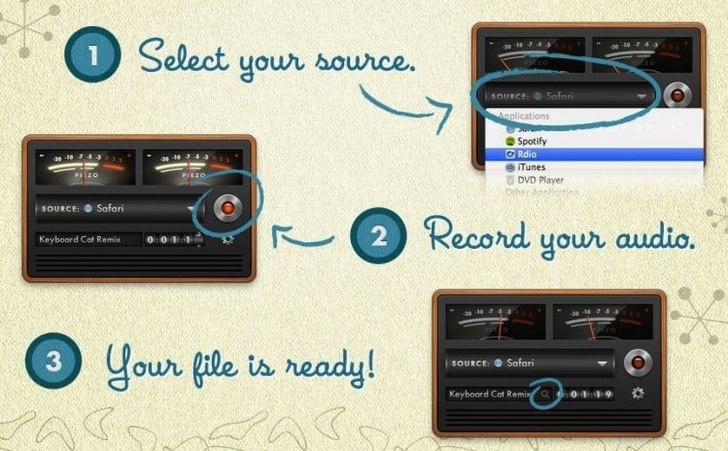
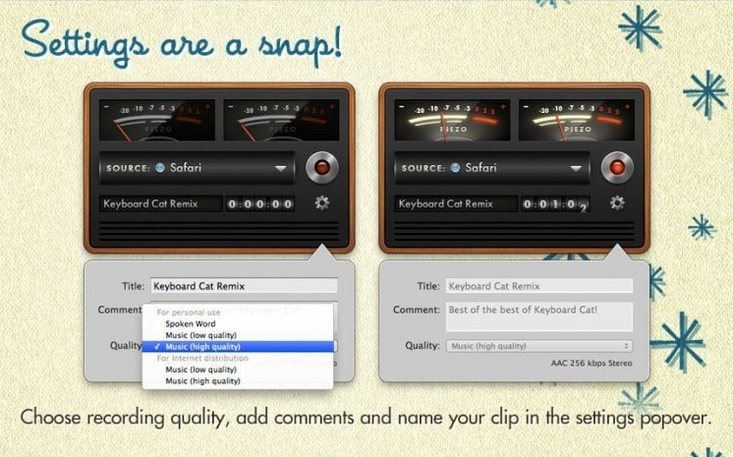
You pick the source before you hit the red button. The window lists running apps and connected hardware — select Zoom, Music, a browser tab, or a USB interface, and Piezo locks onto it. You can also set the recording quality, name the clip, and type a short comment while the capture runs. No post-session renaming of "Untitled 1" later.
One detail that matters for editing: the app can save recordings with separate left and right channels intact. If your source produces stereo or dual-mono tracks, you keep that separation instead of a flattened mix.
Version 1.9.10 introduces full macOS 27 support and drops the launch warning that appeared on that OS. The app runs natively on both Apple Silicon and Intel 64-bit Macs, with a minimum requirement of macOS 14.4.
macOS 27 Support Arrives, Launch Warning Retired
Version 1.9.10 is a maintenance release that does two things: it brings full support for macOS 27 and removes the launch warning that users saw when opening the app on that system. Nothing in the recording engine or interface shifted. If you were already running 1.9.9 on macOS 26, the day-to-day experience is identical after the update — same source selection, same quality presets, same channel handling.
The practical effect is simply that macOS 27 users no longer see a dialogue telling them Piezo might not be optimised. The installer path stayed the same too: mount the disk image, run the Gatekeeper-friendly routine, and drag the app to Applications.
Switch from AAC 128 kbps to a Lossless Format
Piezo ships with sensible defaults, but three adjustments make a difference once the app is installed.
Recording quality. The default format is AAC at 128 kbps. That is fine for voice memos, but if you plan to edit the audio later — especially music or multi-track material — switch to Apple Lossless or AIFF in the Quality menu. The files get larger, but you avoid generation loss when an editor re-encodes the clip. For VoIP calls and dictation, AAC at 64 kbps is often enough and keeps file sizes small.
Channel mode. Piezo respects the source's channel layout by default. If you record from a stereo USB mic, you get a stereo file. If you want to force mono — useful when one channel is silent or when the destination is a mono podcast track — tick Mix to Mono in the Recording Options. This saves a step in post-production.
Comment field habit. The text box under the source selector accepts notes while recording. Typing a speaker name, date, or take number as the capture runs adds metadata you will appreciate when searching a folder of clips later.
Capturing VoIP Calls Directly from Any App Source
The app fits three groups particularly well.
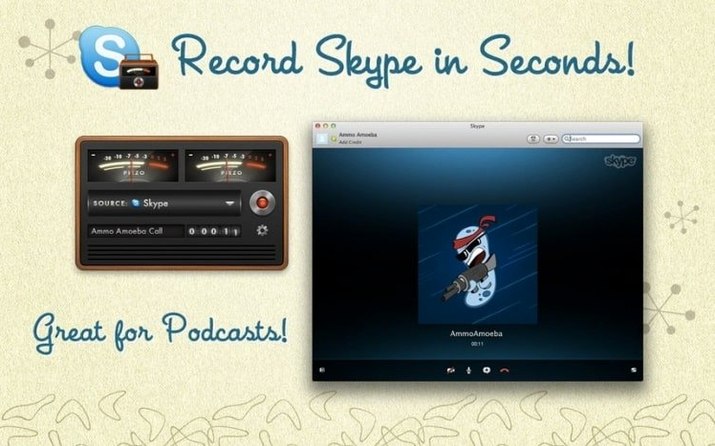
People who record VoIP interviews. Skype, Zoom, FaceTime, and web-based calling tools all appear as application sources. Select the app, press record, and you get a local capture of the call that is independent of the platform's own recording feature — useful when the built-in recorder is blocked on a corporate plan or when you want a clean stereo split of both sides of the conversation.
Musicians grabbing software instruments. If a synth or drum machine runs as a standalone app, Piezo can capture its output directly. No need to wire up a virtual audio device or bounce inside a DAW for a quick idea. The lossless quality setting matters here; a compressed AAC capture of a high-frequency pad will show artefacts on playback.
Anyone who documents software. Capturing audio from a single browser tab or a tutorial app while a mic records voice-over in a separate pass keeps the sources clean. The per-application source lock means you never accidentally record a system alert ping along with the target app.
If your workflow already involves Rogue Amoeba's more complex tools like Audio Hijack or Loopback, Piezo does not replace them. It sits alongside as the fast, single-source option — open, pick an app, record. Users who need multi-source routing or real-time effects will hit the ceiling quickly, but for the core task of capturing one audio stream at a time, the simplicity is the point.
- macOS 27 — Added full support.
- Launch behaviour — Removed the warning dialog on macOS 27.
- macOS 14.4 or later
- Apple Silicon or Intel 64-bit processor
Questions on file
Can Piezo record audio from a specific application?
Yes. Choose any running application or connected audio device from the source list before starting a recording.
Sign in · Create an account to add a field note.
No field notes yet. A measurement, a version, a machine — they appear after moderation.