Audio
QLab 5.6.3
AudioUpdated
| Requirement | On file |
|---|---|
| macOS | macOS 11 or later |
| CPU | Apple Silicon, Intel 64-bit |
| Download | 34 MB |
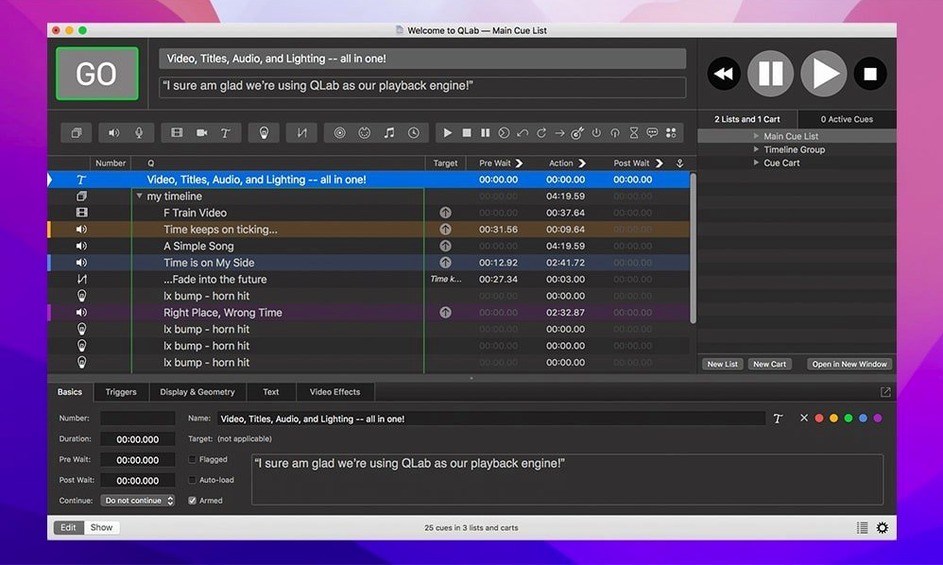
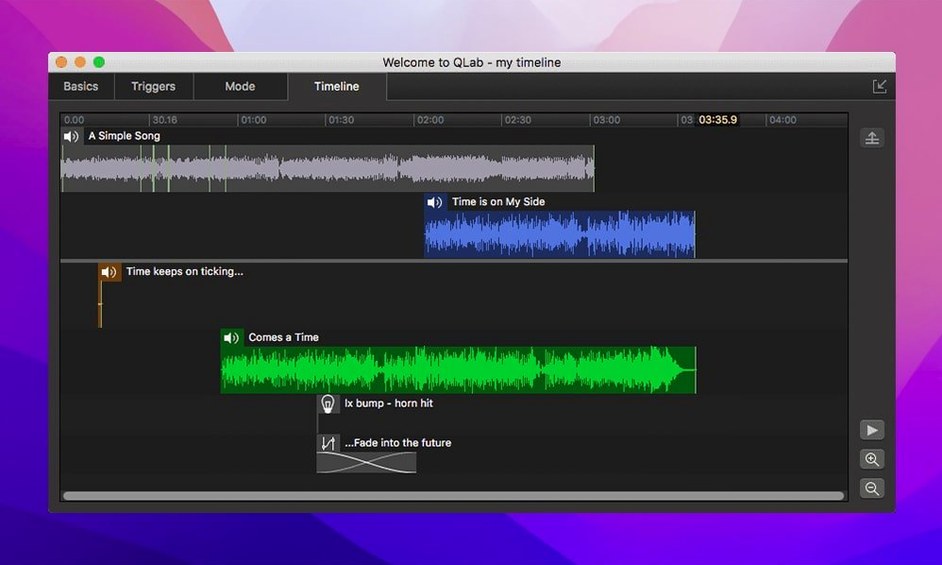
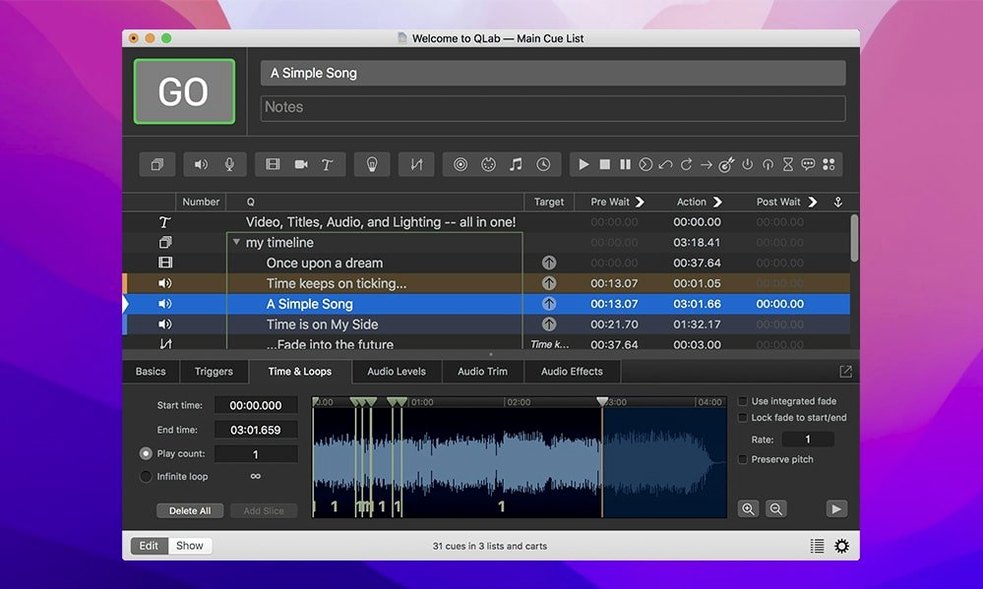
Lighting designers, sound engineers and theatre technicians reach for QLab to build precise multimedia sequences. The software coordinates audio playback, video projection, lighting instruments and external show-control signals inside a single timeline workspace. Version 5.6.3 refines that workflow with a handful of targeted fixes while keeping the broad toolset familiar to anyone who has used the 5.x series.
What visual tools does version 5 handle?
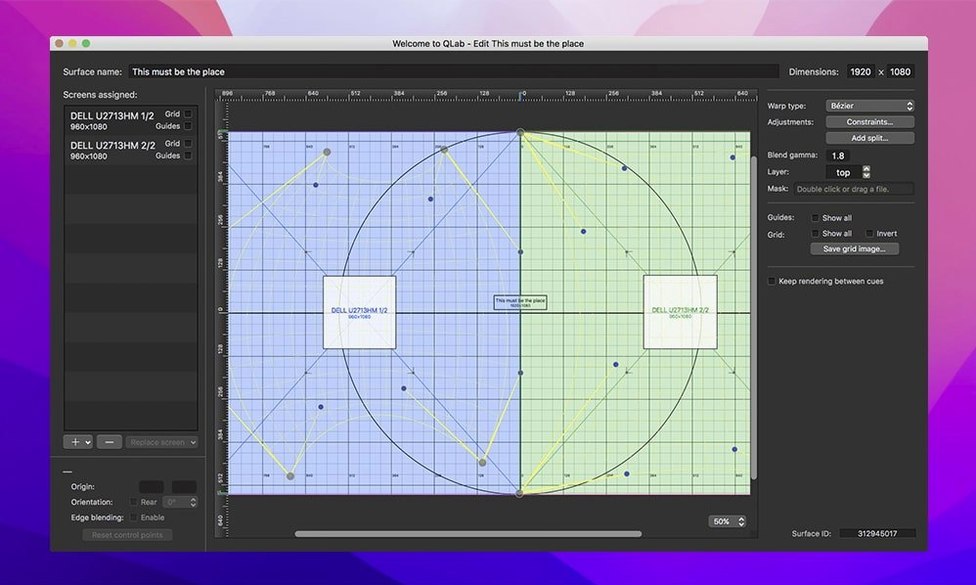
QLab 5 includes keystone correction and corner pinning for aligning projections on irregular surfaces. The animation tools built into the workspace let you reverse and centre video on a projector without leaving the cue editor.
Blackmagic and Syphon Feeds Land Straight in the Cue List
Live video input from Blackmagic devices feeds directly into a cue, and Syphon integration shares frames between compatible applications on the same Mac. Both feed straight into the cue list, so no extra capture app is needed.
Broken Instrument Definitions Now Flag Themselves in Colour
Instrument definition rows in the Light Library or Light Definition editor now show a colour change when a configuration is broken, making patch errors visible at a glance. Workspaces created in 5.6.2 and earlier also gain a migration step that adopts the built-in network device definition for Right On Cue Services Stage|Tracks.
Option-Drag Copies a Cue Instantly
Some of the most-used actions in QLab hide behind key combinations that are easy to overlook. Holding Option while dragging a cue copies it instantly, which is faster than copy-paste when you are building a stack of identical fades. Command-Option-F jumps straight to the Filter field in the cue list—useful when a workspace holds hundreds of cues and scrolling becomes impractical. The integrated audio editor opens with a double-click on any audio cue's waveform thumbnail, and trimming the start or end points there updates the cue duration automatically, no re-import required.
Fader levels respond to finer control when you hold Shift while dragging a slider, reducing the increment to 0.1 dB for audio and single-pixel movements for video geometry. In the video stage editor, Command-drag on a corner pin handle constrains adjustment to one axis, which speeds up keystone correction on a projector that is only misaligned vertically. The undo system covers most edits inside cue inspectors, including accidental trim changes, fader moves and title text edits.
A Single Laptop Runs the Show and Your Email
Does QLab require a dedicated machine, or can it share a Mac I use for other work? It runs on any Mac meeting the macOS 11 minimum, and plenty of designers use it on a laptop that also handles email and browsing. The key consideration is audio and video output count: a show with 24 channels of playback and live Blackmagic input will demand more from the hardware than a two-channel stereo cue list. The application itself does not enforce a dedicated-machine policy.
Will it open workspaces from much older versions? Workspaces from QLab 4 open in version 5 with a one-way migration step. The cue structure, timing and routing carry over. Some older video effects may need re-application because the rendering pipeline changed in the 5.x series, but audio cues and MIDI triggers generally survive the trip intact. The 5.6.3 build specifically addresses a migration path for Right On Cue Services Stage|Tracks device definitions from 5.6.2 and earlier workspaces.
Does it need an internet connection once installed? No. Cue triggering, playback and show control work entirely offline. Network-dependent features—OSC messages to other devices on a local subnet, for instance—require only a working LAN connection, not internet access.
What the 5.6.x Series Changed in Daily Use
Version 5.6 brought the Light Library and Light Patch editors closer to the cue list workflow. Before 5.6, a misconfigured instrument definition might produce unexpected behaviour during playback without any visual warning in the editor. Now a row turns a distinct colour the moment a definition breaks, and the Light Patch editor appends a "Broken" status label. For a technician striking a rig at 2 a.m., that colour change cuts fault-finding time noticeably. No extra click, no buried diagnostic panel—the signal sits right in the row you are already scanning.
The Stage|Tracks migration introduced in 5.6.3 is a background change that most users will not notice until they open an older workspace on a system running the current build. The workspace silently adopts the built-in network device definition, which removes a manual reconfiguration step that previously tripped up operators switching between a rehearsal Mac and a show Mac. On a practical level, it means one fewer thing to forget during a rushed load-in.
A less obvious improvement across the 5.6.x line is the handling of video playback stop commands. A rare crash—triggered under specific timing conditions when stopping a video cue—was fixed in 5.6.3. The crash was intermittent enough that some users blamed their hardware or codec choices; the fix removes that variable entirely.
Reassign the Audio Output Patch After a macOS Update
Audio output routing resets after a macOS update. macOS sometimes reassigns Core Audio device identifiers when the system restarts after an update. If QLab suddenly sends audio to the wrong output, open Workspace Settings, select the Audio tab and reassign the patch matrix. Saving the workspace afterwards locks the new routing. Some designers keep a screenshot of the patch matrix in the show folder for faster restoration.
Video cues stutter on an external display. The most frequent cause is the display's refresh rate mismatching the cue's frame rate. Check the video stage settings and, where possible, set the projector or monitor to a refresh rate that divides evenly into the content's frame rate—60 Hz for 30 fps content, for instance. Syphon feeds add a layer of GPU load, so disabling any unused Syphon outputs in the workspace can free enough headroom to smooth playback.
MIDI cues fire but the receiving device does not respond. Verify the MIDI destination in the cue inspector matches the physical output port, not a virtual bus left over from another application. The "MIDI Setup" button inside QLab's preferences opens Audio MIDI Setup directly; checking the device list there often surfaces a mismatch faster than digging through the cue itself.
Blackmagic input appears black in the cue. The Blackmagic Desktop Video driver version needs to be compatible with the macOS build running on the Mac. A driver that worked under macOS 12 may not fully initialise under macOS 14, even if QLab recognises the device. Installing the driver version that Blackmagic Design lists for your specific macOS release usually restores the feed.
Workspace file grows unexpectedly large. Audio files dragged into a workspace embed by default, which inflates the file size. If disk space on the show machine is tight, switch the cue's audio source to "External file" and point to a shared drive. The workspace references the file path instead of storing the audio data inside the bundle.
How QLab Sits Next to Similar Mac Apps
QLab and Isadora share a stage but target different workflows. Isadora leans into real-time video manipulation and generative visuals, with a node-based patch editor that lets you route live camera feeds through effects chains on the fly. QLab organises around a linear cue list, which suits scripted performances where every event has a fixed timecode or manual trigger. If a show needs a single video file played back on bar 32 every night, QLab's approach is more direct. If the same show needs interactive projection that responds to a dancer's position, Isadora's scene-based patching pulls ahead. The two apps often coexist in large productions, with QLab handling the structured timeline and Isadora managing the reactive layer via OSC cues.
Compared with Ableton Live, the dividing line is audio flexibility versus show-control scope. Live offers deep warping, clip launching and multitrack recording that QLab does not attempt to match. A band running backing tracks with tempo changes and live looping will find Live fits the task more naturally. QLab counters with native video projection, lighting control, and the ability to fire MIDI, OSC and timecode from a single cue. For a theatre production that needs to trigger a sound effect, crossfade it, start a video on the cyc, and send a lighting state change—all from one GO button—QLab consolidates steps that would require multiple applications or Max for Live devices in an Ableton session.
Millumin occupies the video-mapping niche more aggressively than QLab. Its keystone, warping and multi-projector edge-blending tools outpace QLab's built-in geometry correction, and its timeline handles multi-layer video compositing with more finesse. QLab's video stage editor covers basic corner pinning and keystone, but a complex projection mapping across three blended projectors on an irregular surface will push against its limits. Millumin, however, does not offer the same depth in audio routing or lighting patch management. Productions that prioritise video mapping often run Millumin alongside QLab, using OSC to keep the two in sync—QLab calls the cues, and Millumin handles the heavy projection work.
Light Library — rows change colour when an instrument definition is misconfigured. Right On Cue Services Stage|Tracks — workspaces from 5.6.2 and earlier now migrate to the built-in network device definition.
- macOS 11 or later
- Apple Silicon and Intel Macs
Sign in · Create an account to add a field note.
No field notes yet. A measurement, a version, a machine — they appear after moderation.