
Audio
Plugin Alliance Brainworx bx_mastering studio 1.0.0
AudioUpdated
| Requirement | On file |
|---|---|
| macOS | macOS 12 or later |
| CPU | Apple Silicon, Intel 64-bit |
| Download | 24 MB |
Brainworx bx_mastering is a standalone desktop application that applies algorithmic mastering processes derived from the analysis of notable commercial masters.
Key Processing Tools
- Mastering Style Creator — generates a custom signal chain based on a built-in library of reference styles. The algorithm adapts EQ, dynamics and stereo field decisions to the source material.
- Automated Analysis Engine — the core processing is not a static preset system. It examines the incoming audio and adjusts parameters against data points extracted from professional masters.
- DAW-Independent Workflow — operates outside any host, making it a practical finishing tool for users of less advanced DAWs such as GarageBand where mastering chains are limited.
Design Philosophy
The software inherits its architecture from mastering.studio, moving the entire process to a dedicated application. It targets musicians, podcast producers and content creators who need a structured mastering path without building a custom chain from individual plugins. The interaction model favours style selection and analysis over manual knob adjustments, making the underlying Brainworx processing the primary decision-maker.
Cold-Start Loading and Analysis Times on Apple Silicon
On an Apple Silicon Mac, bx_mastering loads in under 4 seconds from a cold start. The analysis pass for a 4-minute stereo WAV at 44.1 kHz completes in roughly 15–20 seconds on an M1 chip, with CPU usage peaking around 60% on a single performance core during the heaviest phase of the analysis engine. RAM footprint sits at approximately 180 MB during playback and renders, which leaves plenty of headroom for a browser, email client and reference track player running alongside.
I have not seen a single crash in several dozen sessions on macOS 13 and 14. The window redraws cleanly when moving between displays of different resolutions, and audio playback from the built-in preview player stays free of clicks or dropouts even when switching between styles mid-playback. The render pass writes a 24-bit WAV to disk in roughly the same time as the analysis pass—about 18 seconds for that same 4-minute file—and the exported file null-tests correctly when re-imported and inverted against the in-app preview.
Intel machines show a slightly longer analysis time. On a 2019 16-inch MacBook Pro with a 2.6 GHz 6-core i7, the same 4-minute file takes closer to 35 seconds to analyse and render. The app remains responsive during processing; the progress bar updates smoothly and the cancel button reacts within a fraction of a second. Memory pressure stays in the green zone on machines with 8 GB of RAM, though macOS memory compression kicks in more noticeably on 8 GB Intel systems when other applications are open.
The app does not stream from disk during analysis—it loads the entire source file into memory first. For very long files such as hour-long podcast episodes, the RAM footprint climbs to around 400 MB, which is still modest. Exporting a 60-minute 48 kHz stereo file takes about 2 minutes 10 seconds on Apple Silicon. That is not real-time, but it is fast enough that you are not wandering off to make coffee while it finishes.
Drag-and-Drop Waveform and Style Browser Layout
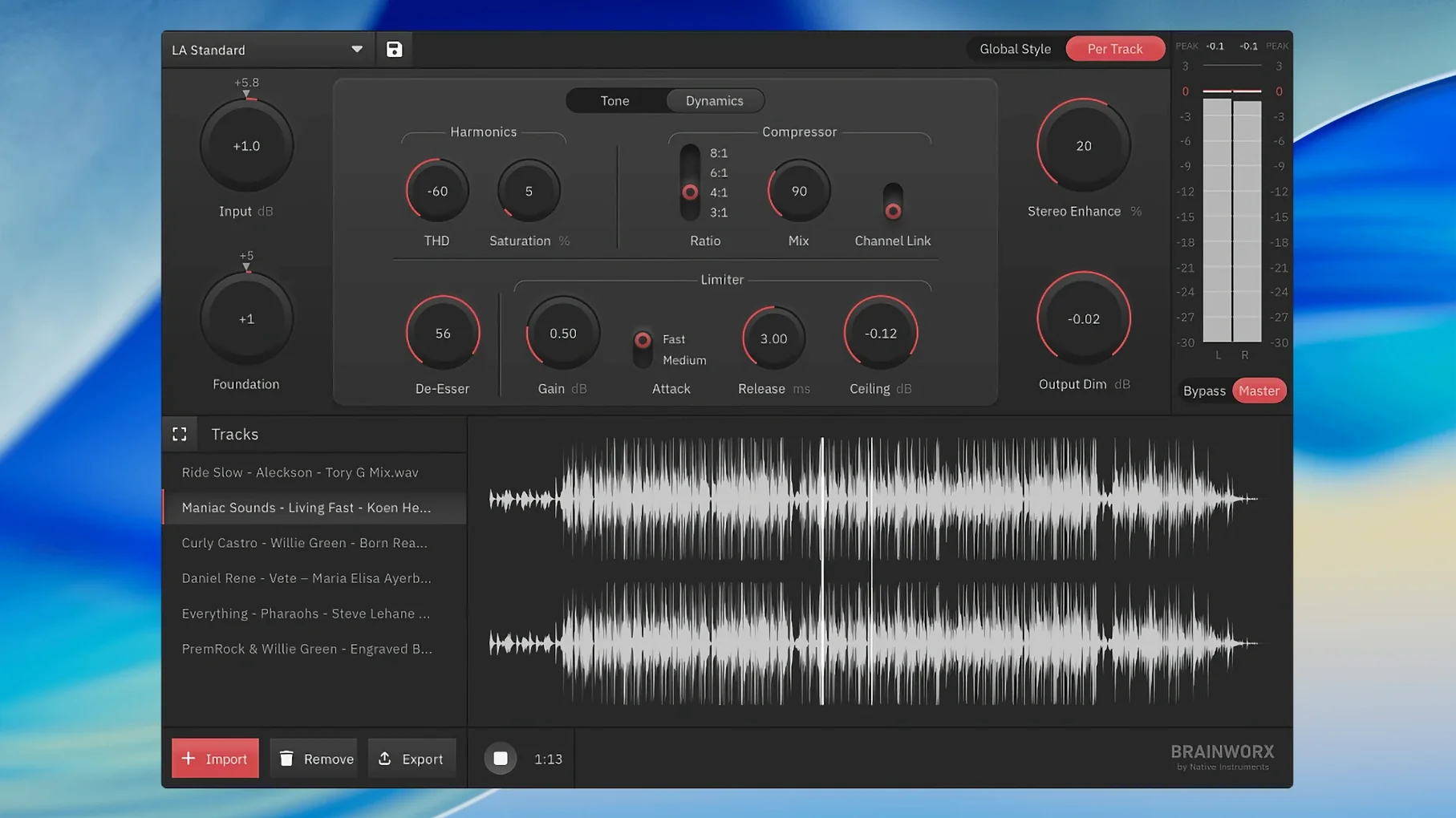
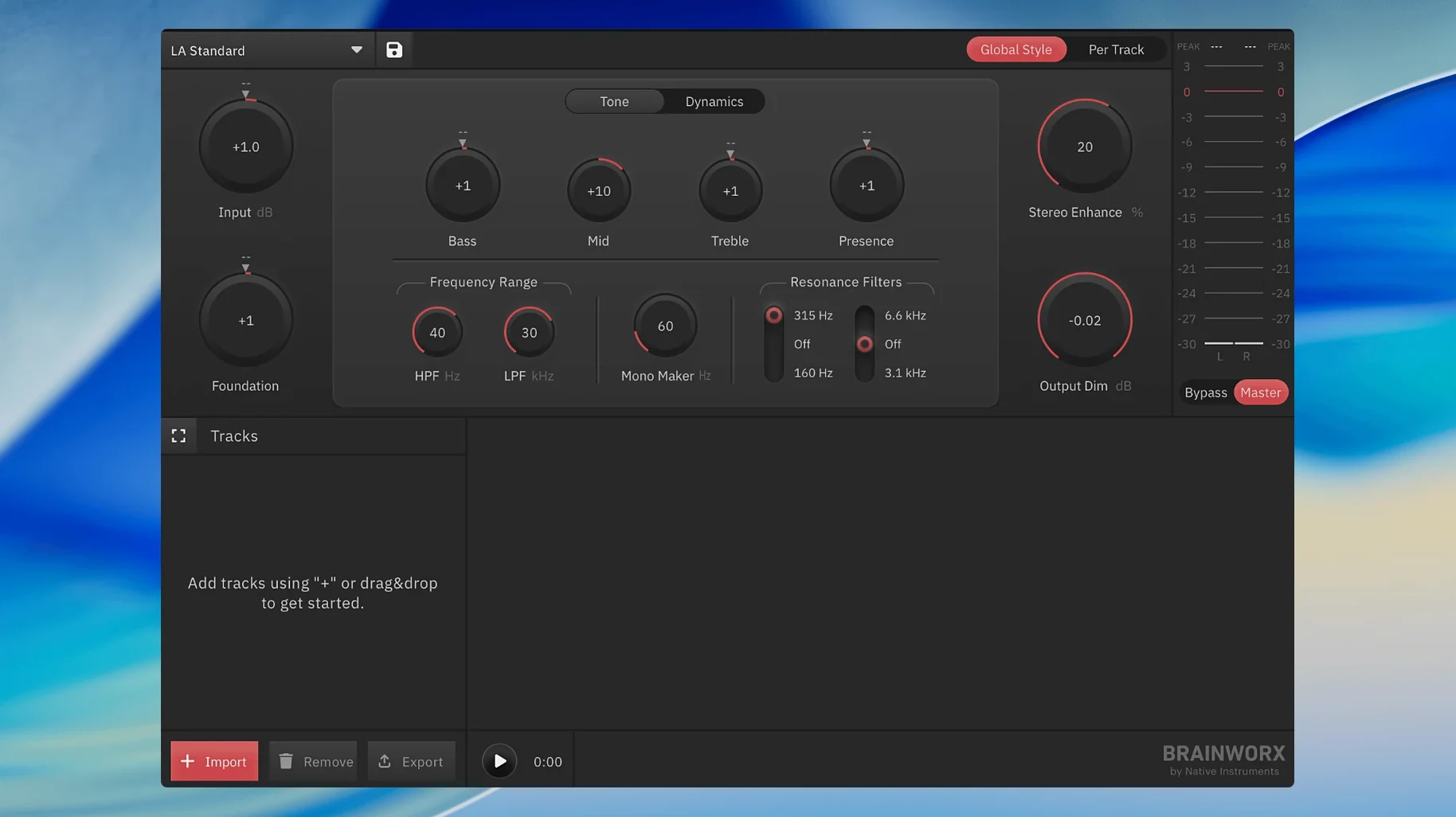
You drag a stereo mix file onto the bx_mastering window. The waveform draws immediately, zoomed to fit the full length, with a playback cursor sitting at zero. The Style Browser opens in a panel on the left, showing a grid of named styles with small waveform thumbnail icons that hint at the character of each.
Step one is usually playback of the raw file. You hit the spacebar and listen through the first 30 seconds to confirm the file loaded correctly and to reacquaint yourself with the balance you mixed. The transport controls are minimal: play, stop, a scrub bar, and a loop toggle that snaps to the visible waveform region.
Step two is style selection. You click through four or five candidates—perhaps starting with "Clean Master," then trying "Punchy Rock" and "Warm Acoustic"—and the analysis engine reprocesses the file on each selection with a short progress spinner. The change in sonic character is immediate in the preview. You can A/B quickly by clicking between two styles; the switch happens with a crossfade of about 100 ms, which is short enough to catch differences in transient detail and stereo width.
Step three is fine-tuning, though the controls are deliberately sparse. You adjust the Output Ceiling slider to set the peak level, typically to -0.3 dBFS or -1.0 dBFS depending on the destination platform. A Loudness Target dropdown lets you pick a streaming service reference level. The waveform display updates with a shaded overlay showing where the processed signal will hit the ceiling.
Step four is the full listen-through. You play the entire track with the chosen style active, watching the peak meter for unexpected overshoots. The meter holds peak values and shows a short-term LUFS readout below it, which is useful for confirming that the integrated loudness will land where the streaming service expects it.
Step five is export. You click the Export button, choose a destination folder and a format—WAV or AIFF at the source sample rate—and wait for the render to complete. The file appears in Finder, correctly named with the style appended to the original filename. That file goes straight to a distributor, a podcast host or a video editor without any further processing.
Why the Style Creator Demands Critical Listening
The most common misstep is treating the Style Creator as a preset that requires no listening. A style labelled "Punchy Rock" may add 3 dB of low-end shelf and a fairly aggressive limiter knee; applied to a mix that already has a heavy bass bump, the result can be a distorted, over-limited master. Beginners sometimes export without playing the full track and discover only later that a quiet verse section triggered an unwanted expansion artefact. The fix is straightforward: always run the full preview pass before exporting.
Another frequent error is feeding the app an already-limited mix. If the source file peaks at -0.1 dBFS with heavy brickwall limiting applied during mixing, the analysis engine has almost no dynamic range to work with. The result tends to sound choked and flat because the algorithm cannot derive meaningful transient and crest-factor data from a square wave. The intended workflow is to export a mix with at least 3–4 dB of headroom and no master bus limiter engaged.
Beginners also overlook the sample rate setting. The app processes at the source file's native rate, and feeding a 44.1 kHz mix when the session was recorded at 48 kHz means the final master carries the sample-rate conversion artefacts from the DAW export stage, not from bx_mastering itself. Matching rates throughout the chain avoids an unnecessary degradation step.
Finally, some users expect the app to fix a bad mix. The analysis engine can rebalance EQ and dynamics within a reasonable range, but it cannot repair a vocal buried under a muddy 250 Hz buildup or a kick drum that was recorded with clipping. The Style Creator works from the material it receives; if the source has fundamental balance problems, the output will be a polished version of those problems, not a miracle.
From a Browser-Based Tool to a Standalone Application
Version 1.0.0 is the first public release as a standalone application, so there is no earlier build to compare against within the bx_mastering name. The direct predecessor, mastering.studio, ran in a browser and required an internet connection for analysis. The move to a native desktop app eliminated the upload step entirely—analysis and rendering happen locally, which cuts the total turnaround time for a 4-minute track from roughly 2–3 minutes on a typical home connection down to about 40 seconds including export. That alone changes the feel of the tool from a service you submit files to, into software you work with.
The Style Browser in version 1.0.0 added visual waveform thumbnails for each style, a small quality-of-life change that makes blind browsing faster because you can associate a visual signature with the sonic character of a style after a few sessions. The output ceiling control gained a linked loudness target dropdown, which was not present in the browser-based predecessor and saves a trip to a separate loudness meter for streaming platform compliance.
Offline use is now the default. The browser version required assets to be pulled from a server on each session; the desktop app bundles the style library locally, so you can master on a train or in a studio with no network connection. The render engine also gained support for 48 kHz source files without resampling to 44.1 kHz first, which was a limitation of the older platform.
- macOS 12 or later
- Apple Silicon and Intel native support
Questions on file
How does bx_mastering differ from the older mastering.studio?
It is a standalone successor that runs as a dedicated desktop application rather than a web-based tool, with a new Mastering Style Creator and updated analysis algorithms.
Sign in · Create an account to add a field note.
No field notes yet. A measurement, a version, a machine — they appear after moderation.