Audio
Serato DJ Pro 5.0.0
AudioUpdated
| Requirement | On file |
|---|---|
| macOS | macOS 12 or later |
| CPU | Apple Silicon, Intel 64-bit |
| Download | 1 GB |
Stems Pad FX lands with a satisfying thwack. Echoes smears a vocal across two bars while Brakers chops the beat into stuttered silence, and it all responds to the same performance pads you know.
Stems algorithm splits tracks into four parts
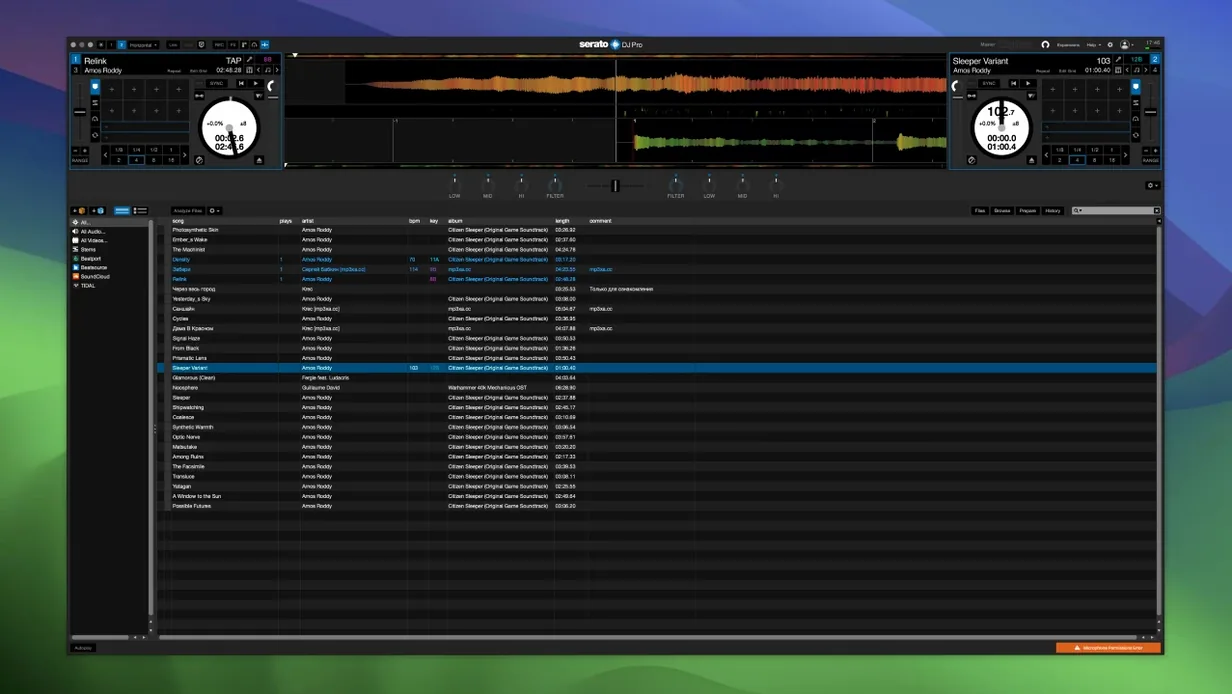
The layout hasn't shifted. Serato DJ Pro 4.0.5 keeps its familiar deck structure and the core mixing engine that runs club installs worldwide. What sits on top has grown: the Stems algorithm now separates tracks into four component parts — vocals, melody, bass, drums — in real time, and the Pad mode adds performance effects purpose-built for those stems. Echoes, Brakers, and a handful of other Stems Pad FX let a DJ isolate a vocal line and drench it in repeats, or kill everything but the kick and bring it back in halves.
The hardware picture
The software recognises more than 90 controllers and mixers from manufacturers across the industry. That means the stem-separation controls, the built-in FX suite, and the one-button acapella-or-instrumental workflow all map to physical knobs and pads on whatever certified device is plugged in. No MIDI mapping required for the core functions — just plug in and the software reads the hardware profile. Runs on any Mac with macOS 12 Monterey or newer, Intel or Apple Silicon.
Mistakes that cost a set
New users tend to treat Serato DJ Pro like a media player with a crossfader. That works for about fifteen minutes — then the audio drops, or a track skips, and panic sets in. The first error is ignoring the analyse-before-play rule. Dragging un-analysed files straight from Finder onto a deck means the software has to calculate BPM, key, and waveform data while the track is already running. On a 64-bit Intel Mac with a large FLAC library, this can spike CPU enough to cause audible glitches. Set the analysis preference to run on import, or batch-process a crate before a gig. The difference between silent analysis and real-time crunching is the difference between a clean transition and a trainwreck.
The second common misstep: trusting a single USB cable. A controller that draws bus power and carries 24-bit audio over one flimsy Type-C lead is asking for a dropout when the booth monitor kicks. Carry a high-quality, short-run cable with a ferrite choke, and tape it to the mixer stand so a dancer's foot doesn't yank it. Club installs with a Rane or Pioneer mixer over USB-B are less vulnerable, but mobile DJs on a laptop stand learn this one the hard way.
Then there is the Stems beginner trap. Hitting the acapella button mid-phrase without first checking that the original track carries a strong centre-panned vocal confuses the algorithm. A track mixed wide with heavy stereo reverb on the lead voice will leave artefacts — faint ghost syllables bleeding into the instrumental side. The fix is not to blame the software but to audition the stem separation at home, mark the tracks where it works cleanly, and build a separate crate labelled "Stems-ready". Four-part separation is a tool, not a magic trick, and it rewards prep work.
A working session, beat by beat
Friday night, 9:40pm. The DJ arrives at a bar that runs a Pioneer DJM-S9 and two Technics SL-1200s, both already patched into a Mac mini running Serato DJ Pro 4.0.5. The previous act is fading out a deep house number. The DJ connects an external SSD, opens the library, and clicks "Analyse Files" on a crate of forty new tracks added that afternoon. The software hums through them in under two minutes — BPM grids appear, keys populate, waveforms render. Nothing plays yet. That happens in silence, while the outgoing DJ's track still has ninety seconds left.
10:02pm. First track loads onto Deck 1. The DJ taps Sync, nudges the platter to slip the downbeat a fraction ahead, and brings the channel fader up. Headphones are split-cued: Deck 1 in the room, Deck 2 cueing in the cans. The browser shows key-compatible tracks sorted by BPM, and the next pick is two semitones away in Camelot wheel terms — close enough for a clean blend. The DJ drops a cue point eight bars before the first breakdown, loops a four-bar drum section on Deck 2, and starts the blend using the channel EQ to carve out the low end on the incoming track.
10:28pm. Time to test the room with a Stems move. A pop track with a recognisable vocal plays on Deck 1. The DJ activates Stems Pad mode and hits the Echoes pad mapped to the vocal stem. The lead voice repeats in descending rhythmic fractions — quarter, eighth, sixteenth — while the bass and drums continue unaffected underneath. The crowd doesn't lose the groove, but the texture shifts enough to signal a change. The DJ then kills the drums on Deck 1 entirely with one pad press, letting Deck 2's percussion take over for a bar before bringing everything back on the downbeat. A bartender looks up. That is the metric that matters.
11:15pm. A request arrives — a track not in the prepared crate. The DJ streams it from a synced folder, loads it directly, and the software analyses it in under ten seconds. BPM is 128, key is 8A, and it slots into the current harmonic arc without adjustment. The DJ beat-matches manually, riding the pitch fader while watching the phase meter on the display, and cuts it in at the bridge. No sync, no quantised snap — just a hand on the platter and a crossfader push.
Midnight. The set winds down. The DJ opens the History panel, which has logged every track played with timestamps. That list exports as a playlist for the venue manager and becomes the foundation for next week's crate. Headphones come off. The software sits idle, library intact, session logged. Nothing crashed, nothing glitched. The analyser did its work early, the stems delivered when asked, and the hardware never lost connection.
Serato DJ Pro alongside three alternatives
Set Serato DJ Pro next to rekordbox, and the philosophical divide becomes clear quickly. Rekordbox builds its workflow around Pioneer DJ's export mode — USB sticks prepared on a laptop, plugged into CDJs, with no laptop in the booth. Serato DJ Pro assumes the laptop stays open and connected. That makes rekordbox the obvious choice for DJs who play on house Pioneer rigs with pre-formatted USBs, while Serato favours performers who bring a controller or a DVS setup and want real-time stem manipulation. Rekordbox 6 does have its own vocal-isolation feature, but it arrived later and does not offer the same pad-based performance effects like Brakers or Echoes mapped to individual stems. The library management in rekordbox is deeper — intelligent playlists, tag-based filtering, My Tag system — whereas Serato's crate-based system is flatter and faster for on-the-fly set building. For a mobile DJ who turns up with a laptop, a controller, and two hours of requests, Serato DJ Pro's immediacy wins. For a touring club DJ on CDJ-3000s, rekordbox's export pipeline is hard to beat.
Traktor Pro 4 from Native Instruments takes a different route entirely. Its Stem separation works on a similar principle — four-part real-time splitting — but Traktor's remix decks and step sequencer push it closer to live remixing and production territory. The effects routing in Traktor is more complex: parallel chains, per-channel macro controls, and the Xone-style filter modelling appeal to DJs who want to sculpt sound rather than just blend tracks. The trade-off is stability. Traktor's history on current macOS versions has been bumpier, with intermittent audio dropouts reported on Apple Silicon machines, whereas Serato DJ Pro 4.0.5 has been stable on macOS 12 and later across both architectures. Traktor also supports fewer controllers out of the box — the certified hardware list is shorter, and the mapping community fills the gaps. Serato's 90-plus hardware partners mean a DJ can walk into most installed booths and find a recognised device without XML editing.
djay Pro by Algoriddim occupies the accessible end of the spectrum but has grown up fast. Its Neural Mix engine, powered by machine learning, offers stem isolation that some users find cleaner on acoustic and vocal-heavy material than Serato's algorithm. djay Pro also integrates directly with streaming services, which Serato DJ Pro does not attempt. The downside for professional use is controller support: djay Pro maps to a decent range of hardware but does not match Serato's tight integration with club-standard mixers like the DJM-S11 or Rane Seventy-Two. Cue point behaviour, slip mode, and vinyl braking feel less precise on djay Pro, which matters the moment a turntablist starts scratching. djay Pro is a powerful tool for a streaming-era DJ who wants AI-assisted mixing on an iPad, but Serato DJ Pro remains the choice when the set demands sample-accurate platter control and a rider-friendly hardware profile.
Rane One controller setup at a wedding venue
Saturday, 3:00pm. A mobile DJ arrives at a wedding venue in Adelaide, unpacks a Rane One controller, and sets it on a folding table near the dance floor. The MacBook Air running Serato DJ Pro 4.0.5 connects via a single USB-C cable. The software recognises the Rane One instantly — the two-channel mixer, the motorised platters, and the performance pads all map without manual configuration. The DJ opens a crate called "Wedding Essentials" that contains two hundred pre-analysed tracks sorted by genre and energy level. First dances, father-daughter songs, and the couple's requested playlist sit in sub-crates colour-coded orange. The ceremony playlist — acoustic covers loaded as high-bitrate MP3s — sits in a green crate. The DJ tests the stems on the couple's first-dance song, isolating the vocals to check for artefacts. Clean. That gives an option for a live acapella intro later.
7:45pm. Dinner music winds down. The DJ switches from background jazz to an upbeat Motown set, key-matched so every transition stays in compatible keys. The library view filters to show only tracks analysed between 110 and 125 BPM. The DJ loads two tracks, sets a loop on the incoming track's intro, and uses the channel fader curve adjusted to a sharp cut for quick drops. Guests start moving toward the floor.
9:30pm. Peak dancing. The DJ triggers the Brakers pad effect on a drum stem, cutting the beat into staccato bursts while a pop vocal continues over the top. The effect lasts four bars, then the full rhythm slams back. A guest shouts "what was that?" — the DJ just grins. Later, the History panel shows every track played, with durations, which the DJ will email to the couple as a memento. By 11:30pm, the gear is packed. The MacBook goes to sleep with Serato DJ Pro still open, session intact, ready for next weekend.
Core Audio routing for producers' four stem outputs
Serato DJ Pro talks to the macOS audio layer through Core Audio, which means any multi-channel audio interface recognised by the system appears in the Setup menu. That opens a path for producers who want to route Serato's four stem outputs — vocals, melody, bass, drums — into a DAW like Logic Pro or Ableton Live via a virtual audio device such as BlackHole or Loopback. A producer can play a full track inside Serato, isolate the drum stem, and record it as a separate audio channel in Logic while the other stems mute. No bouncing, no exporting stems from a separate editor — the real-time separation feeds the DAW directly. It is not a replacement for iZotope RX or SpectraLayers when surgical isolation is needed, but for quick idea capture and remix sketching, it reduces a twenty-minute export-and-import round trip to a single real-time pass.
The crates and library data live in a standard folder structure on the Mac's filesystem, which makes backup straightforward. A DJ can point a cloud sync tool at the _Serato_ folder and keep crates, cue points, and analysis data mirrored across a desktop Mac and a performance laptop. The library file itself is an SQLite database, readable by any tool that can query database files, which matters for DJs who want to script library checks or integrate track metadata with external inventory apps. Keyboard shortcuts for loading tracks and triggering cue points can be extended through macOS's built-in Keyboard Shortcuts pane — map a spare function key to "Load Selected Track to Deck 1" and the workflow tightens further.
Integration with the macOS menu bar and media keys is minimal by design — Serato DJ Pro takes over the audio device exclusively and does not share it with system sounds. That means a notification ping will not blast through the PA during a set, provided the DJ has enabled "Do Not Disturb" before launching the software. The application also respects the Mac's Dark Mode setting, which matters in a dark booth: waveforms and library text follow the system appearance preference without manual tweaking. For DJs who use external displays, the secondary screen can be dedicated to a full-screen library view while the primary display shows the decks and waveforms. No special configuration file required — just drag the window to the second monitor and maximise it.
What's new in 5.0.0
- Grid analysis — New Lucid Beatgrids engine with tighter downbeat detection and automatic tempo-change tracking.
- BPM on waveform — Tempo-change markers now display BPM values directly on the waveform.
- Grid precision — Tempo changes can be set per bar or per individual beat.
- Manual grid tools — Set Grid Start, Set Beat and Set Bar commands for hand-adjusting grid position and single beats.
- Cue Loops — Trigger a Cue point and a loop simultaneously with a single action.
- Open Streaming — Run multiple streaming music services side by side in one session.
- Serato iOS Transfer — Move tracks, playlists, Cue points, beat grids and metadata into Serato DJ for iOS.
- Library upkeep — Library protection, M3U playlist import, and a reset button for the played-tracks list.
- Explicit column — New column flags age-restricted content.
- Column control — Hide Status and Type columns; manage column visibility inside library crates.
- Stream metadata — Better BPM and key display for Tidal and SoundCloud tracks when the services supply that data.
- Favourites from streams — Save tracks from supported streaming services to a favourites list via the context menu.
- Driver refresh — Updated macOS drivers for a range of Pioneer DJ hardware.
- Under the hood — Faster startup, quicker search across large libraries, and general performance improvements. Fixed crashes, memory leaks, UI glitches, track-loading errors, hardware-connection hiccups, streaming-service faults, stem-splitting issues, loop playback, Cue-point handling and metadata processing.
- macOS floor — Support for macOS Big Sur 11 and earlier has been dropped. Requires macOS 12 or later.
- macOS 12 or later
- Apple Silicon or Intel 64-bit processor
Questions on file
Can Serato DJ Pro create acapellas and instrumentals in real time?
Yes. The Stems feature separates any track into vocals, melody, bass, and drums, letting you isolate or mute parts with a single pad press during a performance.
Sign in · Create an account to add a field note.
No field notes yet. A measurement, a version, a machine — they appear after moderation.