Audio
Serato Studio 2.5.0
AudioUpdated
| Requirement | On file |
|---|---|
| macOS | macOS 10.14 or later |
| CPU | Apple Silicon, Intel 64-bit |
| Download | 540 MB |
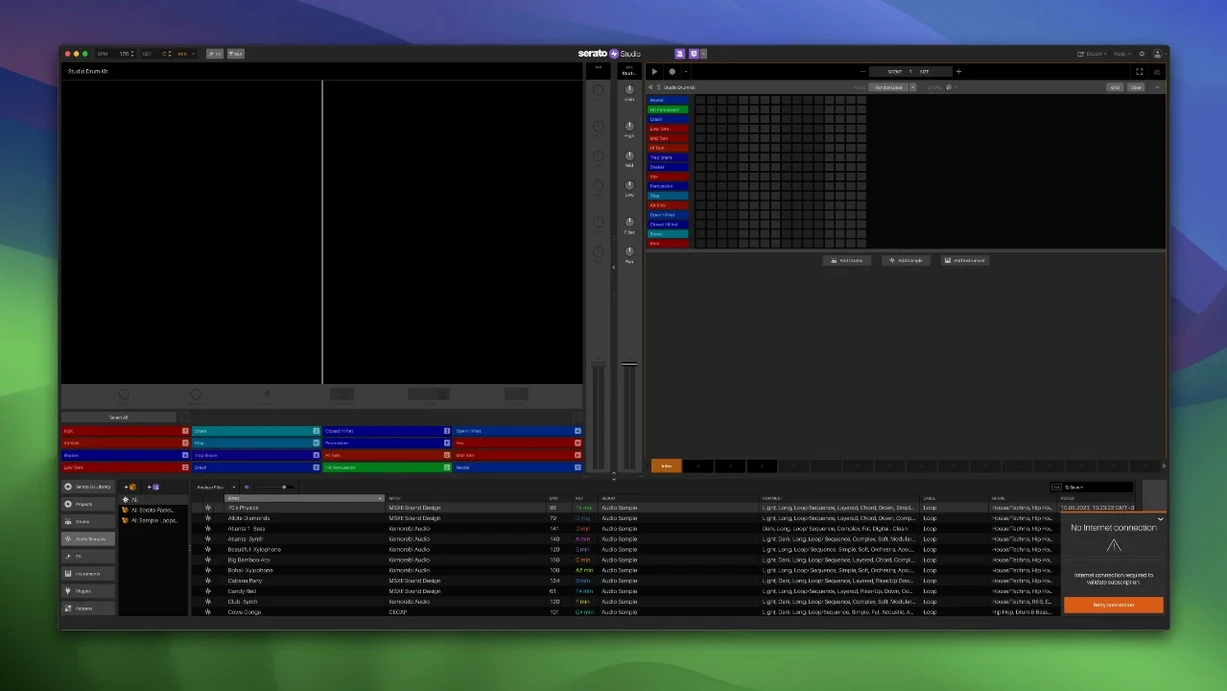
Version 2.5.0 brings two changes that reshape a Sample Deck session. Individual level control for acapella, melody, bassline and drum stems is now native, and both Stems On/Off and those four level lanes can be automated. For anyone building a track from a single source file, that means a break can drop to bass and drums only, then reintroduce the melody stem through a gradual fader move, all written into the arrangement without a workaround. AlphaTheta SLAB control arrives in the same update, and macOS 26 Tahoe support is confirmed.
Stems are the obvious headline, but the chord tools underneath reward a closer look. Auto Chord mode generates progressions locked to the project key, and the Feel control introduces timing offsets that mimic a live keyboard player — slight pushes and pulls that keep a pad or keys line from sounding grid-quantised. Together, they turn the Scene-based sequencer into something that sketches fast and still sounds human.
The library overhaul is less visible but changes daily use. Track Rating, Favorite Crates and Crate Search give an experienced user the filtering speed of a performance DJ set inside a production session. Colour-coded waveforms, BPM syncing and one-touch key switching remain in place, and VST and AU plugin support means those chord and feel tools can feed a third-party instrument or effects chain in the mixer channel.
Scene-Based Sequencing Does Not Replace a Linear DAW
A producer coming from a linear DAW often asks whether Serato Studio replaces that workflow. It does not — and that is the point. Scene-based sequencing treats sections as blocks you trigger, mute and rearrange, closer to a performance tool than a tape machine. If your work relies on comping dozens of vocal takes or fine-tuning MIDI CC curves across a seven-minute arrangement, you will still open Logic or Ableton for those tasks. What Studio adds is a second environment where a beat sketch takes eight scenes and twelve minutes, not an hour.
The hardware question comes up just as often. Studio works with mouse and keyboard, but the layout reveals its DJ heritage. Any Serato DJ-compatible controller or mixer maps to the transport, pads and channel faders without manual MIDI mapping. The 2.5.0 AlphaTheta SLAB integration extends that to a dedicated beat-making surface — pads trigger samples, faders ride stem levels, and the performance grid matches what you see on screen. If you already own Serato DJ hardware, the muscle memory transfers.
Another recurring concern is whether the built-in sound library carries enough weight. The Core Pack installs drum kits, one-shots, loops and instrument patches that lean toward hip-hop, electronic and R&B — 808s, punchy kicks, clean synth basses, a workable Rhodes. It is a starting kit, not a 40 GB orchestral library. VST and AU plugin support fills the gap. Serum, Kontakt, Spitfire libraries — anything that passes validation loads into the instrument slot and responds to Auto Chord and Feel exactly like the stock instruments.
Ghost Frequencies in Extracted Rock Acapellas
Stems separation quality varies with source material. An acapella extracted from a dense rock mix may carry ghost frequencies from the guitar bus, and a bassline stem from an old MP3 rip can sound watery in isolation. The workaround is not a setting inside Studio — it is feeding the Sample Deck a lossless file. A 16-bit WAV or AIFF gives the separation algorithm more to work with than a 192 kbps MP3. For DJs pulling tracks from a Serato library built during gig years, re-ripping a handful of key sources as WAV files pays off in cleaner stems.
Plugin scanning trips up new users who install Studio, point it at a sprawling AU folder and watch it hang. The scan walks every component and VST bundle recursively, and a single 32-bit relic from 2011 can stall the process. The fix is a clean scan folder — create a temporary directory, drop in a dozen plugins you actually intend to use, point Studio there in Preferences, then add more in batches. Once the library stabilises, the scan runs fast on relaunch.
Another snag surfaces with automation in Scene View. Drawing a Stems Level lane for a four-bar scene works as expected, but if the scene loops and the automation does not return to its starting value, the next trigger jumps. The solution is to extend the automation clip one bar past the scene length and draw the return curve there. Scene View reads the full clip, so the reset happens before the loop point, not after it.
Workflow: Building a Beat from a Sampled Loop
Start with a four-bar drum break dropped into a Sample Deck. Set the project BPM to match the loop — tap it out or let the waveform analysis suggest a tempo. Switch Stems on and solo the drum stem to check separation. If the kick punches through but the hi-hat bleed is distracting, pull the drum stem level down by 2 dB and use the Sample Deck's built-in EQ to roll off above 10 kHz. That gives you a clean backbone without opening an external editor.
Duplicate the scene three times. On scene one, leave drums soloed. On scene two, unsolo the bassline stem and set its level to -6 dB, then draw a four-bar ramp that brings it to unity by bar four. On scene three, add the melody stem with a slow attack from the Feel control — set the timing offset to roughly 15 ms late — and automate the acapella stem in at bar two with a sharp fade. Scene four becomes the drop: all stems on, drums panned slightly wide, bassline stem pushed 1 dB hot.
With the stem arrangement locked, open an instrument slot and load a bass patch. Turn on Auto Chord, set the key to match the sample, and tap in a root-note pattern that mirrors the bassline stem's rhythm. The generated chords will follow the project key, so even a three-note pattern sounds harmonically anchored. Add a second instrument for a pad layer, dial the Feel control to around 20 ms of randomised offset, and let it sit behind the melody stem. Export stems for mixing, or bounce the whole arrangement from the master channel — the stem automation prints directly to the file.
A Beat Tape Maker's Evening Session
A producer who builds short-run beat tapes for local rappers sits down with a crate of soul samples ripped from vinyl during a digging trip. The library update in 2.5.0 means those samples now carry a five-star rating and sit inside a Favourite Crate called "Soul Chops 2025." Crate Search pulls up the folder in two keystrokes.
An afternoon session yields three beats. The first starts with a piano loop dropped into a Sample Deck, stems separated, the melody stem isolated and pitched up two semitones with the one-touch key switch. A drum pattern from the built-in kit locks to the project BPM, and the Feel control on a Rhodes patch softens the quantisation so the keys breathe. The second beat reverses the process — drums from a Sample Deck stem, chords from Auto Chord feeding a VST pad, the acapella stem gated into a rhythmic chop. The third beat never leaves Scene View. Six scenes, each a different stem combination from the same source file, triggered live and recorded to the arrangement as a single pass. The session closes with a stem export of all three beats, dry, ready for the vocal booth.
- Sample Deck stems — individual level controls for acapella, melody, bassline and drum stems, plus automation for Stems On/Off and per-stem levels
- Hardware control — native support added for AlphaTheta SLAB
- Operating system — support for macOS 26 Tahoe
- macOS 10.14 or later
- Intel or Apple Silicon Mac
Questions on file
Can I adjust individual stem levels in Serato Studio 2.5.0?
Yes, acapella, melody, bassline and drum stem levels are individually adjustable on any Sample Deck, and those level changes can be automated.
What does the Feel control do for chords?
It applies subtle timing offsets to imitate the natural groove of a live keyboard player, avoiding perfectly quantised note starts.
Which plugin formats does Serato Studio support on Mac?
It supports both VST and AU plugin formats, loaded directly into the mixer channel or instrument slots.
Sign in · Create an account to add a field note.
No field notes yet. A measurement, a version, a machine — they appear after moderation.