
Games
The Sims 4 1.127.41.1030
GamesUpdated



| Requirement | On file |
|---|---|
| macOS | See the sheet |
| CPU | Apple Silicon, Intel 64-bit |
| Download | 78 GB |
| Tested on | macOS Sonoma, MacBook Air (M1. 2020) |
If you’ve spent time in a tool like Blender tweaking every vertex of a model, the character creation in The Sims 4 offers a similar depth of control, but applied to people. It’s a life simulation where you direct a household’s daily routine, relationships, and long-term ambitions. The base is free to grab, and version 1.127.41.1030 brings it to both ARM and 64-bit Intel Macs with full support for 18 interface languages.
- Design Sims from the ground up: sculpt facial features, pick body types, assign personality traits, and curate their wardrobe.
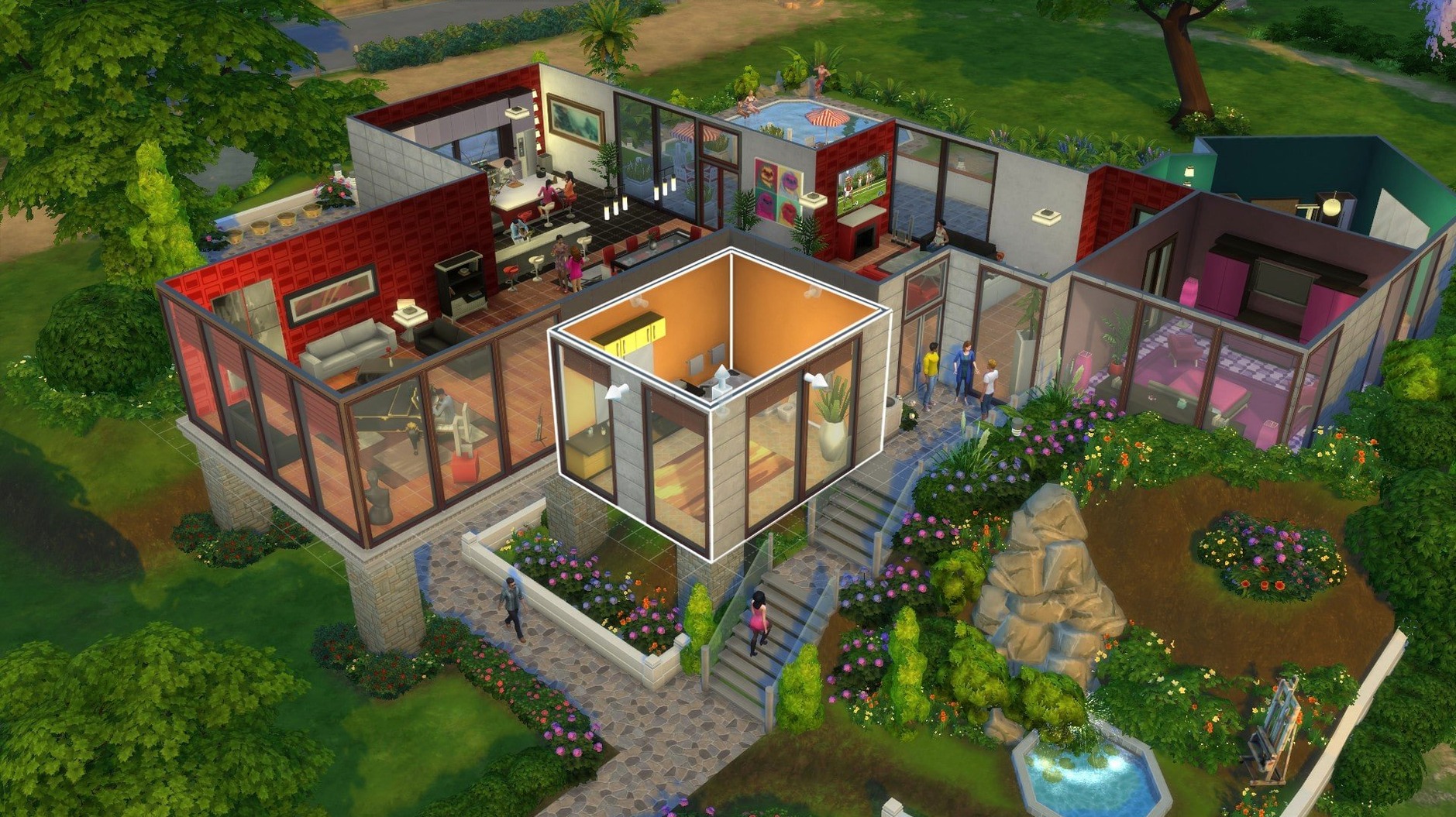
- Enter Build Mode to construct houses room by room, from foundation to roof, then furnish them with a catalogue of objects.
- Guide a Sim’s day—morning coffee, career grind, skill practice, or a chaotic night out.
- Shape social dynamics through friendships, rivalries, and romances that evolve based on your choices.
- Set long-term goals like becoming a master chef, a secret agent, or raising a perfect family.
The game doesn’t push a fixed storyline. You might spend an hour adjusting roof eaves, or three hours navigating a messy breakup. It’s a sandbox for domestic experimentation, and the Mac build holds up on modern Apple Silicon hardware without a fuss.
Catalogue Browsing Got a Local Cache
The update to 1.127.41.1030 wasn't a flashy expansion. Two practical adjustments landed, both aimed at the in-game Marketplace. Browsing the catalogue of community creations now feels less like waiting for a dial-up connection. Thumbnails and item previews cache locally after the first download, so revisiting a creator's page or scrolling back through a list doesn't trigger the same slow fetch. On a spotty Wi‑Fi connection—coffee shop, train, a shared house where someone is streaming 4K video—the difference is tangible. The first load still pulls everything fresh, but every return visit after that pulls from the cache.
Bug fixes tagged along in the same update, though the release notes keep the specifics under the usual blanket phrasing. In practice, the Mac build on 1.127.41.1030 has been stable on Apple Silicon. The freeze-on-splash issue that occasionally hits after a fresh install still exists, but the workaround remains the same: clean the Sims 4 folder in Documents, keep only Tray, Saves, and Mods if you use them, and let the game rebuild the rest.
Your Documents Folder Is the Nerve Center
A handful of early missteps trip up new players on Mac, especially if they come from other platforms or haven't touched the series in years.
- Ignoring the Documents folder. The Sims 4 stores saves, tray items, mods, and configuration files in
~/Documents/Electronic Arts/The Sims 4. Dragging the app to Trash does nothing to this folder. If the game acts oddly after months of use—stuttering, broken UI, infinite loading screens—the culprit is usually a bloated cache or a stale config file in that directory, not the app bundle itself. - Dumping every mod at once. A fresh install tempts people to load 12 GB of custom content before they've even created their first Sim. Mod conflicts are real, and tracking down which one broke the toddler's face or made all chairs invisible is tedious. Add mods in batches of five, launch the game between batches, and keep a text file listing what went in when.
- Forgetting to save households to the library. Creating a Sim for an hour and then starting a new game without saving them to the personal library means that Sim exists only in that one save file. The library—accessible from the gallery tab in Create-a-Sim—preserves households, rooms, and lots independently.
- Letting autonomy run wild on important Sims. The game's default autonomy setting lets inactive household members make their own decisions. That's charming until your carefully crafted surgeon quits her job to become a comedian because you left her unattended for one in-game day. Adjust autonomy in the Game Options menu, especially for households where you care about career progression.
- Using the in-game language setting without reading the install notes. Switching languages requires opening the EA App without the DLC Unlocker, changing the language in the game properties, saving, closing, and clicking Update. Skipping this order leaves the game stuck in its current language, and the in-game options menu won't help.
One Morning in Willow Creek
A player who leans toward architectural tinkering more than live-mode drama opens the game with a single goal: build a tiny home that actually functions. They pick the 20×15 lot in Willow Creek's Foundry Cove, bulldoze the default house, and enter Build Mode.
The first thirty minutes go to the shell. A gabled roof with a 30-degree pitch, two dormers for the loft, and a porch that eats up exactly four of the allowed 64 tiles for a Tiny Home Residential lot. The tile counter in the upper-left corner becomes the real boss fight. Every object placed—a shower, a stove, a single-tile desk—pushes the count closer to the cap. The Murphy bed solves the sleeping puzzle because it folds into the wall and frees floor space during the day. A wall-mounted TV above the desk avoids using a second surface.
By the time the sun rises in-game, the house has a shower, a toilet, a mini-fridge, an oven, a sink, a desk, a chair, a Murphy bed, and three skill-building objects: an easel, a guitar, and a bookshelf. The lot type bonus for Tiny Home Residential doubles skill gain, so the Sim who moves in will level painting and guitar absurdly fast. The player saves the lot to the library, names it "Foundry Micro," and exits without ever entering Live Mode. That's a valid session.
Finder Mods vs. macOS Gatekeeper
The Sims 4 on Mac doesn't live in isolation. The way it interacts with the rest of the system matters for anyone who mods, creates custom content, or wants to keep their game running cleanly across macOS updates.
Finder and file management. The Mods folder inside ~/Documents/Electronic Arts/The Sims 4 follows a flat or one-level-deep structure. Subfolders deeper than one level break the resource.cfg file's default scanning. macOS users comfortable with Terminal can batch-rename .package files or sort CC by creator using shell scripts, but the game won't read a mod buried in Mods/Hair/MaxisMatch/Female/Teens/Long. Keep it to Mods/CreatorName at most.
Preview and Quick Look. .package files don't preview natively. Third-party tools like Sims 4 Studio fill the gap for creators, but for everyday players, Quick Look won't show you what's inside a CC file. Sorting mods means launching the game or using a separate tool. Screen recording. macOS's built-in screenshot and screen recording tools (Cmd-Shift-5) work in windowed or borderless window mode. Fullscreen mode sometimes blanks the recording if the resolution doesn't match the display's native ratio. For recording build tutorials or storytelling clips, borderless window mode at 1920×1080 avoids the black-bar problem.
Spotlight indexing. The Documents folder is indexed by default. If the game stutters during autosave, and you have a large Mods folder, Spotlight re-indexing the thousands of .package and .ts4script files isn't the primary cause, but it doesn't help. Excluding the Sims 4 folder from Spotlight in System Settings > Siri & Spotlight > Spotlight Privacy removes one variable from the performance equation.
Migration Assistant and fresh macOS installs. Moving to a new Mac via Migration Assistant pulls the Documents folder across, including all saves and mods. The app itself needs a fresh download. After migration, launch the game once so it rebuilds any missing folders, then quit and copy your old Saves, Tray, and Mods folders into the new directory.
External drives. The game doesn't officially support running from an external SSD, but a symlink from the internal Documents folder to an external drive works. Point the The Sims 4 folder to an external APFS-formatted drive with a symbolic link in Terminal, and the game follows it without complaint. This is useful for MacBooks with 256 GB of internal storage and a large mod collection.
Lock In Graphics Before Your First Sim
Once the game launches and you've made it past the splash screen, a few deliberate moves in the first hours save headaches later.
- Set your graphics options before creating a household. On Apple Silicon, the game often defaults to medium settings. A MacBook Air with an M1 chip runs The Sims 4 comfortably at high settings with edge smoothing turned off and 3D scene resolution set to match the display. Laptop Mode—a toggle designed for older integrated graphics—should stay off on M-series chips. It limits shadow detail and draw distance unnecessarily.
- Tick "Disable CC for Random" in the game options. Without this, townies spawn wearing mismatched custom content, including pieces you downloaded for your own Sims. A Sim walking past your house in a medieval helmet and neon leg warmers breaks immersion fast.
- Learn the "bb." cheats early. Open the cheat console with Cmd-Shift-C.
bb.moveobjects onremoves placement grid restrictions in Build Mode.bb.showhiddenobjectsandbb.showliveeditobjectsunlock debug items and environmental objects that aren't in the normal catalogue—rocks, trees, street signs, and clutter that make a build feel lived-in. These don't disable achievements unless you add a mod that marks the save as modded. - Rotate and raise objects with modifier keys. Holding Option while placing an object disables grid snapping. The 9 and 0 keys raise or lower wall-mounted objects. The bracket keys [ ] resize objects without a cheat. These three shortcuts turn the Build Mode catalogue into something far more flexible than the default click-and-drag suggests.
- Save households, rooms, and lots to your library constantly. The library is local, not cloud-based, so it persists across save files. A kitchen you spent an hour perfecting shouldn't live only in one house. Save it as a room, and you can drop it into any future build.
- Back up the
Savesfolder before experimenting with mods. A single outdated script mod can corrupt a save file. Copy the entire folder to a dated subfolder on your desktop. If something breaks, you lose an afternoon, not a hundred-hour legacy.
- Marketplace — browsing performance was improved and images are now cached after the first download.
- General — bug fixes were included in the update.
- Apple Silicon or 64-bit Intel Mac
- Tested on macOS Sonoma
- Tested on MacBook Air (M1, 2020)
Questions on file
Which languages does The Sims 4 support on Mac?
It supports Russian, English, German, Danish, Spanish, Italian, Traditional Chinese, Simplified Chinese, Korean, Dutch, Polish, Portuguese, Finnish, French, Czech, Swedish, and Japanese.
Sign in · Create an account to add a field note.
No field notes yet. A measurement, a version, a machine — they appear after moderation.