VST Plugins
Addictive Drums 2 2.9.1
VST PluginsUpdated
| Requirement | On file |
|---|---|
| macOS | macOS 10.13 or later |
| CPU | Apple Silicon, Intel 64-bit |
| Download | 14.5 GB |
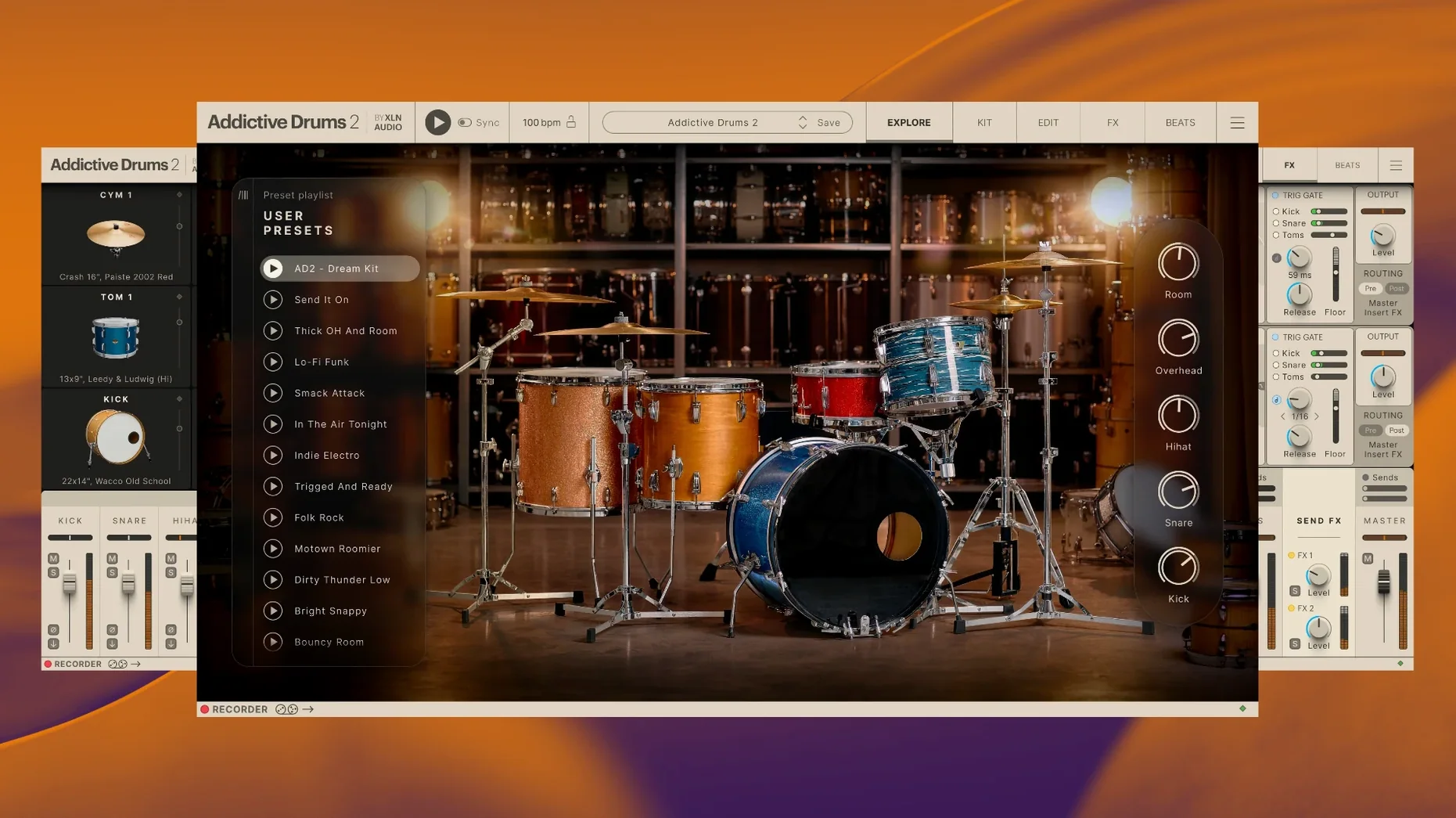
Addictive Drums 2 is a 64-bit virtual instrument from XLN Audio that models a complete studio drum kit, letting you build realistic drum parts from scratch.
Tuning the kit pieces
Every drum and cymbal sits in its own channel with pitch, envelope, and processing controls. You can detune a snare by a few cents for thickness or shorten the hi-hat decay until it cuts through a busy chorus.
Directing the room microphones
The mixer gives you close mics, overheads, and room channels that you balance like a real session. Push the room fader up and the whole kit breathes; pull it back and you get a tight, dead sound that sits flat against a bassline.
Shaping the beater attack
The envelope section works on the transient itself. A fast attack with a short hold makes kicks punch through a dense mix, while a softer attack on the toms gives you the bloom of a large-diaphragm condenser without extra reverb.
Playing Kits Dry Out of the Box
A fresh install of Addictive Drums 2 often triggers the same handful of errors with people who open it for the first time. The most common one is loading a kit and playing it dry. The raw samples are clean, sometimes to the point of sterility. Beginners who skip the mixer tab end up with a flat, lifeless sound and assume the library lacks character. The fix takes thirty seconds: open the mixer, raise the room fader to about -12 dB, and add a touch of bus compression from the built-in effects. The tone shifts from sample-library clean to studio-live immediately.
Another early mistake is ignoring velocity mapping. The default curve works for keyboard input, but pad controllers and electronic kits need adjustment. Hitting a pad at half force and triggering a 127-velocity rimshot breaks the illusion quickly. Spend ten minutes in the Map Window, under the kit piece tab, where you can drag the velocity curve to match your controller. The difference between a flat diagonal and a gentle S-curve is the difference between a machine gun and a drummer.
Overloading the overhead channels is a third trap. New users often push the overhead faders past unity because cymbals sound thin at lower levels. What actually happens is phase smear across the close mics — the kick and snare lose definition because the delayed overhead signal cancels parts of the transient. Keep overheads at -6 dB or lower during the rough mix, then inch them up while soloing the snare close mic. When the snare body thickens without losing its crack, stop.
The last routine mistake is layering ADpaks without checking the tuning. Each expansion kit was recorded in a different room with different heads and mic placements. Dropping a Fairfax snare into a Black Velvet kit without matching the pitch creates a comb-filtered mess. The pitch control on the Edit tab has a readout in cents; a five-cent nudge is often all it takes to lock two pieces into phase.
Apple Silicon Launches in Under Three Seconds
Version 2.9.1 arrived as a maintenance update, but the point releases leading up to it quietly altered the daily workflow. Apple Silicon support went native, which matters for two reasons. First, the standalone application launches in under three seconds on an M1 or M2 machine, compared to the Rosetta-era wait of eight to ten seconds. Second, plugin instances inside Logic Pro and Ableton Live use roughly thirty percent less CPU per channel, meaning a session with six kit pieces, three bus effects, and a convolution reverb no longer forces a buffer size of 512 samples. A 128-sample buffer stays clean on an M1 Pro with four AD2 instances.
The browser received an understated usability change. Kit presets now load with their associated MIDI grooves attached as a preview phrase, so you can audition a kit and a beat together without dragging a MIDI block onto the timeline. This removes a friction point that had been present since version 2.0: the old workflow of loading a preset, switching to the Beats tab, hunting for a groove that fit, dragging it, and only then hearing whether the combination worked. Now it is one click per kit.
The mixer's channel strip presets also gained per-channel save and recall. Before this change, saving a mixer state saved the entire console — all faders, all inserts, all send levels. Now you can save just the snare channel processing and load it into any kit. For someone who dials in a specific snare EQ and transient shape over weeks of mixing, this removes an hour of rework every time a new ADpak is auditioned.
One regression worth noting: older user presets saved before the 2.5 series sometimes load with the room channel muted. The workaround is to resave the preset after unmuting, but XLN Audio has not patched this as of 2.9.1. If you rely on presets from 2018 or earlier, budget an afternoon to open, fix, and overwrite them.
Pointing the Installer at an External SSD
The installer drops a large sample library onto your drive — the Complete Collection occupies around 85 GB when fully unpacked. Before launching the plugin, decide where that library lives. An external SSD over USB 3.1 works fine for streaming, but avoid spinning hard drives; the round-robin sample loading in AD2 pulls multiple velocity layers per hit, and a mechanical drive introduces audible lag on fills faster than sixteenth notes at 120 BPM.
On day one, run the standalone application before opening a DAW. The standalone app lets you test buffer sizes, sample rates, and MIDI controller mapping without the overhead of a host. Set your audio interface to 44.1 kHz and a buffer of 128 samples as a starting point. Play the default kit with the built-in groove player for five minutes while watching the CPU meter in the top-right corner. If the meter stays below forty percent during busy fills, the settings are stable.
Map your controller next. The Learn function under the Map tab accepts MIDI note input directly — hit a pad, click Learn on the corresponding kit piece slot, and the mapping sticks. For electronic drum kits, enable the Hi-Hat CC option and calibrate the pedal range. An uncalibrated hi-hat pedal will produce only open or closed sounds, with none of the quarter-open and half-open articulations that make programmed drums breathe.
Build a template on day two. Open your DAW, insert AD2 on an instrument track, load the kit closest to your usual genre, set the mixer faders to rough balance, and save the track as a template with the plugin state included. A template that loads in four seconds saves forty minutes of setup per project. Keep three templates: one for dry, punchy rock with the room channel tucked low; one for ambient pop with the room fader at -8 dB and a plate reverb on the bus; one for metal with the kick and snare channels gated and the overheads high-passed at 600 Hz.
Explore the MIDIpaks on day three. The included MIDI library spans thousands of grooves across genres, and each one is editable. Drag a groove into your DAW timeline, open the piano roll, and study the velocity values on the hi-hat and snare. The programmed velocities follow a human curve — accents on downbeats, ghost notes between 20 and 40 — and copying that curve into your own patterns teaches more about realistic drum programming than any tutorial.
Standalone App Without a DAW
The first question is almost always about standalone operation. Addictive Drums 2 runs as a standalone application on macOS, not just as a plugin. This means you can open it, load a kit, plug in headphones, and play drums without launching a DAW. Practice and sound design sessions do not require a host application. The standalone app also exports audio, so a quick idea recorded at 3 a.m. can be bounced to a WAV file and dropped into a session the next day.
Another frequent question concerns the difference between the base engine and the Complete Collection. The engine is the same in both — the mixer, effects, routing, and groove player are identical. The difference is the library. The Complete Collection includes every ADpak, MIDIpak, and Kitpiece Pak XLN Audio has released. Someone installing the Complete Collection gets the Fairfax kits, the Black Velvet kits, the Funk kit, the metal-oriented kits, and all the percussion expansions in one download. A base install comes with a starter kit only.
People ask whether AD2 works with electronic drum kits. It does, and the hi-hat continuous controller support makes it one of the better virtual instruments for e-kit players. Roland and Yamaha kits map automatically through the preset menu in the Map tab. Alesis kits require manual mapping, but the Learn function handles it quickly. Latency depends on the audio interface, not the plugin — a round-trip of under 10 ms feels immediate on most mesh-head pads.
The RAM question comes up often. A full kit with all articulations loaded uses approximately 1.2 to 1.8 GB of RAM depending on the ADpak. The engine streams samples from disk by default, so the memory footprint stays manageable on machines with 8 GB of RAM. Disabling disk streaming and loading everything into RAM improves load times on older SSDs but pushes the footprint toward 3 GB per kit. Users with 16 GB or more can safely run multiple kit instances in RAM mode; users on 8 GB should keep streaming enabled.
Compatibility with DAWs is another pre-install concern. Addictive Drums 2 ships as VST2, VST3, AU, and AAX. Logic Pro users run the AU version. Ableton Live, Cubase, and Studio One users can pick VST3. Pro Tools users load the AAX version. The AU version on Apple Silicon runs natively inside Logic Pro without a compatibility layer. Bitwig and REAPER users have reported no issues with the VST3 build on macOS 14 Sonoma.
People also ask about expansion lock-in. ADpaks from version 1 and version 2 work in the same engine; no repurchase is needed if upgrading from an earlier Addictive Drums install. The license covers both standalone and plugin use on the same machine. XLN Audio's installer handles the library migration, though moving 85 GB of samples to a new drive requires pointing the engine to the new path through the Settings menu.
Skip the Live Room, Mics, and Drummer
Songwriters who record at home and cannot mic a live kit benefit immediately. A treated room, a set of decent microphones, and a drummer who can hold time are expensive and loud. Addictive Drums 2 removes all three variables. A songwriter with a MacBook Air, a pair of headphones, and a small MIDI keyboard can lay down drum tracks that sit in a mix without the telltale sterility of older sample libraries. The room channels and the bus compressor in the mixer section do the heavy lifting that used to require third-party plugins.
Mix engineers who receive multitrack drum stems from clients find AD2 useful as a layering tool. A weak snare top mic can be reinforced with a sample from the Fairfax pak, triggered via the original transient and blended underneath at -15 dB. The pitch and envelope controls let the sample match the source recording's tuning and decay, so the reinforcement stays invisible. Engineers working on metal mixes often replace the kick entirely with a sample from the Metal ADpak, gating it to 80 ms and blending it with the original sub frequencies.
Electronic producers who want organic percussion textures get results that sampled one-shots cannot deliver. The round-robin sampling in AD2 pulls from up to six different hits per articulation, so a programmed hi-hat pattern at 140 BPM never repeats the exact same sample twice in a row. Loading a Funk kit, pitching the snare down by 200 cents, and running it through the built-in distortion effect yields a lo-fi percussion layer that still feels played rather than programmed — useful for lo-fi hip-hop and downtempo electronic music.
Film and media composers working to picture gain the most from the MIDIpaks. The orchestral percussion and cinematic kits in the Complete Collection include timpani rolls, cymbal swells, and ensemble hits mapped across the keyboard. The groove player can sync to the host tempo and follow time signature changes, which means a composer can drop a 7/8 groove into a scene, lock it to picture, and audition kit changes without reprogramming the MIDI. The standalone export function also lets composers bounce a quick stereo drum stem without opening the full DAW session — practical during spotting sessions where only a rough rhythm track is needed.
Drummers who use an electronic kit as a practice tool at home form the core audience that the hi-hat engine was built for. The continuous controller response on the hi-hat pedal captures the gradations between open and closed that define a drummer's feel. The Fairfax and Black Velvet ADpaks, in particular, sample the hi-hat at six distinct openness levels, and the engine interpolates between them based on CC data. A Roland VH-10 or VH-11 hi-hat pad triggers the full range without calibration beyond the initial pedal range set in the Map tab. For drummers who want to track ideas at midnight without waking the household, AD2 paired with mesh heads and headphones is a quieter alternative to an acoustic kit in a garage.
- macOS 10.13 or later
- Intel or Apple Silicon Mac
- 64-bit host or standalone
Questions on file
Does Addictive Drums 2 run as a standalone app?
Yes, the official product page lists a standalone application for both Windows and macOS alongside the plugin formats.
What is in the Complete Collection?
The Complete Collection bundles Addictive Drums 2 with all available ADpaks, MIDIpaks, and Kitpiece Paks.
Which macOS versions are supported?
The current version requires macOS 10.13 or later and runs on both Intel and Apple Silicon Macs as a 64-bit application.
Sign in · Create an account to add a field note.
No field notes yet. A measurement, a version, a machine — they appear after moderation.