VST Plugins
Cymatics VOXITY 1.0.0
VST PluginsUpdated
| Requirement | On file |
|---|---|
| macOS | macOS 10.14 or later |
| CPU | Apple Silicon, Intel 64-bit |
| Download | 97 MB |
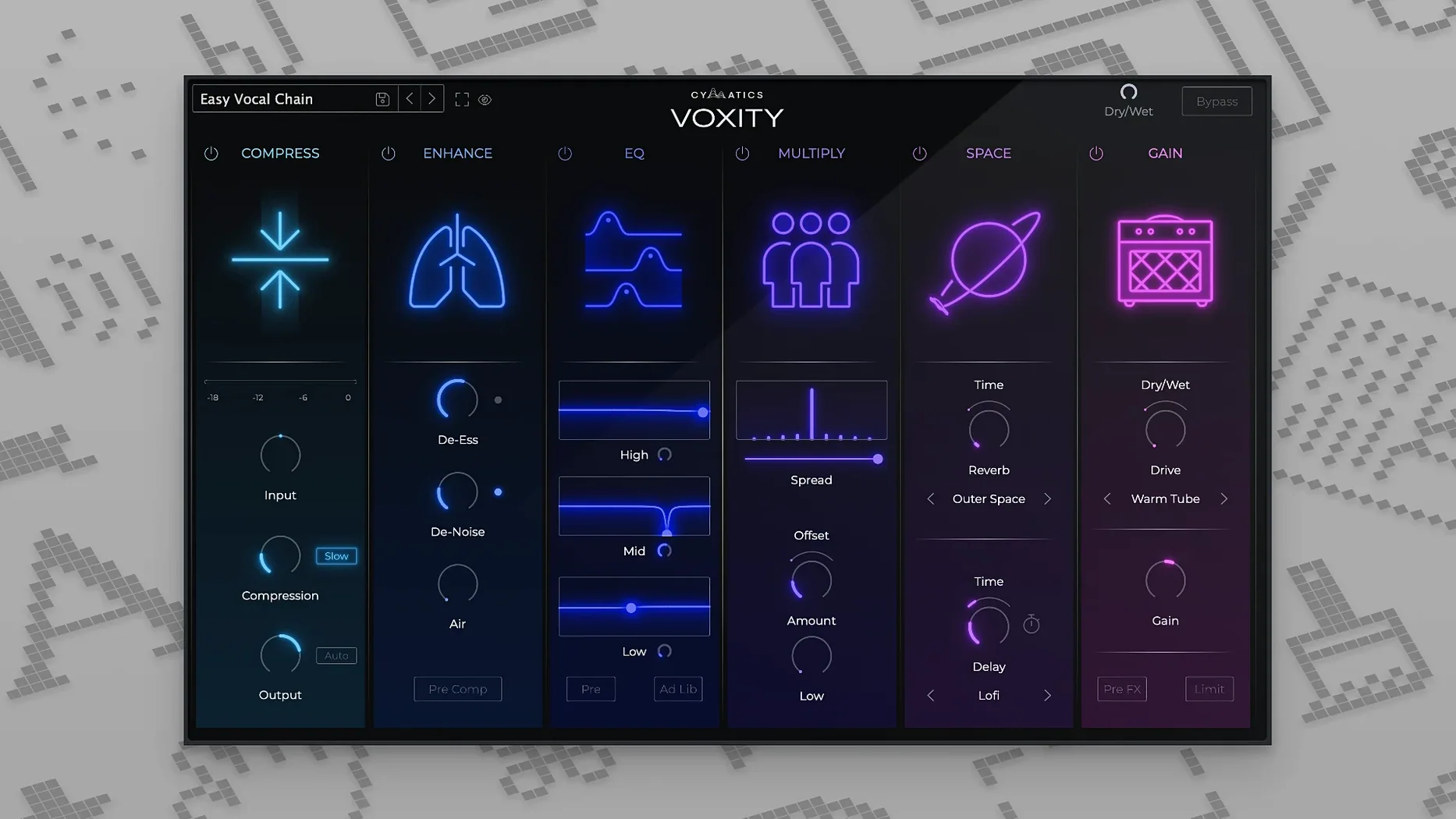
Weighing in at version 1.0.0, VOXITY is a dedicated vocal processing unit from Cymatics, built to add character and space to a dry vocal track. The 64-bit plugin operates on both ARM and x86 architectures, slotting directly into a mixing chain for anyone who needs a vocal to sit forward in a busy arrangement without complex routing. It combines a handful of core spatial and tonal tools into a single interface, making it practical for quick fixes during a writing session or for building a rough mix that sounds finished.
- Adds high-frequency brightness and low-end depth to a vocal signal.
- Contains a stereo widening module to push the voice outward in the field.
- Includes built-in echo and reverb for spatial placement.
- Features a volume levelling algorithm to smooth out inconsistent takes.
- Provides a set of ready-made presets calibrated for different vocal styles.
The practical draw here is consolidation. Instead of stacking three separate plugins for space, width, and dynamics control, VOXITY bundles those processes into one view. A producer working on a tight deadline can pull up a preset, dial in the reverb tail and stereo spread, and level the performance without leaving the window. It is not a surgical tool for fixing bad recordings, but a shaping processor for a vocal that already has a clean base tone.
DAW-Only Plugin, No Standalone App
One of the first things producers want to know is whether VOXITY works as a standalone application or strictly as a plugin. It loads inside a DAW — AU and VST3 formats are included — so you need a host like Logic Pro, Ableton Live, or FL Studio to run it. There is no standalone desktop app. The installer places the plugin components in the standard system folders, and most DAWs pick them up on the next launch without extra scanning.
Another common question concerns CPU load. Because VOXITY runs several processes under the hood (levelling, stereo processing, reverb, echo), a single instance is not invisible on the meter. On a recent Apple Silicon machine, one instance typically sits around 3–5% in a moderate session. Stacking it across eight or ten vocal tracks can push that higher, so freezing or bouncing processed tracks is sensible on older Intel machines. The plugin does not include a low-latency mode, so tracking through it with a live mic introduces a small but noticeable delay.
People also ask about the breathing-noise reduction mentioned in the feature set. It is not a dedicated de-breath module with adjustable threshold and waveform display. The reduction is baked into the overall signal path — it attenuates low-level noise between phrases when the incoming vocal drops below a set point. It works best on recordings where the breaths are already somewhat controlled. A vocal take with loud, sharp inhales will still need manual editing or a purpose-built de-breath plugin upstream.
Preset quality comes up frequently. The included presets span pop, hip-hop, lo-fi, and spoken-word settings, each adjusting the balance of brightness, depth, width, and space. They are starting points, not one-click finishes. A preset labelled "Lo-Fi Radio" might push the high-end roll-off too far for a track with dark instrumentation, but pulling the brightness fader back a few notches usually fixes it. Having the preset recall the entire state of the plugin makes A/B comparisons quick during a mix session.
Nectar Elements, Vocal Rider, and TDR Nova Compared
Three plugins occupy a similar lane to VOXITY: iZotope Nectar Elements, Waves Vocal Rider, and the free TDR Nova in dynamic mode. Each tackles vocal processing from a different angle, and the choice depends on whether the priority is tone, dynamics, or spatial placement.
iZotope Nectar Elements is the closest in concept — an all-in-one vocal chain. It includes pitch correction, compression, de-essing, and a harmoniser, which VOXITY does not offer. Nectar leans harder on corrective processing and AI-driven analysis; it listens to the vocal and suggests settings. VOXITY skips analysis entirely. The trade-off is that Nectar Elements runs heavier on CPU and loads slower, while VOXITY is immediate. A producer who already handles pitch and dynamics elsewhere may prefer the lighter, width-and-space focus of VOXITY.
Waves Vocal Rider solves one specific problem: volume levelling. It rides a vocal fader automatically, writing automation that a mixer can tweak later. VOXITY includes levelling, but not as a transparent gain rider — it is more of a smoothing algorithm that reduces the difference between loud and soft passages. Vocal Rider is surgical and leaves the tone untouched; VOXITY colours the signal. Using both together is common: Vocal Rider for transparent level control early in the chain, then VOXITY for tone and space further down.
TDR Nova is a parallel option for producers who want dynamic EQ rather than spatial processing. Nova can tame resonant frequencies in a vocal — something VOXITY does not address — but it has no reverb, no delay, no stereo width, and no levelling. A budget-conscious setup might pair Nova (free) with stock reverb and delay plugins, but that means managing three or four windows. VOXITY replaces that collection with one plugin, at the cost of less control over each individual process.
Turning a Flat Verse into a Present Vocal
Imagine a Tuesday evening in a home studio. A verse vocal has been comped from six takes, and the raw track is clean but flat — it sits in the centre, dynamically uneven, and lacks presence against a dense synth arrangement. The producer opens Logic Pro, inserts VOXITY on the vocal channel, and starts with the "Pop Lead" preset.
The first thing that jumps out is the stereo width. The preset pushes the vocal outward, almost too wide for a lead. The producer pulls the width knob back from 60% to 35%, keeping the voice anchored near the centre while giving it a subtle spread that separates it from a mono guitar panned hard left. Next, the low-end depth control gets a small boost — about 2 dB — to add body to a thin microphone recording. The brightness fader moves up until the consonants gain clarity without sounding brittle, landing around +3 dB.
The volume levelling meter shows the quieter syllables now sit closer to the louder ones. A few words at the end of the second bar still drop off, so the producer nudges the level control up by a notch. The reverb is set to a short plate at 1.2 seconds decay, mixed low enough that it fills the space behind the vocal rather than pulling it back in the soundstage. Echo stays off — the track already has a ping-pong delay on a send, and doubling the effect would clutter the mix.
After five minutes of tweaking, the producer saves the state as a user preset called "Verse Lead — Warm Width" and moves on. The whole adjustment happened in one window, with no auxiliary sends to configure and no extra plugins to open. That single-window focus is the session workflow VOXITY is built around.
Why Wide Stereo Vocals Disappear in Mono
The most frequent error is over-widening the stereo image. A vocal panned to the extremes sounds impressive in solo but collapses or disappears on mono playback systems — Bluetooth speakers, some club systems, and phone speakers sum to mono. Keeping the width below 50% preserves mono compatibility while still adding a sense of space. Checking the mix in mono before committing the setting saves a lot of later frustration.
Another mistake is treating the levelling module as a compressor. It does not respond to transients the way a traditional compressor does, and pushing it hard on a vocal with sharp plosives can produce an unnatural pumping effect. Beginners sometimes crank the level control to even out a wildly inconsistent performance, then wonder why the vocal sounds squashed. The levelling works best on a track that has already been gain-staged properly, with the worst peaks clipped or manually edited.
Skipping the output gain staging is also common. The combined effect of brightness, depth, reverb, and levelling can add several decibels of apparent loudness. A beginner might insert VOXITY, love the sound, then not notice the channel is now clipping the next plugin in the chain. Lowering the output level inside VOXITY to match the bypassed level keeps the gain structure intact down the line.
Finally, using the plugin on a bus or group channel instead of an individual vocal track produces unpredictable results. VOXITY expects a monophonic vocal signal; feeding it a stereo bus with multiple voices confuses the levelling algorithm and smears the spatial processing. It belongs on insert slots, one instance per vocal track.
Home Studio Beatmakers Who Skip the Engineering Grind
Beatmakers and producers who record vocals in a home setup benefit immediately. The plugin covers the gap between a dry DI vocal and a finished-sounding take without demanding deep knowledge of compression ratios, pre-delay times, or mid-side processing. Someone laying down a hook at 1 a.m. can drop VOXITY on the track, pick a preset, adjust two faders, and have a vocal that sits in the beat well enough to send to the artist for feedback.
Mixing engineers working on quick-turnaround projects — podcast intros, social media ads, demo mixes — also find it useful. The consolidation of four or five common vocal processes into one window reduces the time spent opening and configuring plugins. For a 30-second ad spot that needs a voiceover to sound present and spacious, VOXITY handles the job in under a minute. Engineers working on full album mixes with complex routing will still want individual tools for each task, but as a scratch-pad processor for fast results, it earns its place in the plugin folder.
Vocalists who mix their own demos are another natural fit. An artist tracking at home often lacks the technical background to build a vocal chain from separate plugins. VOXITY provides a single interface with labelled, musical controls — "Brightness" and "Depth" instead of "High Shelf at 8 kHz" and "Low Shelf at 120 Hz." That language lowers the barrier enough that a vocalist can shape their own sound without calling an engineer.
- macOS 10.14 or later
- 64-bit host (supports ARM and x86 architectures)
Questions on file
What does the Voxity plugin actually do to a vocal?
It processes a vocal by adding brightness and depth, applying echo and reverb, widening the stereo image, and automatically levelling the volume of the performance.
Does Voxity work on Apple Silicon Macs?
Yes, version 1.0.0 supports both ARM (Apple Silicon) and x86 architectures in 64-bit on macOS 10.14 and later.
Sign in · Create an account to add a field note.
No field notes yet. A measurement, a version, a machine — they appear after moderation.