VST Plugins
elastiquePitch 2.5.0
VST PluginsUpdated
| Requirement | On file |
|---|---|
| macOS | macOS 10.15 or later |
| CPU | Apple Silicon, Intel 64-bit |
| Download | 17 MB |
Sixteen audio channels. That is the ceiling in version 2.5.0, and it signals where zPlane.development is aiming this tool — post-production suites and surround mixing environments, not just a stereo vocal bus.
Which plug-in formats does it load as?
VST3, AU and AAX Native. All three are 64-bit builds with universal binaries for ARM and x86 architectures. No VST2, no AAX DSP.
What are the host and OS requirements?
macOS 10.15 or later, running a DAW that hosts one of the three supported formats. The installer is a standard disk image package with no additional authorisation tools.
What does the ÉLASTIQUEPRO algorithm bring to the sound?
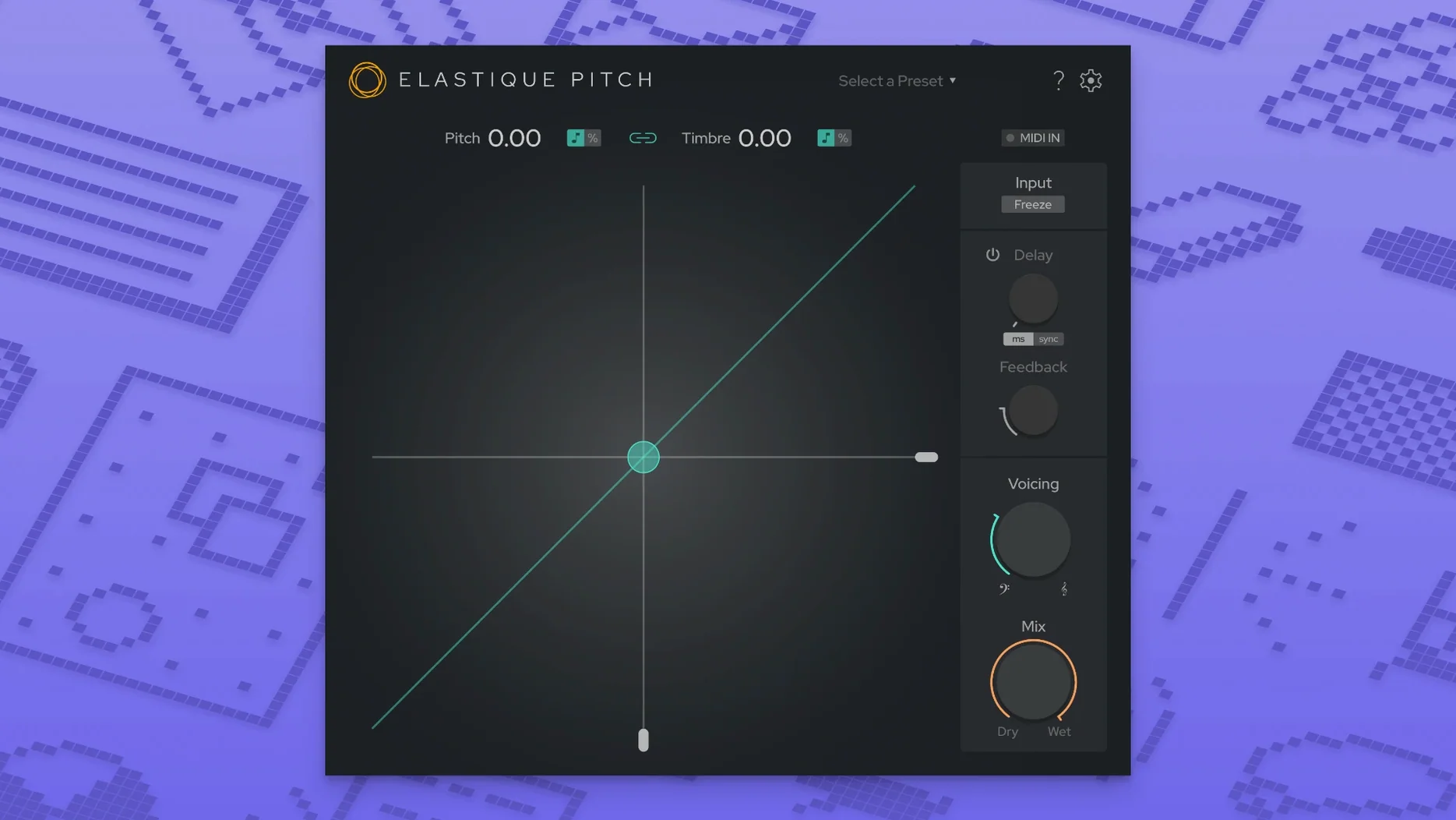
It handles pitch and formant shifting with enough phase coherence for polyphonic material to stay locked. Grain freezing lets you hold a spectral snapshot indefinitely, and the pitch-shifted echo line works as a timed delay with independent shift control — useful for vocal throws and frame-rate conversion tasks where standard resampling would pull the tempo off.
Switch from Standard to Smooth for clean multitrack pitching
Out of the box, elastiquePitch loads with sensible defaults — unity pitch, zero formant shift, no echo — but two controls reward immediate attention. First, the algorithm quality selector tucked into the bottom bar. It defaults to Standard, which keeps CPU load low during tracking. For a mix session, switch it to HQ. The difference is not subtle on dense polyphonic material: transients stay tighter, and the stereo image collapses less when you push the shift beyond ±3 semitones.
Second, the grain freeze gate. The freeze button captures whatever is in the buffer the moment you click it, but the threshold that triggers it is adjustable via a small screw-icon menu beside the grain length knob. Lower it slightly if you plan to freeze quiet tail sections; the factory threshold sometimes misses low-level reverb decays. While you are in that menu, check that tempo sync for the echo section is set to your DAW clock — it defaults to free-running milliseconds, which catches people out when they automate echo throws across a tempo-mapped session.
Pitch a six-channel ambience bed without touching footsteps
Imagine a post-production task: a 48 kHz, six-channel ambience recording of a street market needs the background chatter pitched down by two semitones without touching the footsteps and stall sounds that share the same channels. The timeline sits in Reaper, and the DAW recognises the AU build immediately after installation.
- Insert elastiquePitch on the ambience bus. The plug-in detects the six-channel input and maps channels 1–6 to the internal routing matrix, visible as small numbered indicators along the top edge of the window.
- Set the algorithm to Polyphonic Complex from the mode dropdown. Mono sources can use the lighter Solo mode, but a street market is textured and overlapping — Polyphonic Complex keeps the phase relationships between channels intact.
- Solo channels 3–4, which carry the close chatter. Pull the Pitch knob to –2.00 semitones. The voices drop but keep their natural weight; no chipmunk artefacts creep in because the formant ring stays at zero for now.
- Un-solo and listen to the full mix. The footsteps on channels 1–2 have shifted down too — they were not isolated. Drop the Mix knob on those channels to 30% wet using the per-channel gain offsets in the matrix panel. The pitch-shifted chatter blends under the dry footsteps.
- Add a pitched echo for the stall vendor calls on channel 5. Set Echo Time to 180 ms, Echo Pitch to +5 semitones, and Echo Feedback to 22%. A short ascending shadow trails each shout, creating distance without cluttering the centre image. The Mix knob for the echo section stays at 40%.
- Lock a grain on a single bell strike from channel 6. Hit Freeze during the decay tail. The spectral smear holds, and dragging the Grain Length knob to 80 ms tightens it into a tonal pad that drones under the scene. Automate the freeze release to fade out over four bars.
The whole session runs at 128-sample buffer on an M1 Pro machine, CPU hovering around 11% with the algorithm in HQ mode. Not a single dropout.
Type exact shift values instead of dragging the Pitch knob
- Right-click parameter reset. Double-clicking a knob returns it to the default, but right-clicking any control opens a value entry field. Typing “–4.3” into the Pitch knob is faster than dragging when you know the exact shift in semitones.
- Shift-drag for fine control. Holding Shift while dragging any knob steps the value in 0.01 increments instead of the coarse 0.1 jumps. Critical for formant matching on voice-over work where even a 0.2 shift pulls the timbre into uncanny territory.
- Undocked echo section. The echo strip can be collapsed entirely with the small arrow beside its label. When collapsed, the delay line still runs — it just stops eating interface space on a 13-inch screen. The grain freeze section collapses the same way.
- Channel matrix tooltips. Hovering over any channel indicator in the routing grid shows the current gain offset in decibels. No need to open the full matrix unless you are reassigning channels.
- Automation-friendly layout. Every parameter exposed to the host appears with its exact internal name in the DAW automation lane — no abbreviated labels that leave you guessing whether “PchEcho” means echo pitch or echo pan.
- Preset manager with A/B comparison. The preset browser stores snapshots of the entire state, including the routing matrix. Loading a preset while holding Option on the keyboard loads it into the B slot, and the A/B toggle flashes between the two without re-loading. Useful for checking a ±3 semitone shift against a ±5 shift on the same vocal line without losing either setting.
Three tools that overlap with elastiquePitch — and where they diverge
Three plug-ins tend to appear in the same conversations as elastiquePitch. They overlap in function but diverge in how they approach the work, and the differences matter once you move past basic monophonic shifting.
Soundtoys Little AlterBoy focuses on vocal manipulation with a hard-pitched, character-forward sound. It shifts pitch and formants, adds a robot mode, and drives the result through a tube saturation stage. The processing is monophonic — no multichannel support, no independent grain control. It is a creative colour tool first. elastiquePitch runs wider: up to 16 channels, transparent algorithm behaviour, and the freeze-echo combination that Little AlterBoy does not attempt. If the job is a single vocal track that needs attitude, Little AlterBoy wins on immediacy. If the job spans a 5.1 ambience bed or a polyphonic keys bus that must stay phase-coherent, elastiquePitch covers ground the Soundtoys plug-in cannot reach.
Waves SoundShifter Pitch offers tight integration with Waves’ ecosystem and a set of graph-based pitch curves for automated sweeps. It handles stereo and limited multichannel, and its transient preservation is respectable. The graphical automation is the standout feature — drawing a pitch curve across a region is faster than writing lane automation by hand. Where elastiquePitch pulls ahead: the ÉLASTIQUEPRO algorithm holds formants more cleanly at larger intervals, and the grain freeze is absent from SoundShifter entirely. SoundShifter is a strong choice for quick tape-stop effects and risers; for surgical formant work and prolonged frozen textures, elastiquePitch covers more territory with less sonic degradation.
Celemony Melodyne is a different category — offline pitch editing with polyphonic detection, DNA analysis, and note-level control. It is not a real-time insert effect. Comparisons happen because both tools shift pitch, but the use case splits sharply. Melodyne edits individual notes within a recorded performance; elastiquePitch processes an entire signal in real time during playback or recording. Many sessions run both: Melodyne for corrective tuning on a bounced vocal, elastiquePitch on the vocal bus for live formant tilts and automated echo throws during the mixdown.
The common thread: elastiquePitch occupies the real-time, multichannel, algorithmically transparent slot that none of these alternatives fill in the same way. It does not chase character or note-level editing — it gives you a clean, wide-lane pitch engine that stays out of the way until you ask it for something extreme, and then it delivers without folding.
- User interface — Redesigned layout and control set.
- Multichannel support — Expanded to handle up to 16 audio channels.
- Core algorithm — Updated to the latest ÉLASTIQUEPRO engine.
- macOS 10.15 or later
- 64-bit host supporting VST3, AU, or AAX Native
- Apple Silicon or Intel processor
Questions on file
Does elastiquePitch work on Apple Silicon Macs?
Yes. Version 2.5.0 includes native ARM support alongside Intel, so it runs without Rosetta on M-series machines.
How many audio channels can it process?
Up to 16 channels in the current version, up from the previous limit of stereo-only operation.
Can it freeze audio grains in real time?
Yes. The grain-freeze function captures the current spectral state and sustains it, which works well for creating pads or stuttering vocal textures.
Sign in · Create an account to add a field note.
No field notes yet. A measurement, a version, a machine — they appear after moderation.