VST Plugins
Devious Machines Infiltrator 2.5.26
VST PluginsUpdated
| Requirement | On file |
|---|---|
| macOS | OS X 10.11 or later |
| CPU | Apple Silicon, Intel 64-bit |
| Download | 46 MB |
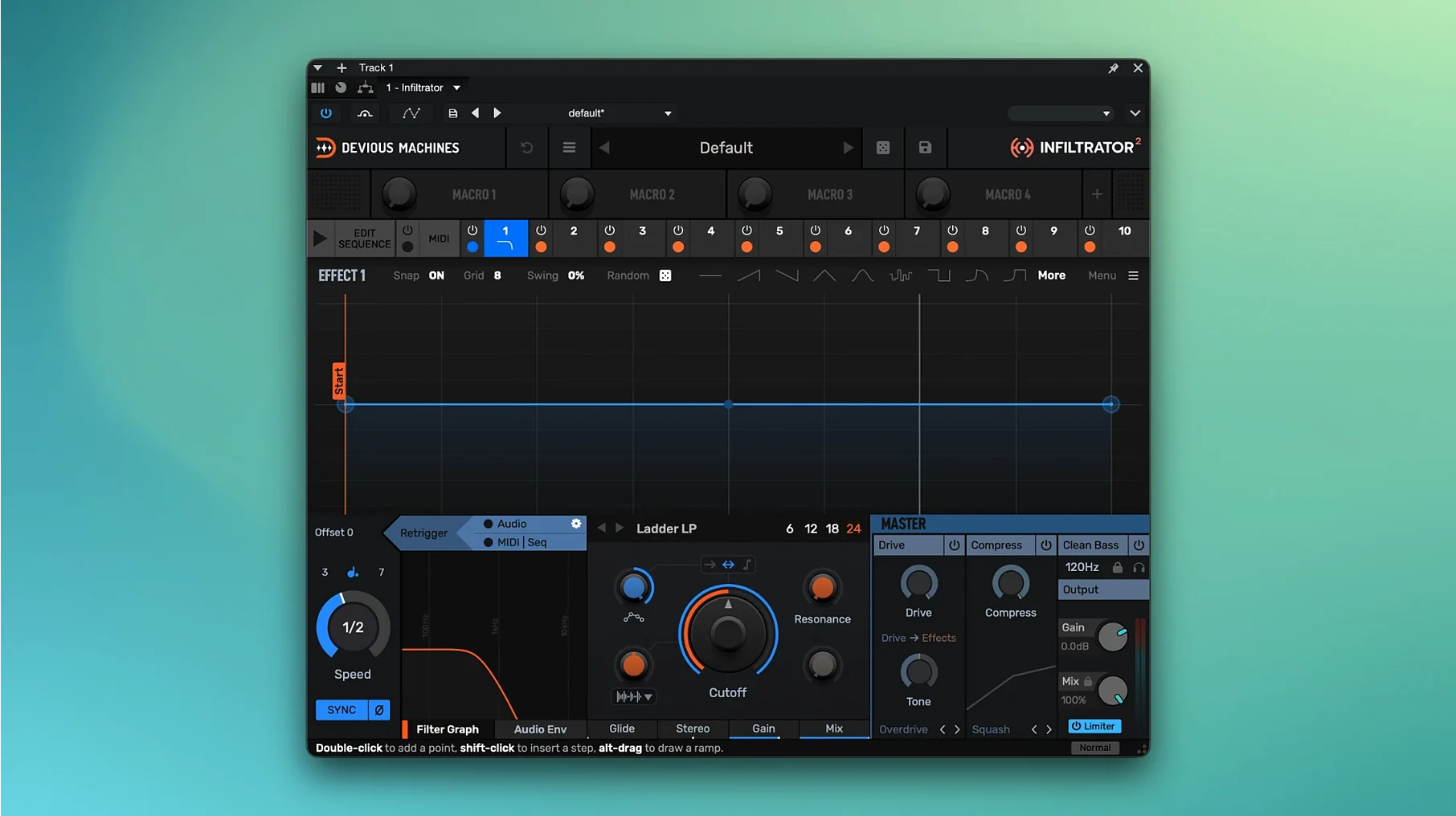
Infiltrator is a multi-effect processor built for stacking, sequencing, and modulating up to ten effects at once. Version 2 doubles the library of effects, presets, and modulation parameters compared with the original release, and the engine runs on 64-bit ARM and x86 architectures. It operates as an envelope-controlled filter and a general multi-effect unit capable of liquid analog-style filtering and drastic sound transformation. The interface language is English.
Sequenced Filter-to-Pitch Chains with Custom Beat Divisions
- Building complex chains where a filter, a distortion, a delay, and a pitch shifter fire in sequence under one modulation system.
- Producers who want tempo-synced effects with custom beat divisions—added in version 2.5.
- Anyone moving between Intel and Apple Silicon Macs; the single installer covers both architectures.
- Sound designers who live in the envelope follower and step sequencer, using them to animate every slot in the chain.
Limiter Safety Net Missing Before Version 2.5
- The plugin needs macOS 10.11 or later; older systems are not supported.
- The current Mac build is listed as version 2.5.26.
- An output limiter was introduced only in version 2.5, so earlier builds lack that safety net.
- Preset browsing and effect selection are entirely in English; no localised interface is available.
Why the Patch Goes Silent After Stacking Gain Stages
Loading Infiltrator onto a channel and scrolling through presets is easy. Understanding why a patch suddenly goes silent or clips the master bus takes a little more time. A few patterns show up repeatedly with new users.
Stacking gain stages without checking the output. Ten slots invite experimentation, but chaining a saturator, a compressor, and a distortion in series can push levels far beyond unity. The output limiter added in version 2.5 catches peaks that would otherwise clip the DAW, but it is not a substitute for gain staging between effects. Beginners often crank every drive knob and wonder why the sound collapses into a square wave.
Ignoring the envelope follower's range. The envelope follower reacts to the incoming signal level, but its default sensitivity and attack-release times do not suit every source. A sharp snare transient can slam a filter cutoff open and shut too fast to hear, while a sustained pad might barely move the modulation at all. Adjusting the threshold and smoothing parameters is not optional—it is what makes the effect track the performance.
Leaving the step sequencer at 16 steps for everything. Custom beat divisions arrived in version 2.5, yet many new users stick to the default grid. A 16-step pattern at 1/16 notes works for four-on-the-floor material, but triplet feels, dotted rhythms, and odd metres need the sequencer to follow. Setting the division to 1/8D or 1/4T immediately shifts the groove away from rigid techno territory.
Forgetting that dry/wet is per-slot, not global. Each effect in the chain has its own mix control. A beginner sets a lush reverb in slot eight, hears nothing, and assumes the plugin is broken—while the mix for that slot sits at zero. Checking the individual slot mix before troubleshooting the audio routing saves ten minutes of confusion.
How Infiltrator fits into a larger setup
Infiltrator does not need to carry a mix alone. It slots into a chain of other tools in ways that multiply what each one can do.
After a synth, before a channel strip. Placing Infiltrator directly on a virtual instrument track means the envelope follower reads the raw, unprocessed waveform. The modulation then reacts to playing dynamics before compression or EQ flatten the peaks. A bassline with velocity-sensitive filter sweeps stays expressive even after downstream processing.
On a send, fed by multiple sources. Sending drums, vocals, and synth stabs to a single Infiltrator instance turns the plugin into a performance hub. The step sequencer gates and pitches the combined signal in real time, creating fills and breakdowns that follow the track's tempo. Automating the bypass on the send return brings the effect in and out without touching the dry mix.
With macOS's Audio Unit routing. Hosts like Logic Pro let you load Infiltrator as a mid-side processor via the dual-mono and mid-side options in the AU plug-in menu. Using it on just the side channel of a stereo bus—filtering and distorting only the wide material while keeping the centre clean—produces width effects that do not collapse in mono.
MIDI control from a hardware sequencer. Infiltrator's parameters respond to MIDI CC messages, which means a hardware controller or a second DAW track can animate the step sequencer position, effect bypass, or envelope follower threshold. Producers running hybrid setups with Elektron or Akai sequencers can treat Infiltrator like an outboard effects unit, synced to the clock but played by hand.
Building a Plasma Rifle Charge-Up from a Sine Wave
Consider someone designing weapon and ambience layers for a science-fiction game. The brief calls for a plasma rifle charge-up: a short, rising burst that moves from a low hum to a sharp, electrical snap.
They start with a simple sine-wave sub-bass sample—two seconds long, no dynamics. Infiltrator loads on the track with an empty ten-slot rack. The first slot gets a comb filter tuned to 120 Hz; the envelope follower opens it over 400 ms, giving the hum a metallic edge that rises with the input. Slot two adds a bitcrusher with the sample rate tied to the same envelope, so the signal degrades from lo-fi grit into full bandwidth as the charge peaks. Slot three holds a delay set to 1/64T, just loud enough to suggest electrical arcing. The step sequencer does not run a pattern here; instead, it is set to one-shot mode and triggered by the DAW's transport, firing the delay taps only once at the end of the sound.
The output limiter catches the combined peak from the filter resonance and the delay feedback, keeping the asset at -6 dBFS without additional limiting on the channel. The asset bounces directly from the plugin, ready for the audio programmer. No external automation lanes, no layered tracks—one instance, three active slots, one modulation source.
Pull the Output Limiter Ceiling to -1.5 dBFS
Out of the box, Infiltrator works, but a few default settings are worth adjusting before building any serious patch.
- Output limiter ceiling. Version 2.5 set the limiter to a conservative -0.3 dBFS threshold. Pulling it to -1.0 or -1.5 dBFS leaves headroom for downstream plug-ins that oversample or apply lookahead. If the project already has a bus limiter, setting Infiltrator's ceiling to -3.0 dBFS prevents two limiters from fighting each other.
- Envelope follower smoothing. The default attack and release times suit medium-tempo material, around 110–130 BPM. For fast breakbeats above 160 BPM, halving both values prevents the follower from lagging behind the transients. For ambient work below 80 BPM, doubling them avoids jittery modulation.
- Sequencer direction mode. The step sequencer defaults to forward motion. Switching to pendulum or random—available per sequencer lane—changes a predictable filter gate into something that feels less looped. Random mode on a pitch-shifter slot produces the kind of unstable, modular-style sequencing that takes much longer to program with automation.
- Global effect bypass assignment. Infiltrator allows MIDI assignment of the global bypass, but it is not mapped by default. Assigning it to a spare CC number or a key switch on the controller keyboard makes it possible to drop the entire effect rack out during a verse and bring it back for the chorus without touching the mouse.
- Quality mode per effect. Some effects—the frequency shifter and certain filter models—offer a high-quality oversampling option. It is off by default to keep CPU usage low during patch building. Engaging it on a finished patch before bouncing removes aliasing artefacts that become audible on bright sources like hi-hats and string transients.
- Output limiter — a new output limiter was added to the signal path.
- Tempo sync — custom beat divisions for tempo-based effects are now available.
- Mac build — the current Mac download build is version 2.5.26.
- macOS Mac OS X 10.11 or later
- Apple Silicon or Intel processor
Questions on file
What architectures does Infiltrator 2 support on Mac?
The current Mac build supports both 64-bit ARM (Apple Silicon) and x86 (Intel) architectures natively.
How many effects can Infiltrator run at the same time?
You can stack up to ten effects in a single chain, and version 2 doubles the total number of available effects compared with the original release.
Sign in · Create an account to add a field note.
No field notes yet. A measurement, a version, a machine — they appear after moderation.