VST Plugins
EZdrummer 3.1.2
VST PluginsUpdated
| Requirement | On file |
|---|---|
| macOS | macOS 10.15 or later |
| CPU | Apple Silicon, Intel 64-bit |
| Download | 786 MB |
Songwriters and producers who need a polished drum track without leaving the DAW will find EZdrummer 3 sitting on an instrument track, fed by its own internal libraries and a tap-to-find MIDI browser.
Instrument track — the plugin loads as a virtual instrument, receiving MIDI from its internal groove library, the built-in Grid Editor, or an external controller.
MIDI groove library — a searchable database of patterns played by drummers. Tap a rhythm into the search field and the browser filters matching grooves across the included libraries, then drag the chosen MIDI block onto the track.
Grid Editor — a step sequencer inside the plugin for writing patterns from scratch. Each drum and percussion element gets its own lane, with velocity adjustable per hit.
Edit Play Style — a real-time control that alters a base groove's feel without swapping the MIDI clip. Tighten the hi-hat, add ghost notes, or shift the power hand while the track plays.
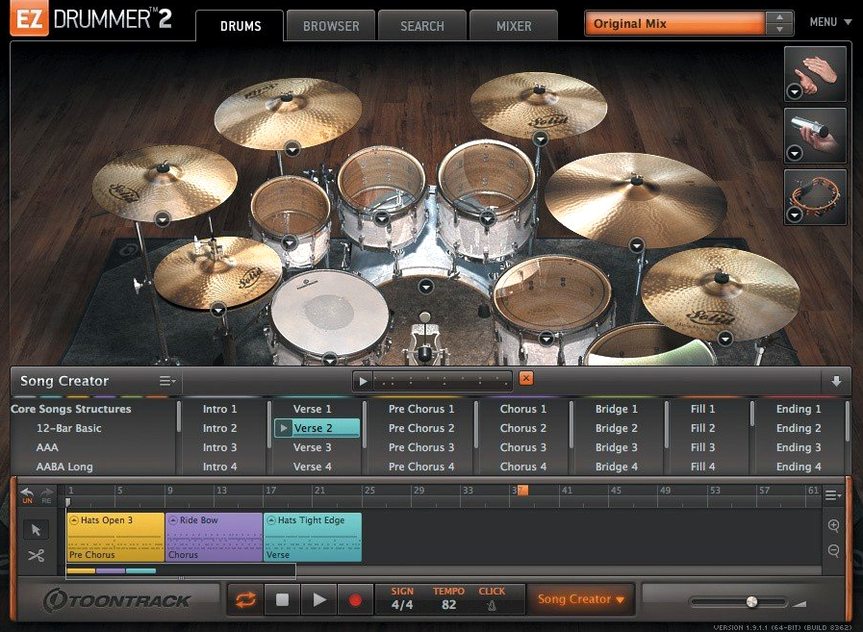
Song Creator — select an intro, verse, or chorus groove and the tool arranges them into a full song structure. It references the tap-to-find browser and suggests sections that fit the chosen foundation.
Mixer and rooms — EZdrummer 3 routes each drum through its own channel into three distinct room ambiences. Mix-ready presets set levels, compression, and reverb with one click, feeding a stereo bus back to the DAW.
Indie-rock sketches at a Melbourne desk, no drum kit needed
Consider a solo artist who writes indie-rock at a desk in Melbourne's inner north. Guitar and vocals go down fast — a Shure SM7B into an old Apogee Duet — but drums have always been the friction point. Programming a full kit from a piano roll takes forty minutes and still sounds mechanical. The aim is a track that breathes, with fills that arrive just before the chorus lift and a snare that cracks rather than pokes.
EZdrummer 3 sits on a stereo instrument track in Logic Pro. The songwriter drags a rough guitar demo — one verse, one chorus, no click — onto the Bandmate drop zone. Within a few seconds the plugin has extracted the tempo map and suggested four groove variations. The verse suggestion stays; the chorus gets swapped for something with an open hi-hat and a heavier kick pattern. The whole thing plays back in context, drums locked to the live guitar pushes, before a single MIDI note has been edited by hand.
The Song Creator then builds out the rest: an intro that drops the toms in bar 2, a bridge with sidestick instead of snare, and an outro that thins to kick and ride. The songwriter tweaks two fills by dragging shorter alternatives from the browser, then opens Edit Play Style and dials the power hand to the floor tom for the bridge. Twenty minutes after loading the plugin, the drum arrangement is done — not a placeholder, but a keeper that will go to mix with the other instruments.
Hi-hat choke fix when the pedal message gets lost
Hi-hat pedal and CC data vanishing during recording
Before version 3.1.2, recording a performance onto the song track with a hi-hat controller could cause intermittent CC dropouts. The pedal position would jump to fully open or fully closed mid-take, and the recorded MIDI would miss the controller data entirely. The fix is straightforward: update to 3.1.2, where Toontrack addressed song-track CC recording specifically. If updating isn't possible immediately, a workaround is to record the hi-hat part into the DAW's own MIDI track rather than the EZdrummer song track, then drag the finished clip in.
Solo and Mute recall states clearing each other
The mixer's Solo and Mute buttons had an annoying interaction in earlier builds. Soloing a kick drum channel, then muting a snare, would wipe the solo state — the kick dropped out of the monitor mix without warning. The reverse also happened: muting several channels and then soloing one would clear all mutes. Version 3.1.2 fixes this so Solo and Mute maintain independent recall. Anyone still on an older build should treat Solo and Mute as mutually exclusive — engage one type only during a listening pass, or do critical isolation work in the DAW mixer instead.
MIDI grooves not previewing at the project tempo
A groove dragged from the browser into the song track can sometimes play at the sample's original BPM rather than following the host. This happens most often when the DAW transport is stopped during the drag. Starting playback before dragging the MIDI clip forces EZdrummer to sync immediately. If the groove still drifts, check that the DAW is sending tempo information to the plugin — some hosts require the instrument track to be armed or in monitor mode for real-time sync to engage.
Expansion packs not appearing after installation
EZX packs released from Q4 2025 onward require EZdrummer 3.1.2 or later. An older build will simply not see them in the library browser, even after a successful install and a rescan. The solution is the 3.1.2 update. For earlier EZX packs that still refuse to show, running Toontrack's Product Manager and choosing "Refresh Libraries" usually resolves the path mapping, provided the packs are installed to the default location.
Electronic kit CC recording now survives the stop button
Version 3.1.2 is a maintenance release that tightens three specific behaviours, and the effect is felt most during sessions where the software is pushed beyond casual browsing.
The CC recording fix means drummers who play electronic kits into the song track can trust their hi-hat pedal again. Before the fix, a take that felt perfect during performance could be unusable on playback — the pedal data simply wasn't there. Now the recorded MIDI matches what was played, which cuts out a round of manual CC editing that could take fifteen minutes per song.
The Solo/Mute fix is small but changes how the mixer gets used. Previously, an engineer checking phase between kick and overheads would lose their mute state the moment they soloed the room channel, leading to an accidental full-kit blast through the monitors. With independent recall, the mixer behaves like a console — Solo and Mute are separate functions that don't interfere. This makes the built-in mixer viable for quick balance checks where it was once too unreliable.
The macOS Tahoe-style icons are cosmetic but signal that Toontrack is keeping the standalone app current with Apple's design language. The internal improvements for Infinity Grid EZX are less visible — they affect how that particular expansion loads and maps its grid-based articulations, which matters to electronic producers using the expansion for hybrid kits but won't register for acoustic-only users.
Pad velocity curve tuned for Akai and finger-drumming
A fresh install of EZdrummer 3 ships with defaults that favour a general-purpose workflow. Five changes make an immediate difference for most users.
Velocity curve for external controllers. The default linear curve often makes pads from the likes of Akai or Roland feel either too hot or too soft. Open the settings panel and adjust the velocity curve so that a moderate strike produces a MIDI velocity around 100–110. This brings ghost notes into the 40–60 range without having to hammer the pad.
Library paths. If sound libraries live on an external SSD, point EZdrummer to that location before the first session. The plugin defaults to the system drive, and moving libraries later without updating the path results in missing kit pieces and an empty browser.
Drum map for the DAW. EZdrummer uses General MIDI mapping by default, but some DAWs — particularly Ableton Live with its Drum Rack — expect a different note layout. Switch the map to match the host before dragging in any MIDI, or the kick might trigger a ride cymbal and vice versa.
Buffer size for the standalone app. The standalone version defaults to a conservative buffer that works on most Macs but introduces noticeable latency for real-time playing. Dropping it to 128 or 64 samples on an Apple Silicon machine brings the response down to a playable range without taxing the CPU.
Mixer preset as the starting template. The "Raw" mixer preset leaves every channel flat and dry, which is honest but uninspiring for writing. Picking a mix-ready preset — "Tight Room" or "Punchy Kit" — as the default gives every groove that gets dragged in a finished feel from the first playback, which keeps the creative momentum going.
A complete workflow: from blank project to drum track
This workflow assumes a songwriter with a verse and chorus guitar part already recorded to a click in Logic Pro, no drums yet. The goal is a full arrangement with intro, two verses, two choruses, a bridge, and an outro.
1. Extract the feel. Load EZdrummer 3 on an instrument track. Open the Bandmate tab and drag the guitar audio file — the full take, silence trimmed — onto the drop area. The plugin analyses the transients and suggests a tempo and a handful of grooves. Audition the suggestions with the guitar part playing. Pick the one that locks best with the strumming rhythm.
2. Build the skeleton with Song Creator. Switch to the Song Creator tab. The suggested groove sits in the first slot. Set the structure: Intro (2 bars), Verse 1 (8 bars), Chorus 1 (8 bars), Verse 2 (8 bars), Chorus 2 (8 bars), Bridge (4 bars), Chorus 3 (8 bars), Outro (4 bars). For each section, click through the options the Song Creator proposes based on the foundation groove. Intro gets a kick-and-hat pattern; verses keep the base groove; choruses get an open-hat variant with a crash on beat one.
3. Place fills manually. The Song Creator adds generic fills, but they rarely land exactly where the song needs them. Open the song track and locate bar 7 of each verse — the bar before the chorus. Delete the auto-placed fill. Open the groove browser, filter by "Fill" and the current time signature, and audition short fills that end with a crash. Drag the best two in place. Do the same for bar 3 of the bridge, where a tom fill leads back into the final chorus.
4. Shape the performance with Edit Play Style. The verses feel too busy on the hi-hat. Select all verse blocks on the song track and open Edit Play Style. Reduce the hi-hat openness by about 30% and add a subtle ghost-note amount — around 15 on the slider. The groove tightens without losing the original pattern. For the bridge, shift the power hand to the ride cymbal and drop the snare centre hits in favour of sidestick.
5. Swap kit pieces for the arrangement. The default kit works for the choruses but the verses want a drier, deader snare. Open the kit piece browser, select the snare, and audition alternatives. Pick one with less ring and a shorter decay. Do the same for the kick in the outro — a softer beater sound helps the fade-out.
6. Balance in the mixer. Open the built-in mixer, select the "Punchy Kit" preset as a starting point, then pull the overheads down by 2 dB and push the room mic up by 1.5 dB for the choruses. The verses can use the same balance — the kit piece swap already did the heavy lifting for contrast between sections.
7. Export or play back. The song track now holds the full arrangement. It can play back inside EZdrummer, driven by Logic's transport, or the MIDI blocks can be dragged out to a Logic region for further editing in the piano roll. Either way, the drum track is complete — arranged, mixed, and matched to the song's dynamics — without ever leaving the plugin window.
Standalone and project icons — updated to macOS Tahoe style
Internal improvements — added support for Infinity Grid EZX
Fixes — song-track CC recording and mixer Solo/Mute recall states now behave correctly
- macOS 10.15 or later
- Apple Silicon and Intel native
Questions on file
Can I use EZdrummer 3 without a MIDI keyboard?
Yes. Every function works with a mouse and computer keyboard. You can browse grooves, edit patterns in the Grid Editor, and arrange songs using only the on-screen controls.
What does Edit Play Style actually change?
It alters the articulation and velocity patterns of a loaded MIDI groove in real time—shifting accents, adding ghost notes, or changing the dominant hand—without editing the underlying MIDI data.
How many room sounds does EZdrummer 3 include?
The mixer provides three different room ambiences, each routable per drum channel, with mix-ready presets that set the blend for you.
Sign in · Create an account to add a field note.
No field notes yet. A measurement, a version, a machine — they appear after moderation.